Key Takeaways
- "Near me" searches are decided by where the searcher is, not by the words on your page. Google uses the person's location, so your job is to be relevant, nearby and well known, not to repeat "near me".
- Google says local results depend on relevance, distance and prominence, and that there's no way to pay for a better local ranking.
- Adding "near me" to your business name or stuffing it into pages breaks Google's rules and doesn't help.
- The five things that work: a complete Business Profile, the right categories and service pages, reviews, a fast mobile site, and being readable by AI assistants that now answer "near me" questions too.
What "Near Me" Searches Really Are
A "near me" search is a request for the closest good option, and the search engine fills in the location itself. When someone types "tyre fitting near me" or asks a voice assistant for "a dentist open now near me", they're telling the search engine three things: what they need, that they want it close, and often that they want it soon.
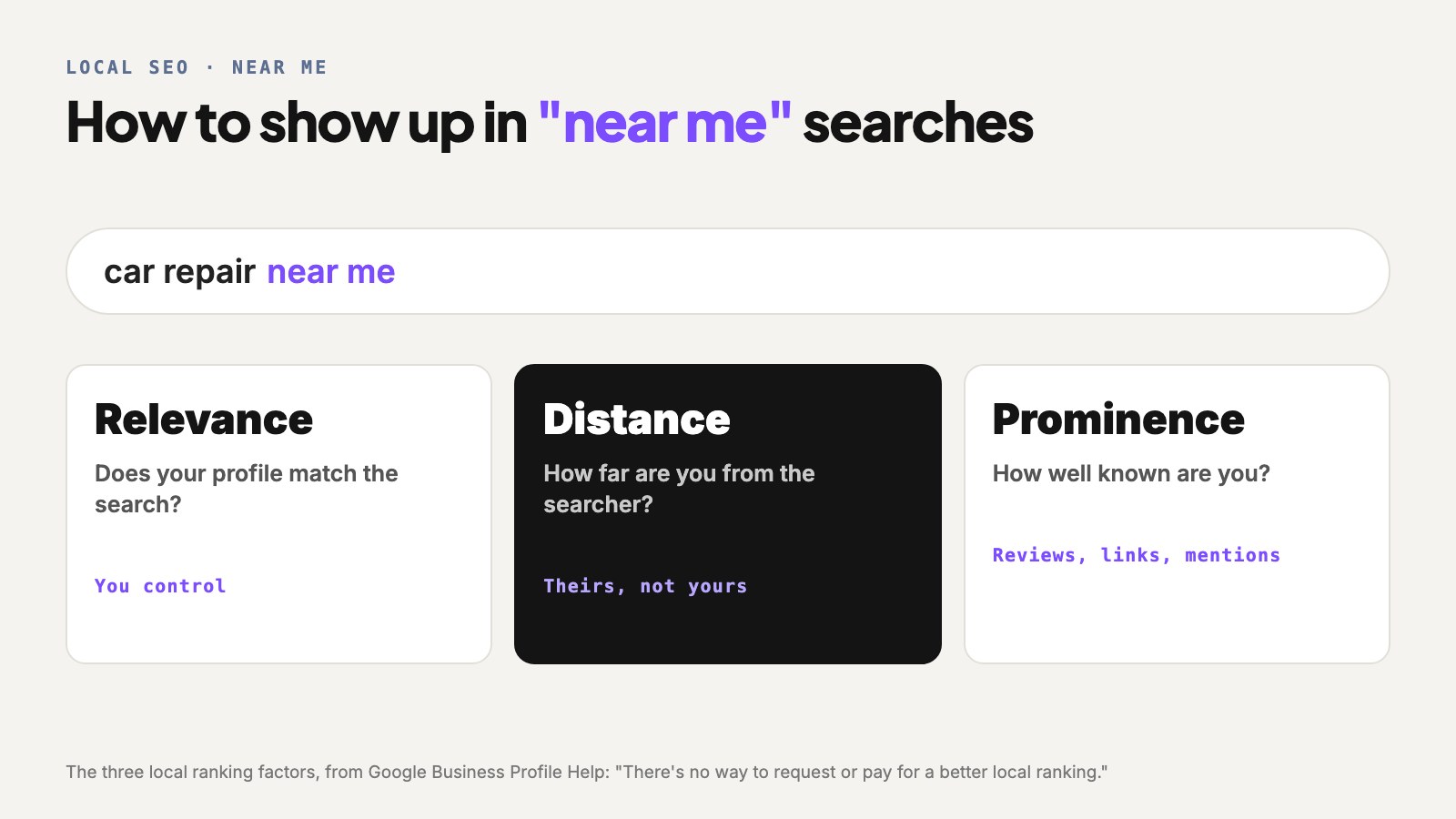
Google's guide to improving your local ranking explains how it decides. Relevance is how well your profile matches the search. Distance is how far you are from the searcher, and if they don't share their location, Google estimates it. Prominence is how well known you are, including reviews and links. Google adds that there's no way to request or pay for a better local ranking.
Notice what's missing: the phrase "near me" on your website. Google already knows what "near me" means. Your job is to be the best answer to the rest of the search.
Common Kinds of "Near Me" Searches
| Search | What the searcher wants | What helps you appear |
|---|---|---|
| "plumber near me" | A nearby business in the right category | Correct primary category, service areas, reviews |
| "emergency boiler repair near me" | A specific service, urgently | A service page for that job, accurate hours |
| "open now near me" | Somewhere open right now | Accurate opening and holiday hours |
| "best pizza near me" | A trusted, well-rated option | Plenty of recent reviews, photos, mentions |
| "cheap car service near me" | Value | Clear services and, if you publish them, prices |
| "wheelchair accessible café near me" | A specific feature | Attributes filled in on your profile and site |
Each of these is won by information, not wording. The more completely and accurately your profile and website describe what you do, when you're open and what you offer, the more "near me" searches you can match.
Should You Put "Near Me" on Your Website?
No, not as a keyword. Writing "best plumber near me" across your pages doesn't help, because the searcher's location, not your text, decides distance. Google's spam policies treat repeating phrases unnaturally as keyword stuffing.
Your business name is even stricter. Google's guidelines for representing your business don't allow unnecessary information in the name, and give "Equinox near SOHO" as an example of a name that isn't acceptable. Adding "near me" or a list of towns to your name risks a suspended profile.
What does help is naming the places you actually serve, naturally: "We repair cars across Kupittaa and Itäharju" is useful to a customer and to search engines. "Car repair near me" isn't.
Five Steps to Show Up in "Near Me" Searches
1. Complete your Google Business Profile
Choose the most specific primary category, add every service you really offer, set accurate hours including holidays, and add photos of your work and premises. Relevance comes from this information. If you travel to customers, our guide to service area business SEO explains how to set up service areas instead of a public address.
2. Give each main service its own page
"Near me" searches usually name a job, not a trade. A page for each main service, explaining what it involves and when to call, gives search engines and AI assistants a clear match. Add LocalBusiness structured data so your name, phone, hours and location are machine readable, and test it with our Schema Markup Checker.
3. Earn reviews steadily
Google says more reviews and positive ratings can help local ranking, and "best" searches lean heavily on them. Ask every customer with a direct link; our guide on how to get more Google reviews covers the method and the rules.
4. Make your site fast on a phone
Most "near me" searches happen on phones, often in a hurry. A slow or awkward mobile page loses the customer to the next result. Check yours with our Mobile-Friendly Checker, and see why a website is slow if it drags.
5. Be readable by AI assistants and other maps
People now ask ChatGPT, Siri and Copilot for nearby businesses too. These tools rely on the web and on map data. List your business on Bing Places and Apple Business Connect, and make sure AI search crawlers such as OpenAI's OAI-SearchBot can read your website. Our free AI Visibility Checker shows whether they can, and our guide to AI crawlers explains the details.
A Worked Example: One Café, Three "Near Me" Searches
Here's how the five steps play out for one business. This is an illustrative example: a small café near a city's market square.
Search 1: "coffee near me" from someone two streets away. Distance favours the café, so this is its easiest win. What decides it is whether the profile is complete, the hours are right and the rating is solid. A café that shows "Closed" when it's open loses this search to the next one.
Search 2: "best brunch near me" from across the city. Distance now works against the café. To appear, it needs prominence: plenty of recent reviews that mention brunch, a brunch page on its website with real photos and a menu, and mentions on local food sites. This is where most of the effort goes.
Search 3: "gluten free cafe open now near me" asked to a phone assistant. The answer depends on details: accurate hours and attributes on the profile, and a website that says plainly which dishes are gluten free. If AI crawlers can't read the site, or it never mentions gluten free food, the café isn't a candidate at all.
The lesson carries across every business type: nearby searches are won by accuracy, wider searches by prominence, and specific searches by detail. The same pattern applies to a garage, a clinic or a plumber.
Keep Your Information Consistent Everywhere
"Near me" results draw on many sources, so the same details need to match everywhere. If your website says you close at 6 and Google says 5, or your phone number differs between Apple Maps and a directory, search engines and AI assistants have to guess which is right, and customers lose trust when they find the mismatch.
- Name, address and phone exactly the same on your website, Google, Bing, Apple and directories.
- Hours updated everywhere at once, including holidays.
- Services and attributes described the same way, so every source supports the same picture.
Google's guidance on helpful, people-first content applies here too: information that's accurate and complete serves the person searching, which is what search systems try to reward.
What You Can't Control (and What to Do Instead)
You can't move closer to every searcher, and you can't pay Google for a higher local ranking. Someone searching from the other side of the city may simply see businesses nearer to them.
| Factor | Can you change it? | What to do |
|---|---|---|
| Distance from the searcher | No | Win searches near your location first |
| Relevance of your profile and pages | Yes | Complete categories, services and pages |
| Prominence: reviews, links, mentions | Yes, over time | Steady reviews, local directories, local coverage |
| Website speed and mobile experience | Yes | Fix the slowest pages first |
| Paid placement | Separately | Ads appear in their own labelled slots |
Location also changes from search to search. The same person can see different businesses at home, at work and on the road, because Google uses where they are at that moment. That's why a complete profile and website matter more than any single ranking you see when you search for yourself, which only shows results from where you're standing.
The businesses that win "near me" searches across a wider area usually do so through prominence: many genuine reviews, strong local mentions and a website that answers each service clearly. For the full checklist of local signals, see our local SEO audit guide.
How CMO Owls Helps You Win "Near Me" Searches
"Near me" is won on two fronts: your Google Business Profile, which you manage in Google's dashboard, and everything else, which is where CMO Owls does the work. The Owls keep your website relevant, fast and readable by both search engines and AI assistants, and show you where competitors are ahead.
| Job | Agent | What it does for you |
|---|---|---|
| Write a page for every service people search for | Owlthor | Researches what ranks for each service and writes the article, sent to WordPress or your CMS |
| Answer the questions people ask AI | Buzz Creator Owl | Finds the questions people ask AI assistants about businesses like yours and answers each one as an article |
| Check AI assistants can read and cite you | Generative Engine Owl | Tracks what ChatGPT, Gemini, Claude and Google AI Overviews say about you, and why they skip you, with fixes |
| Keep the mobile site fast and working | Watch Owl | Checks every page in a real browser and lists speed problems, errors and broken links, worst first |
| See which local competitors are ahead | Spy Owl | Finds your real competitors, what they rank for and who links to them |
When you add your website, the Overview shows within minutes which AI tools can read your site, a website grade, Watch Owl's first problems and article ideas for your services. That's the starting list for winning more "near me" searches, and the Owls keep working through it week by week.
Mind Map: Showing Up in "Near Me" Searches
Frequently Asked Questions
How do I show up when people search "near me"?
Make your Google Business Profile complete and accurate, give each service its own page, earn reviews steadily and keep your site fast on phones. Google uses the searcher's location, so you don't need to add "near me" to your pages.
Should I add "near me" to my business name?
No. Google doesn't allow unnecessary information in business names, and adding phrases like "near me" or locations can get your profile suspended.
Why do competitors further away rank above me for "near me"?
Usually because they're more relevant or more prominent: better categories and service pages, more reviews, or more mentions. Distance is only one of Google's three factors.
Can I pay Google to rank higher in "near me" results?
Not in the organic local results. Google says there's no way to pay for a better local ranking; ads appear separately and are labelled.
Do "near me" searches work in ChatGPT?
People do ask AI assistants for nearby businesses. Those answers rely on information from the web and map services, so being readable by AI crawlers and listed on several maps helps.
Do I need a separate page for every "near me" phrase?
No. One strong page per service is enough, because the searcher's location does the "near me" part. Separate pages that only repeat "near me" variations are thin and can be treated as spam.
Does my website need my address to rank for "near me"?
If customers visit you, yes: show the same address as your Business Profile, plus a map and opening hours. If you travel to customers, list the areas you serve instead of a home address.
How long does it take to rank for "near me" searches?
Profile and website fixes can help within weeks, but prominence from reviews and mentions builds over months. Keep the steps going rather than doing them once.
The Next Step
Open your Google Business Profile today and check three things: the primary category, the hours and the services list. Then add your website to CMO Owls to see which AI tools can read your site and get service pages written for you. If you run a garage, our guide to auto repair shop marketing puts all of this into one plan.
Sources
- Tips to improve your local ranking on Google, Google Business Profile Help, 2026.
- Guidelines for representing your business on Google, Google Business Profile Help, 2026.
- Spam policies for Google web search, Google Search Central, 2026.
- Local business (LocalBusiness) structured data, Google Search Central, 2026.
- Overview of OpenAI crawlers, OpenAI, 2026.
- Bing Places for Business, Microsoft, 2026.
- Apple Business Connect, Apple, 2026.
- Creating helpful, reliable, people-first content, Google Search Central, 2026.