Key Takeaways
- Most slow websites have one of nine causes: a slow server, oversized images, render-blocking code, too many third-party scripts, heavy fonts, redirect chains, too many plugins, no caching, or a cheap host under load.
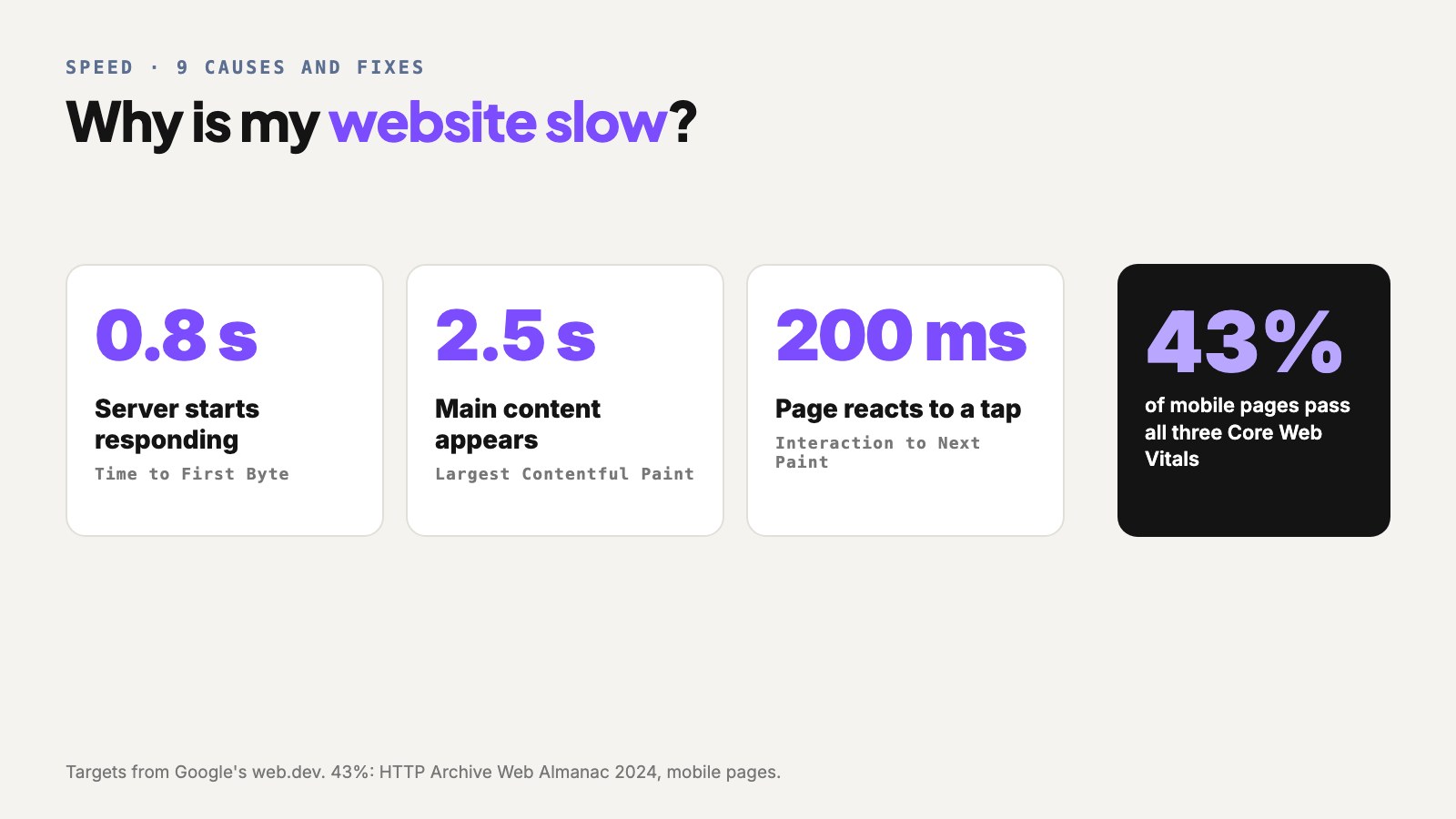
- Google's own targets are under 2.5 seconds for the main content to appear and under 0.8 seconds for the server to start responding. Only 43% of mobile pages passed all three Core Web Vitals in 2024.
- Find the cause before you fix anything. A free speed test tells you whether the problem is the server, the images or the code, and each needs a different fix.
- On our own site, the median page loaded in 1.9 seconds in a test browser, but two pages took over four seconds. Slowness is usually page-specific, not site-wide.
Why a Slow Website Costs You
A slow website loses visitors before they see what you offer, and it gives search engines a reason to prefer a faster competitor. Google uses page experience signals, including Core Web Vitals, as part of how it ranks pages, and its page experience documentation is clear that a good experience is what its ranking systems try to reward.
The problem is common. The HTTP Archive's 2024 Web Almanac, which measures millions of real websites, found that only 59% of mobile pages loaded their main content fast enough to count as good, and only 43% of mobile pages passed all three Core Web Vitals. If your site feels slow, you're in the majority, which also means a fast site is a real advantage.
This guide is for owners and marketers, not developers. You'll learn how to find which cause is slowing your site, what each fix involves, and which ones you can do yourself. If you want the full explanation of the metrics themselves, read our guide to Core Web Vitals.
First, Measure: What "Slow" Actually Means
"Slow" means one of three different things, and each points to a different cause. Google's web.dev guidance sets a target for each, measured at the 75th percentile of real visits, so the experience is good for most visitors, not just the lucky ones.
| What you notice | Metric | Good target | Usually caused by |
|---|---|---|---|
| The page stays blank, then appears | Time to First Byte (TTFB) | 0.8 seconds or less | The server, hosting, redirects |
| The main picture or headline appears late | Largest Contentful Paint (LCP) | 2.5 seconds or less | Heavy images, blocking code, slow server |
| Taps and clicks feel laggy | Interaction to Next Paint (INP) | 200 milliseconds or less | Too much JavaScript, third-party scripts |
| Things jump around while loading | Cumulative Layout Shift (CLS) | 0.1 or less | Images and ads without set sizes, late fonts |
Run your page through PageSpeed Insights, Google's free test, on mobile first. It shows real-visitor data when Google has enough of it, and a lab test either way. Our guide on how to read PageSpeed Insights explains every part of the report. Then use the table below to match what you see to a cause.
The 9 Most Common Causes of a Slow Website
Work through these in order: the first three cause most slow pages.
1. A slow server response
If the page stays white for a second or more before anything appears, the server is slow to respond. Google's TTFB guide explains that this time includes redirects, the DNS lookup, the connection and security handshake, and the server preparing the page. Cheap shared hosting, a database doing too much work, or no page caching are the usual reasons. Fix: turn on page caching, use a content delivery network, or move to better hosting.
2. Oversized images
Images are the most common main element on a page: the Web Almanac found that 73% of mobile pages have an image as their largest visible element. A 4 MB photo from a phone, uploaded straight to the homepage, can take seconds to arrive on a mobile connection. Fix: resize images to the size they're shown at, compress them, and use modern formats like WebP or AVIF, which web.dev compares in its guide to choosing an image format. Check your pages with our Image Size Checker and shrink files with the Image Compressor.
3. Render-blocking CSS and JavaScript
Some files must load before the browser can show anything. When a page loads several large stylesheets and scripts in its head, the visitor waits for all of them. Google's Lighthouse documentation on render-blocking resources explains how to spot them. Fix: defer scripts that aren't needed immediately, and remove code the page doesn't use.
4. Too many third-party scripts
Chat widgets, analytics, heatmaps, ad pixels, review badges and social embeds each load code from another company's server. Individually small, together they can dominate load time and make the page slow to respond to taps. Fix: list every script, remove the ones nobody uses, and load the rest after the page is visible.
5. Images and videos that load before they're needed
A long page that loads every image at once wastes time on pictures the visitor may never scroll to. Browsers support native lazy loading with one attribute. Fix: lazy-load images below the first screen, but never the main image at the top, which should load first.
6. Heavy web fonts
Several font families, each in several weights, add up. Text can stay invisible until fonts arrive, or jump when they swap in. Fix: use one or two font families, only the weights you need, and let text show in a fallback font while the custom font loads.
7. Redirect chains
Every redirect is an extra round trip before the page even starts loading. A link that goes from http to https, then to www, then to a new URL makes the visitor wait three times. Fix: point links and redirects straight at the final address. Our Redirect Checker shows every hop, and our guide to 301 redirects explains how to set them up.
8. Too many plugins or a heavy theme
On WordPress and similar builders, each plugin can add its own scripts and database work to every page. Page builders with dozens of features load code for all of them, even on simple pages. Fix: remove plugins you don't use, replace several small ones with one, and test speed after each change.
9. A host that can't keep up
If your site is fast at night and slow during the day, or slow only when traffic rises, the host is running out of capacity. Fix: upgrade the plan or move to a host that matches your traffic. This is often the cheapest fix for the biggest gain.
What We Found on Our Own Site
Even a well-built site has a few slow pages, and they're rarely the ones you check. When we audited all 142 pages of cmoowls.com, the median page loaded in 1.9 seconds in the test browser. But our terms page took 5.3 seconds and one of our free tools took 4.2 seconds. Nobody had noticed, because nobody visits the terms page to check its speed.
That's the pattern on most sites: the homepage gets attention, while deeper pages quietly slow down as scripts and images are added. The full results are in our website audit case study. Lab load times like these are a starting point; the real-visitor numbers in PageSpeed Insights decide whether a page actually needs work.
How to Find Your Cause in 15 Minutes
- Test your homepage and your most important page in PageSpeed Insights, on mobile.
- Look at the time to first byte. Over 0.8 seconds points to the server (cause 1, 7 or 9).
- Look at the main-content time (LCP) and which element it names. If it's an image, start with causes 2 and 5.
- Open the list of opportunities and diagnostics. Render-blocking files and unused JavaScript point to causes 3, 4 and 8.
- Check the page on a real phone over mobile data. Our Mobile-Friendly Checker also flags layout problems that make pages feel slow.
- Write down the single biggest cause, fix it, and test again before touching anything else.
Which Fixes You Can Do Yourself
About half of speed fixes need no developer at all.
| Fix | Do it yourself? | Typical effort |
|---|---|---|
| Compress and resize images | Yes | Minutes per page |
| Remove unused plugins and widgets | Yes | An hour |
| Turn on caching (WordPress plugin or host setting) | Usually | An hour |
| Add a content delivery network | Usually, through your host or Cloudflare | An hour |
| Fix redirect chains | Sometimes | An hour |
| Defer scripts and remove unused code | Developer | Hours to days |
| Change theme or rebuild heavy pages | Developer | Days |
| Move to better hosting | With help from the new host | A day |
How CMO Owls Finds and Fixes Slow Pages
CMO Owls checks every page of your site for speed and the problems behind it, tells you which pages are slow and why, and fixes the simple ones for you. It's built for owners who don't want to run speed tests page by page.
| Job | Agent | What it does for you |
|---|---|---|
| Find every slow page | Watch Owl | Opens up to 500 of your pages in a real browser and records how long each takes, with errors and broken links, worst problem first |
| Measure real speed | Watch Owl | Shows your homepage's Core Web Vitals for mobile and desktop on the Overview's website report |
| Fix it for you | Watch Owl | On WordPress, Ghost, Shopify and GitHub sites, fixes simple issues such as missing alt text and meta descriptions in one click, with undo; for code issues it writes the message for your developer |
| Check the technical SEO behind it | Owl-gorithm Hacker | Runs a technical SEO audit, including render-blocking resources and heavy pages |
| Catch the effect on traffic | Cash Cow Stalker | Checks your top pages every five days and alerts you when clicks or rankings fall |
When you add your website, the Overview shows a website report within minutes: a grade, site health from Watch Owl's first check, your homepage's speed, and what AI tools can read. Watch Owl then re-checks on a schedule, so a new plugin that slows your pages shows up in the next report instead of in next month's traffic. If traffic has already dropped, our guide on why website traffic drops helps you tell a speed problem from other causes.
Mind Map: Why a Website Is Slow
Frequently Asked Questions
Why is my website so slow all of a sudden?
A sudden slowdown usually follows a change: a new plugin, a new chat or tracking script, a theme update, a large image on the homepage, or a traffic spike your host can't handle. Undo or test the most recent change first.
Why is my website slow on mobile but fine on desktop?
Phones have slower processors and often slower connections, so heavy images and JavaScript hurt them far more. Google measures mobile separately, and only 59% of mobile pages had a good main-content load time in 2024.
How fast should my website load?
Google's targets are under 0.8 seconds for the server to respond, under 2.5 seconds for the main content to appear, and under 200 milliseconds to respond to a tap, measured for most real visitors.
Does website speed affect SEO?
Yes. Google uses page experience, including Core Web Vitals, in ranking. Speed rarely outranks relevance, but between similar pages, the faster one has an edge, and slow pages lose visitors either way.
Do too many plugins slow down WordPress?
They can. Each plugin may add scripts, styles and database work to every page. The number matters less than what each one loads, so remove unused plugins and test speed after each change.
Will a better host make my website faster?
If your server response time is over 0.8 seconds, usually yes. If the server is fast but images or scripts are heavy, a new host won't fix it.
Can I speed up my website without a developer?
Often. Compressing images, removing unused plugins and widgets, and turning on caching are do-it-yourself fixes that solve many slow sites. Code changes like deferring scripts usually need a developer.
The Next Step
Test your two most important pages in PageSpeed Insights on mobile today, write down the single biggest cause, and fix only that. To find every slow page at once and keep catching new ones, add your website to CMO Owls: Watch Owl checks every page and the Overview shows your speed and what to fix first. If you serve customers locally, our guides to auto repair shop marketing and service area business SEO show where speed fits in local search.
Sources
- Web Vitals, web.dev, Google, 2026.
- Time to First Byte (TTFB), web.dev, Google, 2026.
- Performance chapter, Web Almanac 2024, HTTP Archive, 2024.
- Understanding page experience in Google Search results, Google Search Central, 2026.
- PageSpeed Insights, Google, 2026.
- Eliminate render-blocking resources, Chrome for Developers, 2026.
- Choose the right image format, web.dev, Google, 2026.
- Browser-level image lazy loading, web.dev, Google, 2026.