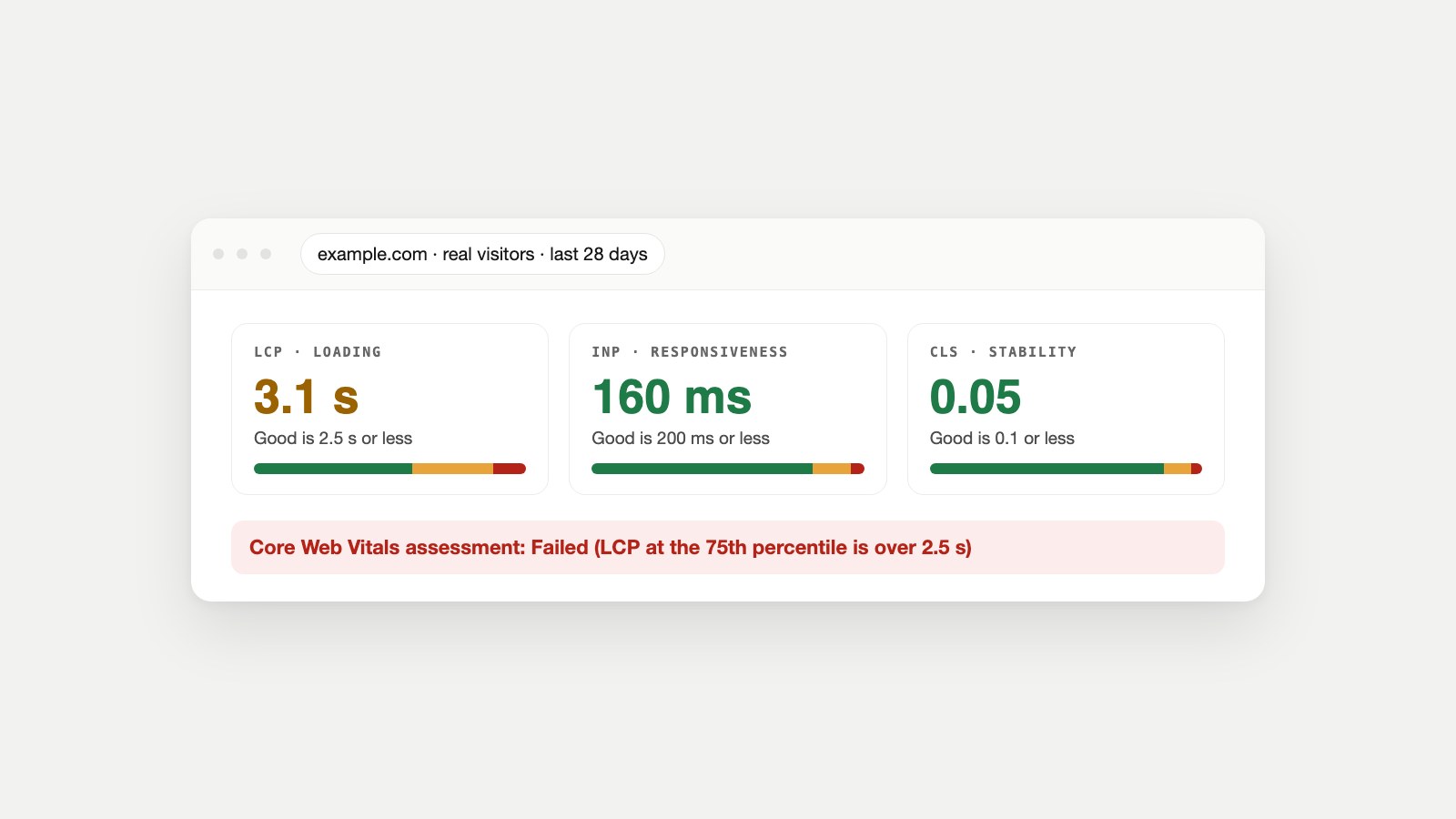
Key Takeaways
- Core Web Vitals are three metrics Google uses to measure real page experience: LCP (loading), INP (responsiveness) and CLS (visual stability).
- Good means LCP of 2.5 seconds or less, INP of 200 milliseconds or less and CLS of 0.1 or less, measured at the 75th percentile of real visits.
- They come from real Chrome users over 28 days, not from the PageSpeed score. A page passes only if all three are good.
- INP replaced FID as a Core Web Vital on March 12, 2024.
- Most failures have a short list of causes: a heavy or late hero image (LCP), too much JavaScript (INP), and images, ads or fonts without reserved space (CLS).
What Are Core Web Vitals?
Core Web Vitals are a set of three metrics that measure how a page feels to real visitors: how fast the main content loads, how quickly the page responds when someone interacts with it, and how stable the layout stays while it loads. Google defines them in its Search Central documentation and on web.dev.
| Metric | Measures | Good | Needs improvement | Poor |
|---|---|---|---|---|
| Largest Contentful Paint (LCP) | Loading: when the main content appears | 2.5 s or less | 2.5–4.0 s | Over 4.0 s |
| Interaction to Next Paint (INP) | Responsiveness: how fast the page reacts to taps, clicks and keys | 200 ms or less | 200–500 ms | Over 500 ms |
| Cumulative Layout Shift (CLS) | Visual stability: how much the layout jumps | 0.1 or less | 0.1–0.25 | Over 0.25 |
Each threshold is applied at the 75th percentile of page loads, separately for mobile and desktop. In other words, three out of four visits need to be good, not just the average one. That's deliberate: it focuses on the visitors with slower phones and connections, who are the ones most likely to leave.
Largest Contentful Paint (LCP)
LCP measures how long it takes for the largest image or text block in the viewport to appear. It's the moment a visitor sees what they came for. web.dev's LCP guide sets good at 2.5 seconds or less. On most pages the LCP element is the hero image, a product photo or the main heading.
LCP is measured from the moment navigation starts, so it includes the server's response time (TTFB) and every redirect before the page. That's why a slow host makes LCP slow even when the image is small. Our guide to reading PageSpeed Insights explains TTFB and the other loading metrics.
How to improve LCP
- Find the LCP element. PageSpeed Insights and Lighthouse name it in the report.
- Make the server fast: page caching, a CDN, and no redirect hops in front of the page.
- Make the image small: serve it at its display size in WebP or AVIF. The Image Size Checker finds oversized images.
- Load it early: never lazy-load the LCP image, add
fetchpriority="high", and preload it if it's set in CSS. - Remove what blocks rendering: inline critical CSS and defer scripts, so the browser can paint the image as soon as it arrives.
web.dev's guide to optimizing LCP breaks LCP into four parts (server response, resource load delay, load time and render delay), which helps you see which one is slow.
Interaction to Next Paint (INP)
INP measures how quickly a page visually responds after someone taps, clicks or presses a key, across the whole visit. It reports one of the slowest interactions a visitor had, so a page that reacts instantly to most taps but freezes once still scores badly. web.dev's INP guide sets good at 200 milliseconds or less and poor at over 500.
INP became a Core Web Vital on March 12, 2024, replacing First Input Delay (FID). FID only measured the delay before the browser started handling the first interaction; INP measures the full time until the screen updates, for every interaction. It's a much harder test, and many sites that passed FID fail INP.
INP needs real interactions, so it only appears in field data. Lab tools can't measure it directly; Lighthouse uses Total Blocking Time as a stand-in.
How to improve INP
- Cut JavaScript you don't need: unused plugins, page-builder add-ons, duplicate analytics tags and abandoned A/B tests.
- Delay third-party scripts such as chat widgets, review widgets and ad code until after the page has loaded, or until someone needs them.
- Break up long tasks so the browser can respond between them. Developers can yield to the main thread instead of running one long function.
- Keep the page light while it's being used: avoid huge DOM sizes and expensive work on every scroll or keypress.
web.dev's guide to optimizing INP covers the techniques in detail. On WordPress and Shopify, removing a few heavy plugins or apps is often the single biggest win.
Cumulative Layout Shift (CLS)
CLS measures how much visible content moves unexpectedly while the page is in use. It's the reason you tap a button and hit an ad that jumped into its place. web.dev's CLS guide sets good at 0.1 or less and poor at over 0.25.
How CLS is calculated: each unexpected shift gets a score based on how much of the screen moved and how far it moved. CLS reports the largest burst of shifts during the visit. Movement that happens right after a visitor's own tap, like an accordion opening, doesn't count.
How to fix CLS
- Give every image and video a width and height (or a CSS aspect ratio), so the browser reserves the space before it loads.
- Reserve space for ads, embeds and iframes with a fixed-size container.
- Don't insert content above existing content, such as cookie bars, promo banners or "related products" that push the page down after it has rendered.
- Load web fonts carefully so text doesn't reflow when the font swaps in; match fallback font sizes where you can.
web.dev's guide to optimizing CLS shows how to find which element is shifting.
How to Check Your Core Web Vitals
- PageSpeed Insights: the "Discover what your real users are experiencing" section shows your page's and site's Core Web Vitals and whether the assessment passed. Our guide to reading PageSpeed Insights walks through the whole report.
- Search Console: the Core Web Vitals report groups similar pages and shows which groups are Poor, Need improvement or Good, on mobile and desktop.
- Our Mobile-Friendly Checker: the free checker shows real-visitor LCP, INP and CLS when Google has data for the page, alongside Google's mobile speed score and layout checks.
- Chrome DevTools: the Performance panel shows LCP, INP and CLS live while you use the page, which is the best way to find a slow interaction.
Real-visitor data needs enough Chrome traffic. New or low-traffic pages may show "no data," in which case PageSpeed Insights falls back to your whole site, and you can use lab tools to find problems in the meantime.
Why Your Core Web Vitals Assessment Failed
The assessment fails if any one of the three metrics isn't good at the 75th percentile. Google's PageSpeed Insights documentation explains that a page or site passes only when LCP, INP and CLS are all good; if there isn't enough INP data, it passes when LCP and CLS are both good.
Common reasons people are surprised by a failure:
- The lab score is high, but the field fails. Your visitors use slower phones or networks than the lab test, or a script that loads later in the visit hurts INP.
- Two metrics are green, one is orange. One metric over the line is enough to fail.
- You fixed it, but it still fails. Field data covers the previous 28 days, so improvements take up to four weeks to fully show. Search Console's report also lets you start a validation once you've fixed an issue.
- The page is fine, but the site fails. With little page-level data, PSI shows origin-level data, which includes your slowest templates.
Do Core Web Vitals Affect SEO?
Yes, as one part of page experience, but not as a trump card. Google says it "highly recommend[s] site owners achieve good Core Web Vitals for success with Search," and that this aligns with what its core ranking systems seek to reward. Google is also clear that relevance comes first: a page with the most helpful answer can rank well with average Core Web Vitals.
The practical view: good Core Web Vitals won't rescue weak content, but poor ones make it harder for good content to win, and they cost you visitors regardless of rankings. If a key page fails, fix it; once it passes, chasing a perfect lab score has little search benefit. Speed is only useful once a page is in the index, too; if a page isn't showing at all, start with our guide to why a page isn't indexed.
Core Web Vitals by Platform
- WordPress: use a caching plugin, compress images on upload, remove unused plugins and page-builder add-ons, and host on a server sized for your traffic.
- Shopify: audit installed apps (each can add scripts that hurt INP), compress product images, and avoid sliders and pop-ups that shift the layout.
- Wix and Squarespace: keep pages lighter, with fewer embeds and animations, and size images before uploading.
- Custom sites and frameworks: server-render the main content, split JavaScript bundles, and preload the LCP image.
Keep Them Passing
Core Web Vitals drift as you add apps, scripts, banners and bigger images. Check them monthly in Search Console, and after any theme, plugin or tracking change. Watch Owl crawls your whole site and can run a PageSpeed (Lighthouse) score for any page it finds, Owl-gorithm Hacker audits indexing and on-page SEO alongside it, Opportunity Owl turns what they find into specific fixes, and Cash Cow Stalker alerts you when a top page starts losing clicks. For the mobile side of page experience, see our mobile-friendly checklist.
FAQ
What are the three Core Web Vitals?
Largest Contentful Paint (LCP) for loading, Interaction to Next Paint (INP) for responsiveness, and Cumulative Layout Shift (CLS) for visual stability.
What are good Core Web Vitals scores?
LCP of 2.5 seconds or less, INP of 200 milliseconds or less and CLS of 0.1 or less, each measured at the 75th percentile of real page loads.
What is the difference between FID and INP?
FID measured only the delay before the browser started handling the first interaction. INP measures the full time until the screen responds, across all interactions. INP replaced FID as a Core Web Vital on March 12, 2024.
Why do my Core Web Vitals pass in Lighthouse but fail in Search Console?
Lighthouse is a single simulated test, while Search Console uses 28 days of real Chrome visitors on their own devices and networks. Real visitors are often slower, and INP can only be measured in the field.
How long does it take for Core Web Vitals to update?
Field data covers the previous 28 days, so a fix can take up to four weeks to fully show in PageSpeed Insights and Search Console.
Do Core Web Vitals affect SEO?
Yes, as part of page experience. Google recommends good Core Web Vitals for success with Search, but relevance and helpful content still matter more.
What is the LCP element?
It's the largest image or block of text visible in the viewport when the page loads, often a hero image or main heading. PageSpeed Insights and Lighthouse name it in the report.
Is CLS measured only during loading?
No. CLS covers the whole visit, but layout shifts that happen right after a visitor's own interaction, like opening a menu, don't count.
Fix the One That Fails First
Open PageSpeed Insights or Search Console, find the metric that's failing on your most important template, and work through its fixes above before touching the others. Check it again with the Mobile-Friendly Checker once the change is live, and give field data four weeks to catch up. For the full report, read how to read PageSpeed Insights; for how search is changing beyond speed, see how AI agents are changing SEO and what an AI crawler is.
Sources
- Understanding Core Web Vitals and Google search results, Google Search Central.
- Web Vitals, web.dev.
- Largest Contentful Paint (LCP) and Optimize LCP, web.dev.
- Interaction to Next Paint (INP) and Optimize INP, web.dev.
- Cumulative Layout Shift (CLS) and Optimize CLS, web.dev.
- Interaction to Next Paint becomes a Core Web Vital on March 12, web.dev, 2024.
- About PageSpeed Insights, Google for Developers.
- Core Web Vitals report, Search Console Help.