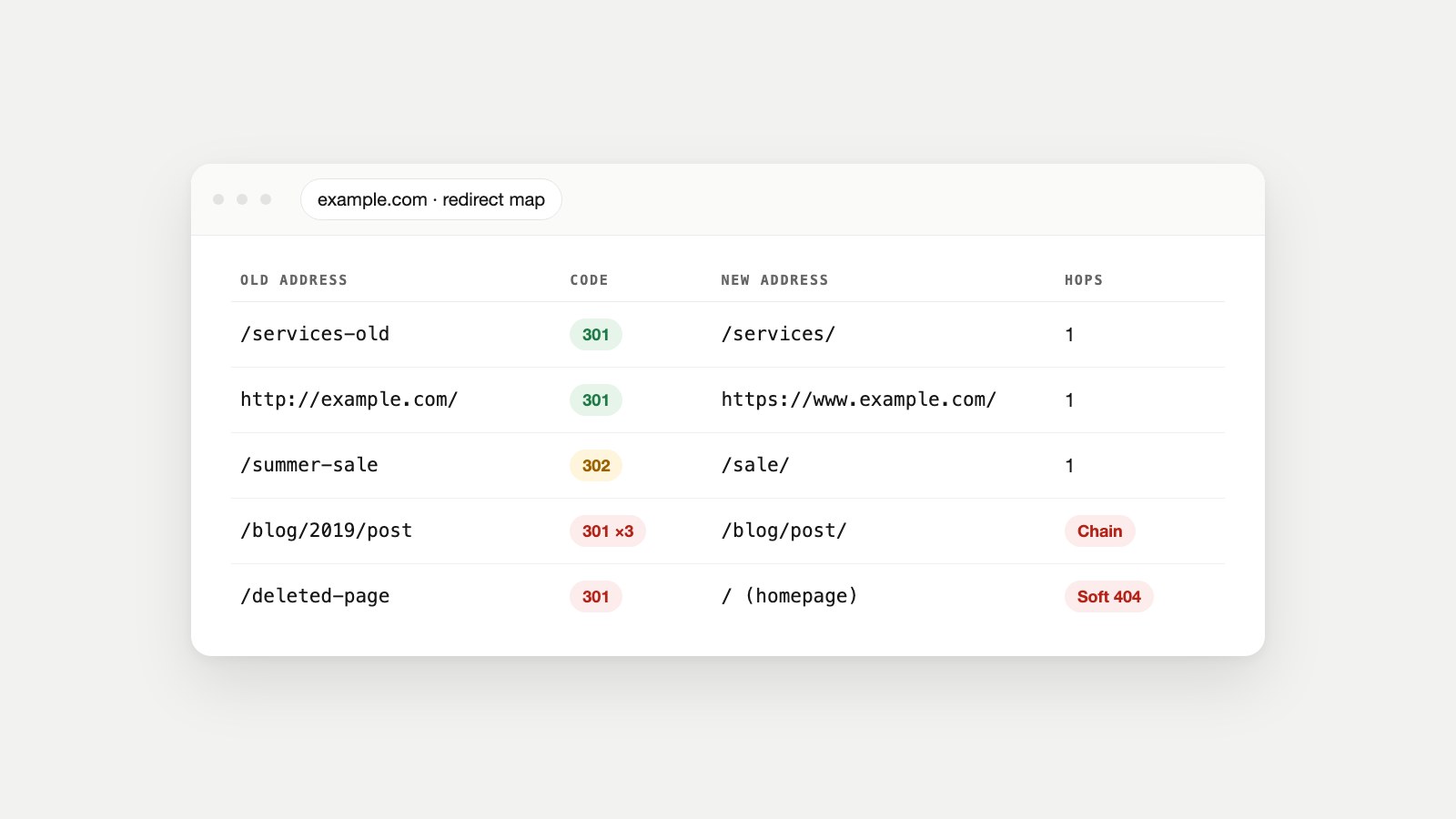
Key Takeaways
- A 301 redirect tells browsers and search engines that a page has moved permanently to a new address, and sends every visitor there automatically.
- Use one whenever a URL changes for good: a renamed page, a deleted page with a close replacement, http to https, a new domain.
- Google treats a permanent redirect as a strong signal that the new URL should be the one it shows in search, so a correct 301 doesn't throw away a page's search value.
- Set redirects up on the server or in your CMS, point each one straight at the final page in one hop, never send everything to the homepage, and keep them for at least a year.
What Is a 301 Redirect?
A 301 redirect is a server response that says "this page has moved permanently" and gives the new address. The browser loads the new page instantly; the visitor usually never notices. The name comes from the HTTP status code 301 Moved Permanently, defined in the HTTP standard, RFC 9110.
Behind the scenes it's a two-line conversation. The browser asks for the old address, and the server answers with the code and a Location header pointing to the new one:
GET /services-old HTTP/1.1
Host: www.example.com

HTTP/1.1 301 Moved Permanently
Location: https://www.example.com/services/
The browser then requests the new address and shows that page instead. Search engines do the same, and over time replace the old URL with the new one in their results. MDN's reference for 301 describes the same behavior from the browser's side.
When Should You Use a 301 Redirect?
Use a 301 any time a URL changes and the old one is never coming back. The common cases:
- You renamed or moved a page, for example
/our-servicesbecame/services/. - You deleted a page and a close replacement exists, such as an old product redirecting to its newer model. If nothing replaces it, let it return a 404 instead (see below).
- You merged pages, combining three thin articles into one strong guide.
- You moved from http to https or picked one of
wwwand non-www as your main address. - You changed domains or restructured the site during a redesign or migration.
- You fixed a URL people had already linked to, such as a typo in a published address.
When the move is temporary (a seasonal sale page, a maintenance page, an A/B test), use a 302 or 307 instead, so search engines keep the original URL. The Redirect Checker page explains the difference between the codes in detail.
Which Redirect Should You Use?
For a permanent move, use a server-side 301 (or 308). Google's redirects guidance ranks the options, and the order is clear:
| Redirect | Permanent? | Use it when | Search engines |
|---|---|---|---|
| 301 Moved Permanently | Yes | A page or site has moved for good (the default choice) | Treat the new URL as the main one |
| 308 Permanent Redirect | Yes | Same as 301, but the request method must stay the same (forms, APIs) | Same as 301 |
| 302 Found | No | A short-term move you'll undo | Usually keep the old URL |
| 307 Temporary Redirect | No | Same as 302, but the request method must stay the same | Usually keep the old URL |
| Meta refresh (0 seconds) | Treated as permanent | You can't change server settings | Followed, but server-side is better |
| JavaScript redirect | Depends | Nothing else is possible | Google: only if server-side and meta refresh aren't possible |
The difference between 301 and 308 is technical: RFC 9110 allows a browser to switch a form submission from POST to GET after a 301, while a 308 forbids it. For ordinary pages they behave the same, and Google treats both as permanent.
Do 301 Redirects Hurt SEO?
No. A correct 301 redirect is the recommended way to move a page without losing its place in search. Google says that if you need to change a page's URL as it's shown in search results, a permanent server-side redirect is "the best way to ensure that Google Search and people are directed to the correct page," and that permanent redirects signal the target should be canonical.
That's what people mean by "passing link equity": the links and signals the old URL earned are consolidated onto the new one, as long as the new page is a genuine replacement. Redirects only hurt when they're done badly:
- Redirecting to an unrelated page. A deleted article redirected to your homepage doesn't carry its value; Google treats it like a missing page (a soft 404), and visitors land somewhere they didn't ask for.
- Long chains, where each hop adds delay and some crawlers stop following. Googlebot follows up to 10 hops; aim for one.
- Loops, where two URLs redirect to each other and nothing ever loads.
- Removing redirects too early, before search engines and linking sites have caught up.
You'll also see "Page with redirect" in Search Console's indexing report. That's normal: Google is telling you the old URL isn't indexed because it redirects, and the target is indexed instead. Our guide to why a page isn't indexed covers when that status is and isn't a problem.
How to Set Up a 301 Redirect
Where you add a redirect depends on how your site is built. Use the most direct option you have: your CMS's redirect tool, your server configuration, or your CDN.
In WordPress
Use a redirect manager rather than editing files by hand: the free Redirection plugin, or the redirect features built into SEO plugins such as Rank Math (and Yoast SEO Premium). Add the old path, the full new URL and choose 301. Some of these plugins can also create a redirect automatically when you change a post's slug.
Shopify, Wix and Squarespace
Each has a built-in tool: URL redirects in Shopify (which also offers to create a redirect when you change a product or page URL handle), the URL Redirect Manager in Wix, and URL mappings in Squarespace's developer tools. Enter the old path and the new destination; all three use permanent redirects for this.
Apache (.htaccess)
On Apache hosting, one line in the .htaccess file in your site's root does it, using the Redirect directive from mod_alias:
Redirect 301 /services-old https://www.example.com/services/nginx
In nginx, use a return inside a matching location block (see nginx's rewrite module documentation):
location = /services-old {
    return 301 https://www.example.com/services/;
}
Redirect http to https and www in one hop
Every variant of your domain should land on the same final address in one redirect: http://example.com, http://www.example.com and https://example.com should each go straight to https://www.example.com/ (or your non-www choice). Most hosts and CDNs have a setting for this. If you also force a trailing slash, include it in the same rule so it isn't a second hop.
Domain forwarding
If you're moving to a new domain, forward the old one with a permanent (301) option at your registrar or DNS host, and map old paths to their new equivalents rather than sending every URL to the new homepage.
Redirecting a Whole Site or Domain
A redesign or domain move is where redirects matter most, and where they're most often forgotten. Google's site move guide recommends mapping old URLs to new ones and keeping the redirects "for as long as possible, generally at least 1 year."
- Export every old URL from your sitemap, Search Console's Pages report and your analytics (pages with traffic or backlinks matter most).
- Map each old URL to its closest new equivalent in a spreadsheet: old address, new address, code.
- Set up the redirects before or at the moment of launch, not afterwards.
- Update internal links, canonical tags and the XML sitemap to use the new URLs directly.
- Test a sample of old URLs and confirm each reaches its new page in one hop with a 200 at the end.
- Watch Search Console for 404s and redirect errors over the following weeks, and fix anything missed.
- Keep the redirects for at least a year, and ideally for good: links from other sites don't update themselves.
Common Redirect Problems and How to Fix Them
"Too many redirects" (ERR_TOO_MANY_REDIRECTS)
This browser error means the page is caught in a loop: A redirects to B, and B redirects back to A. The usual causes are two systems fighting over the address, such as a CDN forcing http while the server forces https, or the CMS's site URL set to www while the server redirects to non-www. Check where each redirect comes from (the Redirect Checker shows every hop), make one system responsible for it, and clear your cookies and cache before testing again.
Chains
Chains build up over years: a page was renamed in 2021, then moved again in 2024, and the old redirect was never updated. Point every old URL directly at the final page. We found one on our own site while writing this article: typing cmoowls.com/blog without the www or the trailing slash takes two hops, one to add www and another to add the slash, before it reaches the page. Two hops is harmless, but it's exactly the kind of thing that grows into a real chain if nobody checks.
Redirecting deleted pages to the homepage
It feels tidy, but it isn't. Redirect a deleted page only to a page that genuinely replaces it. If nothing does, let it return a 404 or 410, remove your internal links to it, and fix any important backlinks individually. Our guide to broken links covers how to decide.
Old internal links left behind
A redirect is a safety net, not a substitute for updating your own links. Run your key pages through the Broken Link Checker, which flags internal links that redirect, and update them to point straight at the final URL. Clean up your XML sitemap the same way; it should list only final URLs that return 200.
A redirect you need to undo
A 301 can be reversed: remove or change the rule and the old URL works again. But browsers may have cached the 301, since RFC 9110 makes it cacheable by default, so some returning visitors keep being sent to the new address until their cache clears. Test changes in a private window, and use a 302 while you're still deciding.
Real Example: How We Renamed a Page
When we renamed one of our tools from Mobile-Ready Checker to Mobile-Friendly Checker, its address changed. The old URL, /tools/mobile-ready-checker/, now answers with a single 301 that lands on the new page, and we updated every internal link and the sitemap to the new address at the same time. Our domain's http, https and non-www versions each reach https://www.cmoowls.com/ in one 301 as well. That's the pattern to copy: one hop, a relevant destination, and your own links already pointing at the final URL.
How to Check Your Redirects
- One URL at a time: paste it into the Redirect Checker to see every hop and the final status.
- From the command line:
curl -IL https://example.com/old-pageprints each response and itsLocationheader. - In Search Console: the Pages report lists "Page with redirect" and "Redirect error" URLs, and URL Inspection shows which URL Google chose.
- Across the whole site: Watch Owl crawls every page and reports redirect chains and loops alongside broken links and other errors, and Owl-gorithm Hacker checks whether search engines can reach and index every page that should be indexed.
FAQ
What does a 301 redirect mean?
It means the page has moved permanently. The server sends the 301 status and the new address, and browsers and search engines go there automatically.
Does a 301 redirect pass link juice?
A permanent redirect to a genuinely equivalent page consolidates the old URL's signals onto the new one, which is why Google recommends 301s for URL changes. Redirects to unrelated pages, like the homepage, don't carry that value.
How long should I keep a 301 redirect?
Google recommends at least a year for site moves, and keeping them indefinitely is better for visitors who arrive from old links and bookmarks.
What is the difference between a 301 and a 308 redirect?
Both are permanent. A 308 guarantees the request method stays the same, which matters for forms and APIs; for normal pages they behave the same.
How many redirects is too many?
Aim for one hop. Google's crawler follows up to 10, but each hop adds delay and some crawlers and browsers give up sooner, so flatten any chain you find.
Why does Search Console say "Page with redirect"?
Because that URL redirects somewhere else, so Google indexes the destination instead. It's expected for old URLs, and only worth fixing if the URL shouldn't redirect at all.
Can a 301 redirect be reversed?
Yes, by removing or changing the rule. Browsers that cached the 301 may keep redirecting for a while, so test in a private window and use a 302 if the move might not be permanent.
Does a 301 redirect change the URL in the browser?
Yes. The address bar shows the new URL once the redirect completes, which is how you can tell a redirect happened.
Move Pages Without Losing Anyone
Before you rename, merge or delete a page, decide where its visitors and links should go, set a 301 to that page, and update your own links in the same change. Then confirm it with the Redirect Checker. While you're tidying, make sure the new page is indexable with the Indexability Checker, and that its title and meta description still match what people search for. For the bigger picture of what search engines and AI crawlers read on your site, see what robots.txt is and what llms.txt is.
Sources
- RFC 9110: HTTP Semantics, IETF, 2022.
- 301 Moved Permanently and 308 Permanent Redirect, MDN Web Docs.
- Redirects and Google Search, Google Search Central.
- How HTTP status codes, and network and DNS errors affect Google Search, Google Search Central.
- Site moves with URL changes, Google Search Central.
- Apache mod_alias, Apache HTTP Server Documentation.
- ngx_http_rewrite_module, nginx documentation.