Key Takeaways
- The meta title (the
<title>tag) is the clickable headline in search results. The meta description is the short summary underneath it. - Google sets no fixed length; it cuts both to fit the screen. Around 50–60 characters for titles and 120–155 for descriptions usually shows in full.
- Write the title with the topic first and your brand last. Write the description as an answer plus a reason to click.
- Titles help Google understand a page. Descriptions don't affect rankings, but a good one earns more clicks from the same position.
- Every page needs its own title and description. Duplicates are one of the most common problems on small business sites.
What Are a Meta Title and Meta Description?
A meta title and meta description are two pieces of HTML in a page's `<head>` that tell search engines what to show in search results: the `<title>` element and the description meta tag. The title becomes the blue clickable headline, which Google calls the title link. The description is often used for the grey snippet below it. Neither appears on the page itself.
<head>
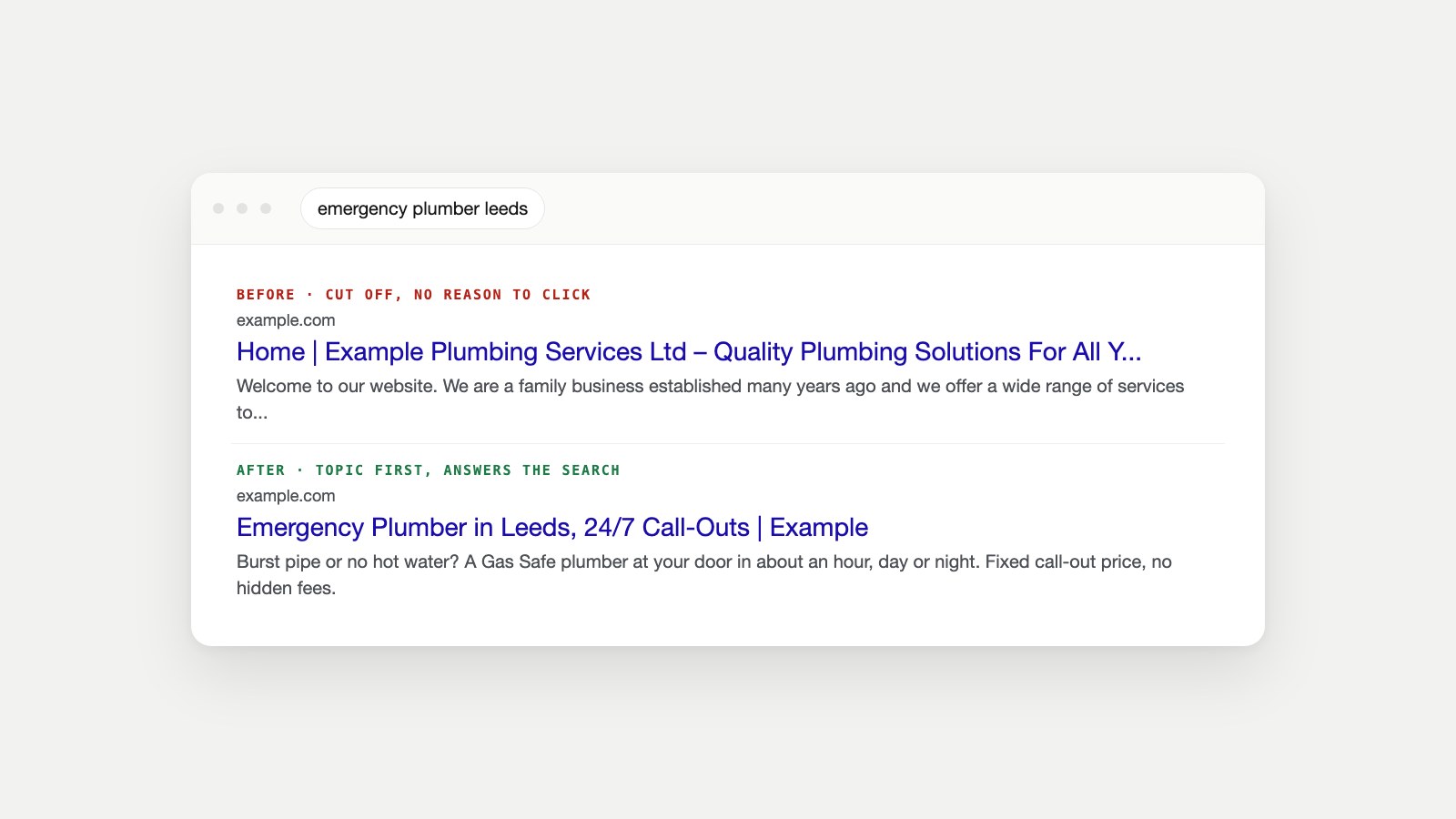
  <title>Emergency Plumber in Leeds, 24/7 Call-Outs | Example</title>
  <meta name="description" content="Burst pipe or no hot water? A Gas Safe plumber at your door in about an hour, day or night. Fixed call-out price, no hidden fees.">
</head>
They're easy to confuse with the other "titles" a page has. Here's what each one does:
| Element | Where people see it | What it's for |
|---|---|---|
| Meta title (<title>) | Search results, browser tab, bookmarks | The headline that earns the click |
| Meta description | Search results, under the title | The pitch: what the page offers |
| H1 heading | At the top of the page itself | Tells visitors they're in the right place |
| og:title and og:description | Link previews on LinkedIn, X, Facebook, WhatsApp | How the page looks when shared |
| Meta keywords | Nowhere | Ignored by Google since at least 2009 |
The social versions are separate tags from the Open Graph protocol; if they're missing, platforms fall back to your title and description or guess. The Open Graph Checker shows how your links look when shared.
Do Meta Titles and Descriptions Affect SEO?
The title matters for SEO; the description matters for clicks. Google's SEO Starter Guide treats the title as one of the main ways to influence how a page appears in search; Google uses it, along with headings and page content, to understand what a page is about, and it's usually the first thing a searcher reads. Google says the meta description is used for the snippet when it describes the page better than the page's own text, and it isn't a ranking factor.
That doesn't make descriptions unimportant. Two results in the same position can get very different click-through rates depending on how well their snippet answers the search. In Search Console, the Performance report shows impressions and clicks for every page and query, so you can see which pages are seen often but rarely clicked. Those are the first pages to rewrite.
What about meta keywords? Google announced back in 2009 that it doesn't use the keywords meta tag in web ranking, and it still isn't on Google's list of supported meta tags. You can leave it out.
How Long Should a Meta Title and Description Be?
Google doesn't set a character limit for either one. Its documentation says there's no limit on how long a title element or meta description can be, but both are truncated in search results "to fit the device width." The real limit is the width in pixels, not the number of characters.
| Element | Aim for | Why |
|---|---|---|
| Meta title | About 50–60 characters | Usually fits about 600 pixels on desktop before being cut |
| Meta description | About 120–155 characters | Shows in full on most screens; mobile can show a little more |
| Most important words | In the first half | Survives truncation on every device |
Because wide letters like W and M take up more space than i and l, two titles with the same number of characters can be cut at different points. The Meta Tag Checker measures your title and description in pixels and previews the result, which is more reliable than counting characters.
How to Write a Meta Title
- Start with what the page is about, in the words searchers use. "Emergency Plumber in Leeds" beats "Welcome to Example Plumbing".
- Add the detail that wins the click: the location, the year, the price, "free", "24/7", or what makes the page different.
- Put your brand at the end, after a separator, or leave it out on long titles. Your homepage is the exception: lead with the brand there.
- Make it unique. Two pages with the same title compete for the same searches and leave Google guessing which to show.
- Match the page. The title should describe what's actually on it, and sit close to the H1. Google may replace titles that don't match, are stuffed with keywords or are the same boilerplate on every page, as its title link guidance explains.
- Check the length in a pixel preview before publishing.
A simple pattern covers most pages: Topic + detail that matters | Brand, for example "Wholesale Window Wall Mounts, Free UK Delivery | Example".
How to Write a Meta Description
- Answer the search in the first sentence. Say what the page gives the reader, not what your company is.
- Add a reason to choose you: a number, a guarantee, a benefit, a price or a time saving.
- Include the main keyword naturally. Google bolds words that match the search, which draws the eye.
- End with a soft call to action when it fits: "Book online", "See prices", "Get the checklist".
- Keep it honest and specific. A description that promises something the page doesn't deliver earns clicks that bounce straight back.
- Write a different one for every important page. Google recommends unique descriptions and says identical ones across a site aren't helpful. For very large sites, generate them from each page's real data (product name, price, specs) rather than repeating one sentence.
Meta Title and Description Examples
These examples use made-up businesses. Each shows the same pattern: topic first, a concrete detail, a reason to click.
| Business | Meta title | Meta description |
|---|---|---|
| Local plumber | Emergency Plumber in Leeds, 24/7 Call-Outs | Example | Burst pipe or no hot water? A Gas Safe plumber at your door in about an hour, day or night. Fixed call-out price, no hidden fees. |
| Dentist | Invisalign in Manchester, Free Consultation | Example Dental | Straighter teeth without metal braces. Book a free Invisalign consultation and see your 3D smile plan before you decide. |
| Online shop product | Merino Wool Running Socks, Blister-Free | Example | Flat-seam merino running socks that stay dry for long runs. Sizes 3–13, free returns within 30 days. |
| SaaS tool | Invoice Software for Freelancers, Free Plan | Example | Send professional invoices in two minutes, get paid by card, and chase late payments automatically. Free for up to five clients. |
| Blog post | How to Fix a Leaking Tap in 5 Steps (No Plumber) | Most leaking taps need a new washer and ten minutes. Here's how to find the fault, the parts to buy and the steps to fix it. |
| Category page | Women's Trail Running Shoes, Waterproof Styles | Example | Shop 40+ women's trail running shoes with grip for mud, rock and wet trails. Free delivery over £50 and 30-day returns. |
Notice what's missing: "Welcome to", "Home", the company's founding year and lists of every service. None of them help a searcher decide.
Can the Meta Title and H1 Be the Same?
Yes, and they're often similar. They do slightly different jobs: the title has to win the click among ten results, so it's shorter and may include the brand; the H1 greets the visitor on the page, so it can be longer and more natural. What matters is that they describe the same topic, so a searcher who clicks finds exactly what the title promised.
How to Add a Meta Title and Description on Your Platform
- WordPress: install an SEO plugin such as Yoast SEO, Rank Math or All in One SEO, then edit the "SEO title" and "Meta description" fields in the box under each post or page. Without a plugin, WordPress uses the post title and has no description field.
- Shopify: open a product, collection, page or blog post, find the Search engine listing section, click Edit website SEO, and fill in the page title and description (Shopify's guide).
- Wix: open the page's settings and use the SEO basics tab to set the title tag and meta description.
- Squarespace: open the page's settings and edit the SEO tab; set the site-wide pattern under the SEO panel.
- Hand-coded sites: edit the
<title>and<meta name="description">tags in each page's<head>, as in the example above.
After publishing, check the live page rather than the editor; themes and plugins sometimes override what you typed, or output two title tags.
Common Meta Title and Description Mistakes
| Mistake | What happens | Fix |
|---|---|---|
| Missing description | Google picks text from the page, often badly | Write one for every important page |
| Same title or description on many pages | Pages compete; Google rewrites them | Make each one specific to its page |
| Keyword stuffing | Looks spammy; Google may replace it | Use the main keyword once, naturally |
| Brand first on every page | The topic gets cut off | Topic first, brand last |
| Too long | Cut off mid-sentence | Check pixel width; front-load the key words |
| Doesn't match the page | Clicks bounce back; Google rewrites it | Describe what's actually on the page |
| Title and H1 about different things | Confuses searchers and search engines | Keep both on the same topic |
A missing or duplicated title is also a symptom worth investigating: it often means a template is broken, or pages are near-duplicates that might not be indexed at all. Our guide to why a page isn't indexed explains how duplicates are handled.
Why Google Sometimes Shows Something Else
Google may show a different title or snippet from the one you wrote. It does this when it decides other text on the page better matches a particular search, or when your tags are missing, duplicated, stuffed or don't match the content. You can't force Google to use yours, but you can make it the best option: specific, accurate, unique and the right length. If you need to limit what Google shows, the robots meta tag supports max-snippet and nosnippet; use them sparingly, since a page needs a snippet to appear as a link in Google's AI Overviews.
Measure and Improve
- Find the pages to fix first: in Search Console's Performance report, sort pages by impressions and look for low click-through rates.
- Rewrite one page at a time, and note the date so you can compare clicks a few weeks later.
- Check every page, not just one: Owl-gorithm Hacker audits titles, descriptions and headings across the whole site as part of its technical SEO review, and Opportunity Owl turns the gaps into specific rewrites.
- Start new pages from what already ranks: Owlthor researches the results for a keyword before drafting the article, so the title you write matches what searchers expect.
- Don't forget the rest of the snippet: schema markup can add stars, prices or FAQs to your result; test it with the Schema Markup Checker.
FAQ
What's the best length for a meta description?
Google sets no limit, but it trims descriptions to fit the screen. About 120–155 characters usually shows in full, so put the most important information first.
How many characters should a meta title be?
About 50–60 characters, which usually fits Google's roughly 600-pixel desktop width. Wide letters take more space, so check the pixel width rather than relying on a character count.
Does the meta description affect SEO?
Not directly. It isn't a ranking factor, but a clear, relevant description can increase how many people click your result, which is the point of ranking in the first place.
What is the difference between a meta title and a meta description?
The meta title is the clickable headline in search results and the browser tab. The meta description is the short summary that often appears underneath it.
Should every page have a unique meta description?
Yes, at least every page you want people to find. Google recommends unique descriptions, because identical ones across a site don't help searchers tell pages apart.
Does Google still use meta keywords?
No. Google said in 2009 that it doesn't use the keywords meta tag for web ranking, and it isn't among the meta tags Google supports today.
Why does Google show a different title than the one I wrote?
Google may rewrite titles that are missing, too long, stuffed with keywords, repeated across pages or don't match the page content. Make yours accurate, specific and unique.
Can I use emojis or special characters in a meta title?
You can, and Google sometimes shows them, but it may also drop them. Use them only when they add meaning, and never instead of the words people search for.
Rewrite Your Top Three Pages This Week
Open Search Console, find your three pages with the most impressions and the lowest click-through rate, and rewrite their titles and descriptions using the patterns above. Preview each one in the Meta Tag Checker before publishing. While you're there, make sure each page is indexable, works well on phones and hasn't changed address without a 301 redirect. For where search is heading next, read how to check your AI visibility and how AI agents are changing SEO.
Sources
- SEO Starter Guide, Google Search Central.
- Performance report (Search results), Search Console Help.
- <title>: The Document Title element and standard metadata names, MDN Web Docs.
- The Open Graph protocol, ogp.me.
- Adding keywords for SEO, Shopify Help Center.
- Influencing your title links in search results, Google Search Central.
- Control your snippets in search results, Google Search Central.
- Google does not use the keywords meta tag in web ranking, Google Search Central Blog, 2009.
- Meta tags and attributes that Google supports, Google Search Central.
- Robots meta tag, data-nosnippet, and X-Robots-Tag specifications, Google Search Central.