Key Takeaways
- AI visibility is two things: access (can AI crawlers reach and read your pages?) and presence (do AI answers mention or cite you?). Presence is impossible without access.
- Most AI visibility tools measure presence. Access problems, like a blocked crawler, a firewall rule or a page that only renders with JavaScript, are quieter and often go unnoticed.
- You can check access in about five minutes with a free AI visibility checker, your robots.txt, View Page Source, and Google Search Console.
- Search engine indexes still matter: Google's AI Overviews and ChatGPT search draw on search indexes, so classic SEO is the floor GEO stands on.
What Is AI Visibility?
AI visibility is how easily AI assistants like ChatGPT, Claude, Perplexity, Gemini and Google's AI Overviews can find your website, understand it, and recommend it when someone asks a question you should be the answer to. You'll also see it called LLM visibility or AI search visibility. They mean the same thing.
Why care? Because more and more buyers now ask an assistant before they ever open a search results page. If that assistant can't read your site, it can't describe you, cite you or recommend you. And you'll never see the lost visit, because it never reaches your analytics.
Here's how to check AI visibility for your own site, one layer at a time, using free tools and a few quick manual tests.
The Two Layers of AI Visibility
Picture a shop. Access is the front door: can the AI crawler get in and read the page? Presence is the sale: once it has read you, do you end up in the answer? Most advice skips straight to the sale.
| Layer | The question it answers | What breaks it | How to check |
|---|---|---|---|
| Access | Can AI crawlers reach and read my pages? | robots.txt rules, firewall or bot protection, noindex tags, AI opt-out tags, content that only loads with JavaScript | A free AI visibility checker, robots.txt, View Page Source |
| Presence | Do AI answers mention or cite me? | Weak brand signals, inconsistent descriptions, few independent mentions, thin content | Ask the assistants your customers' questions; presence-tracking tools |
Presence-tracking tools (Semrush's AI Visibility Toolkit, Ahrefs, Otterly AI, Profound and Peec AI are well-known names) mostly answer the second question. They're useful. But if the door is locked, a presence report can only tell you that you're missing. It can't tell you why.
Layer 1: Can AI Crawlers Reach Your Site?
Know which crawlers you're dealing with
There isn't one "AI robot." Each company sends several, and each has a different job. Our free AI Visibility Checker tests 18 of them, in three groups:
| Group | Examples | What blocking them does |
|---|---|---|
| Search engines | Googlebot, Bingbot | Removes you from search and from most AI answers, since Google AI Overviews and ChatGPT search draw on these indexes |
| AI search and assistant crawlers | OAI-SearchBot, ChatGPT-User, Claude-SearchBot, Claude-User, PerplexityBot, Perplexity-User, DuckAssistBot, Applebot | Stops your pages from appearing and being cited in AI answers |
| AI training crawlers | GPTBot, ClaudeBot, Google-Extended, Applebot-Extended, CCBot, Meta-ExternalAgent, Bytespider, Amazonbot | Stops model training on your content. On its own, this does not remove you from AI search results |
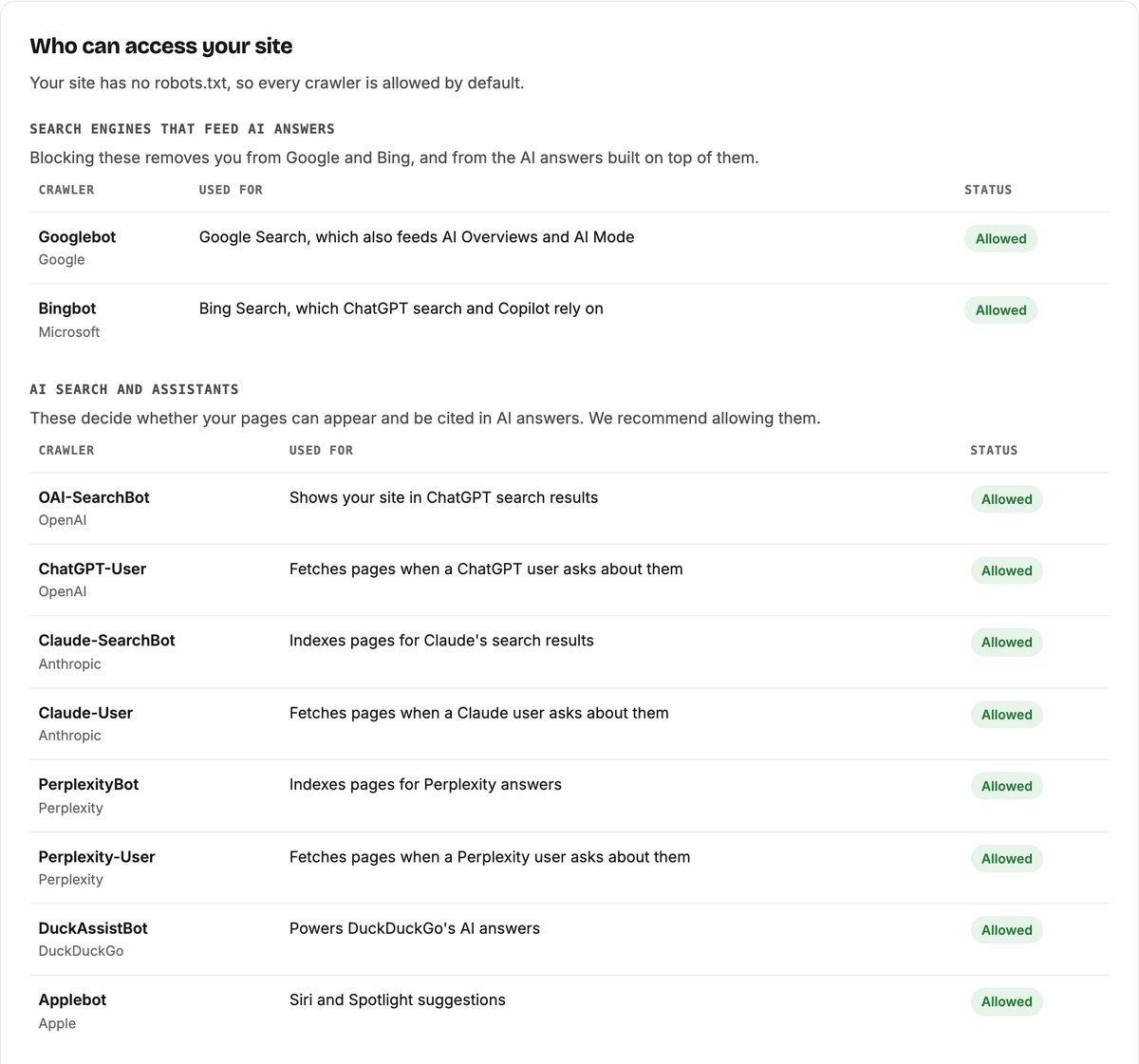
That last row trips people up in both directions. Blocking GPTBot is a business choice about training, not a switch that hides you from ChatGPT search. And the live "-User" crawlers fetch your page at the moment someone asks about you, which is exactly when a citation happens. Blocking those is almost never what you want.
Check your robots.txt
Open yoursite.com/robots.txt. Look for three things:
- A named block:
User-agent: GPTBotfollowed byDisallow: /keeps that crawler out. - A wildcard block:
User-agent: *withDisallow: /blocks every crawler you didn't name separately. - Precedence: a crawler that has its own section ignores the
*section entirely, so one forgotten line can override everything else you meant.
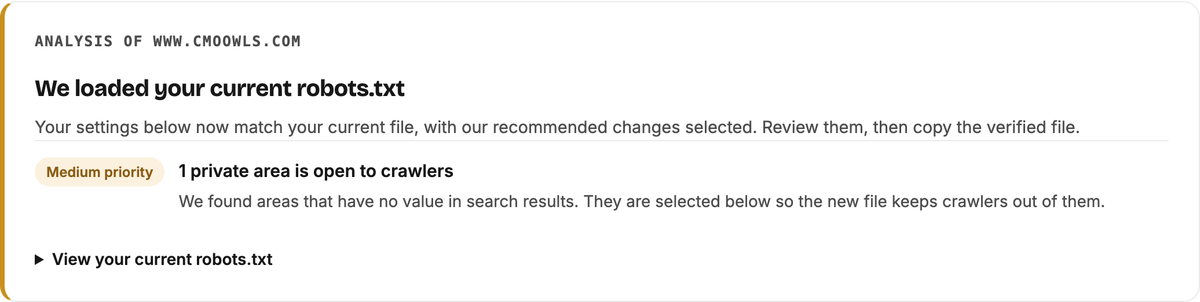
Our Robots.txt Generator reads your current file, keeps your existing rules and builds a verified version that stays visible in AI search.
Check your firewall
robots.txt is a polite request. Your firewall or bot protection decides who actually gets in. Cloudflare, for example, has settings that block AI crawlers even when robots.txt invites them. When that happens, the crawler gets a 403 error or a challenge page instead of your content.
This happened to us. Our robots.txt welcomed GPTBot and ClaudeBot, but when we requested our own homepage the way GPTBot does, Cloudflare answered 403. One setting fixed it. You can run the same test with one line in Terminal:
curl -s -o /dev/null -w "%{http_code}" -A "GPTBot/1.1" https://yoursite.com/
A 200 means the door is open. A 403 or 429 means something is turning crawlers away.
Check what AI can read without JavaScript
Google renders JavaScript. Most AI crawlers don't; they read the raw HTML. Right-click your homepage, choose View Page Source, and search for your main headline. If it isn't there, AI crawlers probably can't see it either. Our free checker flags a homepage with fewer than about 150 words of readable text in the raw HTML.
Check for noindex and AI opt-out tags
A noindex tag tells search engines, and the AI tools built on them, not to show the page. Some site builders also add AI opt-out tags such as noai. Both are easy to add by accident and easy to miss.
Run a free AI visibility checker
None of these checks is hard. Doing all of them, on every change, is the part people skip. Our free AI Visibility Checker does it in seconds with no sign-up: it tests your robots.txt against all 18 crawlers, checks your llms.txt, and looks at your homepage for noindex, AI opt-out tags and JavaScript-only content. One thing it can't see is your firewall, so run the Terminal test above as well.
What Your AI Visibility Result Means
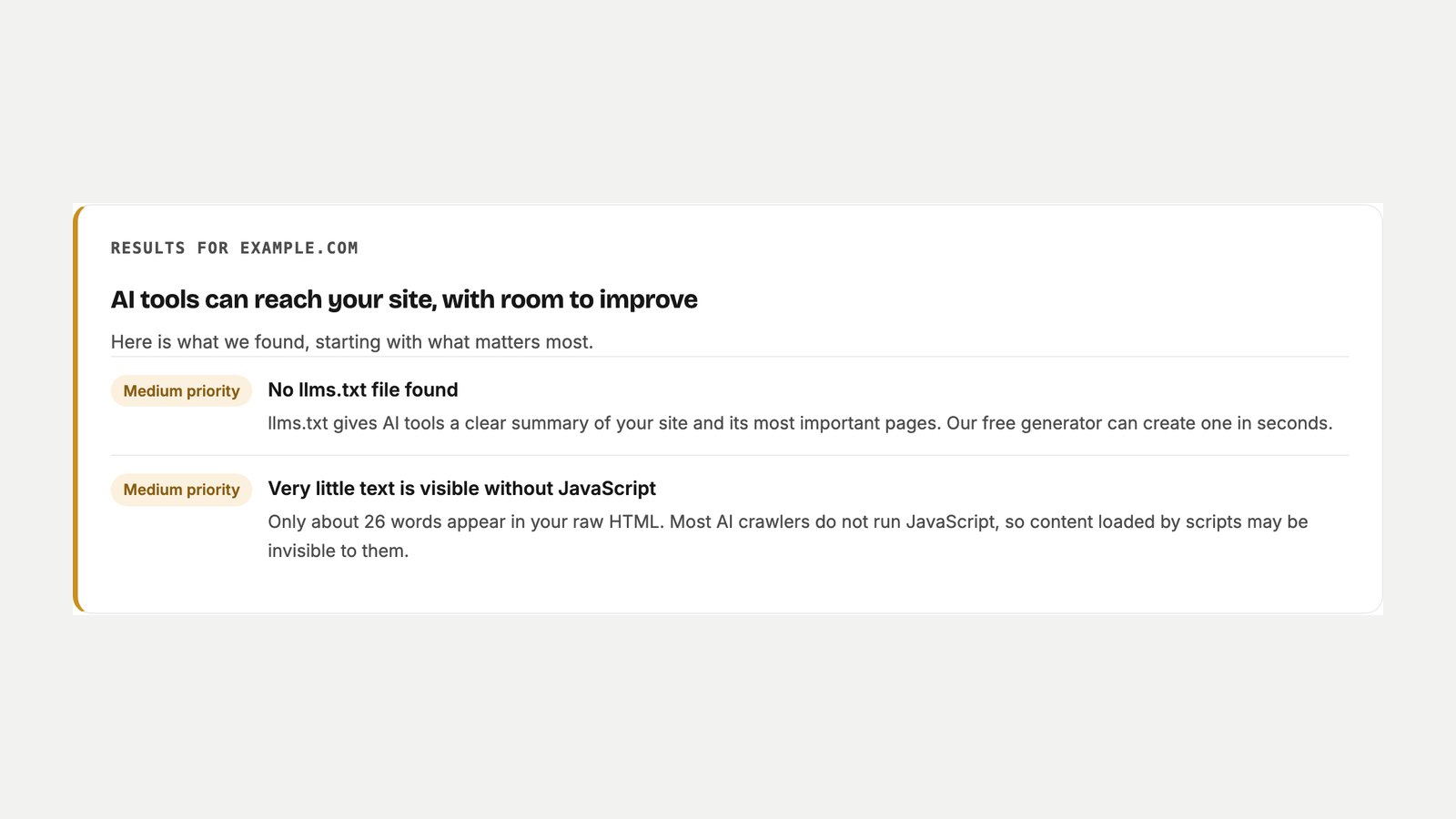
Plenty of tools hand you an AI visibility score out of 100. A number is easy to screenshot. It's much less useful when you're trying to work out what to fix. Our checker gives one of three verdicts, based on the most serious issue it finds:
| Verdict | What it means | What to do |
|---|---|---|
| Your site is open to AI search tools | No high or medium issues found | Move on to presence: brand signals and content |
| AI tools can reach your site, with room to improve | Medium issues, such as no llms.txt or little text without JavaScript | Fix them this week |
| AI tools may not be able to find or cite your site | A high issue, such as blocked search engines or AI search crawlers, or a noindex homepage | Fix it today, before anything else |
Layer 2: Does AI Actually Mention You?
Ask the assistants directly
Write down 10 to 20 questions a real customer would type, such as "best tool for X" or "how do I fix Y". Ask them in ChatGPT, Perplexity, Gemini and Claude, and note whether you appear, how you're described, and who appears instead. Repeat every few weeks. AI answers change from one day to the next, so watch the trend, not a single screenshot.
Make your brand easy to understand
AI doesn't only judge pages. It judges your brand as an entity. Two things help:
- Structured data: Organization schema with your name, logo and a
sameAslist that links your site to your official profiles. Schema doesn't force a citation, but it removes doubt about who you are. - One consistent description: the same name, numbers and category on your site, your profiles and directory listings. When sources disagree, AI blends them. Google's AI Overview once described us as having "18 to 21 agents" because some of our pages said 18 and others said 21.
Earn mentions where AI already looks
Your own site is a claim. What other people write about you is evidence, and AI treats it that way. Reviews, community answers, industry press and honest comparisons on trusted sites all feed the picture AI builds.
Don't Skip the Classic SEO Checks
AI search sits on top of regular search. It didn't replace it. So the old checks still count:
- Google Search Console: make sure your important pages are indexed. A page Google hasn't indexed is unlikely to show up in AI Overviews. Our guide to why a page isn't indexed shows how to find and fix the cause.
- Bing Webmaster Tools: ChatGPT search and Copilot rely on Bing, so submit your sitemap there too.
- Speed: PageSpeed Insights and Core Web Vitals. A slow, heavy page is harder to fetch.
- Broken pages: a broken link checker finds dead pages that waste crawl time. Watch Owl does this for free.
- llms.txt: a short Markdown summary of your best pages. It's an emerging convention, not a ranking factor, and Google says it doesn't use it, but it costs nothing. Our LLMs.txt Generator builds one from your sitemap.
GEO and AEO, in Plain Words
What is generative engine optimization (GEO)?
GEO is the practice of making your content easy for generative AI to find, trust and quote. Traditional SEO gets your pages into the index; GEO helps them get picked and cited once they're there.
What new practice does AEO introduce beyond traditional SEO?
Answer engine optimization adds answer-first writing: a short, complete answer to the question at the top of each section, so an assistant can lift it as-is, plus clear structure that machines can extract.
Why do voice assistants like Siri and Alexa count as answer engines?
They give one spoken answer instead of a list of links, so being the source of that answer is all that counts. Apple's Applebot and Amazon's Amazonbot are among the crawlers our checker tests.
Which answer engine is most transparent about its sources?
Perplexity is known for showing numbered citations next to almost every claim. ChatGPT search and Google's AI Overviews also link sources, but less consistently.
Your Five-Minute AI Visibility Checklist
- Run the free AI Visibility Checker.
- Run the GPTBot Terminal test for your firewall.
- View Page Source and find your headline.
- Check your schema for your logo and
sameAsprofiles. - Ask ChatGPT, Perplexity and Gemini three customer questions and note who they recommend.
FAQ
Is there a free AI visibility checker?
Yes. Our AI Visibility Checker is free with no sign-up. It tests access for 18 crawlers, your llms.txt and your homepage, and doesn't store the sites you check.
What's the difference between an AI visibility checker and an SEO checker?
An SEO checker looks at how search engines rank your pages. An AI visibility checker looks at whether AI assistants can reach, read and cite them. They overlap, because AI search leans on search indexes, but an SEO checker won't tell you that a firewall is blocking GPTBot.
What is a good AI visibility score?
There's no shared standard, so scores from different tools can't be compared. What matters is that no search engines or AI search crawlers are blocked, your homepage isn't noindex, your main content is readable without JavaScript, and AI answers mention you for the questions your customers ask.
Does blocking GPTBot remove me from ChatGPT?
No. GPTBot collects training data. ChatGPT search uses OAI-SearchBot, and pages requested during a chat are fetched by ChatGPT-User.
How often should I check my AI visibility?
Check access after any change to your robots.txt, firewall, CDN or site builder, and at least monthly. Check presence every few weeks, since AI answers shift often.
Want This Checked for You Every Month?
Can you do all of this yourself? Yes, and if you have the time, you should. If you don't, that's the job CMO Owls was built for. Owl-gorithm Hacker flags conflicting robots rules and content that only appears after JavaScript, Generative Engine Owl finds missing schema and pages that describe you differently and suggests the fix, and Game Plan Owl ranks every fix by impact. Start with the free tools, or see plans.
Related reading: How AI Agents Are Changing SEO in 2026 · Meet the Owls
Sources
- RFC 9309: Robots Exclusion Protocol, the robots.txt standard, including how crawler groups are matched.
- How Google interprets the robots.txt specification, Google Search Central.
- AI features and your website, Google Search Central, on how AI Overviews and AI Mode use Search.
- Overview of OpenAI crawlers: GPTBot, OAI-SearchBot and ChatGPT-User.
- Perplexity crawlers: PerplexityBot and Perplexity-User.
- The /llms.txt file, the llms.txt proposal and format.
- Organization structured data, Google Search Central, including logo and sameAs.