Key Takeaways
- A broken link (or dead link) points to a page or file that no longer loads: usually a 404 Not Found, sometimes a server error or a domain that no longer exists.
- Links break because pages move, sites redesign, URLs get mistyped and other websites disappear. Pew Research found that 38% of web pages that existed in 2013 were gone a decade later.
- A 404 for a page you removed on purpose isn't the problem. The links that still point to it are: they strand visitors, waste crawler visits and throw away the value of backlinks.
- Fix each one by updating the link, redirecting with a 301 to the closest matching page, restoring the page, or removing the link.
What Is a Broken Link?
A broken link is a hyperlink that sends visitors or crawlers to something that can't be loaded. You click, and instead of the page you expected you get an error: most often "404 Not Found", sometimes a server error, a timeout, or a browser message saying the site can't be reached. People also call them dead links, and the slow decay of links across the web over time is known as link rot.
Broken links aren't only text links. Images, videos, PDFs, scripts and stylesheets are all loaded by links, and when one of those breaks you get a missing picture, a download that fails or a page that renders without its styling.
What Causes Broken Links?
- A page was deleted or moved and nothing redirects the old address to a new one. This is the most common cause by far.
- A redesign or migration changed the URL structure, for example
/blog/2024/postbecame/post, or a site moved from http to https without redirects. - A typo in the link, such as a missing letter, a stray space or a wrong domain.
- Another website changed. The page you linked to was removed, renamed or put behind a login, or the whole domain expired.
- Files were renamed or removed from a media library or CDN.
- Temporary outages. The other site is down for an hour. The link isn't broken for good, which is why you re-check before deleting anything.
The scale of the problem surprises most people. In its 2024 study "When Online Content Disappears", Pew Research found that 38% of web pages that existed in 2013 were no longer accessible ten years later, and that 23% of news webpages contained at least one broken link. Links don't stay working on their own; they have to be maintained.
Broken Link Error Codes Explained
Every time a page loads, the server answers with a three-digit HTTP status code. These are the ones you'll see when checking links (the full list is in MDN's HTTP status reference):
| Code | What it means | Is the link broken? |
|---|---|---|
| 200 OK | The page loaded normally | No |
| 301 / 308 | Permanently moved to a new address | No, but update the link to the new address |
| 302 / 307 | Temporarily moved | No, if the move really is temporary |
| 404 Not Found | The page doesn't exist at this address | Yes |
| 410 Gone | The page was removed on purpose and isn't coming back | Yes, and intentionally so |
| 5xx (500, 502, 503) | The server failed to respond properly | Maybe: re-check later before acting |
| DNS error | The domain doesn't exist or doesn't resolve | Yes, if it persists |
| 403, 429 or 999 | The site refused an automated request | Not necessarily: open it yourself |
What is a soft 404?
A soft 404 is a page that tells visitors it doesn't exist (or is nearly empty) but returns a 200 OK status instead of a 404. Search engines are left guessing, and Google reports these separately in Search Console. If a page is gone, the server should say so with a real 404 or 410, or redirect to a genuine replacement.
Do Broken Links Hurt SEO and AI Visibility?
Here's the honest answer: a 404 on its own isn't the problem. Google's page indexing documentation says a 404 isn't necessarily an issue when a page was removed on purpose, and recommends fixing the 404s you link to yourself or list in your sitemap. Pages get deleted; that's normal. The damage comes from the links that still point to them:
- Visitors hit dead ends and leave, often on exactly the pages that were meant to lead them somewhere.
- Crawlers waste their visits. Search and AI crawlers find pages by following links. Every dead end is a visit spent on nothing, and an important page only reachable through broken links may not be found at all.
- Backlink value is thrown away. When other sites link to a page you deleted, the authority those links carried goes nowhere until you redirect it.
- Trust erodes. Articles full of dead citations look abandoned, to readers and to systems deciding which sources to quote.
In our 57-factor framework for AI visibility, broken links touch four layers. In Access, they block crawlers from reaching pages and pollute your sitemap. In Content, dead citations undermine freshness and the sources that make a page quotable. In Off-site, links from other sites to deleted pages are evidence you're no longer collecting. And in Measurement, Search Console's 404 reports are one of the first places these problems show up.
How to Find Broken Links
Check one page in seconds
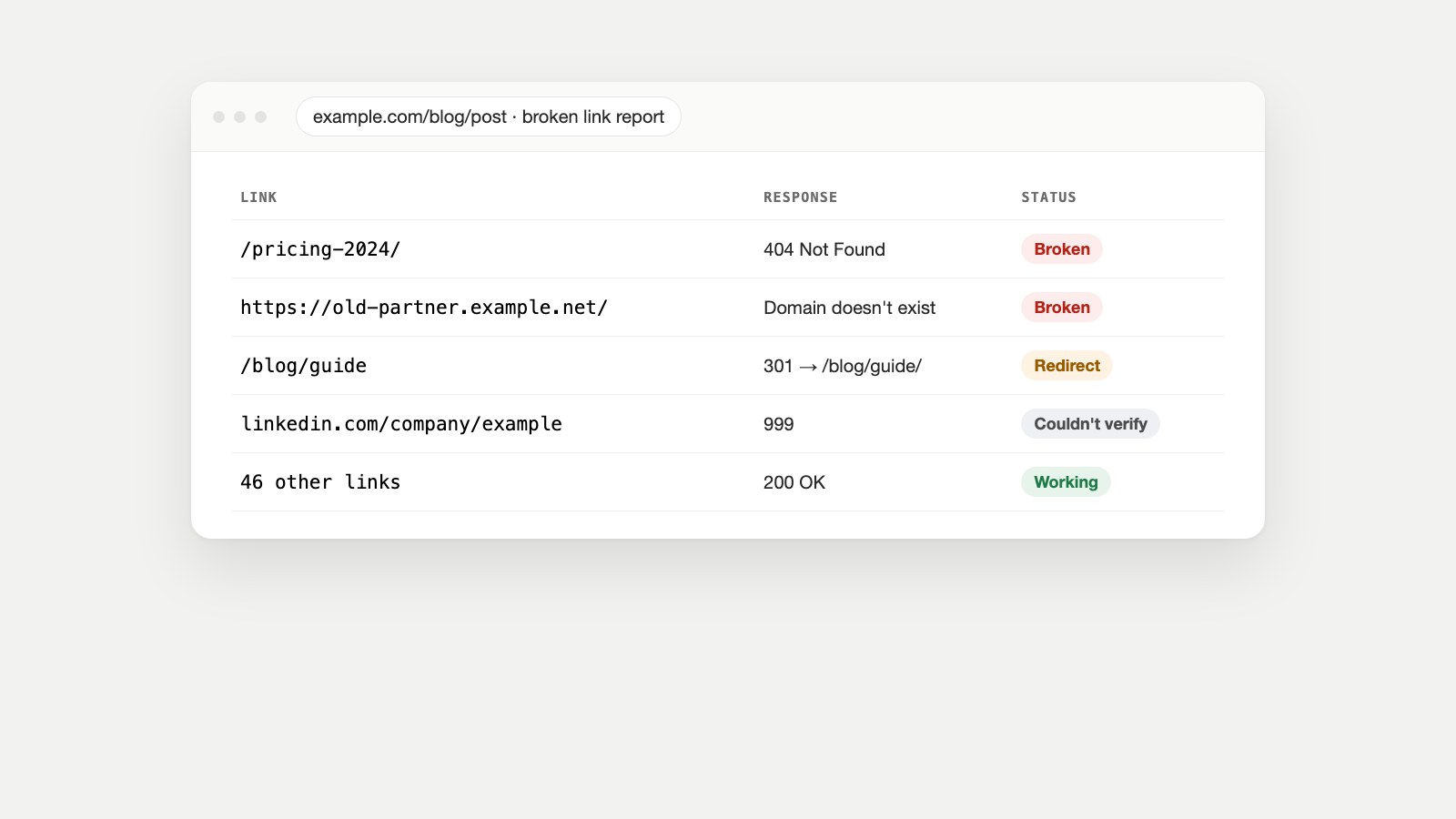
Paste any page into the free Broken Link Checker. It checks every link, image, script and stylesheet on the page, up to 120 of them, and sorts the results into broken, redirecting, couldn't verify and working. It's the quickest way to check a new blog post, a landing page before a campaign, or a page someone has reported.
Check your whole site
Broken links rarely sit on just one page. Watch Owl crawls your entire site for broken links, console errors, failing forms and accessibility issues. It's included in the CMO Owls free plan with unlimited scans. A full crawl also catches the problem a one-page check can't: pages that are only linked from other broken pages.
Use Google Search Console
In Search Console, open Indexing → Pages and look for Not found (404) under "Why pages aren't indexed." These are URLs Google tried and failed to load. Pick one, and URL Inspection shows where Google found the link. The Links report shows which of your pages other sites link to most, so you can spot deleted pages that still have backlinks. For the other statuses in that report, see our guide to why a page isn't indexed.
Check server logs and analytics
Your server or CDN logs record every 404 request with the URL that was asked for, including requests from AI crawlers. In analytics, a report filtered to your 404 page's title shows which broken URLs real visitors are hitting most often. Fix those first.
How to Fix Broken Links
There are only four fixes. Choose by what happened to the page:
| Situation | Best fix |
|---|---|
| The link has a typo | Correct the link |
| The page moved to a new address | Update the link, and add a 301 redirect from the old address |
| The page was deleted, but a close replacement exists | 301 redirect the old address to the closest matching page |
| The page was deleted by mistake | Restore it at its original address |
| The page is gone and nothing replaces it | Remove or replace the link. Let the old URL return 404 or 410 |
| An external page vanished | Link to an updated source, or to an archived copy on the Wayback Machine |
Three rules keep redirects healthy. (Our guide to setting up a 301 redirect covers WordPress, Shopify, .htaccess and nginx.) Redirect to a relevant page, not to your homepage (Google's redirect guidance explains why): a homepage redirect for a deleted article is treated like a soft 404 and frustrates visitors. Avoid chains: if A redirects to B and B to C, point A straight at C. Google's crawlers follow up to 10 hops, but every hop costs time, and other crawlers give up sooner. And update your own links even when a redirect exists, so visitors and crawlers go straight to the final address.
Reclaim backlinks to deleted pages
If other websites link to a page you removed, you're losing referral traffic and authority every day. Find those URLs in Search Console's Links report or a backlink checker, then 301 redirect each one to the most relevant live page. For valuable links, it's also worth emailing the linking site with the new address.
Prevent new broken links
- Set up a redirect every time you delete, move or rename a page, and make it part of your publishing checklist.
- Plan redirects before a redesign or migration, using a map of every old URL to its new one.
- Re-check external links in your most important pages every few months; other sites change without telling you.
- Keep your XML sitemap and llms.txt free of dead URLs, since crawlers use both as a list of what to read.
- Run a full-site scan on a schedule rather than waiting for visitors to report problems.
Why Some "Broken" Links Aren't Broken
Not every error in a link report is real, and treating false positives as broken can lead you to delete good links. We ran into several while building our own checker:
- Sites that refuse bots. LinkedIn often answers automated requests with an unusual 999 code, and many shops return 403 or 429 to anything that isn't a browser. The page works fine for people.
- Cloudflare email protection. Cloudflare can rewrite email links into an address like
/cdn-cgi/l/email-protection#...that only works in a browser. A naive checker reports it as a 404. - Temporary outages and timeouts. Re-check before you act.
A good checker separates "couldn't verify" from "broken." For anything it can't verify, open the link yourself, or use an "is it down or just me" service to see whether the site is down for everyone.
FAQ
What is a broken link in simple terms?
It's a link that goes nowhere: clicking it shows an error, usually 404 Not Found, instead of the page or file you expected.
What is the difference between a broken link and a 404 error?
The 404 is the error the server returns for a page that doesn't exist. The broken link is the link that points to it. Fixing the link, or redirecting the missing address, makes the error disappear for visitors.
Do broken links affect SEO?
Indirectly. Google says a 404 for a page you removed on purpose isn't necessarily a problem, and recommends fixing the 404s you link to or list in your sitemap. Those links waste crawler visits, strand visitors and throw away backlink value.
How do I check for broken links for free?
Use our free Broken Link Checker for one page at a time, Google Search Console's Pages report for the 404s Google has found, and Watch Owl on the CMO Owls free plan to scan your whole site.
Should I redirect every 404 to my homepage?
No. Redirect to the closest matching page. If nothing is relevant, let the URL return a 404 or 410. Mass homepage redirects are treated as soft 404s and confuse visitors.
How often should I check for broken links?
After every redesign, migration or bulk content change, and at least monthly for active sites. Check important external links every few months.
What is link rot?
Link rot is the gradual breaking of links across the web as pages are moved, deleted or abandoned. Pew Research found 38% of pages from 2013 had disappeared within ten years.
Can a broken image or script count as a broken link?
Yes. Images, scripts, stylesheets and files are all loaded through links. A broken one shows a missing image, a failed download or a page without its styling.
Stop Finding Broken Links by Accident
Most broken links are found by a frustrated visitor, or not at all. Watch Owl scans your whole site for broken links, console errors, failing forms, accessibility issues and visual changes, free with unlimited scans. While you're fixing links, check the rest of what crawlers see: the AI Crawler Access Test shows which AI bots your firewall lets in, and the Schema Markup Checker catches errors in your structured data. For the bigger picture, read what an AI crawler is and how to check your AI visibility.
Sources
- When Online Content Disappears, Pew Research Center, May 2024.
- HTTP response status codes, MDN Web Docs.
- Redirects and Google Search, Google Search Central.
- How HTTP status codes, and network and DNS errors affect Google Search, Google Search Central.
- Page indexing report, Search Console Help.
- Wayback Machine, Internet Archive.