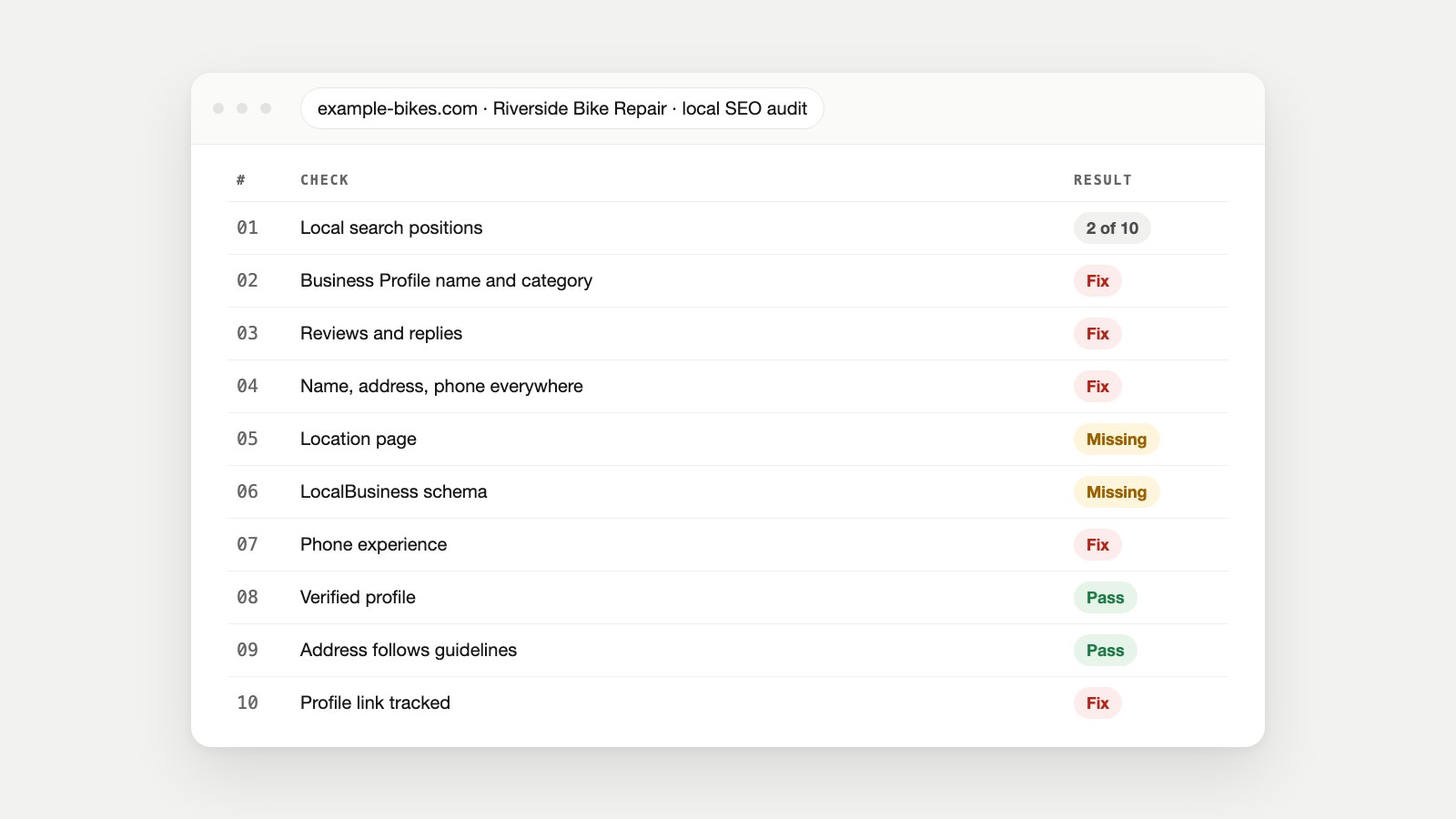
The Audit on One Page
- Google ranks local results on three things: relevance (does your profile match the search), distance (how far you are from the searcher) and prominence (how well-known you are). You can't change distance, and there's no way to pay for a better local ranking.
- Most fixes are in your Google Business Profile and reviews: the right primary category, accurate hours, real photos, and a steady flow of honest reviews with replies.
- Your website backs it up: the same name, address and phone everywhere, a page per location, and LocalBusiness schema with exact hours and coordinates.
- Then measure it: tag your profile's website link so you can see the visits it sends, and recheck your local search positions every month.
Meet the Shop We're Auditing
Riverside Bike Repair (example-bikes.com, an illustrative example) fixes and services bikes from a workshop in Leeds. The owner noticed that when people nearby search "bike repair near me", three other shops appear in the map results and Riverside doesn't, even though it has been open for nine years. Its website ranks on page one for its own name and nothing else.
A local SEO audit is a structured check of everything that decides whether a business shows up for searches with local intent: its Google Business Profile, reviews, listings on other sites, location pages, structured data, and the signals that make it well-known in its area. It's narrower than a full SEO audit and different from a website audit: the website is only one of ten checks.
We'll audit Riverside in the order a customer meets the business, and score each check as it goes. You can do the same for your business in an afternoon.
Step 1: Search Like Your Customers Do
Start with the result, not the settings. Make a list of 10 searches a real customer would type, such as "bike repair near me", "bike service Leeds", "puncture repair" and "[your town] bike shop". Then run each one:
- On your phone, standing in or near the business, because distance shapes the results and that's how many customers search.
- In a private window, so your own history doesn't push your business up.
- On Google Maps and in normal Google search, noting whether you appear in the map pack (the three map results) and where.
- From a second location a few miles away, because results change with the searcher's position.
Then open Google Search Console's Performance report and filter queries that contain your town or "near me". Those are local searches you already appear for, with impressions and clicks. Riverside's result: absent from the map pack for 8 of 10 searches, visible only for its own name.
Step 2: Audit Your Google Business Profile
Your Business Profile is the biggest single lever in local search. Google's own advice comes down to: verify it, keep the information accurate, respond to reviews and add photos. Check each item against Google's guidelines for representing your business:
| Check | What good looks like | Riverside |
|---|---|---|
| Verified | The profile is verified and you have owner access | Pass |
| Business name | Your real-world name only. Google says including unnecessary information in the name "isn't permitted" | Fix: "Riverside Bike Repair Leeds Cheap Bike Service" |
| Primary category | The most specific category for your main service | Fix: "Store" instead of "Bicycle repair shop" |
| Address or service area | A staffed location customers can visit, or a hidden address plus service areas if you go to customers. No remote PO boxes | Pass |
| Hours | Regular customer-facing hours, plus holiday hours. By-appointment-only businesses shouldn't list hours | Fix: Saturday hours missing |
| Photos | Real photos of the shopfront, inside, team and work | Fix: two photos from 2019 |
| Services and products | Each main service listed with a short description | Missing |
| Website link | Points to the matching location page, tagged for tracking (Step 9) | Fix: points to the homepage, untagged |
The business name fix often makes the biggest difference people don't expect. Adding keywords to the name breaks Google's guidelines, so it puts the whole profile at risk. Relevance comes from the right category and a complete profile, not from the name.
Step 3: Check Reviews and Replies
Google says plainly that more reviews and positive ratings can help your local ranking, and that helpful replies help you stand out. Audit four numbers against your top three competitors: total reviews, average rating, how recent the newest reviews are, and the share you've replied to.
Then check how you ask for them, because this is where audits find rule-breaking. Google's contributed content policy prohibits offering incentives "such as payment, discounts, free goods and/or services" for reviews, and prohibits merchants who "discourage or prohibit negative reviews, or selectively solicit positive reviews." Reviews from current or former employees count as a conflict of interest. Google's review guidance suggests asking every customer the same way, with a link or QR code.
Riverside's result: 23 reviews against competitors' 140 to 310, the newest from five months ago, and no replies. The fix is a habit, not a campaign: a QR code on the counter and a link on every repair receipt, plus a reply to every review, good or bad, within a few days.
Step 4: Check Your Name, Address and Phone Everywhere
NAP stands for name, address and phone number. Customers and search engines both meet your business in many places: your website, your Business Profile, Apple Maps, Bing Places, Facebook and industry directories. When those places disagree, customers call old numbers and search engines have to guess which version is right.
- Write down the exact version: "Riverside Bike Repair, 12 Canal Wharf, Leeds LS1 4AB, 0113 000 0000".
- Search for your business name with your old address or phone number to find outdated listings.
- Check the big ones by hand: Google Business Profile, Apple Business Connect, Bing Places, Facebook, and the two or three directories that matter in your industry.
- Fix each listing, starting with the ones that rank highest for your name.
Riverside's result: the old phone number from before a move was still on two directories and in the website footer.
Step 5: Give Every Location Its Own Page
Your Business Profile's website link should land on a page about that location, not a generic homepage. A good location page has the full address and phone, opening hours, directions and parking, the services offered at that site, photos of it, and reviews or stories from local customers. With more than one location, each one needs its own page with genuinely different details, not the same text with the town swapped.
Check the page's title and meta description too. "Bike Repair in Leeds | Riverside Bike Repair" tells searchers more than "Home". Our guide to writing meta titles and descriptions covers the format, and the Meta Tag Checker shows how yours appear.
Step 6: Add LocalBusiness Schema
Local schema markup is structured data that states your business details in a format search engines read exactly. Google's LocalBusiness documentation requires only name and address, and recommends geo (latitude and longitude with at least five decimal places), telephone with the country code, url for the specific location, openingHoursSpecification and priceRange. It also says to use the most specific subtype, so a bike shop uses BikeStore, not just LocalBusiness.
Here's Riverside's block. Copy it, change every value to match your Business Profile exactly, and add one block per location page:
<script type="application/ld+json">
{
  "@context": "https://schema.org",
  "@type": "BikeStore",
  "name": "Riverside Bike Repair",
  "url": "https://www.example-bikes.com/locations/riverside/",
  "telephone": "+441130000000",
  "image": "https://www.example-bikes.com/img/riverside-workshop.jpg",
  "priceRange": "££",
  "address": {
    "@type": "PostalAddress",
    "streetAddress": "12 Canal Wharf",
    "addressLocality": "Leeds",
    "postalCode": "LS1 4AB",
    "addressCountry": "GB"
  },
  "geo": {
    "@type": "GeoCoordinates",
    "latitude": 53.79315,
    "longitude": -1.54862
  },
  "openingHoursSpecification": [
    {
      "@type": "OpeningHoursSpecification",
      "dayOfWeek": ["Monday", "Tuesday", "Wednesday", "Thursday", "Friday"],
      "opens": "08:30",
      "closes": "18:00"
    },
    {
      "@type": "OpeningHoursSpecification",
      "dayOfWeek": "Saturday",
      "opens": "09:00",
      "closes": "16:00"
    }
  ],
  "sameAs": ["https://www.facebook.com/examplebikes"]
}
</script>
Two rules from Google's guidelines matter most here: only describe what's true and visible on the page, and don't add review stars about yourself to your own LocalBusiness markup. Our guide to schema markup explains the wider picture, and the free Schema Markup Checker tests your block and can generate one for you.
Step 7: Check the Phone Experience
Someone searching "bike repair near me" is usually on a phone and often standing in the street. Open your location page on a phone and time how long it takes to find the phone number, tap to call and get directions. Then run the free Mobile-Friendly Checker and read the page's speed in PageSpeed Insights; our guides to making a site mobile-friendly and reading PageSpeed Insights cover the fixes. Riverside's result: the phone number was an image, so it couldn't be tapped.
Step 8: Build Local Prominence
Google describes prominence as "how well-known a business is." You build that the same way in search as in real life: by being mentioned and linked by other local organisations. Look for local news coverage, sponsorships of clubs and events, membership listings from trade associations or the chamber of commerce, partnerships with nearby businesses, and helpful content of your own, such as Riverside's guide to safe cycling routes in the city.
Audit what you already have: search for your business name in quotes, list who mentions you, and compare with the businesses that outrank you. Our guide to SEO competitor analysis shows how to see who links to them.
Step 9: Set Up Tracking
An audit without measurement can't tell you whether the fixes worked. Tag your Business Profile's website link with UTM parameters, for example utm_source=google&utm_medium=organic&utm_campaign=gbp-riverside, using the free UTM Builder, so profile visits show up separately in Google Analytics. Then track calls, direction requests and website clicks in your Business Profile's performance view, and local queries in Search Console.
Write down today's numbers next to your Step 1 search results. Recheck the same ten searches monthly.
Step 10: Compare Against the Map Pack
Finally, look at the three businesses that appear in the map pack for your most valuable search. For each, note their primary category, review count and rating, photo count, how complete their profile is and whether their website has a page for that location. The gap between them and you is your fix list.
| Check | Result | Fix first? |
|---|---|---|
| 1. Local search positions | In the map pack for 2 of 10 searches | Baseline |
| 2. Business Profile | Wrong category, keywords in name, old photos | Yes |
| 3. Reviews | 23 reviews, none recent, no replies | Yes |
| 4. NAP consistency | Old phone on site footer and 2 directories | Yes |
| 5. Location page | Profile links to the homepage | Yes |
| 6. LocalBusiness schema | Missing | Yes |
| 7. Phone experience | Phone number is an image | Yes |
| 8. Prominence | Few local mentions | Ongoing |
| 9. Tracking | Profile link untagged | Quick win |
| 10. Competitor gap | Top 3 average 200+ reviews | Ongoing |
Local SEO Audit Mistakes to Avoid
- Keyword-stuffing the business name on your profile, which breaks Google's guidelines.
- Choosing a broad primary category like "Store" instead of what you actually do.
- Buying or rewarding reviews, or only asking happy customers.
- Using a virtual office or PO box as your address.
- Copying one location page for every town with only the name changed.
- Self-awarded review stars in your own schema markup.
- Auditing once. Hours, categories and competitors change; recheck quarterly.
Which Tools Help With a Local SEO Audit
No single local SEO audit tool covers all ten checks. Your Business Profile dashboard, Search Console and Google Analytics are free and cover Steps 1, 2 and 9. For the website side, CMO Owls' free SEO Page Checker, Schema Markup Checker, Mobile-Friendly Checker and UTM Builder cover Steps 5, 6, 7 and 9. For a whole site, Owl-gorithm Hacker audits technical SEO by layer and checks local business details when the site is a local business, Watch Owl crawls every page for broken links and missing tags, and Spy Owl helps with the competitor side. CMO Owls doesn't edit your Business Profile or request reviews for you; those stay in your hands. If you'd rather hand the whole audit to someone, here's what an SEO consultant does.
Local SEO Audit Questions
What is a local SEO audit?
A check of everything that decides whether a business appears in local searches and on Google Maps: its Business Profile, reviews, listings, location pages, structured data, local mentions and tracking.
How do I audit my Google Business Profile?
Confirm it's verified, then check the name has no extra keywords, the primary category is specific, hours and address follow Google's guidelines, photos are recent, services are listed and the website link goes to the right location page.
What are the local ranking factors?
Google names three: relevance, distance and prominence. Reviews and ratings can help prominence, and there's no way to pay for a better local ranking.
What is NAP consistency?
Using exactly the same business name, address and phone number on your website, Business Profile and every other listing, so customers and search engines never see conflicting details.
Do I need LocalBusiness schema?
It's recommended. It states your address, phone, hours and coordinates exactly, which helps search engines match your website to your business. Google requires only name and address, but more complete markup is more useful.
How often should I do a local SEO audit?
A full audit once or twice a year, a quick review of your profile, reviews and local search positions every month, and a recheck after any move, rebrand or change of hours.
Can I pay Google to rank higher in the map pack?
No. Google states there's no way to request or pay for a better local ranking. Local ads are a separate, clearly labelled product.
Why doesn't my business show up on Google Maps?
Common causes are an unverified or suspended profile, the wrong primary category, a hidden address without service areas, very few reviews, or simply being farther from the searcher than competitors. Work through Steps 1 to 4 first.
Google's Own Guidance, and Other Sources
- Tips to improve your local ranking on Google, Google Business Profile Help.
- Guidelines for representing your business on Google, Google Business Profile Help.
- Get reviews on your Business Profile, Google Business Profile Help.
- Maps user contributed content policy: prohibited and restricted content, Google.
- Local business structured data, Google Search Central.
- BikeStore, Schema.org.
- Apple Business Connect, Apple.
- Bing Places for Business, Microsoft.