Quick Answer
A website audit is a structured check of whether a site works for the people using it: that it loads, that its links, forms and scripts work, that it's fast on a phone, that everyone can use it, and that it looks safe to trust. You walk the site the way a customer would, write down every problem with the page it's on, and sort the list by what's costing you the most.
Search visibility is one part of that, and it gets its own, deeper treatment in our guide to doing an SEO audit. This guide covers everything else a visitor runs into.
Meet the Florist
To keep this concrete, we'll audit an imaginary shop: example-florist.com, a local florist with about 60 pages, same-day delivery and an online order form. The owner's complaint is a familiar one. "People visit, but orders are down, and I don't know why."
Nothing on the site is obviously broken. The home page looks fine on the owner's laptop. That's the usual starting point, and it's exactly why audits exist: the problems that cost the most are the ones the owner never sees, because they only happen on a phone, in another browser, on a page nobody at the shop visits, or for someone who can't use a mouse.
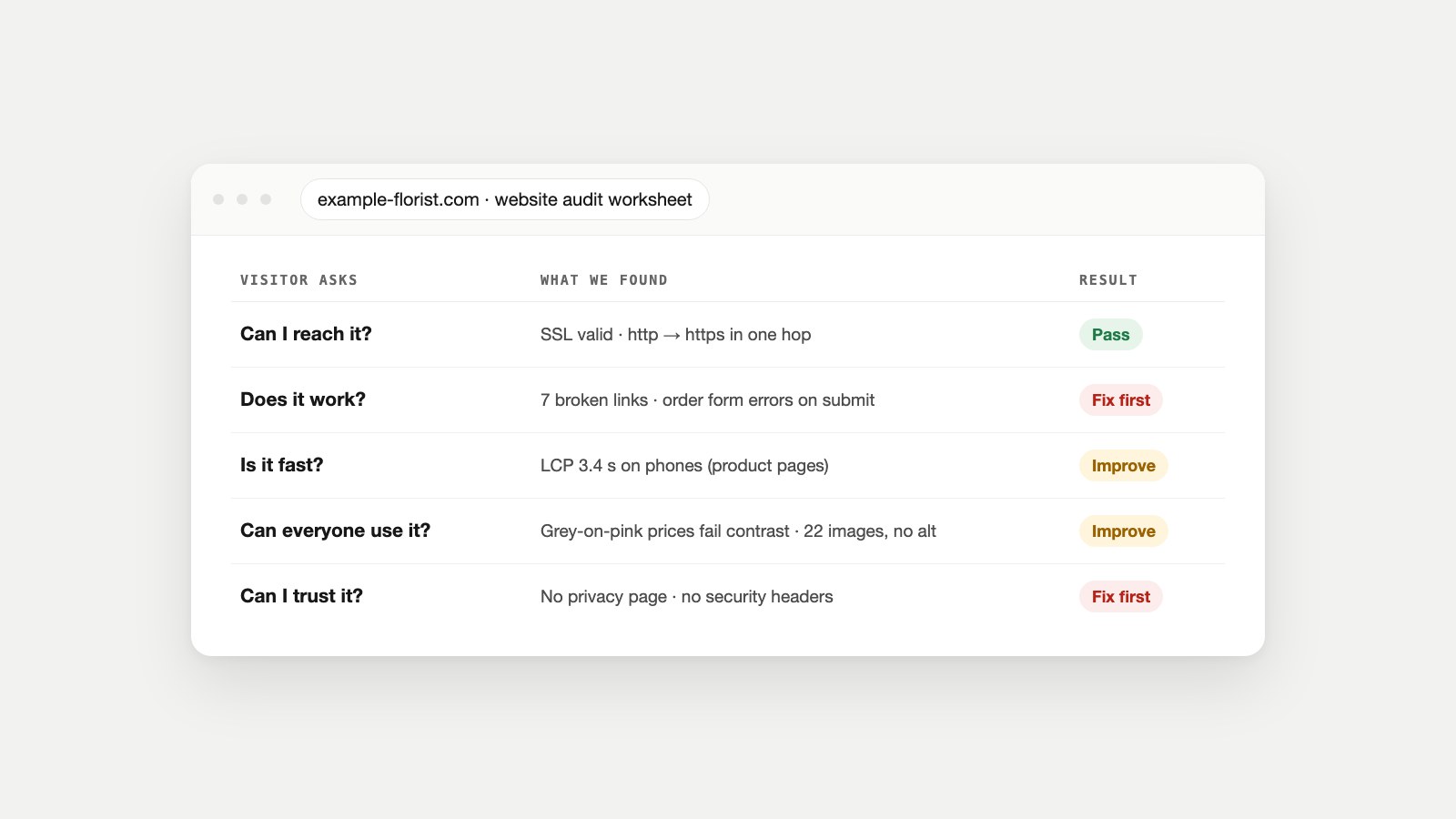
The worksheet at the top of this page is where the florist ended up. Here's how to get there.
What a Website Audit Includes
People use "website audit" for anything from a five-minute speed test to a month-long agency project. A useful one covers five areas, and each maps to a question a visitor asks without ever typing it:
| Visitor's question | What you check | What failure costs you |
|---|---|---|
| Can I reach it? | DNS, SSL certificate, HTTPS redirects, domain expiry, uptime | Visitors see a browser warning or nothing at all |
| Does it work? | Broken links, forms, JavaScript errors, missing images, the 404 page | Lost orders and enquiries, often silently |
| Is it fast? | Core Web Vitals on phones, page weight, server response time | People leave before the page appears |
| Can everyone use it? | Contrast, alt text, form labels, keyboard use, headings | A share of your visitors simply can't buy |
| Can I trust it? | Security headers, mixed content, privacy and contact pages, spam protection | Hesitation at checkout; risk to customer data |
What it doesn't include, at least not here: keyword research, content strategy and competitor research. Those are marketing decisions, and they're easier to make once the site underneath them is sound.
Before You Start: Two Short Lists
An audit without a focus produces a list of 300 issues and no decisions. Ten minutes of preparation fixes that.
- List the pages that make money. For the florist: the home page, the five best-selling bouquet pages, the delivery-area page and the order form. Every problem on these pages jumps the queue.
- List the journeys. "Find a birthday bouquet and order it for tomorrow" is a journey. So is "check whether you deliver to my postcode." Write three to five of them, and walk each one on a phone and on a laptop.
Open a spreadsheet with five columns: page, problem, which question it fails, how many visitors it affects, and fix. Every check below adds rows to it.
Question 1: Can People Reach the Site?
Start at the front door. If this layer fails, nothing else on the site matters.
- Type the bare domain (example-florist.com, without www or https) into a fresh browser window. It should land on one secure address in a single hop. Our Redirect Checker shows every hop, and our guide to 301 redirects explains how to collapse a chain.
- Check the certificate. Click the padlock: who issued it and when does it expire? An expired certificate puts a full-page warning in front of every visitor.
- Check the domain's renewal date with your registrar. Letting a domain lapse is rarer than a broken link and far more expensive.
- Look for mixed content: a secure page that loads an image or script over plain http. Browsers block or flag it, and it often shows up after a site moves to https.
The florist passed this layer. Most small sites do, until the day a certificate renewal fails.
Question 2: Does Everything Work?
This is where most audits find the expensive problems, because broken things rarely announce themselves.
Links and missing pages
Every link that returns an error is a dead end for a visitor and wasted effort for search engines. Run the Broken Link Checker on your key pages, then read our explainer on what broken links are and how to fix them. The florist had seven, all pointing at seasonal bouquets that had been deleted instead of redirected.
Forms
Fill in every form yourself, on a phone, with real-looking details. Does it submit? Does a confirmation appear? Does the email actually arrive? The florist's order form looked fine and threw an error on submit whenever the delivery note was longer than 200 characters. Nobody had noticed for weeks.
Scripts and console errors
Open your browser's developer tools (F12 in most browsers), go to the Console tab and load each key page. Red errors mean a script failed. Sometimes that's harmless; sometimes it's the reason the "Add to basket" button does nothing in Safari.
Images and the 404 page
Look for images that never load, and type a nonsense address on your domain to see your 404 page. A good one says the page is gone and offers search or your main sections. The Image Size Checker also catches images that load but are far larger than they need to be.
Question 3: Is It Fast Enough on a Phone?
Test on a phone first: most small-business traffic arrives that way, and phones are where sites are slowest. Google's three Core Web Vitals are the clearest yardstick. A page is "good" when the main content appears within 2.5 seconds (LCP), it responds to a tap within 200 milliseconds (INP), and the layout shifts less than 0.1 (CLS).
Run your money pages through PageSpeed Insights. Our guide to reading PageSpeed Insights explains which half of the report reflects real visitors and which half is a lab test, and our Core Web Vitals guide covers what moves each number. For layout problems on small screens, the Mobile-Friendly Checker and our mobile-friendly guide go deeper.
The florist's product pages took 3.4 seconds to show their main photo on a mid-range phone. The cause was a 4 MB hero image on every bouquet page. Resizing it was a one-hour fix.
Question 4: Can Everyone Use It?
Accessibility is the part of a website audit that's most often skipped and most often failed. In the 2026 WebAIM Million study of the top one million home pages, 95.9% had detectable failures of the Web Content Accessibility Guidelines, with an average of 56.1 errors per page. The most common were low-contrast text (83.9% of pages), images missing alternative text (53.1%) and form fields without labels (51%).
Those three are also the easiest to check yourself:
- Contrast. Light grey text on white, or white text on a pale photo, fails. The standard is set out in WCAG 2.2; any contrast checker will tell you whether a pair of colours passes.
- Alt text. Every meaningful image needs a short description. A bouquet photo's alt text should say what's in the bouquet, not "IMG_2231."
- Labels. Every form field needs a visible label, not just grey placeholder text that disappears when someone starts typing.
- Keyboard. Put the mouse away and press Tab through the order journey. Can you see where you are? Can you reach and press every button? If you get stuck, so does anyone who can't use a mouse.
Automated tools catch roughly the first three. The keyboard test needs a person, and five minutes.
Question 5: Would You Trust It?
Visitors decide in seconds whether to hand over a card number. Some trust signals are visible, and some only your browser sees.
- The visible ones: a real contact page with an address or phone number, a privacy policy, clear delivery and returns information, and prices that match at checkout.
- Security headers. These are instructions your server sends with every page, telling browsers to always use https, not to let other sites frame your pages, and which scripts are allowed to run. Mozilla's free HTTP Observatory grades them, and MDN documents each one, including Content Security Policy.
- Spam protection on forms, so your inbox and your customers' details aren't buried under bot submissions.
- Email records. SPF, DKIM and DMARC records help the order confirmations you send land in inboxes rather than spam. Your email provider's help pages explain how to add them.
The florist had no privacy page at all and sent no security headers. Both went straight into the "fix first" column: one affects trust at checkout, the other is an afternoon's work for whoever hosts the site.
The Website Audit Checklist
Here's the whole audit on one page. Work down it with your list of money pages beside you.
| Check | How to check | Passes when |
|---|---|---|
| One secure address | Type the bare domain; follow the hops | One redirect at most, to https |
| SSL certificate | Padlock in the address bar | Valid, with weeks to spare before expiry |
| Domain renewal | Registrar account | Auto-renew on, card up to date |
| Mixed content | Console warnings on https pages | No http resources on https pages |
| Broken links | Broken Link Checker on key pages | No internal link returns an error |
| Forms | Submit each one on a phone | Confirmation shows and the email arrives |
| Console errors | Developer tools, Console tab | No errors on key pages in two browsers |
| 404 page | Visit a made-up address | Helpful page with search or links |
| Phone speed | PageSpeed Insights, mobile tab | LCP ≤ 2.5 s, INP ≤ 200 ms, CLS ≤ 0.1 |
| Image weight | Image Size Checker | No image far larger than its display size |
| Contrast | Contrast checker on text colours | Meets WCAG 2.2 AA |
| Alt text | Inspect key images | Every meaningful image is described |
| Form labels | Look at each field | Visible label on every field |
| Keyboard journey | Tab through checkout | Every step reachable, focus always visible |
| Security headers | HTTP Observatory | HTTPS enforced, framing and scripts controlled |
| Trust pages | Footer and navigation | Contact, privacy, delivery and returns present |
| Search basics | Our SEO audit guide | Key pages indexed, titles and descriptions unique |
For that last row, the SEO audit guide and our walkthrough of why a page isn't indexed cover the search side, and the Sitemap Checker confirms the list of pages you're giving Google is clean.
From Findings to a Short List of Fixes
A website audit report isn't the spreadsheet of everything you found. It's the five to ten changes that matter, in order. Rank each finding by two things: how badly it blocks a visitor, and how many visitors reach that page. A broken order form on a page with 2,000 visits a month beats a missing alt attribute on a page with 12.
Group identical problems, too. Forty broken links caused by one deleted category are one fix, not forty. The florist's final report fitted on one screen:
example-florist.com · website audit · October

FIX FIRST
1. Order form fails when the delivery note is over 200 characters (all orders)
2. Add a privacy page and link it from the footer and the order form
3. Redirect 7 deleted seasonal bouquet pages to their category

IMPROVE
4. Resize bouquet hero images (4 MB each); target LCP under 2.5 s on phones
5. Darken grey price text on pink backgrounds to pass contrast
6. Write alt text for 22 product photos
7. Ask the host to add HTTPS enforcement and basic security headers

ALREADY FINE
SSL, redirects, domain renewal, 404 page
Notice what isn't on it: dozens of minor warnings that change nothing for a customer. They can wait for the next audit.
How Long a Website Audit Takes, and How Often
For a site of 50 to 100 pages, a manual audit like the one above takes an afternoon. Larger sites take longer mainly because of the link and form checks, which is where software earns its keep.
How often depends on how often the site changes. A reasonable rhythm for a small business:
- After every redesign, platform move or big launch, before you announce it.
- Every quarter for the full checklist.
- Continuously for the things that break without warning: certificates, forms, links and pages that suddenly start returning errors.
By Hand or by Crawler?
Doing the audit by hand once is worth it: you'll understand your site better than any report could explain it. Repeating it every quarter across hundreds of pages is where people give up, and where automated crawling helps.
Watch Owl runs this kind of audit for you. It opens up to 500 of your pages in a real Chromium browser, so your JavaScript runs exactly as it does for a visitor, and runs 54 checks: links, console errors and failed requests, accessibility rules, images, and forms, which it fills in and submits (never on checkout or payment pages). It compares full-page screenshots with the previous crawl to catch layout breaks, then checks the site around the pages: DNS, SSL, domain expiry, redirects, robots.txt, sitemaps, email records, security headers and server response time. The result is a fix list grouped by problem type, worst first, with an Excel export of every affected URL.
For the search layer, Owl-gorithm Hacker runs the crawl-and-index side of an SEO audit, and Opportunity Owl turns findings into specific fixes. And if you'd rather keep doing it yourself, every check in the table above has a free tool in our tools library.
Website Audit Questions
What does a website audit include?
A full website audit checks whether the site can be reached securely, whether its links, forms and scripts work, how fast it is on phones, whether people with disabilities can use it, and whether it shows the trust signals and security settings visitors expect. Many audits add a search layer as well.
How do I do a website audit for free?
Use your browser's developer tools for console errors, PageSpeed Insights for speed, Mozilla's HTTP Observatory for security headers, a contrast checker for accessibility, and free link and redirect checkers. Walk your key journeys on a phone yourself; that step costs nothing and finds the most.
What's the difference between a website audit and an SEO audit?
An SEO audit asks whether search engines can find, understand and rank your pages. A website audit asks whether the site works for the people who arrive. They overlap on speed and broken pages, but a site can rank well and still lose sales to a broken form.
How long does a website audit take?
An afternoon for a small site checked by hand, and longer for large sites, mostly because of link and form checks across many pages. Automated crawls can cover hundreds of pages in the time it takes to make a coffee.
How often should I audit my website?
Run the full checklist every quarter and after any redesign or platform change. Keep continuous monitoring on things that fail suddenly: certificates, forms and pages returning errors.
What should a website audit report look like?
A short, ranked list of fixes, each with the page, the problem, who it affects and what to do, followed by the full data for reference. If the first page of a report doesn't tell you what to fix this week, it's a data dump, not a report.
Can I audit a website I don't own?
You can check anything a normal visitor can see, such as speed, links, accessibility and security headers, which is useful for reviewing a competitor or a site you're about to buy. Don't run aggressive crawls or submit forms on sites you don't control.
Do I need a developer to fix what the audit finds?
Not for everything. Rewriting alt text, adding a privacy page, resizing images and redirecting deleted pages are usually possible in your website builder. Script errors, security headers and server speed usually need your developer or host.
Further Reading
- The WebAIM Million: 2026 report, WebAIM.
- Web Content Accessibility Guidelines (WCAG) 2.2, W3C.
- Introduction to Lighthouse, Chrome for Developers.
- Web Vitals, web.dev.
- HTTP Observatory, MDN.
- Content Security Policy (CSP), MDN.
- Google Search Essentials, Google Search Central.
- Markup Validation Service, W3C.