The Short Version
- An SEO audit checks whether search engines can reach your pages, understand them, trust them, and whether you're showing up for the searches that bring customers.
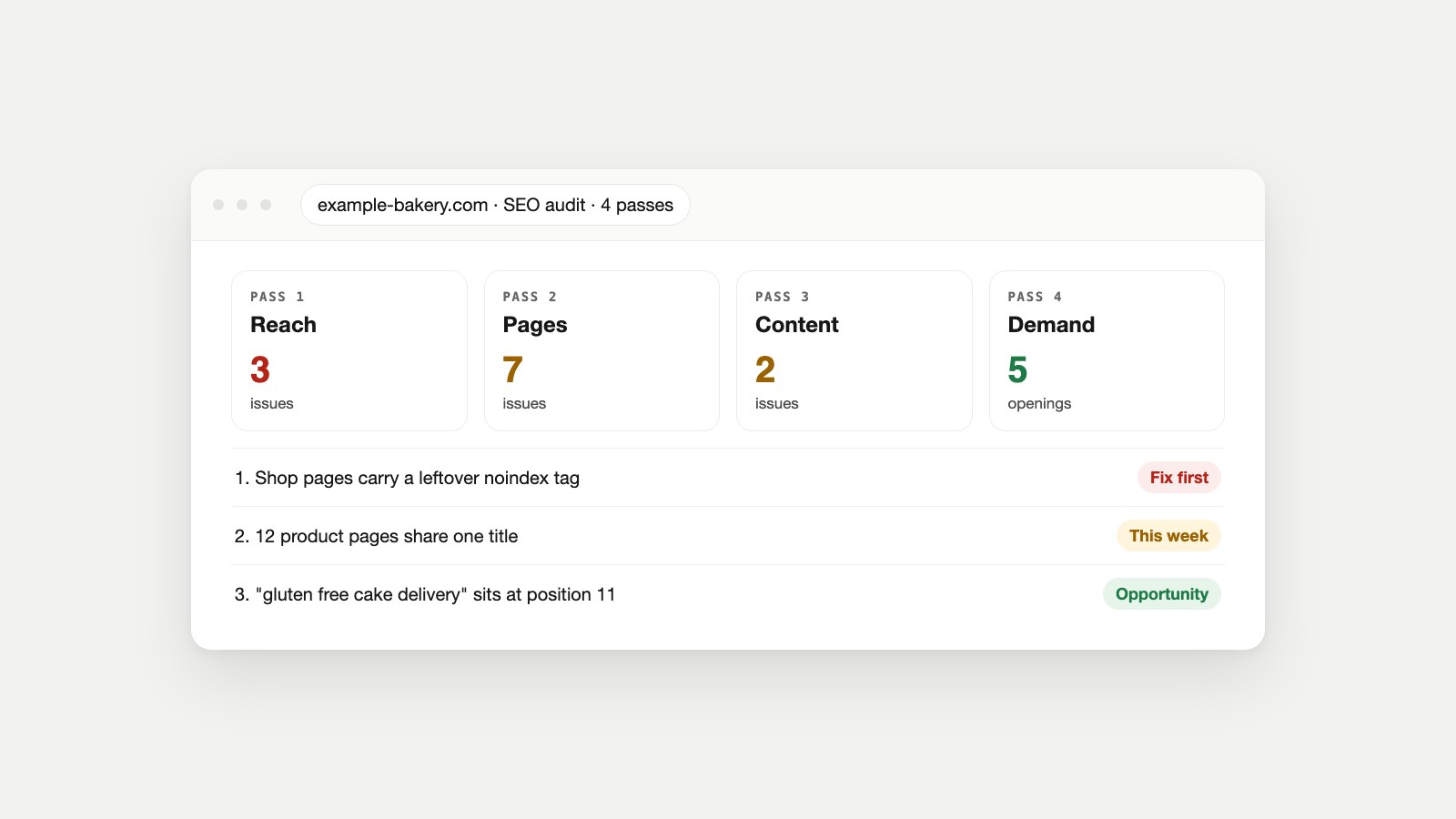
- Do it in four passes: reach (can Google get in?), pages (does each page say what it's about?), content (is it worth ranking?) and demand (which searches are within reach?).
- You need Google Search Console and a few free checkers. Paid crawlers help on big sites but aren't required to start.
- The output that matters is a fix list of about ten items, ranked by impact and effort, not a spreadsheet of every warning.
The Site We're Auditing
Here's the situation most audits start from. A site that looks fine to its owner, traffic that's flat or sliding, and a vague feeling that "the SEO" needs looking at. We'll use a made-up site, example-bakery.com, a local bakery with a shop, a blog and about 60 pages, and audit it the way you'd audit your own. Every check below says what to open, what to look for and what we found.
Before You Start: Open These Three Things
- Google Search Console for the site. If you don't have it, verify the site today; the audit leans on it more than anything else.
- A list of your money pages: the 10 to 20 pages that sell, book or capture leads. Problems on those matter ten times more than problems on an old tag page.
- A plain document for findings: one line per problem, with the page, what's wrong and how you know. No scoring yet.
Google's own Search Essentials are the rulebook you're checking against: the technical requirements a page must meet to appear at all, the spam policies to stay inside, and the practices that help. Keep them open in a tab.
Pass 1: Can Google Reach Your Pages? (About 20 Minutes)
Nothing else in the audit matters if Google can't get to the pages. Start here, and start with the pages that earn money.
Is everything that should be indexed, indexed?
In Search Console, open Indexing → Pages. Note the number of indexed pages, then read every reason under "Why pages aren't indexed." On example-bakery.com, the shop's eight product pages were listed under "Excluded by 'noindex' tag": a setting left on from when the shop was being built. That single finding outranks everything else in this audit. Our guide to why a page isn't indexed explains every status, and the Indexability Checker shows which signal is blocking a single page.
robots.txt and the sitemap
Open /robots.txt and check it isn't disallowing anything you want found (the robots.txt guide covers the syntax). Then check the sitemap is submitted under Indexing → Sitemaps and lists only live, final URLs; the Sitemap Checker validates it and spot-checks the pages it lists.
Redirects, 404s and broken links
Run your homepage and a few key pages through the Redirect Checker: every version of your domain (http, https, www, non-www) should land on one address in a single hop. Then run your most-linked pages through the Broken Link Checker. The bakery had a redesign two years ago; six old blog URLs still had backlinks and returned 404. Each one gets a 301 redirect to its closest live page.
Phones and speed
Test two money pages with the Mobile-Friendly Checker, which also shows real-visitor Core Web Vitals when Google has the data. A failing assessment goes on the list; our guide to what Core Web Vitals are explains which fix moves which metric.
Pass 2: Does Every Page Say What It's About? (About 30 Minutes)
This is the on-page SEO audit: the parts of each page that tell search engines and searchers what it covers.
- Titles and meta descriptions. Each page needs its own. Google's title link guidance warns against boilerplate and keyword stuffing. On the bakery site, 12 product pages shared the title "Shop | Example Bakery." Check a page with the Meta Tag Checker, and see how to write a meta title and description for the fix.
- One clear H1 that matches the page's topic, and headings that follow a sensible outline.
- Structured data that matches the page. Product, LocalBusiness or FAQ markup is only useful if it's valid and describes what's visible. Google's introduction to structured data explains the rules; the Schema Markup Checker finds errors, and what schema markup is covers which types a site needs.
- Internal links with descriptive text. Google's link best practices ask for crawlable
<a href>links with anchor text that describes the target. The bakery's best article, on gluten-free birthday cakes, had no links pointing to it from anywhere on the site. - Images: sensible file sizes and alt text that describes them.
Pass 3: Is the Content Worth Ranking? (About 45 Minutes)
This is the seo content audit, and it's the pass tools are worst at. Read your money pages and your ten highest-traffic articles as if you were a customer, using Google's questions for helpful, people-first content as the checklist.
- Thin pages: pages that say almost nothing, such as empty category pages or a three-line "services" page.
- Two pages, one search. The bakery had "Custom Cakes" and "Bespoke Cakes" pages saying the same thing. They compete with each other; merge them and redirect one.
- Out-of-date facts: old prices, discontinued products, last year's opening hours. These quietly damage trust.
- Who's behind it. Does the page show who wrote it or who runs the business, and why they know what they're talking about? Google's helpful-content guidance asks exactly this.
Mark each page keep, improve, merge or remove. Most sites find that a handful of strong pages do almost all the work, and a long tail of weak ones dilutes them.
Pass 4: Which Searches Are Within Reach? (About 30 Minutes)
The first three passes find problems. This one finds openings. Open Search Console's Performance report, set it to the last three months, and sort queries by impressions.
- Queries at positions 8 to 20. These are on the edge of page one. "Gluten free cake delivery" sat at position 11 for the bakery, on a page that barely mentioned delivery. A better section on that page is the cheapest win in the audit.
- High impressions, few clicks. People see the result but don't choose it. Usually the title and description don't match what they searched.
- Searches competitors win and you don't. That's a whole exercise in itself; our guide to SEO competitor analysis shows how to find those gaps.
- AI answers. Check whether AI assistants can reach your site at all with the AI Visibility Checker.
Turning Findings Into a Fix List
By now the document has 20 to 60 lines. Score each one on two things, impact and effort, and sort. Anything that blocks indexing on a money page goes to the top regardless.
| Finding | Impact | Effort | When |
|---|---|---|---|
| noindex on the shop's product pages | Very high | Minutes | Today |
| 12 product pages share one title | High | An hour | This week |
| 6 old URLs with backlinks return 404 | High | An hour | This week |
| Page at position 11 lacks the topic people search | High | Half a day | This week |
| Duplicate Custom/Bespoke Cakes pages | Medium | An hour | This month |
| Best article has no internal links | Medium | Minutes | This month |
| Missing alt text on gallery images | Low | An hour | When convenient |
Keep the top ten and park the rest. A fix list someone finishes beats a perfect one nobody starts.
What to Put in an SEO Audit Report
If the audit is for a client, a manager or your future self, write it up as a short report. This template works for a small business site:
- One-paragraph summary: the state of the site in plain words and the single biggest problem.
- The fix list: the top ten items, each with the page, the evidence and the expected benefit.
- What's working: pages and searches that are performing, so nobody breaks them.
- Openings: the queries within reach and the content gaps found in pass 4.
- What wasn't checked: be honest about the limits, such as backlinks or a full crawl.
- When to re-check: a date, and what you'll measure.
Google's own advice when hiring help is that a good audit gives "realistic estimates of improvement, and an estimate of the work involved" (Do you need an SEO?). Hold your own report to the same standard. No guarantees, no rank predictions.
Doing It Without Paid Tools
Everything above can be done for free: Search Console for indexing and performance, Google's SEO Starter Guide for the basics, and the free tools on our site for the page-level checks. Paid crawlers earn their keep on sites with hundreds of pages, where checking by hand stops being realistic.
That's also where automation helps. Watch Owl opens up to 500 pages in a real browser and runs 54 checks, including broken links, redirects, robots.txt, sitemaps and accessibility, and returns a fix list, worst problem first. Owl-gorithm Hacker audits the SEO layers covered in passes 1 to 4 (crawl and index, on the page, content and trust, search demand) with a specialist for each, and ranks the results by what to fix first. Opportunity Owl then turns each finding into a specific fix or a new article.
Mistakes That Make Audits Useless
- Chasing a tool's score. A crawler's "health score" of 92 means nothing if the shop pages carry a noindex tag. Judge findings by what they cost you, not by how a tool weights them.
- Auditing every page equally. Start with the pages that earn money. A missing alt tag on a 2019 news post can wait.
- No baseline. Note today's indexed pages, clicks and top queries before you change anything, or you'll never know what worked.
- Fixing warnings that aren't problems. "Page with redirect" and a few 404s for pages you deleted on purpose are normal. Our guide to why a page isn't indexed explains which statuses are expected.
- Changing everything at once. Fix the top items, wait for Google to recrawl, then measure. Ten changes in one week leave you guessing which one helped.
If the business serves customers in one area, add one more check to pass 2: make sure the name, address and phone number on the site match your Google Business Profile exactly, and that the profile itself is complete. Google's guide to improving your local ranking explains which details matter.
How Often Should You Audit?
A full audit once or twice a year is enough for most small sites. Run passes 1 and 2 again after any redesign, migration, theme change or CMS update, because that's when noindex tags, broken redirects and duplicate titles appear. And check Search Console's Pages report monthly; it's the earliest warning you'll get.
If you'd rather have someone experienced do it, read our guide to what an SEO consultant does first, so you know what a good audit from them should include.
Questions People Ask
How long does an SEO audit take?
For a small site of up to about 100 pages, the four passes take an afternoon. Larger sites take longer mainly because pass 3, reading the content, can't be rushed.
How much does an SEO audit cost?
Doing it yourself with Search Console and free checkers costs nothing but time. Paid audits vary widely with site size and depth; ask for a sample report and a clear scope before you pay.
What is the difference between a technical SEO audit and a content audit?
A technical audit checks whether search engines can reach, render and index pages. A content audit checks whether those pages deserve to rank. You need both, which is why they're passes 1 and 3 here.
Can I do an SEO audit without any tools?
Mostly. Google Search Console is free and covers indexing and performance; the page checks can be done by viewing source and reading pages. Free checkers simply make it faster.
What should an SEO audit checklist include?
Indexing and crawl access, redirects and broken links, mobile and Core Web Vitals, titles and descriptions, headings, structured data, internal links, content quality, duplicate pages and the searches you're close to winning.
What's the first thing to fix after an audit?
Anything that stops money pages from being indexed, such as a stray noindex tag or a robots.txt block. After that, duplicate titles and broken URLs that still have backlinks.
Does an SEO audit improve rankings by itself?
No. An audit only finds what to fix. Rankings change after the fixes are made and Google recrawls the pages, which can take days to weeks.
References
- Google Search Essentials, Google Search Central.
- SEO Starter Guide, Google Search Central.
- Creating helpful, reliable, people-first content, Google Search Central.
- Influencing your title links, Google Search Central.
- Introduction to structured data markup, Google Search Central.
- Link best practices for Google, Google Search Central.
- Performance report (Search results), Search Console Help.
- Do you need an SEO?, Google Search Central.
- Tips to improve your local ranking on Google, Google Business Profile Help.