Key Takeaways
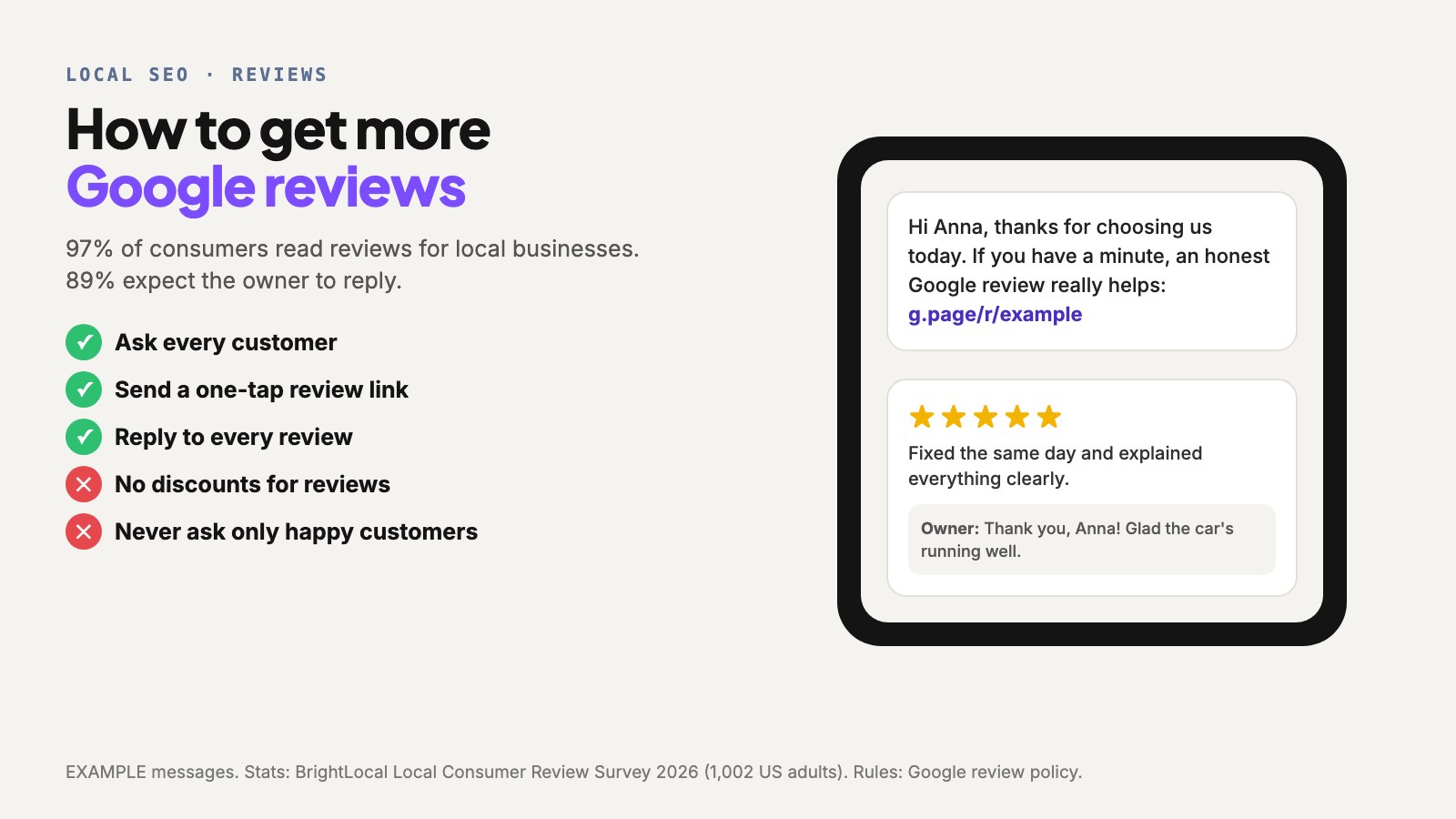
- The way to get more Google reviews is to ask every customer, at the right moment, with a one-tap link. Most happy customers never review simply because nobody asked them.
- Never offer anything in return, and never ask only the happy ones. Google's policy bans incentives and selective asking, and the US and UK now treat fake or bought reviews as illegal.
- Reviews matter twice: Google says more reviews and positive ratings can help your local ranking, and 97% of consumers read reviews for local businesses, according to BrightLocal's 2026 survey.
- Reply to every review, good and bad. 89% of consumers expect business owners to respond.
Why Google Reviews Matter So Much
Reviews affect both whether you appear in local results and whether people choose you once you do. Google's guide to improving your local ranking lists prominence, how well known a business is, as one of three ranking factors, and says directly: "More reviews and positive ratings can help your business's local ranking." It also says there's no way to pay for a better local ranking.
Customers read them closely. BrightLocal's Local Consumer Review Survey 2026, a survey of 1,002 US adults, found that 97% of consumers read reviews for local businesses, 68% will only use a business with four stars or more, and 31% now want 4.5 stars or more, up from 17% a year earlier. Google remains the review site people use most, at 71%.
Reviews also feed AI assistants. When someone asks ChatGPT or Google's AI features for the best local business, those answers lean on what the web says about you, and reviews are a big part of that. Our guide on how to get recommended by ChatGPT covers the wider picture. This article focuses on getting more genuine Google reviews, week after week.
What Google and the Law Don't Allow
Before asking for a single review, know the rules, because breaking them can get reviews removed and, in some countries, lead to fines. Google's policy on user-contributed content is specific.
| Practice | Allowed? | Source |
|---|---|---|
| Asking every customer for an honest review | Yes | Google review policy |
| Sharing a review link or QR code | Yes | Google Business Profile Help |
| Offering a discount, gift or entry into a draw for a review | No | Google bans "payment, discounts, free goods and/or services" for reviews |
| Asking only customers you think are happy (review gating) | No | Google bans "selectively solicit positive reviews" |
| Pressuring customers to review while they're still on your premises | No | Google: don't "require or pressure users" on the premises |
| Staff, family or friends reviewing the business | No | Google's conflict-of-interest rules |
| Adding keywords or offers to your business name to look better in results | No | Google Business Profile guidelines |
| Buying reviews or posting fake ones | No, and illegal in the US and UK | FTC rule (2024), UK CMA guidance (2025) |
In the United States, the Federal Trade Commission announced a final rule banning fake reviews on August 14, 2024. It covers buying reviews, fake and AI-generated reviews, and incentives tied to a positive or negative review. In the UK, the Competition and Markets Authority published guidance on fake reviews in April 2025, alongside new consumer law that took effect that month. If you operate elsewhere, check your own consumer protection rules; the direction everywhere is the same.
The safe principle is simple: ask everyone, the same way, for an honest review, and give nothing in return.
When to Ask: The Right Moment
Ask when the customer has just experienced the result, not when they've just paid. Timing matters more than wording.
- Garages and repair services: when the customer picks up the car or the job is confirmed working, not when the quote is approved.
- Restaurants and cafés: with the receipt or in a follow-up message the same evening.
- Clinics and salons: a few hours after the appointment, once the customer has seen the result.
- Trades and home services: the day the job is finished, while the customer can see the work.
- Online and service businesses: after the first clear win, such as a delivered project or a solved problem.
If you run a garage, our guide to auto repair shop marketing shows how reviews fit into the rest of your local marketing.
How to Ask: A Simple System That Works Every Week
Make asking a routine step in every job, not something you remember to do occasionally.
- Get your review link. In your Google Business Profile, use the option to ask for reviews; Google's tips to get more reviews explain that customers can open a link or scan a QR code, and that they need to be signed in to a Google Account.
- Put the link everywhere a customer already is: the invoice, the confirmation email, the SMS when the job is done, and a QR code at the counter.
- Ask in person first, then send the link. A short, genuine request from the person who did the work works far better than an automated email alone.
- Send one reminder, not more. A single follow-up two or three days later is reasonable; repeated nudges become pressure.
- Ask everyone. Include the customer whose job had a hiccup. Google notes that a mix of positive and negative feedback often feels more trustworthy.
- Track it weekly. Count new reviews each week. A steady trickle beats a burst followed by silence.
A review request message you can copy
"Hi [name], thanks for choosing [business] today. If you have a minute, an honest Google review really helps a small business like ours: [link]. Thank you, [your name]."
Keep it short, personal and honest. Don't mention stars, don't suggest what to write, and don't offer anything for it.
How to Reply to Reviews
Reply to every review, quickly and briefly. BrightLocal's 2026 survey found that 89% of consumers expect owners to respond, and Google's own help says helpful replies show you're responsive.
| Review | What to write | Avoid |
|---|---|---|
| 5 stars, detailed | Thank them by name, mention the specific job, invite them back | Copy-paste replies |
| 5 stars, no text | A short, warm thank you | Long promotional replies |
| 3 stars | Thank them, acknowledge the issue, say what you've changed | Arguing about the rating |
| 1 to 2 stars, fair | Apologise, take ownership, offer to fix it offline | Excuses, private details |
| 1 star, not a real customer | A calm, factual reply, then report it to Google | Accusations or anger |
Google's help on how to read and reply to reviews notes that replies are checked against its policies before they appear. Its guidance is to keep them professional, short and relevant, protect the customer's privacy, and avoid promotions. Replies are checked against Google's policies and appear as coming from the business. Remember that the reply is written for the next customer reading it, not only for the reviewer.
How Many Reviews Do You Need?
There's no magic number; what matters is how you compare with the businesses customers see next to you, and how recent your reviews are. Search for your main service the way a customer would and look at the three businesses in the map results. Note their review counts, their average rating and when their latest reviews were posted.
If they have 150 reviews and you have 20, closing that gap is your clearest local goal. If you already match them on count, recency becomes the edge: a steady flow of new reviews tells customers you're active now, not just popular three years ago. BrightLocal's 2026 survey shows why the rating itself also matters: 68% of consumers won't use a business below four stars, and nearly a third now want 4.5 or more.
Set a weekly target you can actually keep, such as asking every customer and aiming for three to five new reviews a week, and track it. Small, steady numbers compound faster than occasional pushes.
Turn Reviews Into Better Marketing
Reviews tell you what customers value, in their own words, which is exactly the language your website should use. Read your last thirty reviews and note the phrases that repeat: "fixed it the same day", "explained everything", "fair price". Those are your strongest selling points, already proven.
- Use the words on your service pages. If customers keep praising same-day repairs, say so clearly where people decide.
- Fix what complaints repeat. Three reviews mentioning slow phone answers point to a process to fix, not just replies to write.
- Share genuine quotes, with care. Quoting a review on your website is common practice; keep it accurate and don't edit its meaning.
- Answer the questions reviews raise. If customers mention parking or waiting times, add that information to your profile and website.
Common Mistakes That Cost Reviews
- Asking only at the till, when the customer is busy paying and leaving.
- Sending a long link that opens the wrong page, instead of the direct review link.
- Review gating: sending only happy customers to Google and unhappy ones to a private form. Google bans this.
- Offering a discount for a review, even a small one. It's against Google's policy and, in many places, the law.
- Ignoring negative reviews. Silence reads as not caring.
- Getting fifty reviews in one week, then none. A natural, steady pace looks more trustworthy to customers.
How CMO Owls Helps You Earn and Use More Reviews
Google reviews come from your customers, and you manage them in your Google Business Profile. CMO Owls handles everything around them: making sure the customers who read your reviews can find you, keeping the habit going, and turning what customers praise into content.
| Job | Agent | What it does for you |
|---|---|---|
| Keep the review habit going | Scheduler Owl | Puts your weekly marketing on one calendar, so review requests and replies become a routine instead of an afterthought |
| Keep every reply in your voice | Knowledge Base | Holds your product facts and tone, shared with every writing Owl |
| Turn praise into pages that rank | Owlthor | Researches what ranks for your services and writes the article, sent to WordPress or your CMS |
| Answer what people ask AI about you | Buzz Creator Owl | Finds the questions people ask AI assistants about businesses like yours and answers each as an article |
| See what AI says about you | Generative Engine Owl | Tracks what ChatGPT, Gemini, Claude and Google AI Overviews say about your brand, and why they skip you |
| Make sure people can reach you | Watch Owl | Checks your website for broken pages, errors and slow load times, so the customers your reviews attract don't bounce |
The first time you add your website, the Overview gives you a website report within minutes, including what AI tools can read and which problems to fix first. Pair that with the review routine above, and both halves of local trust, what customers say and what your website shows, improve together. For the full local checklist, see our local SEO audit guide.
Mind Map: Getting More Google Reviews
Frequently Asked Questions
How can I get more Google reviews quickly?
Ask every recent customer personally, then send your direct Google review link by text or email the same day. Most businesses have many happy customers who simply were never asked.
Can I offer a discount for a Google review?
No. Google's policy bans offering payment, discounts or free goods or services in exchange for reviews, and fake or incentivised reviews are also restricted by law in places like the US and UK.
Is it allowed to ask only happy customers for reviews?
No. Google bans selectively asking for positive reviews, often called review gating. Ask every customer the same way.
Do Google reviews help local SEO?
Yes. Google says more reviews and positive ratings can help your local ranking, as part of how prominent your business is.
Should I reply to every Google review?
Yes. BrightLocal's 2026 survey found 89% of consumers expect owners to respond, and replies show future customers how you treat people.
How do I respond to a negative Google review?
Reply promptly and calmly, apologise where it's fair, avoid private details, and offer to resolve it offline. Write the reply for future customers reading it.
Can I remove a bad Google review?
Only if it breaks Google's policies, for example if it's fake or from a conflict of interest. You can report it from your Business Profile; genuine negative reviews stay.
The Next Step
Get your Google review link today, add it to your invoice and job-done message, and ask the next ten customers in person. Then add your website to CMO Owls so the customers your reviews attract find a fast, working site, and your content keeps pace. If you serve customers at their address, read our guides on service area business SEO and showing up in "near me" searches.
Sources
- Maps user-contributed content policy: Fake engagement and prohibited practices, Google, 2026.
- Tips to get more reviews, Google Business Profile Help, 2026.
- Read and reply to reviews, Google Business Profile Help, 2026.
- Tips to improve your local ranking on Google, Google Business Profile Help, 2026.
- Local Consumer Review Survey 2026, BrightLocal, 2026.
- Federal Trade Commission announces final rule banning fake reviews and testimonials, FTC, 2024.
- Fake reviews: guidance for businesses (CMA208), Competition and Markets Authority, 2025.
- Guidelines for representing your business on Google, Google Business Profile Help, 2026.