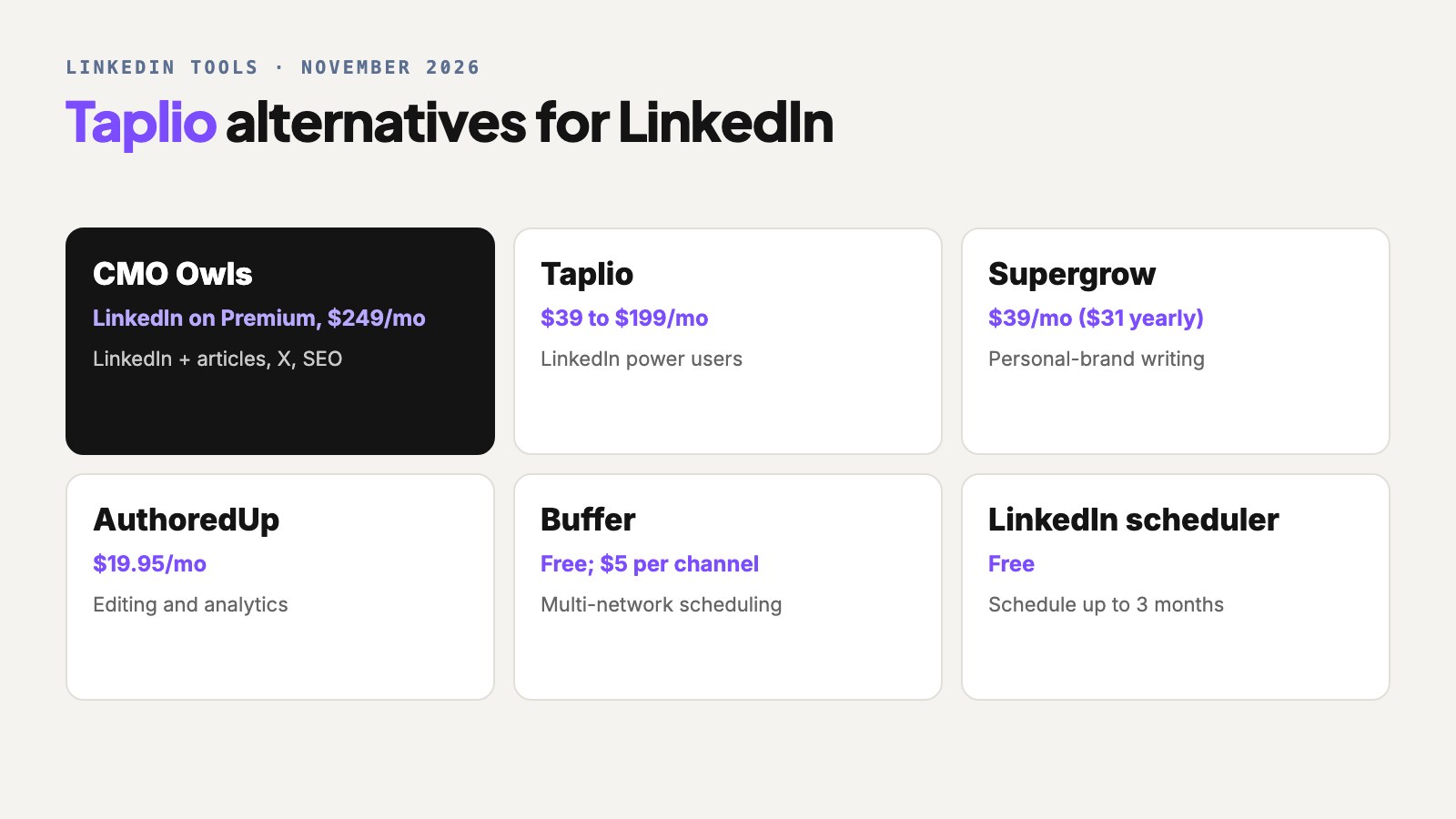
Taplio is a popular all-in-one LinkedIn tool for writing, scheduling and growing an audience, priced from $39 to $199 a month. Plenty of people outgrow it, find it more than they need, or want LinkedIn handled as part of their wider marketing. This guide compares the main Taplio alternatives on price and features, using each vendor's own pricing page, and explains which kinds of LinkedIn tools can get your account restricted.
Key Takeaways
- Taplio lists $39, $69 and $199 a month plans, a 7-day trial with Pro access and a 30-day money-back guarantee.
- Cheaper writing and scheduling: AuthoredUp from $16.63 a month billed yearly, Supergrow from $31, and Buffer from $5 per channel, with a free plan.
- Free option: LinkedIn's own composer can schedule posts up to three months ahead.
- CMO Owls is our pick for businesses that want LinkedIn as one channel of a full marketing plan, with researched posts, articles, X, Reddit and SEO together.
- Avoid engagement automation: LinkedIn prohibits third-party software that automates activity or scrapes data, and can restrict accounts that use it.
What Taplio Does and Costs
Taplio combines AI post writing, scheduling, analytics and a lead database for LinkedIn. Its pricing page lists Starter at $39, Growth at $69 and Pro at $199 a month, billed monthly. A comparison table further down the same page shows lower figures ($32, $49 and $149) without explaining them, so check which price applies at checkout.
Starter and Growth include 250 AI credits a month; Pro is listed with unlimited AI posts and comments and lead outreach automation. Every plan starts with a 7-day trial with full Pro access, and the FAQ offers a refund within 30 days of payment. Its Chrome extension is free and works without a plan.
Taplio's strength is depth on LinkedIn: writing, analytics and prospecting in one place. If LinkedIn is your main sales channel, that depth is worth paying for. If you mainly need well-written posts on a schedule, you're likely paying for features you won't use.
A simple test before you renew: list the Taplio features you used in the last month. If it's only writing and scheduling, every alternative below covers that for less, and LinkedIn's own scheduler covers the scheduling for free. If you used the lead database or outreach features every week, compare carefully before switching, because most cheaper tools don't offer them.
Six Taplio Alternatives Compared
The alternatives split into writing-and-scheduling tools, general social schedulers and full marketing teams. Prices below are from each vendor's own page, checked on November 15, 2026.
| Tool | Starts at | Best for | Free way to try |
|---|---|---|---|
| CMO Owls | Free plan; LinkedIn from Premium, $249/mo ($204 yearly) | LinkedIn as part of a full marketing plan | Free plan (site checks) |
| Taplio | $39/mo | LinkedIn power users and prospecting | 7-day trial |
| Supergrow | $39/mo ($31 yearly) | Personal-brand writing and repurposing | 7-day trial |
| AuthoredUp | $19.95/mo ($16.63 yearly) | Editing, preview and post analytics | Free trial, no card |
| Buffer | Free; $5 per channel/mo | Scheduling across several networks | Free plan |
| LinkedIn's own scheduler | Free | Scheduling a few posts ahead | Built in |
Supergrow
Supergrow is built for personal-brand writing. Pro costs $39 a month, or $31 billed yearly, for one account, with tools for turning interviews and old content into posts, a carousel maker, scheduling and profile analytics. Teams costs $199 a month for five accounts with approval workflows. Every plan includes a 7-day free trial.
AuthoredUp
AuthoredUp focuses on writing well: a text editor with formatting, previews of how a post looks on different devices, a library of hooks, scheduling and analytics. Individual costs $19.95 a month or $16.63 billed yearly. Business is $14.95 per profile for three or more. It offers a free trial with no card.
Buffer
Buffer is a general social scheduler that publishes to LinkedIn profiles and pages. Its free plan covers three channels with 10 scheduled posts each, and paid plans cost $5 or $10 per channel a month. It includes an AI assistant for rewording posts. It's the best fit if LinkedIn is one of several networks you post to.
LinkedIn's own scheduler
You don't need a tool to schedule. LinkedIn's help page on scheduling posts explains how to use the clock icon in the post composer to pick a publish time up to three months ahead, and see your scheduled posts in a list. It doesn't write posts or give deep analytics, but it's free and has no account-safety risk.
Why CMO Owls Fits Businesses Best
CMO Owls treats LinkedIn as one channel of your marketing, not the whole job. LinkedIn Owl writes one researched post of 180 to 220 words, built in four parts (hook, insight, proof and takeaway), each checked against its own word limit. Every draft is flagged for you to read first; once you connect your LinkedIn account, the dashboard can publish it to your profile in one click.
The difference is everything around it. The same plan includes articles from Owlthor, threads from X Owl, replies from Reddit Owl, SEO and AI visibility audits, and Scheduler Owl spreading the month's content across a calendar. Premium includes 16 LinkedIn posts a month alongside 30 articles and 20 X posts.
Honest limits: LinkedIn posting starts on the Premium plan, not Basic, and LinkedIn Owl writes text posts only. It doesn't include LinkedIn analytics, a lead database or a carousel maker. If you live on LinkedIn and prospect there daily, Taplio or Supergrow is the better specialist tool; if LinkedIn is one part of growing a business, CMO Owls covers far more for the money.
LinkedIn's Rules on Automation Tools
LinkedIn doesn't allow third-party software that scrapes the site or automates activity, and it can restrict accounts that use it. Its help article on prohibited software and extensions says it doesn't permit crawlers, bots, browser plug-ins or extensions that scrape LinkedIn, change its appearance or automate activity, and points to Section 8.2 of its User Agreement. Its account restrictions page explains that accounts can be limited for breaking these rules.
In practice, writing and scheduling tools that publish through LinkedIn's official sign-in are a different category from tools that auto-like, auto-comment, auto-connect or extract profile data. Before you buy any LinkedIn tool, check which of these it does:
- Generally fine: drafting posts, editing, previewing, and scheduling or publishing through LinkedIn's official sign-in connection.
- Risky: automated comments, likes, connection requests or messages, and anything that copies profile data.
CMO Owls only drafts posts and publishes them through LinkedIn's official connection when you click to publish. It never automates likes, comments or connection requests.
How to Choose a Taplio Alternative
- Name your goal. Personal brand, company page, or sales prospecting? Prospecting points to Taplio; brand-building to Supergrow or AuthoredUp; a whole business to CMO Owls.
- Count your channels. LinkedIn only, or LinkedIn plus X, a blog and Reddit? More channels favour Buffer or CMO Owls.
- Decide how much writing help you need. Editors help you write; AI writers draft for you. Either way, read every post before it goes out.
- Check the automation features against LinkedIn's rules before you connect your account.
- Start free. LinkedIn's scheduler and Buffer's free plan cost nothing; use them while you trial a paid tool.
Worked Example: A Consultant Moving Off Taplio
Here's a typical switch. The person and numbers are an EXAMPLE.
An independent marketing consultant pays $69 a month for Taplio but only uses it to write and schedule three posts a week. She doesn't use the lead database or analytics.
- Option A: AuthoredUp at $16.63 a month billed yearly for editing and scheduling, writing posts herself. Saves about $52 a month.
- Option B: CMO Owls Premium at $204 a month billed yearly. Costs more, but adds 16 researched LinkedIn posts, 30 articles for her website, X threads and an SEO audit, replacing a separate content writer.
If she only wants LinkedIn, Option A is the clear saving. If she was also paying for blog content or SEO help, Option B replaces several costs at once. Our guide to formatting LinkedIn posts covers the writing side either way.
What a Good LinkedIn Post Needs, Whatever the Tool
No tool fixes a weak post, so judge every alternative by whether it helps you write these four things well. LinkedIn shows only the first few lines before "see more," which is why the opening carries most of the weight.
- A specific hook. One concrete line about a problem your reader has, not a generic question.
- One idea. A post that tries to make three points makes none. Pick the single insight you want remembered.
- Proof. A number, a short story or an example from your own work makes the idea believable.
- A clear takeaway. End with what the reader should do or think differently, not a list of hashtags.
This is the structure LinkedIn Owl builds every post around, with a word budget for each part, and it's a useful checklist when you test any other tool's drafts. Check the length with our free social media character counter, and plan the month with the free social media calendar template.
Mistakes When Switching LinkedIn Tools
- Losing your scheduled queue. Export or note your scheduled posts before cancelling, and re-create them in the new tool.
- Letting AI post unread. Google's guidance on generative AI content stresses fact-checking AI output before publishing; the same applies to LinkedIn, where it's your name on the post.
- Connecting tools that automate engagement. The time saved isn't worth a restricted account.
- Measuring likes instead of leads. Tag the links in your posts with a UTM builder so you can see which posts bring visits.
- Changing everything at once. Switch tools first and keep your posting rhythm the same for a month, so you can tell whether any change in reach came from the tool or from what you posted.
Taplio Alternative Questions
How much does Taplio cost?
Taplio lists Starter at $39, Growth at $69 and Pro at $199 a month, billed monthly. It offers a 7-day trial with Pro access and a 30-day money-back guarantee.
What is the best free Taplio alternative?
LinkedIn's own composer can schedule posts up to three months ahead for free, and Buffer's free plan covers three channels with 10 scheduled posts each. Neither writes posts for you.
Is Supergrow better than Taplio?
For writing and repurposing personal-brand content, Supergrow is cheaper at $31 a month billed yearly. Taplio adds a lead database and lead outreach features that Supergrow's pricing page doesn't list.
Can LinkedIn ban me for using a scheduling tool?
Scheduling through an official LinkedIn connection is a normal use. LinkedIn prohibits third-party tools that scrape data or automate activity such as likes, comments or messages, and can restrict accounts that use them.
Does CMO Owls post to LinkedIn automatically?
It drafts each post for you to review, and once you connect your LinkedIn account you can publish it to your profile in one click. LinkedIn posting is included from the Premium plan.
Which Taplio alternative is best for a whole business?
CMO Owls, because it covers LinkedIn alongside articles, X, Reddit, SEO and AI visibility in one plan. For a single person focused only on LinkedIn, a specialist like Supergrow or AuthoredUp is cheaper.
Make the Switch Simple
Write down the three LinkedIn features you actually use, then pick the cheapest tool that covers them. If you want LinkedIn handled as part of your whole marketing, compare CMO Owls plans. For more options across every channel, see our guide to AI marketing tools for small business.
Sources
- Taplio pricing, Taplio, checked November 15, 2026.
- Supergrow pricing, Supergrow, checked November 15, 2026.
- AuthoredUp pricing, AuthoredUp, checked November 15, 2026.
- Buffer pricing, Buffer, checked November 15, 2026.
- Schedule posts, LinkedIn Help, 2026.
- Prohibited software and extensions, LinkedIn Help, 2026.
- Account restrictions, LinkedIn Help, 2026.
- Google Search's guidance on using generative AI content, Google Search Central, 2026.