Profound is one of the best-known tools for tracking how AI assistants mention your brand. It's also built for large teams: after a free 7-day trial, its paid plan is a custom enterprise quote. If you're looking for Profound alternatives, you probably want the same answer, "are ChatGPT and Google's AI naming us?", at a price a small business can plan around.
This guide compares six options using each vendor's own pricing page, checked in November 2026. It also explains the difference between tools that only track mentions and tools that help you change them.
Key Takeaways
- Profound offers a free 7-day trial with 50 prompts on ChatGPT, Gemini and AI Overviews; its paid tier is custom-priced, covering up to 10 AI engines.
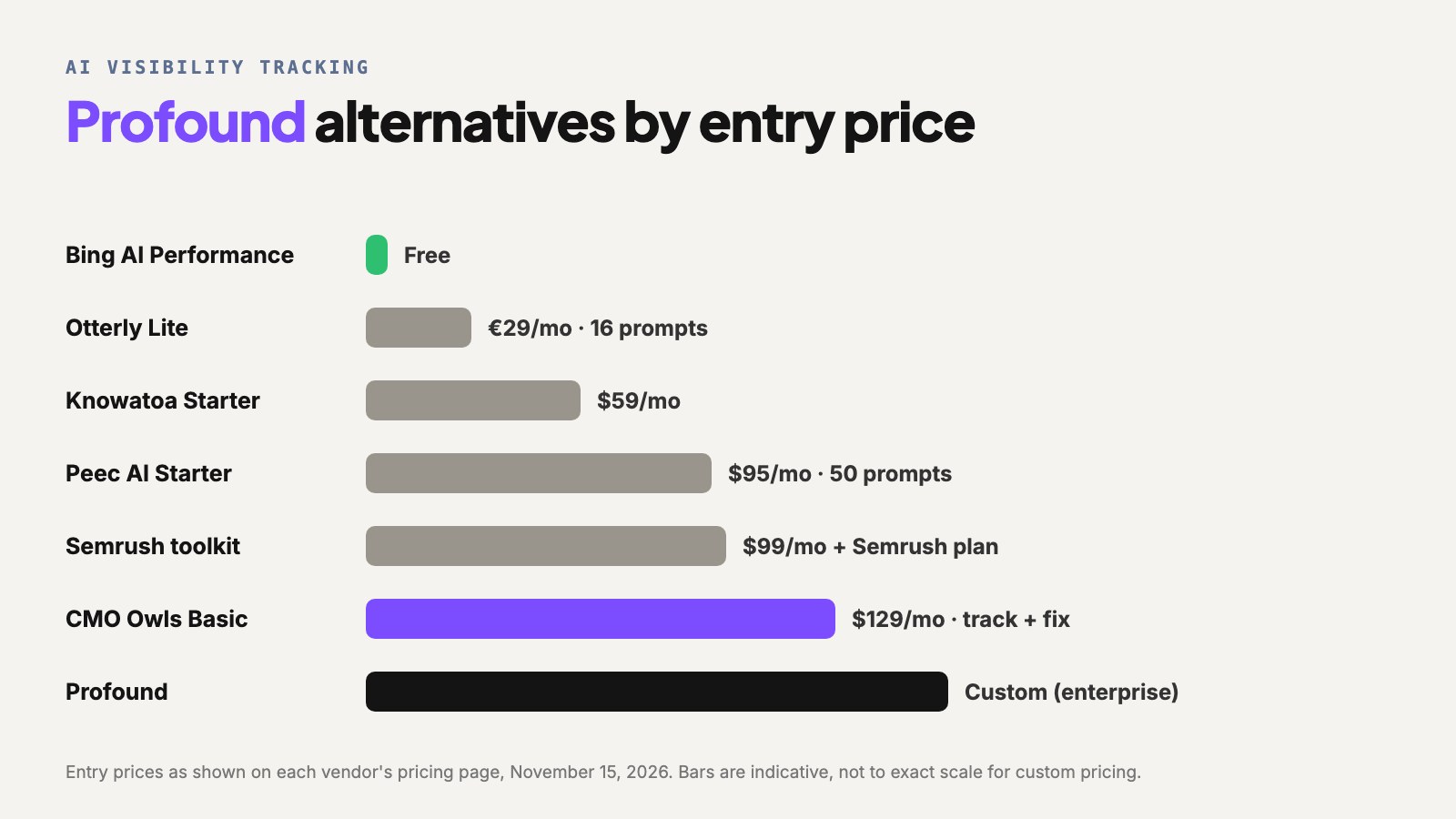
- Cheapest trackers: Otterly from €29 a month (16 prompts) and Knowatoa from $59; Peec AI starts at $95 for 50 prompts on 3 engines.
- Free option: Bing Webmaster Tools' AI Performance report shows when Copilot and Bing's AI answers cite you, at no cost.
- CMO Owls is our pick for small teams because its audit both measures AI answers and fixes what keeps you out of them, from $129 a month.
- Trade-off to know: dedicated trackers check prompts daily; CMO Owls runs a full audit each month.
What You're Actually Paying For
AI visibility trackers sell three things: how many prompts they check, which AI engines they ask, and how often. A prompt is a question a real customer might type, such as "best accounting software for freelancers." The tool asks it repeatedly and records whether your brand appears, where, and which sources are cited.
Three numbers decide the price:
- Prompts: 15 to 50 is enough for a small business's core questions; agencies need hundreds.
- Engines: ChatGPT and Google's AI Overviews matter most for most markets. Each extra engine often costs more.
- Frequency: daily tracking smooths out how much AI answers vary between runs. Weekly or monthly is enough to see a trend.
A fourth question matters more than any of them: who fixes what the tracker finds? A dashboard that says you're missing from ChatGPT doesn't explain why. Our guide on how to check your AI visibility shows how to do the measuring by hand first, so you know what you're buying.
Profound Pricing, From Its Own Page
Profound has two published tiers: a free trial and a custom enterprise plan. According to its pricing page, the trial runs 50 unique prompts daily for 7 days on ChatGPT, Gemini and Google AI Overviews. Trial users get a recommended prompt set for their industry and can't customize it.
The Enterprise plan is priced on request and adds up to 10 answer engines, including Perplexity, Google AI Mode, Claude and DeepSeek, plus API access, SSO and SOC 2 compliance. The page also mentions an Agency Growth plan without a price. That breadth is Profound's real strength: no other tool here tracks as many engines, and for a large brand that needs an API and security reviews it may well be the right choice.
Six Profound Alternatives Compared
For a small team, the alternatives differ mainly on price per prompt and whether they help you act. All prices are as shown on each vendor's page.
| Tool | Entry price | Prompts at entry | AI engines at entry | Helps you fix it? |
|---|---|---|---|---|
| CMO Owls | $129/mo ($106 yearly); free plan for site checks | Real questions in each monthly audit | ChatGPT, Gemini, Claude, AI Overviews | ✓ Crawl access, site fixes and content |
| Peec AI | $95/mo | 50 | 3, chosen from 8 | Tracking and recommendations |
| Otterly | €29/mo (shown in euros) | 16 | 4 of 7 | Tracking and recommendations |
| Knowatoa | $59/mo | Not listed | ChatGPT, AI Overviews, AI Mode | Tracking |
| Semrush AI Visibility Toolkit | $99/mo, needs a Semrush plan | 25 | ChatGPT and Google AI Mode | Inside Semrush's SEO tools |
| Bing AI Performance report | Free | Your real citations, not prompts | Copilot and Bing AI answers | No, data only |
Sources: Peec AI, Otterly, Knowatoa pricing pages, Semrush's AI Visibility Toolkit help page and Bing's AI Performance help page. Peec's page shows "$" without naming a currency, and Otterly's showed euros when we checked from Europe. For a wider list of trackers, see our AI search visibility tools roundup.
Peec AI
Peec suits teams that want daily data on a fixed set of engines. Every self-serve plan tracks 3 models you choose, with more prompts at each tier: 50 for $95, 150 for $245 and 350 for $495 a month. Adding a fourth engine costs $30 a month on Starter. Its range of engines is unusually wide, including Naver and Baidu's ERNIE for Asian markets.
Otterly
Otterly is the cheapest way to start tracking. Lite gives 16 prompts for €29 a month, Standard 120 for €189 and Premium 403 for €489. Its plan cards say 4 of 7 engines while its comparison table says every plan can track every engine using credits, so confirm which engines you get before buying.
Knowatoa
Knowatoa's Starter plan at $59 covers ChatGPT, AI Overviews and AI Mode; Growth at $199 covers all seven of its services. Its pricing page doesn't list how many questions each plan includes.
Semrush AI Visibility Toolkit
If you already pay for Semrush, its $99 toolkit adds 25 prompts tracked in ChatGPT and Google AI Mode. On its own it isn't available; you need a Semrush subscription. Our Semrush comparison covers the full cost.
Bing's free AI Performance report
Bing Webmaster Tools added an AI Performance report in public preview in February 2026. It shows how often your pages are cited in Copilot and Bing's AI answers. It counts citations, not clicks or rankings, and only covers Microsoft's AI, but it's free and uses your real data rather than sample prompts.
Why CMO Owls Fits Small Teams Best
Trackers tell you that you're missing; CMO Owls also tells you why and fixes it. That's the gap most small businesses fall into: they pay for a dashboard showing they're absent from ChatGPT, then have no one to do the work.
- Measure: Generative Engine Owl asks ChatGPT, Gemini, Claude and Google AI Overviews real customer questions in each audit and reports where you're named and who's named instead.
- Diagnose: the same audit checks whether AI crawlers can reach your pages. Our free AI Crawler Access Test runs that check on its own.
- Fix: Watch Owl finds broken pages and errors, and Owlthor writes answer-first articles for the questions you're missing from, 15 a month on Basic.
Two honest limits. CMO Owls runs one full audit a month, so if you need daily tracking to report week-by-week movement to a client, Peec or Otterly is better at that. And Profound covers more engines; CMO Owls checks AI Mode, Copilot and Perplexity by hand rather than automatically.
How to Choose a Profound Alternative
- List 10 to 20 real customer questions. If you can't, you're not ready to buy a tracker yet.
- Pick the engines your customers use. For most markets that's ChatGPT and Google's AI Overviews; add others only if you have a reason.
- Check access before tracking. If AI crawlers are blocked, every tracker will just confirm you're invisible.
- Decide who acts on the data. If no one on your team will rewrite pages, choose a tool that includes the fixing.
- Start with free data. Bing's AI Performance report and a manual prompt check cost nothing and set your baseline.
What the Research Says About Changing AI Answers
Tracking is only useful because AI answers can be changed. The original GEO study by Pranjal Aggarwal and colleagues (KDD 2024) found that adding quotations, statistics and source citations to content raised visibility in AI answers by up to 40%, while keyword stuffing made it worse. That's work a tracker can't do for you.
It also matters because AI answers are taking clicks. Pew Research Center found that people clicked a regular Google result in 8% of visits when an AI summary appeared, against 15% without one. Being named in the answer is increasingly how you get seen. Our guides on getting recommended by ChatGPT and ranking in AI Overviews cover the changes, and GEO vs SEO explains how it fits with your existing SEO.
Building a Prompt List That's Worth Tracking
Whatever tool you choose, the prompts you track decide whether the data is useful. Tracking generic questions tells you little; tracking the questions your buyers actually ask shows where you win and lose sales.
- Collect real wording. Use sales call notes, support emails, Search Console queries and the questions people ask in communities.
- Cover each stage. Mix problem questions ("why is my site not on ChatGPT"), comparison questions ("Peec vs Otterly") and buying questions ("best tool for a small agency").
- Add your location or niche where it matters, such as "accountant for freelancers in Leeds."
- Keep it stable. Change prompts rarely, so month-to-month results stay comparable.
Twenty good prompts beat two hundred vague ones. Start with the list, check it by hand for a month, and only then decide whether you need a paid tracker.
When you do check by hand, use a private or logged-out browser window, ask each question the same way every time, and note the date. AI answers can change with the user's history and location, so a consistent routine matters more than the exact tool. Save each answer as a screenshot or text so you can compare months later and show what changed after you updated a page.
Mistakes When Choosing a Tracker
- Buying hundreds of prompts you'll never read. Start small and add prompts once you act on the first set.
- Judging from one day's results. AI answers vary between runs; look at trends over weeks.
- Ignoring currency and add-ons. Extra engines and prompts often cost more than the headline price.
- Tracking without fixing. A month of red dashboards changes nothing on its own.
- Forgetting your competitors. Track the same prompts for two or three rivals, so you can see who AI assistants name instead of you and what their cited pages have that yours don't.
Profound Alternative Questions
How much does Profound cost?
Profound offers a free 7-day trial with 50 prompts on ChatGPT, Gemini and AI Overviews. Its paid Enterprise plan is custom-priced and not listed publicly.
What is the cheapest Profound alternative?
Bing's AI Performance report is free but only covers Microsoft's AI. Among paid trackers, Otterly starts at €29 a month for 16 prompts and Knowatoa at $59.
Is Peec AI better than Profound?
For a small team, Peec is easier to buy, with published prices from $95 a month. Profound tracks more engines and adds enterprise features such as an API and SSO.
Do I need daily AI visibility tracking?
Not usually. Daily tracking helps agencies report short-term changes, but a small business can see trends with monthly or weekly checks.
Does CMO Owls track Perplexity?
Not automatically. Its audits check ChatGPT, Gemini, Claude and Google AI Overviews; Perplexity, Copilot and AI Mode are checked by hand. Bing's free report covers Copilot citations.
Can an AI visibility tool improve my rankings in AI answers?
Trackers measure; they don't change answers. Improving visibility needs crawl access, answer-first content with sources, and outside mentions, which is the work CMO Owls includes.
Choose Your First Step
Set your baseline for free: check Bing's AI Performance report and run the AI Crawler Access Test. If you're missing from AI answers and need someone to do the fixing, compare CMO Owls plans.
Sources
- Profound pricing, Profound, checked November 15, 2026.
- Peec AI pricing, Peec AI, checked November 15, 2026.
- Otterly pricing, Otterly.AI, checked November 15, 2026.
- Knowatoa pricing, Knowatoa, checked November 15, 2026.
- AI Visibility Toolkit, Semrush Knowledge Base, checked October 2026.
- AI Performance, Bing Webmaster Tools Help, 2026.
- GEO: Generative Engine Optimization, Aggarwal et al., KDD 2024.
- Google users are less likely to click on links when an AI summary appears in the results, Pew Research Center, 2025.