Search a question on Google today and there's a good chance an AI-written summary sits above the blue links, with a handful of websites cited beside it. Those cited sites get seen first. If you want to know how to rank in Google AI Overviews and its deeper sibling, AI Mode, the honest starting point is what Google itself says: there's no special markup and no secret setting. The work is in eligibility, coverage and writing.
This guide turns Google's documentation into a checklist, shows how its "query fan-out" changes what you should write, and explains how to tell whether it's working.
Key Takeaways
- Google's only stated requirement: the page must be indexed and eligible to show with a snippet. There's no special schema or AI-only optimization.
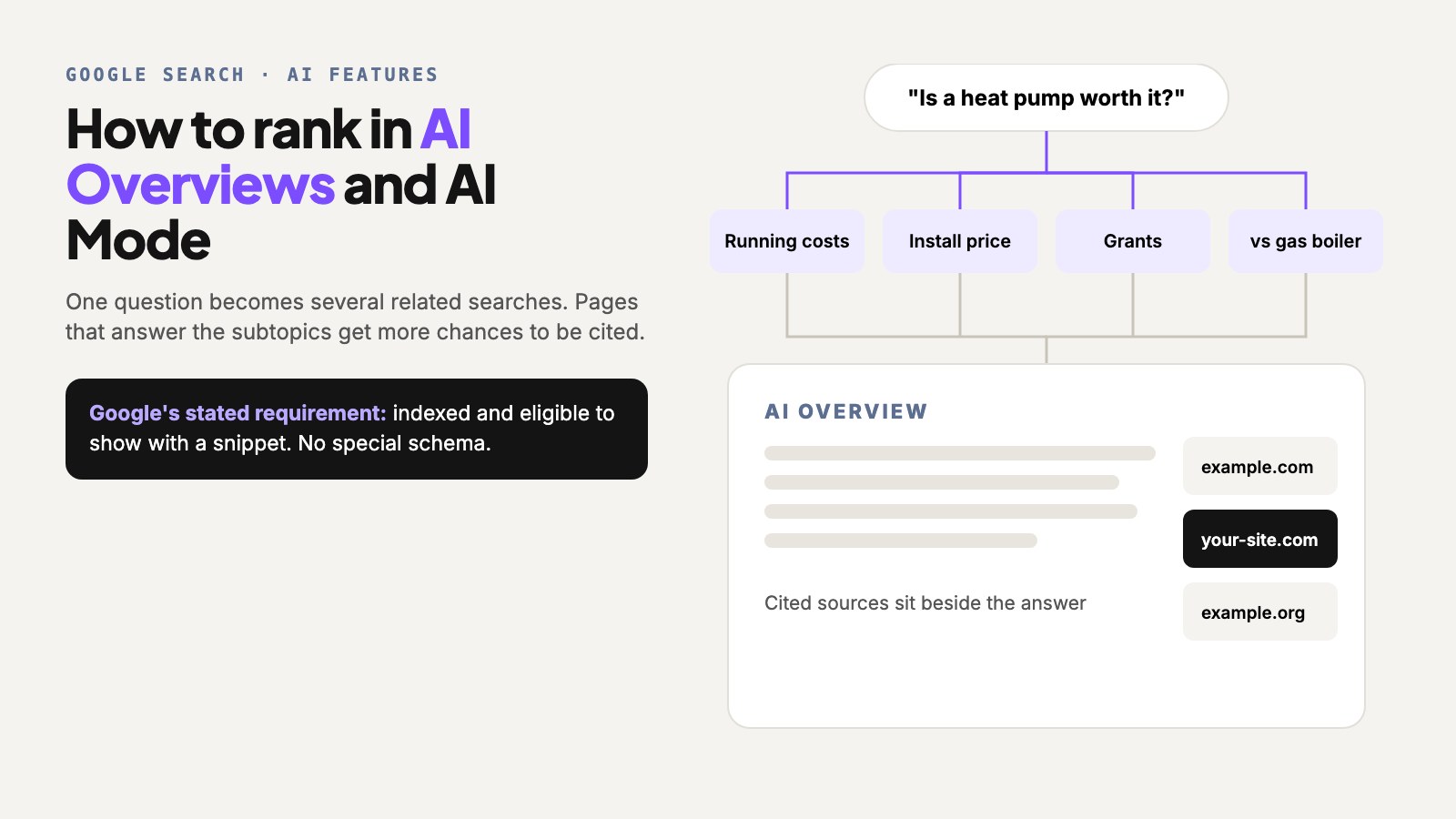
- AI Overviews and AI Mode use query fan-out, running several related searches for one question, so pages that cover the subtopics around a question have more chances to be cited.
- Write passages that stand alone: a direct answer in the first sentence, specifics after it, one idea per paragraph.
- Snippet controls cut both ways: nosnippet or a tiny max-snippet limits how Google can use your page in AI features.
- AI features send fewer clicks per search: Pew found people clicked a regular result in 8% of visits with an AI summary versus 15% without one, so measure conversions, not just clicks.
What Google Actually Requires
To be shown as a supporting link in AI Overviews or AI Mode, a page must be indexed and eligible to appear in Google Search with a snippet. That's the full technical requirement, according to Google's page on AI features and your website. It adds that "there are no additional requirements to appear in AI Overviews or AI Mode, nor other special optimizations necessary," and that "there's also no special schema.org structured data that you need to add."
This sounds like bad news for anyone selling "AI Overview optimization", but it's useful. It means the work that helps you rank normally is the same work that gets you cited, and that tricks aimed only at AI are a waste of money. The differences lie in which pages Google picks for a given answer, and that comes down to coverage and how quotable your content is.
Google's guidance on succeeding in AI search, published in May 2025, lists the same foundations: unique and valuable content, a good page experience, content Google can access, preview controls set the way you intend, structured data that matches what's visible, and supporting images and video.
AI Overviews, AI Mode and Classic Results Compared
AI Overviews appear on the normal results page; AI Mode is a separate, conversational search tab built for longer questions and follow-ups. Google began rolling out AI Mode in the US in May 2025 and describes it as its most advanced AI search experience.
| Category | Classic results | AI Overviews | AI Mode |
|---|---|---|---|
| Where it appears | The ranked list of links | A summary at the top of some results pages | A separate tab for conversational search |
| How sources are found | Ranking for the query typed | May use query fan-out | Breaks a question into subtopics and runs many searches at once |
| How your site shows | A blue link with title and snippet | A supporting link beside the summary | Links within and beside the answer |
| Follow-up questions | New search each time | Limited | Built for follow-ups |
| Where traffic is reported | Search Console, Web | Included in Search Console, Web | Included in Search Console, Web |
Why Query Fan-Out Changes Your Content Plan
Fan-out means Google answers one question by running several related searches, so it can cite a page that ranks for a subtopic rather than the exact phrase typed. Google's AI features page describes it as "issuing multiple related searches across subtopics and data sources", and its AI Mode announcement says it "breaks down your question into subtopics."
Take the question "is a heat pump worth it in a cold climate?". A fan-out might also search running costs in winter, installation price, grants available, and heat pump versus gas boiler. A page that only repeats the main question competes for one slot. A page, or a small cluster of linked pages, that also answers costs, grants and comparisons has a chance in several of those searches.
Three practical consequences:
- Map the questions around your topic, not just the main keyword. Search Console queries, People Also Ask and customer emails are good sources.
- Answer the close neighbours on the same page, and give bigger subtopics their own pages.
- Link those pages together with descriptive anchors, which Google lists as a best practice: "making your content easily findable through internal links on your website."
The Seven-Point Eligibility Checklist
Run these checks on any page you want cited. Most are free, and each one maps to something Google names in its documentation.
- Crawling is allowed. Check robots.txt and your CDN or firewall. Google's first best practice is "ensuring that crawling is allowed in robots.txt, and by any CDN or hosting infrastructure." Our robots.txt generator helps if you need to fix the file.
- The page is indexed. Use the URL Inspection tool in Search Console, or our free Indexability Checker. If it isn't, our guide on why a page isn't indexed covers the usual causes.
- Snippets are allowed. Look for nosnippet, data-nosnippet or a small max-snippet value in your robots meta tags. Google says these limit how content appears in its AI features; its guide to controlling snippets shows each option.
- Key content is text. Prices, steps and specs inside images or behind tabs that load late are harder to use. Google asks for "important content" to be "available in textual form."
- Structured data matches the page. Markup must describe what visitors can see, per Google's structured data policies. Test it with our Schema Markup Checker.
- Page experience is good. Fast, stable pages that work on phones, as described in Google's page experience guidance. Our Core Web Vitals guide explains the metrics.
- Business data is current. For shops and local businesses, Google says to check that Merchant Center and Business Profile information is up to date.
Writing Passages Google Can Lift
A passage Google can cite answers one question completely in two or three sentences, without needing the paragraphs around it. AI summaries pull pieces of pages, so a passage that depends on "as mentioned above" loses its meaning when quoted.
| Category | Hard to quote | Easy to quote |
|---|---|---|
| Opening | "There are many factors to consider, and it really depends." | "A heat pump usually costs more to install than a gas boiler but less to run." |
| Specifics | "Costs vary." | Gives a range, says what changes it, and links the source of the figures |
| Context | "As we saw earlier..." | Names the topic again so the passage stands alone |
| Structure | One long paragraph mixing three ideas | One idea per paragraph, a table for comparisons |
Google's guidance on helpful, people-first content still decides which of many quotable pages it trusts, so originality matters: your own prices, photos, test results and experience are what generic pages don't have. Our Owlthor writing agent builds articles this way, with an answer at the start of each section.
What the Click Data Says
AI summaries reduce clicks per search, but the clicks that do happen may be better quality. Both of these findings are true, and you should plan for both.
Pew Research Center tracked the browsing of 900 US adults in March 2025. When a Google results page showed an AI summary, people clicked a traditional result in 8% of visits, compared with 15% when there was no summary. They clicked a link inside the summary in about 1% of visits, and they ended their browsing session more often after a page with a summary (26% versus 16%). About 18% of the searches in the study produced a summary.
Google's position, in its May 2025 guidance, is that "when people click to a website from search results pages with AI Overviews, these clicks are higher quality, where users are more likely to spend more time on the site." Google also suggests judging success by conversions, such as "sales, signups, a more engaged audience", rather than by clicks alone.
The practical takeaway: being cited protects your visibility, and a strong page converts the smaller number of visitors who do click. A clear title and meta description still matters for the classic links underneath.
Measuring AI Overview Visibility
Search Console counts AI Overview and AI Mode traffic inside the normal Web report, with no separate filter. Google's AI features page says the traffic is "included in the overall search traffic in Search Console." So you can't isolate it there, but you can watch for patterns: rising impressions with falling clicks on question queries often means a summary is answering for you.
To see whether you're actually cited, you need to check the answers themselves. Do it by hand for a small set of queries, or use a tool. CMO Owls' Generative Engine Owl checks Google AI Overviews alongside ChatGPT, Gemini and Claude in each paid audit and shows where competitors are cited instead. Our guide on checking AI visibility covers the manual method, and the AI visibility tools roundup compares other trackers.
Mistakes That Keep Pages Out
- Blocking with snippet controls by accident. A sitewide max-snippet or nosnippet added years ago can quietly limit AI features.
- Buying "AI Overview schema". Google says no special schema is needed. Spend that money on content.
- One page per keyword variant. Thin near-duplicate pages compete with each other. Cover a topic and its neighbours properly instead.
- Hiding answers behind accordions that load late or in images. Keep key facts in plain HTML text.
- Judging success on clicks alone. Fewer, better visits can still mean more sales.
AI Overviews Questions Answered
How do I get my website into Google AI Overviews?
Make sure the page is indexed and allowed to show a snippet, then cover the question and its related subtopics with clear, self-contained answers. Google says there are no additional technical requirements beyond that.
Do I need special schema markup for AI Overviews?
No. Google says there's no special schema.org structured data needed for AI Overviews or AI Mode. Normal structured data still helps if it matches the visible page.
What is query fan-out?
It's when Google runs several related searches across subtopics to answer one question. It means a page can be cited for a subtopic it ranks for, even if it doesn't rank for the exact question typed.
Can I stop Google using my content in AI Overviews?
You can limit it with nosnippet, data-nosnippet or max-snippet, or block indexing with noindex. These also limit how the page appears in normal search, so weigh the trade-off first.
Do AI Overviews reduce website traffic?
Often per search, yes. Pew found clicks on regular results fell from 15% to 8% of visits when a summary appeared. Google says the clicks that remain tend to be higher quality.
How do I know if my site appears in AI Overviews?
Search Console includes the traffic in its Web report but doesn't separate it, so check the answers for your key queries directly or use a tracker that records AI Overview citations.
Is AI Mode available everywhere?
Google started rolling it out in the US in May 2025. Availability depends on country and language and has changed since launch, so check Google's current announcements for your market.
Where to Begin This Week
Pick your five most important pages and run them through the seven-point checklist this week. Fix any indexing or snippet problems first, then rewrite each section opening as a direct answer. For ChatGPT, read our guide to getting recommended by ChatGPT; for the bigger strategy, see GEO vs SEO. When you want it all tracked, see the CMO Owls plans.
Sources
- AI features and your website, Google Search Central, 2026.
- Top ways to ensure your content performs well in Google's AI experiences on Search, Google Search Central Blog, 2025.
- AI Mode in Google Search: updates from Google I/O 2025, Google, 2025.
- Google users are less likely to click on links when an AI summary appears in the results, Pew Research Center, 2025.
- Robots meta tag, data-nosnippet, and X-Robots-Tag specifications, Google Search Central, 2026.
- General structured data guidelines, Google Search Central, 2026.
- Understanding page experience in Google Search results, Google Search Central, 2026.
- URL Inspection tool, Search Console Help, 2026.
- Creating helpful, reliable, people-first content, Google Search Central, 2026.
- Control your snippets in search results, Google Search Central, 2026.