Our Verdict in Brief
- Our pick: CMO Owls. Owl Cam writes persona-led ads from your brand profile without inventing claims, and Owl Studio builds product ads from your real photos. Both sit inside a full marketing plan.
- Best for long videos and many languages: HeyGen. Videos up to 30 minutes and 175+ languages on its Creator plan, from $29 a month.
- Biggest actor library: Creatify. 1,500 AI actors and ad templates on Pro, from $44 a month billed annually.
- Cheapest way to try: MakeUGC. Any plan for $1 to start, then from $29 a month billed yearly.
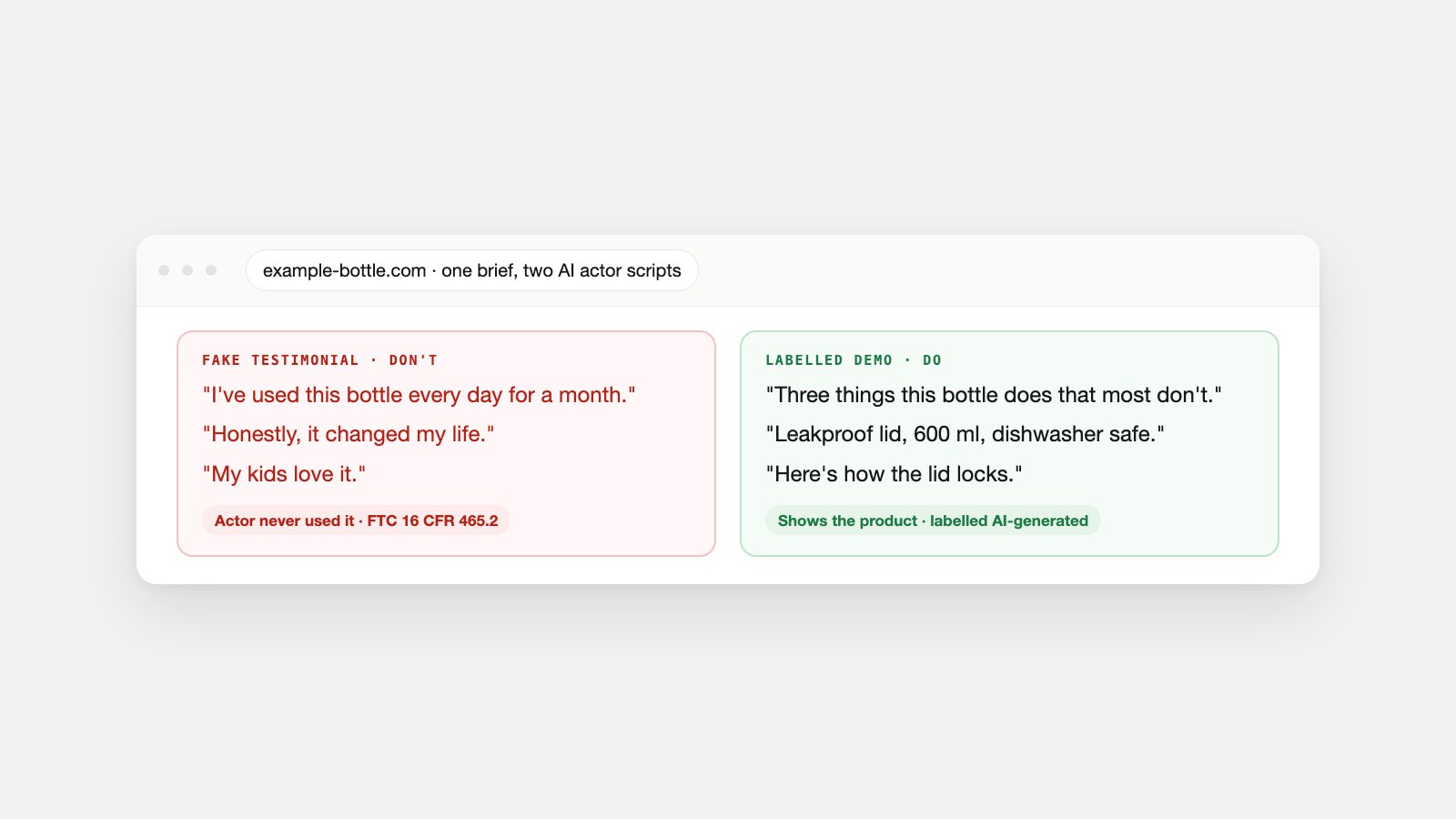
- The rule that matters more than the tool: an AI actor must never claim to have used your product. That's a fake testimonial under the FTC's 2024 rule. Script demos, not reviews, and label the video as AI.
What a UGC-Style AI Ad Actually Is
UGC means user-generated content: a real customer filming themselves talking about a product, usually on a phone, in vertical video. It works in ads because it looks like a recommendation from a person, not a commercial. A UGC-style AI ad copies that format with an AI-generated presenter, often called an AI actor or AI avatar, who reads a script to camera.
The appeal is speed. Instead of finding, briefing and paying a creator for every new hook, you can test ten openings in an afternoon and keep the two that work. The risk is in the same feature: the format borrows the trust people give real customers. That's why the rules below matter as much as the software.
The Legal Line: Demo, Not Testimonial
In 2024 the U.S. Federal Trade Commission finalized its rule banning fake reviews and testimonials. The regulation, 16 CFR 465.2, makes it unlawful for a business to create a consumer testimonial that materially misrepresents "that the reviewer or testimonialist exists" or "used or otherwise had experience with the product." The FTC's announcement names AI-generated fake reviews specifically.
An AI actor doesn't exist and hasn't used your product. So a script where the actor says "I've used this every day for a month and my skin has never been better" is exactly what the rule describes. A script where the actor presents the product, explains what it does, shows it in use and is labelled as AI is a different thing: a demonstration, not a testimonial.
| Script line | Why | Use instead |
|---|---|---|
| "I've used this for 30 days and…" | Claims experience the actor can't have | "Here's what happens in the first 30 days…" |
| "Honestly, this changed my life." | Presents an opinion as a real customer's | "Three things this does that most bottles don't." |
| "My kids love it." | Invents a personal story | "Built for school bags: leakproof, 600 ml, dishwasher safe." |
| "Rated 4.9 by 10,000 customers" (if untrue or unsourced) | A false or unverifiable claim | Real, current figures only, from your own data |
Platforms add their own rules. TikTok's AI-generated content policy requires creators to label all AI-generated content that contains realistic images, audio and video, using its "creator labeled as AI-generated" label or a clear note in the caption. TikTok may also apply an "AI-generated" label automatically when a file carries C2PA Content Credentials. Real creators you pay still need to disclose the partnership, as the FTC's Disclosures 101 for influencers explains. This isn't legal advice; if you advertise in regulated categories such as health or finance, check with a lawyer.
How We Scored the Tools
We looked at what a small marketing team needs from a video ad generator: ads that sound like the brand, show the real product, stay within the rules and fit into a weekly testing routine. Ten points, with the leader on each:
| Question | Who leads | Why |
|---|---|---|
| Is the script grounded in my brand, not generic? | CMO Owls | Owl Cam writes from your brand profile, brand voice, design guide and notes. |
| Does it avoid inventing product claims? | CMO Owls | Owl Cam and Owl Studio use only what you provide and say so when something's missing. |
| Does the product look like my real product? | CMO Owls | Owl Studio uses your own photos as the storyboard instead of drawing the product. |
| Can I match the presenter to my buyer? | CMO Owls | Each of 500+ personas has a profession, city, nationality and years of experience. |
| Do new videos open differently? | CMO Owls | Owl Cam steers away from your last 15 hooks. |
| Does it fit a content plan? | CMO Owls | Video slots appear in Scheduler Owl's calendar next to articles and posts. |
| Is there a path to real creators? | CMO Owls | Owl Match connects winning messages with real creators. |
| Does it guide responsible use? | CMO Owls | Built-in guidance to label AI, keep claims true and add captions. |
| Longer videos and more formats | HeyGen, Creatify | Up to 30 minutes (HeyGen) or 10 minutes (Creatify); CMO Owls is fixed at 15 seconds, 9:16. |
| Languages, dubbing and built-in editing | HeyGen, Creatify | 175+ languages and voice cloning (HeyGen); templates and editing tools (Creatify). CMO Owls adds no captions. |
The Four Tools at a Glance
| Tool | Presenters | Video length | Free option | Entry paid price |
|---|---|---|---|---|
| CMO Owls | 500+ personas (Owl Cam) or your product photos (Owl Studio) | 15 s, vertical 9:16 | Free plan (no video) | Premium, $204/mo billed annually, 8 videos plus the rest of the plan |
| Creatify | 1,500 AI actors on Pro, plus custom avatars | Up to 10 min on Pro | 10 credits/mo, up to 2 video ads, watermarked | Pro $55/mo, or $44/mo billed annually |
| HeyGen | 500+ stock avatars, custom and photo avatars | Up to 30 min on paid plans | 3 videos/mo, up to 1 min | Creator $29/mo |
| MakeUGC | 300+ AI actors on Starter | Not listed on the pricing page | Any plan for $1 to start | Starter $29/mo billed yearly (480p/720p) |
1. CMO Owls: Best for On-Brand, Rule-Safe Ads
CMO Owls has two video agents for two kinds of ad. Owl Cam makes persona-led ads: you pick a presenter from a library of more than 500, each with a profession, city and background, add a note about what to say, and it writes the hook and script from your brand profile, draws a storyboard and produces a 15-second vertical video. The persona changes how the script sounds, so a nurse and a contractor pitch the same product differently.
Owl Studio makes product ads without a presenter. You upload one to three product photos, a key message and a call to action, and your photos become the visual reference for the whole video. That solves the most common complaint about AI video ads: a product that looks slightly wrong, because the tool drew it from a description.
What sets them apart is restraint. Both write only from what you give them (your Knowledge Base, notes and website) and don't add features, claims or results. Owl Cam's guidance tells you to label videos as AI, keep claims true, test several personas and move winning messages to real creators through Owl Match. Video slots also appear in Scheduler Owl's monthly calendar, next to your articles and posts.
Price: videos are included from the Premium plan (8 a month at $204/mo billed annually), with 16 on Corporate and 30 on Enterprise, alongside articles, social posts and audits. See plans. Limits: every video is 15 seconds in 9:16, there's no caption burn-in or editor, and there's no dubbing into other languages yet.
2. Creatify: Best for Volume and Templates
Creatify is built for performance marketers who test many ads a week. Its Pro plan ($55 a month, or $44 billed annually) includes 280 credits a month, 1,500 realistic AI actors, three custom avatars, 500+ ad templates and videos up to 10 minutes. Its plans also list an Ad Launcher and an AI performance agent for Meta, TikTok and AppLovin, plus a competitor ad tracker.
The free plan gives 10 credits a month, enough for up to two video ads or 20 image ads, with a watermark. Best for ecommerce teams running constant creative tests. Limits: credits run out fast at volume, and the brand context comes from what you type into each project.
3. HeyGen: Best for Longer Videos and Many Languages
HeyGen is a general AI video platform that's widely used for ads, training and explainers. Its free plan makes three videos a month up to one minute, with 500+ stock avatars. Creator ($29 a month) adds 600 credits, videos up to 30 minutes, 1080p export, voice cloning and 175+ languages and dialects; Pro ($49) adds 4K and more credits.
Best for brands selling in several languages or making longer explainers alongside short ads. Limits: it's a video studio, not an ad strategist, so hooks, angles and claims are up to you.
4. MakeUGC: Cheapest Way to Experiment
MakeUGC lets you try any plan for $1. Starter costs $29 a month billed yearly for 500 credits, 300+ AI actors and 480p or 720p export. Growth ($39 billed yearly) adds HD to 4K export, 500+ actors and one custom avatar; Pro ($79) adds 1,000+ actors and unlimited parallel jobs. It supports 50+ languages and accents.
Best for testing whether AI-presenter ads work for your product before committing. Limits: Starter's 480p/720p export is low for paid placements, and annual billing is needed for the advertised prices.
How to Make and Test an AI UGC-Style Ad in a Week
- Write one message per ad. One problem, one benefit, one call to action. Pull the facts from your product page so nothing is invented.
- Write three hooks for the first two seconds: a question, a surprising fact and a visual demonstration. People can scroll past in a second, so the opening carries the ad.
- Pick two presenters that fit different buyers, or use your own product photos for a presenter-free version.
- Script it as a demo, using the table above. Never write first-person usage claims for an AI actor.
- Label and caption it. Add the platform's AI label and on-screen captions, since people often watch with the sound off.
- Tag the links with the UTM Builder so each version shows up separately in your analytics.
- Run all six combinations with a small, equal budget for a few days, keep the winner, and brief a real creator on it if it keeps winning. Our guide to finding influencers covers that step.
Plan the videos into the same calendar as your other content, so ads and organic posts tell the same story. Our content calendar guide shows how.
Common Mistakes With AI Video Ads
- First-person testimonials from AI actors. The fastest way into FTC trouble and lost trust.
- No AI label on realistic AI video, which TikTok requires.
- Inventing numbers ("10,000 happy customers") the script can't back up.
- A product that doesn't match reality, because the tool drew it from a prompt.
- Testing one hook at a time instead of several against each other.
- No captions for viewers watching muted.
- Sending every click to the homepage instead of a page that matches the ad's promise.
Questions About AI UGC Ad Tools
What is the best AI tool for UGC ads?
For on-brand ads that stay within the rules, CMO Owls. For long videos and many languages, HeyGen. For the biggest actor library and templates, Creatify. For a cheap trial, MakeUGC.
Are AI UGC-style ads legal?
Yes, when the AI actor presents the product rather than pretending to be a customer who used it. The FTC's rule on fake reviews and testimonials bans testimonials that misrepresent that the person exists or used the product.
Do I have to label AI-generated ads?
On TikTok, realistic AI-generated content must be labelled. Other platforms and countries have their own rules, so labelling every AI-presenter ad is the safe default.
Is there a free script-to-video AI tool?
HeyGen's free plan makes three videos a month up to one minute, and Creatify's free plan allows up to two video ads with a watermark. Free plans are fine for testing, not for running ads.
How long should a UGC ad be?
Start short, around 15 to 30 seconds for Reels, TikTok and Shorts, with the hook in the first two seconds. Then test lengths against each other, because the right length depends on the product.
Do AI actor ads perform as well as real creators?
It depends on the product and audience, so test both. Many brands use AI actors to find a winning message quickly, then pay a real creator to deliver it.
Can an AI actor say they use my product?
No. An AI actor hasn't used anything, so a first-person usage claim is a fake testimonial. Script the actor as a presenter or demonstrator instead.
What's the difference between Owl Cam and Owl Studio?
Owl Cam uses an AI persona who speaks to camera. Owl Studio has no presenter and builds the ad from your own product photos. Both make 15-second vertical videos.
Rules and Pricing Pages We Checked
- Creatify pricing, checked October 17, 2026.
- HeyGen pricing, checked October 17, 2026.
- MakeUGC pricing, checked October 17, 2026.
- FTC announces final rule banning fake reviews and testimonials, Federal Trade Commission, August 2024.
- 16 CFR Part 465: Use of consumer reviews and testimonials, Electronic Code of Federal Regulations.
- Disclosures 101 for social media influencers, Federal Trade Commission.
- About AI-generated content, TikTok Support.
- Coalition for Content Provenance and Authenticity (C2PA).