In Brief
- A content calendar is a dated plan of what you'll publish, where, and why: the article, the post, the email, the video.
- The calendars that last start from one goal a month, take topics from real demand (your search data and customer questions), and set a pace you can keep.
- A spreadsheet is enough. Columns for date, channel, format, topic, goal, owner and status cover almost every small business.
- Plan a month at a time, review it at the end, and reuse one idea across several formats instead of inventing a new one every day.
Why Most Content Calendars Get Abandoned
It's rarely the template. In the Content Marketing Institute's 2025 B2B research, 58% of marketers rated their content strategy only "moderately effective," and 42% of those said the reason was a lack of clear goals. Nearly half (45%) said they had no scalable model for creating content. A calendar can't fix a missing goal; it just makes the gap visible on a grid.
So we'll build one the other way round: goal first, topics second, dates last. The example is a made-up physiotherapy clinic, example-physio.com, planning January. Swap in your own business as you go.
Step 1: Decide What This Month Is For
Pick one outcome. The clinic's is simple: fill January's appointment slots for back and neck pain, which always rise after the holidays. Everything on the calendar has to earn its place against that goal. Posts that don't serve it can wait for February.
Then pick the channels you can genuinely keep up. The clinic chose its blog, Instagram, a monthly email to past patients and replies to Google reviews. LinkedIn got one post a week for its workplace physio service. TikTok was skipped: nobody had time to do it well.
Step 2: Find Topics People Are Already Asking About
Good topics are found, not brainstormed. Four places to look, in order of how much they're worth:
- Your own search data. In Search Console's Performance report, look at queries you already appear for but rarely get clicks on. For the clinic: "lower back pain after sitting" and "physio or chiropractor."
- Customer questions. What do people ask on the phone, at the desk and in reviews? Write down the exact wording.
- Seasonal demand. Google Trends shows when interest in a topic rises; the Keyword Planner gives rough monthly volumes. January means New Year fitness injuries and desk-job resolutions.
- Competitor gaps. Topics competitors rank for that you don't. Our guide to SEO competitor analysis shows how to find them.
The test for every topic is the one in Google's guidance on helpful, people-first content: would someone who came to you for this leave feeling they learned enough to act? The clinic ended up with four article topics, one per week, and about fifteen short-post ideas that came out of them.
Step 3: Set a Pace You Can Keep
This is where most calendars break: a burst of posts in week one, nothing by week three. Three rules keep it honest:
- Weekdays only, spread evenly. If you have eight items for a month, space them out across the working days rather than front-loading them.
- Mix the formats. Don't stack three articles on Monday and nothing else all week. One long piece, then short posts that point back to it.
- Leave slack. Keep one day a week empty for things you couldn't predict: a review that needs a reply, a news story worth reacting to.
For the clinic: one article every Monday, an Instagram post on Tuesday and Thursday, a short video on Wednesday reusing Monday's article, LinkedIn on Thursday, and the past-patient email on the first Friday.
Planning Around Key Dates
A content calendar works best on top of a simple marketing calendar: the dates in your year that change what customers want. Mark them once, at the start of the year, and each month's plan starts half-written.
- Seasonal peaks in your trade: January for back pain and fitness injuries, spring for garden services, autumn for heating repairs.
- Your own dates: launches, price changes, opening anniversaries, events you're attending.
- Public and cultural dates your customers care about, from bank holidays to back-to-school.
- Industry deadlines: tax dates, renewal periods, trade shows.
Plan content a few weeks before each date, not on it. People search for "how far in advance to book" well before the day itself, and pages need time to be found.
Step 4: Write It Down (the Template)
A content calendar template needs seven columns. Copy these into Google Sheets, Excel, Notion or Airtable; the tool matters far less than the habit.
| Column | What goes in it | Example |
|---|---|---|
| Date | The day it goes live | Mon 5 Jan |
| Channel | Where it's published | Blog |
| Format | Article, post, video, email, reply | Article |
| Topic / working title | What it's about, in the searcher's words | Lower back pain after sitting: 5 fixes |
| Goal | What it should achieve | Book a back-pain assessment |
| Owner | Who makes it | Sam |
| Status | Idea, drafting, ready, published | Drafting |
Add a link column once things go live, and a notes column for what happened: clicks, bookings, replies. That's what makes next month's planning faster.
The Finished Month
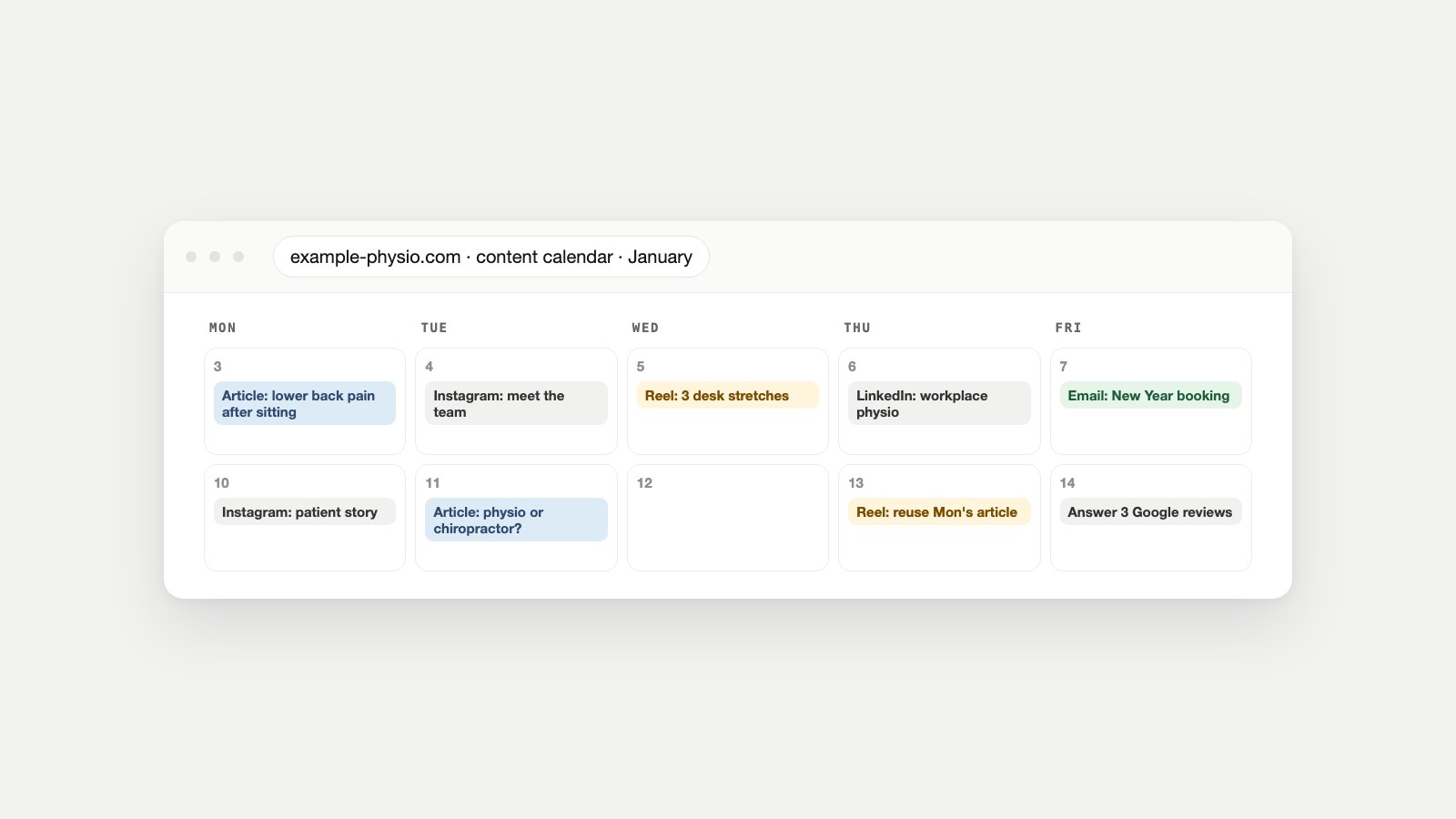
Here's the clinic's first two weeks of January. Notice how often one idea appears in more than one format: Monday's article becomes Wednesday's video and Thursday's LinkedIn post.
| Day | Channel and format | Topic | Goal |
|---|---|---|---|
| Mon 5 | Blog article | Lower back pain after sitting: 5 fixes | Back-pain bookings |
| Tue 6 | Instagram post | Meet the team: who you'll see | Trust |
| Wed 7 | Short video | 3 desk stretches (from Monday's article) | Article visits |
| Thu 8 | LinkedIn post | What workplace physio costs an employer | Business enquiries |
| Fri 9 | New Year booking reminder for past patients | Bookings | |
| Mon 12 | Blog article | Physio or chiropractor? How to choose | Bookings |
| Tue 13 | Instagram post | A patient's recovery story (with consent) | Trust |
| Wed 14 | Short video | Physio vs chiro in 30 seconds | Article visits |
| Thu 15 | Google reviews | Reply to the week's reviews | Reputation |
| Fri 16 | (Empty) | Slack for the unexpected | — |
One Idea, Five Pieces
The clinic's calendar looks busy, but it was built from only four ideas. That's the trick that keeps a small team going: make one substantial piece, then cut it down for each channel instead of starting from a blank page every day.
- The article (Monday): "Lower back pain after sitting: 5 fixes," written to answer the search properly.
- A short video (Wednesday): the three stretches from the article, filmed in under a minute.
- An Instagram carousel (the following week): the five fixes, one per slide, linking to the article.
- A LinkedIn post (Thursday): the same problem framed for employers, pointing to the workplace physio service.
- An email line (end of the month): "Our most-read article this month" in the past-patient newsletter.
Each version is a few minutes' work once the article exists, and each one sends people back to the page that converts.
Content Calendar Examples for Other Businesses
The clinic's rhythm won't suit everyone. Here's how the same approach looks for three other kinds of business:
| Business | Weekly rhythm | Where topics come from |
|---|---|---|
| Online shop | One buying guide or how-to article, two product posts, one email | Product questions, size and fit queries, seasonal sales dates |
| B2B service firm | One in-depth article every two weeks, two LinkedIn posts a week, one case study a month | Sales-call questions, comparison searches, industry deadlines |
| Local restaurant or café | Two Instagram posts, one short video, review replies, a monthly menu update | Seasonal dishes, local events, the questions people ask when booking |
The pattern is the same in all three: one piece with real substance, several small pieces around it, and a slot for replying to people.
Where to Keep Your Content Calendar
- Google Sheets or Excel: the fastest start, easy to share, and enough for most small teams.
- Notion, Airtable, Trello or Asana: better when several people work on each piece and you want a board view by status.
- Canva's planner or your social tool: handy for visual posts, but keep the master plan somewhere that includes your blog and email too.
- Google Calendar: good for reminders, bad as the plan itself. Use it to ping the owner, not to hold the content.
Most platforms let you schedule ahead once the calendar is set. LinkedIn lets you schedule a post between 10 minutes and three months in advance; YouTube lets you set a publish time for videos; Meta Business Suite schedules Facebook and Instagram posts from one place. Before scheduling links, check how they'll preview with the Open Graph Checker.
Can ChatGPT Make a Content Calendar for You?
It can draft one in seconds, and that's both the appeal and the problem. A chatbot doesn't know what your customers searched last month, which topics you already rank for, or what your competitors cover. Give it that context (your goal, your real topic list from step 2, your channels and your pace) and it's a useful formatting assistant. Without it, you get a generic grid of "Motivation Monday" posts. Our guide to AI marketing assistants covers what to hand over and what to keep.
This is the part CMO Owls automates from real data. Game Plan Owl builds each month's content roadmap from your audit findings, competitor keyword gaps and Search Console queries, and sets a posting rhythm per channel. Scheduler Owl then lays that month's items across the working days, mixed by channel and spaced evenly, and opens the right agent when an item is due: Owlthor for articles, X Owl for threads, LinkedIn Owl for posts, Reddit Owl for replies and Owl Cam for video.
If you want to go further and automate more of the routine, our guide to small business marketing automation covers what's worth automating first, and our guide to AI marketing tools for small business sorts the options by job.
Reviewing the Month
On the last Friday, spend 30 minutes with the calendar and your numbers. Which pieces got clicks, bookings or replies? Which did you skip, and why? Drop the formats that cost more than they returned, keep the ones that worked, and carry unfinished ideas into next month. If an article got impressions but few clicks, rewrite its title and meta description. Run a quick SEO audit once a quarter so the pages you're promoting are actually in good shape.
Quick Answers
What should a content calendar include?
At minimum: the date, channel, format, topic, goal, owner and status of each piece. A link and a notes column for results make it far more useful over time.
How far ahead should I plan my content calendar?
A month at a time works for most small businesses, with a rough list of themes for the quarter. Planning further ahead in detail usually means rewriting it anyway.
How many posts should be on a content calendar?
As many as you can make well and keep up. One strong article a week plus a few short posts that reuse it beats daily posting that stops after three weeks.
Is a content calendar the same as a content strategy?
No. The strategy decides who you're trying to reach and why; the calendar is the dated plan that carries it out. A calendar without a strategy is just a list of posts.
What is the best free content calendar template?
A spreadsheet with seven columns (date, channel, format, topic, goal, owner, status) covers almost every small business. Start there before paying for a tool.
What's the difference between a content calendar and a social media calendar?
A social media calendar covers only social posts. A content calendar covers everything you publish (articles, email, video and social) so you can see how the pieces support each other.
How do I make a content calendar in Google Sheets?
Create the seven columns, add one row per piece of content, and use a dropdown for status. Sort by date, filter by channel, and add conditional colours for overdue items.
Sources
- B2B Content Marketing Benchmarks, Budgets, and Trends: Outlook for 2025, Content Marketing Institute and MarketingProfs.
- Performance report (Search results), Search Console Help.
- Creating helpful, reliable, people-first content, Google Search Central.
- Google Trends, Google.
- Use Keyword Planner, Google Ads Help.
- Schedule posts, LinkedIn Help.
- Schedule video publish time, YouTube Help.
- Create and manage posts in Meta Business Suite, Meta Business Help Center.