A small business owner repeats the same marketing tasks every week: thank new customers, ask for reviews, post on social, chase enquiries, check the numbers. Small business marketing automation turns those repeats into workflows that run on their own, so the owner only steps in where judgment matters. This guide shows the seven workflows to automate first, what to keep human, the email and review rules that apply, and how to set up your first automation in an afternoon. It's part of our guide to AI marketing for small business.
Key Takeaways
- Small business marketing automation means a trigger starts an action automatically, such as a purchase sending a thank-you email.
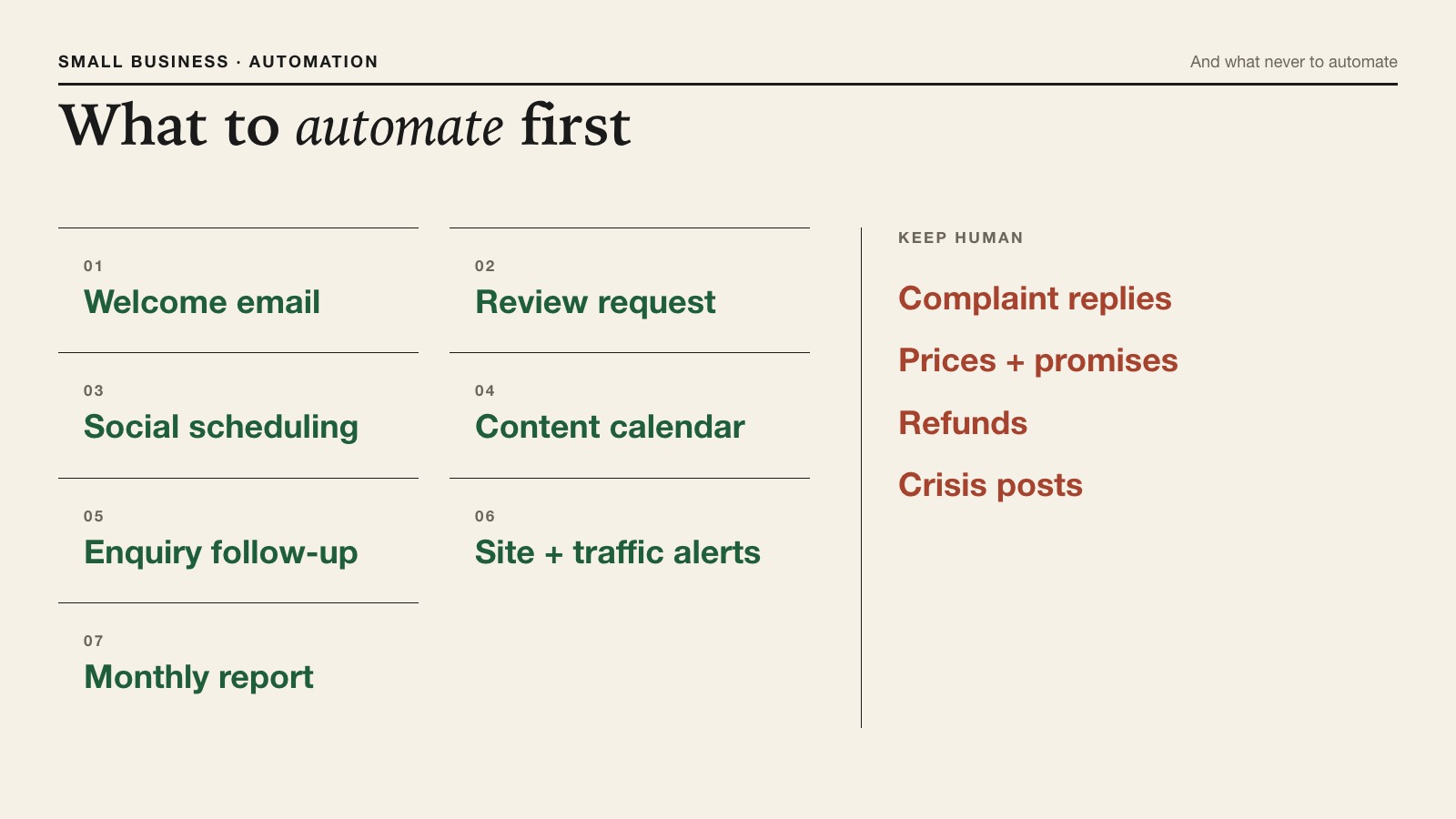
- Automate first: welcome emails, review requests, social scheduling, the content calendar, enquiry follow-ups, traffic alerts and monthly reports.
- Never automate complaint replies, pricing promises, refunds or public statements.
- Email and review law still apply: honour opt-outs within 10 business days, and never pay for positive-only reviews.
- Start with one workflow, check it for two weeks, then add the next.
What Small Business Marketing Automation Is
Small business marketing automation is software that performs a marketing task automatically when something happens, like a signup, a purchase, a date or a drop in traffic. Every automation has three parts: a trigger, an action and a check.
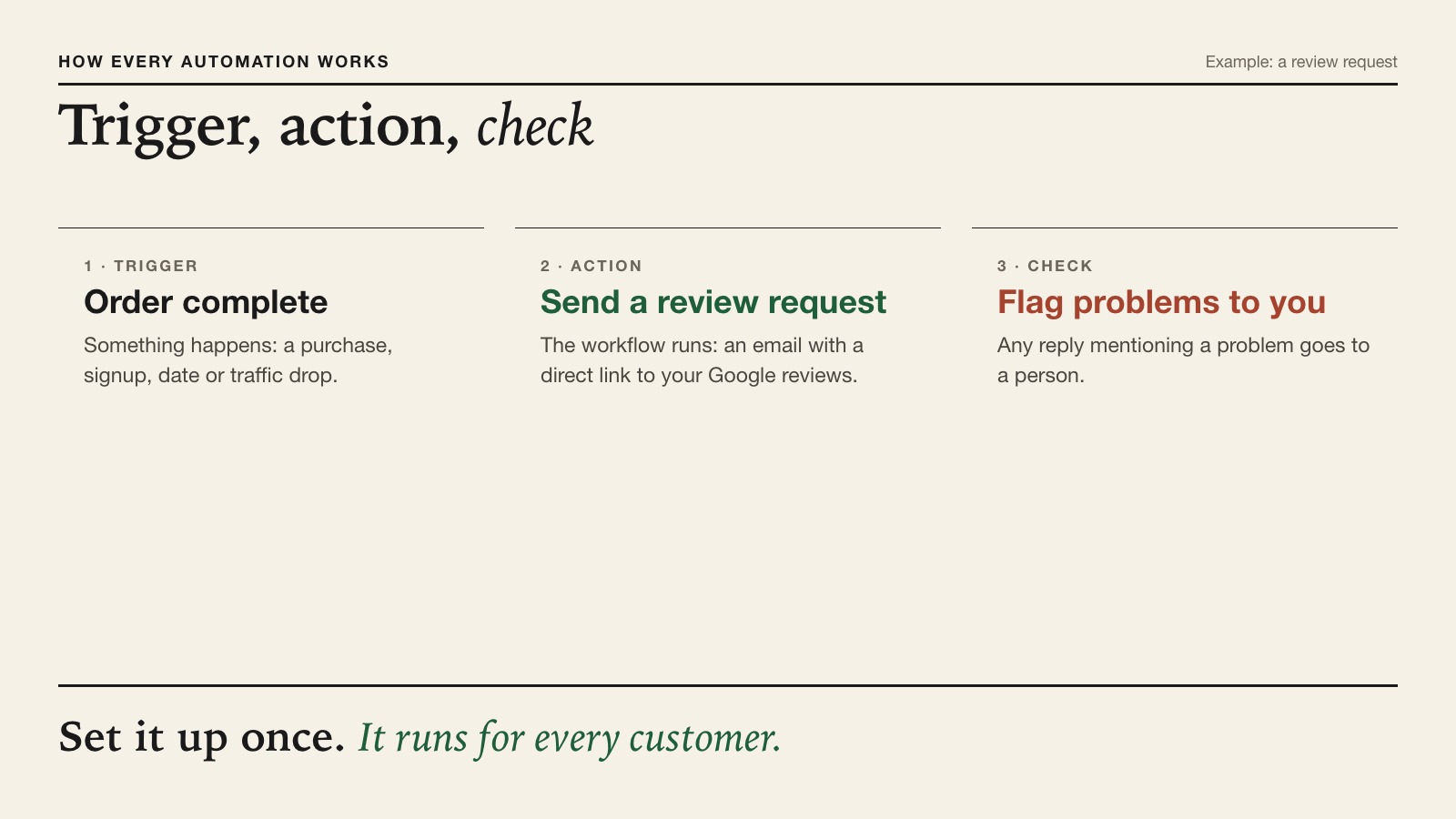
For example: when an order is marked complete (trigger), send a thank-you email with a link to leave a review (action), and flag any reply that mentions a problem for the owner to read (check). Set it up once and it runs for every customer.
It matters more for small firms because there's no team to absorb the repeats. Small businesses make up 99.9% of US firms, and most have no marketing staff at all.
Rule-Based Automation vs AI Agents
Rule-based automation follows fixed steps you define; AI agents read your data and decide what to draft or flag next. Most small businesses benefit from both.
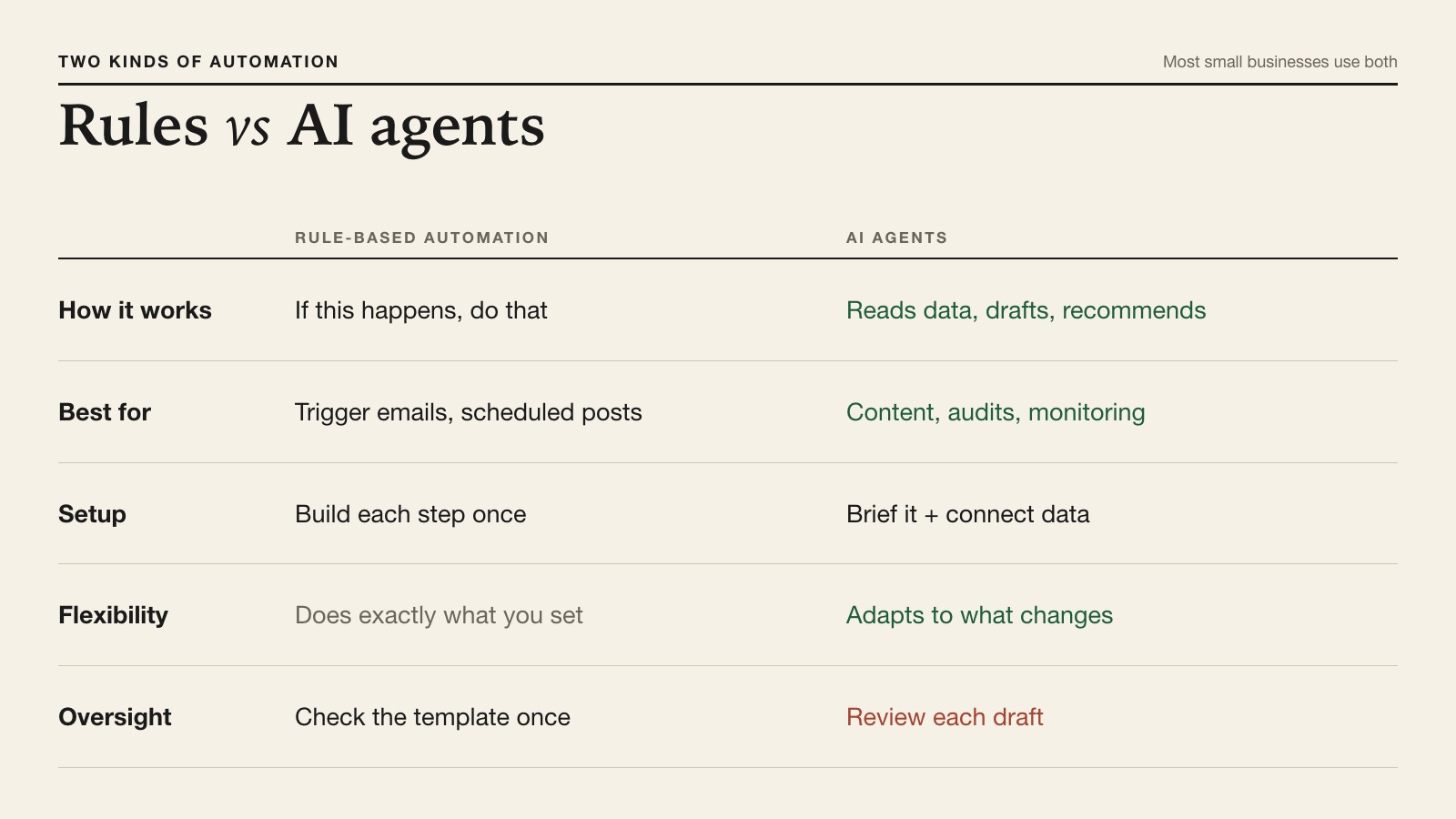
| Factor | Rule-based automation | AI agents |
|---|---|---|
| How it works | If this happens, do that | Reads data, drafts or recommends |
| Best for | Emails on a trigger, scheduled posts | Content, audits, monitoring, priorities |
| Setup | Build each step once | Give it a brief and connect your data |
| Flexibility | Does exactly what you set | Adapts to what changes |
| Oversight | Check the template once | Review each draft before it goes out |
Adoption is uneven. The U.S. Chamber of Commerce found 58% of small businesses use generative AI, but the Census Bureau found fewer than 20% of the smallest firms use AI in their operations. Automation is how you move from occasional use to something that runs every week.
What to Automate First: 7 Workflows for a Small Business
Automate the workflows that repeat most and carry the least risk first. These seven cover most small businesses:
- Welcome email. Trigger: someone joins your list or buys for the first time. Action: a short thank-you with what to expect next. Runs in your email platform.
- Review request. Trigger: an order or appointment is complete. Action: a polite request with a direct link to your Google review page, sent to every customer, not just happy ones.
- Social scheduling. Trigger: a weekly slot. Action: approved posts go out on schedule. X Owl and the other social owls draft posts from your real findings for review.
- Content calendar. Trigger: the start of the month. Action: the month's content spread across real days. Scheduler Owl does this so you always know what's due today. To set one up by hand first, see our guide to creating a content calendar.
- Enquiry follow-up. Trigger: a form submission. Action: an instant confirmation and a reminder to you if nobody has replied within a working day.
- Site and traffic alerts. Trigger: a broken page or a drop in visits. Action: an alert with the page named. Watch Owl crawls your site for broken links and failing forms, and Cash Cow Stalker checks your top pages for traffic changes every five days.
- Monthly report and next steps. Trigger: month end. Action: a plain summary of what worked and a ranked to-do list. Game Plan Owl turns every agent's findings into one prioritised roadmap.
Email flows (1, 2 and 5) belong in your email platform, which handles your list and opt-outs. CMO Owls covers the content, social, site and reporting workflows. For help choosing the platforms themselves, see AI marketing tools for small business.
What Not to Automate
Don't automate anything where a wrong word costs money or trust. Keep these with a person:
- Replies to complaints and negative reviews. Let AI draft, but a person reads and sends.
- Prices, discounts and promises. A wrong number in an automated message is still your offer.
- Refunds and account issues. These need judgment and often a conversation.
- Public statements and anything sensitive. A scheduled post during a crisis can do real damage, so pause automations when something goes wrong.
The Rules Your Automations Must Follow
Automated marketing is covered by the same laws as any other marketing, and mistakes repeat at scale. Three rules matter most for a small business:
- Email (CAN-SPAM). The FTC's guide lists clear requirements: no misleading headers or subject lines, identify ads, include your physical address, and give a clear way to opt out, honoured within 10 business days. Each violating email can cost up to $53,088.
- Reviews (FTC rule). Since October 2024, the FTC's rule bans fake reviews, including AI-generated ones, and paying or rewarding customers for reviews that must be positive. Ask everyone, and accept what they say.
- Review replies (Google). Google says replying to reviews shows customers you value their feedback. Automate the reminder to reply, not a canned response.
If an automation writes text with AI, Google's guidance applies too: content should help people, and AI output should be fact-checked before publishing. And handle customer data carefully; the FTC's guide to protecting personal information is a practical checklist.
How to Set Up Your First Automation in an Afternoon
Pick one workflow, write it down, build it, test it on yourself, then switch it on.
- Choose the workflow. The review request is the best first one for most local businesses.
- Write the trigger, action and check on paper. One sentence each.
- Draft the message. Use AI for a first draft, then edit it into your own voice. Keep it short.
- Build it in your tool and add the legal basics: your address and an opt-out for emails.
- Test it on yourself. Place a test order or submit your own form and read exactly what a customer gets.
- Switch it on and check weekly for two weeks. Then add the next workflow.
Before automating posts and content, make sure your site itself works. A quick crawl catches broken links, and the free AI Visibility Checker confirms that search and AI crawlers can read your pages.
Example: A Week of Automation at a Local Salon
Here's how the seven workflows fit together for one small business, a two-chair hair salon with an online booking page:
- Monday: the content calendar shows this week's post (a seasonal colour offer) and a short article on aftercare. Both drafts wait for the owner's approval.
- Tuesday: a new client books online. The welcome email goes out instantly with directions, parking and what to expect.
- Wednesday: after each appointment is marked complete, a review request goes to every client with a link to the salon's Google reviews.
- Thursday: a three-star review mentions a long wait. The owner gets an alert and writes the reply personally, using an AI draft as a starting point.
- Friday: the traffic alert shows the booking page had fewer visits than usual. The site crawl finds a broken link from the homepage, which gets fixed the same day.
Total owner time: roughly an hour of approvals and one personal reply. Everything else ran on its own, inside the rules.
Common Marketing Automation Mistakes
- Automating before the message is right. A weak email sent automatically is a weak email sent to everyone. Get the words right by hand first.
- Never checking it again. Links break, offers end and opening hours change. Review every live workflow monthly.
- Asking only happy customers for reviews. Filtering who you ask skews your reviews and misleads future customers. Ask everyone.
- Forgetting the opt-out. Every commercial email needs one, and it has to work.
- Letting posts run during bad news. Pause scheduled content when something goes wrong, so a cheerful post doesn't land at the worst moment.
How to Measure Your Automations
Measure each automation by the result it exists for, not by how busy it looks. Review requests should mean more reviews; follow-ups should mean faster replies; content and posts should mean more visits and enquiries in Google Analytics. Check monthly. If a workflow isn't moving its number after two months, rewrite it or turn it off. Your AI marketing assistant can prepare this summary each week.
FAQ
What is small business marketing automation?
It's software that runs marketing tasks automatically when something happens, such as a purchase or a signup. It saves time on repeat work while the owner keeps control of judgment calls.
What should a small business automate first?
A review request after each sale and a welcome email for new customers. Both are simple, low-risk and pay off quickly.
Is marketing automation expensive for a small business?
No. Many email and scheduling tools have free tiers, and all-in-one platforms such as CMO Owls start with a free plan. The bigger cost is the time to set it up well.
Can I automate review requests legally?
Yes, as long as you ask all customers and don't pay or reward them for positive reviews. The FTC's rule bans fake reviews and reviews bought to express a particular opinion.
What's the difference between marketing automation and AI marketing?
Marketing automation follows fixed rules you set. AI marketing uses AI to draft, analyse or recommend, and the two work best together.
Do automated emails need an unsubscribe link?
Yes. Under CAN-SPAM, commercial emails need a clear way to opt out, and opt-outs must be honoured within 10 business days.
Will automation make my marketing feel robotic?
Only if you let it. Write the messages in your own voice, keep them short, and keep a person on replies and anything sensitive.
How many automations does a small business need?
Start with one or two and grow to around seven. More than that is usually hard to keep checked.
The Verdict
Small business marketing automation pays off when it starts small and stays checked. Automate the seven repeat workflows, keep people on complaints, prices and public statements, and follow the email and review rules every time. Then read the hub guide to AI marketing for small business for the full picture.
Sources
- FTC, CAN-SPAM Act compliance guide for business.
- FTC, final rule banning fake reviews and testimonials, August 14, 2024.
- FTC, Protecting Personal Information: A Guide for Business.
- Google Business Profile Help, reading and replying to reviews.
- Google Search Central, using generative AI content.
- Google Analytics Help, How Google Analytics works.
- U.S. Chamber of Commerce, Empowering Small Business, August 18, 2025.
- U.S. Census Bureau, AI use by business size, May 26, 2026.
- SBA Office of Advocacy, small business count, June 30, 2025.