Key Takeaways
- Bing Webmaster Tools is Microsoft's free dashboard for seeing how Bing crawls and ranks your site, the equivalent of Google Search Console.
- It matters more than Bing's market share suggests: Bing powers Microsoft Copilot, and Microsoft announced in 2023 that Bing would be the default search experience in ChatGPT.
- Setup takes about 15 minutes if you import your site from Google Search Console, which brings your verified sites and sitemaps across.
- Since February 2026, a free AI Performance report shows how often your pages are cited as sources in Copilot and Bing's AI answers.
Why Bing Matters Even If Nobody You Know Uses It
Bing reaches far more people than its search page does, because other products are built on it. On May 23, 2023, Microsoft announced that "Bing is coming to ChatGPT as the default search experience". Microsoft Copilot answers questions using Bing's index too.
AI assistants also run their own crawlers. OpenAI documents OAI-SearchBot, which finds pages for ChatGPT's search features, and our guide to AI crawlers covers the rest. But Bing is a search engine you can actually monitor and influence directly, with a free dashboard, which most of your competitors have never opened.
If you've set up Google Search Console and stopped there, Bing is the cheapest visibility gain left on the table. Our new website SEO case study explains why we submitted our own sitemap to both on day one.
The 15-Minute Setup
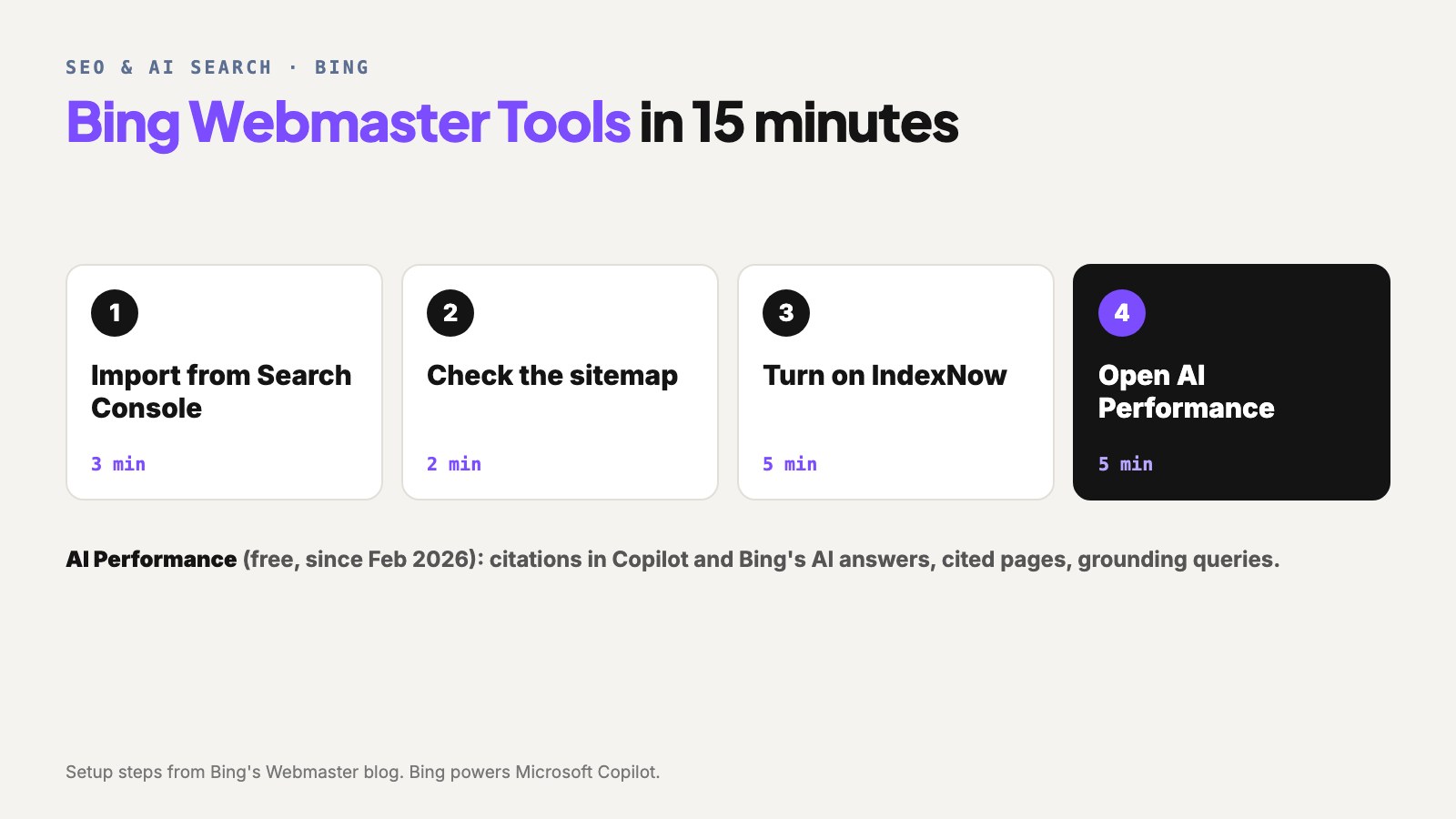
Four steps, in this order.
Step 1: Import your site from Google Search Console (3 minutes)
Bing lets you skip verification by importing from Google. Its announcement of the import feature describes the steps: sign in to Bing Webmaster Tools with a free account, open the My Sites page, choose Import, sign in to your Google Search Console account, approve access, and pick the sites to add. Your verified sites and sitemaps come across together.
If you don't use Search Console, you can verify with a meta tag, an uploaded file or a DNS record instead.
Step 2: Check your sitemap (2 minutes)
Open the Sitemaps section and confirm your sitemap is listed and was read successfully. If it wasn't imported, submit its address, usually yoursite.com/sitemap.xml. Our free Sitemap Checker finds errors before Bing does, and our sitemap guide explains what belongs in one.
Step 3: Turn on IndexNow (5 minutes)
IndexNow is an open protocol that lets your site tell participating search engines, including Bing, the moment a page is added, changed or deleted, instead of waiting for them to recrawl. Many platforms and SEO plugins support it with a toggle; otherwise, our free IndexNow Submitter sends URLs for you.
Step 4: Open the AI Performance report (5 minutes)
This is the newest and most useful part for small businesses. Read on.
The AI Performance Report: See When Copilot Cites You
On February 10, 2026, Bing launched AI Performance in public preview: a free report showing how your content appears in Microsoft Copilot, AI-generated summaries in Bing and select partner integrations. Bing's announcement lists what it shows:
| Metric | What it tells you | How to use it |
|---|---|---|
| Citations | How many times your pages were shown as sources in AI answers | Track the trend month by month |
| Cited pages | The average number of your pages cited per day | Shows how broad your AI presence is |
| Grounding queries | Key phrases the AI used when retrieving your content (a sample) | Write more about the topics AI already trusts you on |
| Page-level activity | Citation counts per URL | Find your most-cited pages and keep them fresh |
| Trends | Citation activity over time | Spot drops after site changes |
Be clear about what it covers: Microsoft's own AI surfaces and partners, not every assistant. It's still the only free, first-party report from a major search engine showing when AI cites your pages, and a useful signal of whether your content is being used at all.
How to Get Cited More Often in Copilot
The AI Performance report tells you what's working; your job is to do more of it. Three habits make the biggest difference.
- Answer one question per section. AI answers are built from passages. A section that opens with a direct, one- or two-sentence answer is easy to lift and cite.
- Keep your most-cited pages fresh. The page-level view shows which URLs Copilot already trusts. Update their facts, dates and examples first; they're your strongest assets.
- Write for the grounding queries. The sample of key phrases shows how the AI searched when it found you. If a phrase appears that you've only touched on, write a full page about it.
These are the same habits that help with Google's AI features and ChatGPT search, because every assistant prefers clear, specific, up-to-date pages. Bing simply gives you the clearest free view of whether it's working.
Other Reports Worth Checking
| Report | What to look for | How often |
|---|---|---|
| Search Performance | Clicks, impressions and queries from Bing | Monthly |
| URL Inspection | Whether a page is indexed and any problems | When a page isn't showing |
| Site Scan | A crawl that flags SEO issues on your pages | After big changes |
| Backlinks | Sites linking to you | Quarterly |
| Keyword Research | Search demand on Bing for your topics | When planning content |
Look at the queries in Search Performance alongside Google's. Bing's audience isn't the same as Google's, so the mix of queries can differ, and occasionally reveals demand you hadn't noticed. If you serve customers locally, also claim your free listing on Bing Places, which feeds Bing Maps. And whatever the search engine, Google's guidance on helpful, people-first content describes the kind of pages every engine and assistant prefers to show.
Bing Webmaster Tools vs Google Search Console
They do similar jobs for different search engines, so use both. The differences that matter for a small business:
| Feature | Bing Webmaster Tools | Google Search Console |
|---|---|---|
| Search performance (clicks, impressions, queries) | Yes, for Bing | Yes, for Google |
| Instant indexing protocol | IndexNow supported | Not supported |
| AI citation report | AI Performance (Copilot, Bing AI summaries) | No separate AI citation report |
| Import the other tool's sites | Yes, from Search Console | No |
| Built-in keyword research | Yes | No |
| URL inspection | Yes | Yes |
The practical routine: check Google Search Console weekly, Bing Webmaster Tools monthly, and use IndexNow so Bing hears about new pages the moment they go live.
A Monthly Bing Routine
- Open AI Performance and note citations and your most-cited pages.
- Look at the grounding queries for topics you could write more about.
- Check Search Performance for new queries and pages gaining impressions.
- Run Site Scan after any big site change and fix what it flags.
- Confirm the sitemap was read recently and IndexNow submissions are going through.
Ten minutes a month keeps Bing, and the AI products built on it, working from an accurate picture of your site.
Common Problems When Bing Won't Index You
- Your firewall blocks Bingbot. Some security settings challenge every crawler. Test with our free AI Crawler Access Test.
- Duplicate versions of your pages. Bing, like Google, needs one clear address per page; see our guide to canonical tags.
- Server errors at crawl time. Pages that fail when Bingbot visits can't be indexed; our guide to 5xx server errors explains how to catch them.
- A brand-new site with no links. Like Google, Bing finds sites faster when other sites link to them; see how to get backlinks for a new website.
- No sitemap. Submit one, and use IndexNow for updates.
How CMO Owls Covers Bing, Copilot and ChatGPT for You
Setting up Bing takes 15 minutes. Staying visible in Bing, Copilot, ChatGPT and Google takes constant work: clean pages, fresh content and someone checking what AI says about you. CMO Owls does that ongoing work so you don't have to.
| Category | Doing it yourself | A typical AI-visibility tracker | CMO Owls |
|---|---|---|---|
| Checks AI crawlers can reach you | Manual tests | Sometimes | Yes, instantly on your website report |
| Tracks what AI assistants say about you | Manual prompts | Yes | Yes, with Generative Engine Owl |
| Explains why AI skips you, with fixes | No | Rarely | Yes |
| Fixes the site problems behind it | You find them | No | Yes: Watch Owl checks every page and fixes simple issues |
| Writes the content AI can cite | You write it | No | Yes: Owlthor and Buzz Creator Owl |
| One plan across Google, Bing and AI | No | No | Yes |
- Generative Engine Owl measures what ChatGPT, Gemini, Claude and Google AI Overviews say about your brand and shows why AI skips you, with fixes.
- Watch Owl checks every page for the problems that stop crawlers, from server errors to broken links, and fixes simple issues on WordPress, Ghost, Shopify and GitHub.
- Buzz Creator Owl finds the questions people ask AI about products like yours and answers each one as an article, and Owlthor writes the articles that rank for your keywords.
When you add your website, the Overview shows within minutes which AI crawlers can read your site, your website grade and Watch Owl's first problems. Combine that with Bing's free AI Performance report and you can see both sides: whether AI can reach you, and whether it's citing you. For the Google and ChatGPT side, see how to check your AI visibility.
Mind Map: Bing Webmaster Tools
Frequently Asked Questions
Is Bing Webmaster Tools free?
Yes. Bing Webmaster Tools, including the AI Performance report, is free for any site you verify.
Does Bing Webmaster Tools help with ChatGPT?
It helps your site get indexed and understood by Bing, which Microsoft announced in 2023 as the default search experience in ChatGPT. ChatGPT also uses OpenAI's own crawler, so make sure OAI-SearchBot can reach your site too.
How do I add my site to Bing quickly?
Import it from Google Search Console from the My Sites page in Bing Webmaster Tools. Your verified sites and sitemaps come across without separate verification.
What is the Bing AI Performance report?
A free report, in public preview since February 2026, showing how often your pages are cited as sources in Microsoft Copilot, Bing's AI summaries and select partners, plus the queries behind those citations.
What is IndexNow?
An open protocol that lets your site notify participating search engines, including Bing, instantly when pages change, instead of waiting for a recrawl.
Do I need Bing Webmaster Tools if I already use Google Search Console?
Yes. They report on different search engines, and only Bing Webmaster Tools offers IndexNow submission and a report on Copilot citations. Importing from Search Console makes setup quick.
How long does Bing take to index a new site?
It varies with how easily Bing can find and crawl the site. Submitting a sitemap and using IndexNow helps Bing discover new pages faster than waiting for links.
Does the AI Performance report show ChatGPT citations?
It covers Microsoft Copilot, AI-generated summaries in Bing and select partner integrations. For other assistants, ask them directly or use a tracker that checks what they say about your brand.
Why isn't my site showing in Bing?
Common causes are a firewall blocking Bingbot, no submitted sitemap, server errors, duplicate pages or a new site with no links yet. URL Inspection in Bing Webmaster Tools shows the reason for a specific page.
The Next Step
Set aside 15 minutes today: import your site from Search Console, check the sitemap, turn on IndexNow and open AI Performance. Then add your website to CMO Owls to see which AI crawlers can read your site and have the Owls keep your pages and content ready for Bing, Copilot, ChatGPT and Google.
Sources
- Microsoft Build brings AI tools to the forefront for developers, Microsoft, 2023.
- Easily verify your site in Bing Webmaster Tools by importing from Google Search Console, Bing Webmaster Blog, 2019.
- Introducing AI Performance in Bing Webmaster Tools Public Preview, Bing Webmaster Blog, 2026.
- Bing Webmaster Tools, Microsoft, 2026.
- IndexNow documentation, IndexNow.org, 2026.
- Overview of OpenAI crawlers, OpenAI, 2026.
- Bing Places for Business, Microsoft, 2026.
- Creating helpful, reliable, people-first content, Google Search Central, 2026.