Key Takeaways
- A canonical tag is a line of code,
<link rel="canonical" href="...">, that tells search engines which address is the original version of a page when the same content is reachable at several addresses. - Duplicates are normal: http and https, with and without www, filters, sorting and tracking links all create extra addresses for the same page. Google says some duplicate content is normal and not a spam violation.
- Google treats redirects and canonical tags as strong signals, and a sitemap as a weak one. It's a preference, not an order: Google can still choose another version.
- Don't use robots.txt or noindex to handle duplicates. Google advises against both for choosing a canonical.
What a Canonical Tag Is
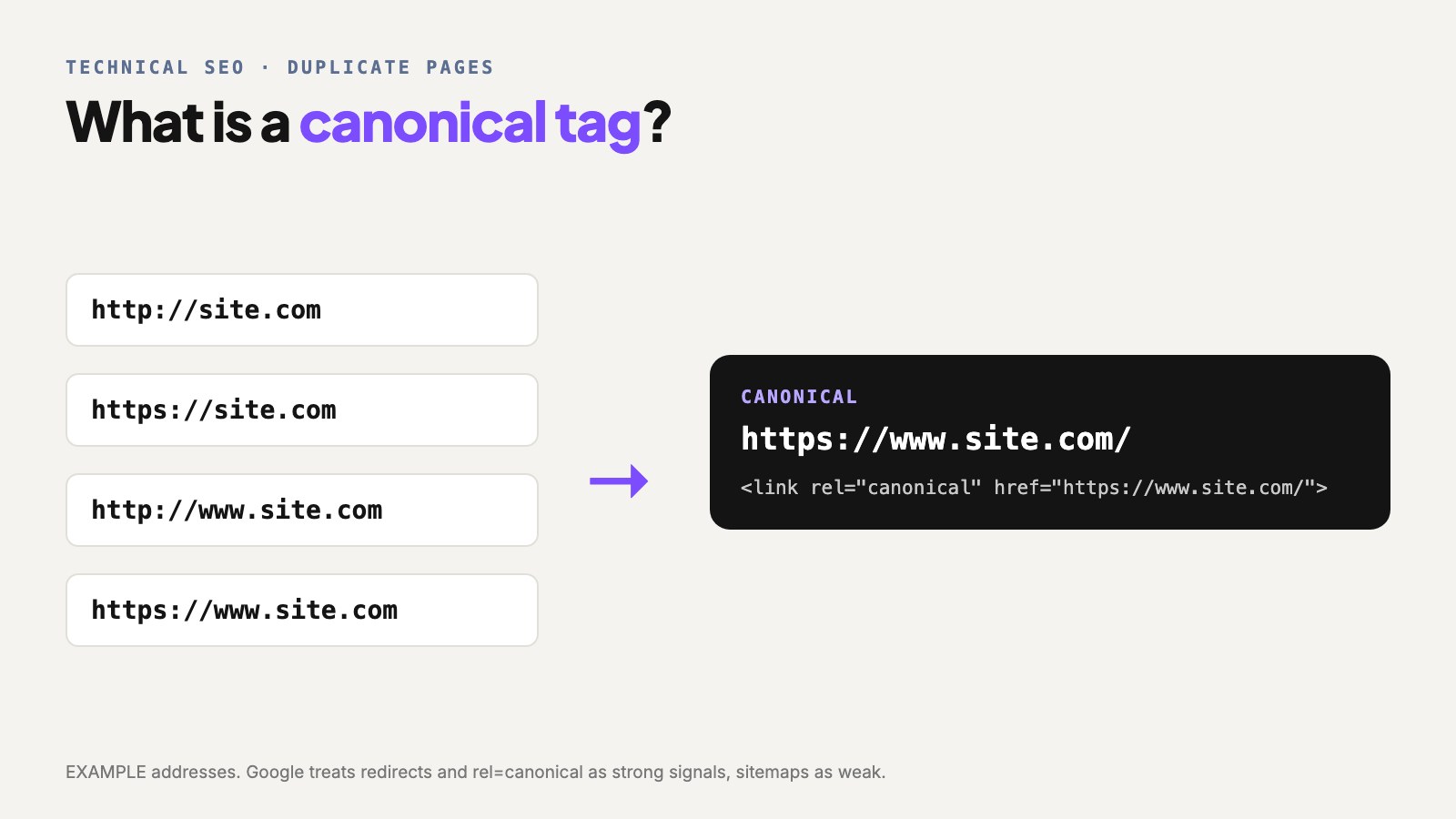
A canonical tag tells search engines: of all the addresses that show this content, this one is the original, so rank and count this one. It sits in the page's <head> and looks like this:
<link rel="canonical" href="https://www.yoursite.com/shoes/">
Google's guide to what canonicalization is defines a canonical URL as the URL Google chose as the most representative from a set of duplicate pages. The canonical link relation itself is an internet standard, published as RFC 6596 in 2012, and the rel attribute is documented on MDN.
Why it matters: when one page lives at several addresses, search engines have to guess which one to show. Rankings, links and data can end up split between the copies, or Google may show a version you'd rather it didn't, such as a URL full of tracking parameters.
Where Duplicate Pages Come From
Most duplicate pages aren't created on purpose; the website makes them. Google lists the usual causes in its canonicalization guide:
| Cause | Example | How common |
|---|---|---|
| Protocol variants | http://site.com and https://site.com | Very common on older sites |
| www and non-www | site.com and www.site.com | Very common |
| Sorting and filtering | /shoes?color=red, /shoes?sort=price | Almost every online shop |
| Tracking links | /shoes?utm_source=instagram | Every marketing campaign |
| Device or region variants | m.site.com, site.com/uk/ and /us/ | Larger sites |
| Accidental copies | A staging or demo site left open | Common after redesigns |
Your homepage alone can exist at four addresses: http, https, with www and without. Type all four into your browser. If they don't all end up at the same https address, you have duplicates. Our Redirect Checker shows where each one lands.
How Google Chooses the Canonical
Google weighs several signals and picks the version it thinks is best; your canonical tag is a strong hint, not a command. Its guide to consolidating duplicate URLs ranks the methods:
| Method | Strength | Best for |
|---|---|---|
| 301 redirect | Strong | Versions that shouldn't exist at all, like http or the non-preferred www |
| rel="canonical" tag (or HTTP header) | Strong | Versions that must stay reachable, like filtered or tracked URLs |
| Listing the URL in your sitemap | Weak | Supporting the other two |
Google adds that it generally prefers HTTPS over HTTP, unless the HTTPS version has problems like an invalid certificate. If you don't declare a canonical at all, Google picks what it considers the best version to show users.
Two methods to avoid: Google advises against using robots.txt for canonicalization, because blocked URLs can still be indexed without their content, and against noindex, because it removes the page from search entirely rather than consolidating it. Our guide to robots.txt explains what blocking really does.
Step by Step: Fix Duplicates on Your Site
- Pick one preferred address format: https, and either with or without www. Use it everywhere: links, sitemap, ads, social profiles.
- Redirect the other three homepage versions to it with permanent 301 redirects. Our guide to 301 redirects shows how on common platforms.
- Turn on HTTPS everywhere. Free certificates from Let's Encrypt are offered by most hosts. Google announced back in 2014 that it uses HTTPS as a ranking signal, and browsers warn visitors away from "Not secure" pages.
- Add a self-referencing canonical tag to every page, pointing at its own clean address. Most modern platforms do this automatically; check that yours does.
- Make filtered, sorted and tracked URLs point their canonical at the clean page. Google's guide to managing faceted navigation covers shops with many filter combinations.
- List only canonical URLs in your sitemap. Our sitemap guide explains why.
- Check what Google chose. In Search Console, the Page indexing report lists "Duplicate without user-selected canonical" and "Duplicate, Google chose different canonical than user". URL Inspection shows the canonical Google picked for any single page.
A Worked Example: One Product, Nine Addresses
Here's how duplicates pile up on a typical small online shop, and how canonicals clean them up. This is an illustrative example: a shop selling one pair of running shoes.
The product page is meant to live at https://www.shop.com/shoes/trail-runner/. But the same page also opens at the http version, at the non-www version, through the "Running" collection and the "Sale" collection, with a colour filter, sorted by price, and with three different tracking links from an Instagram post, a newsletter and an ad. That's nine addresses for one product.
Without guidance, Google picks one, possibly the Instagram tracking link, and any links other sites gave the product are spread across several versions. With the fixes above, it's simple: the http and non-www versions redirect to the https www version; every other variant carries a canonical tag pointing to the clean product address; and only that clean address appears in the sitemap. Nine addresses, one page in search.
The same logic applies to a services business with tracking links on every campaign, or a blog whose posts appear under several category paths. Once you look for duplicates, you find them everywhere.
Canonical Tags on Common Platforms
Most modern website platforms add a canonical tag for you, but apps, plugins and theme edits can break it, so check rather than assume.
- WordPress: core and the major SEO plugins output a canonical tag on posts and pages; check that only one appears in the page source after installing several plugins.
- Shopify: themes output a canonical for each page through the platform's canonical URL setting; our guide to Shopify SEO for AI search covers product duplicates.
- Hosted website builders: generally add canonical tags automatically; use View Source to confirm on your key pages.
- Custom-built sites: often miss them entirely; ask your developer to add a self-referencing canonical to every page template.
Whatever the platform, the test is the same: open a page, view the source, search for rel="canonical" and check the address is the clean https version you want to rank.
Common Canonical Tag Mistakes
| Mistake | What happens | Fix |
|---|---|---|
| Every page's canonical points to the homepage | Google may ignore your other pages as duplicates | Each page canonicals to itself |
| Canonical points to a redirected or 404 URL | Mixed signals; Google may pick its own | Point to the final, live URL |
| Canonical to http while the site is https | Contradicts your redirects | Always use the https address |
| Canonical and noindex on the same page | Conflicting instructions | Use one or the other, for its own job |
| Two canonical tags on one page | Google may ignore both | Keep exactly one |
| Canonical in the body, not the head | Ignored | Put it in the <head> |
Most of these come from themes, plugins or copy-pasted templates rather than deliberate choices, which is why they go unnoticed for months. Our free SEO Page Checker and Indexability Checker show the canonical tag on any single page.
Canonical Tags and AI Search
AI search tools pull from the same index signals, so clean canonicals help you there too. When ChatGPT, Copilot or Google's AI features cite a page, they cite an address. If your content is split across several, the citation can land on a messy tracking URL, or a duplicate can be filtered out altogether.
Bing, which powers Microsoft Copilot and was announced in 2023 as the default search experience in ChatGPT, reads canonical tags as well. Our guide to Bing Webmaster Tools shows how to check what Bing sees. One clean address per page is the simplest way to make sure every search engine and assistant points customers to the right place.
How CMO Owls Catches Duplicate Pages for You
Duplicate and broken canonicals are invisible from the outside: the page looks fine, while search engines see four copies. CMO Owls finds them automatically on every page, explains each one in plain English and tells you or your developer exactly what to change.
| Category | Checking by hand | A typical SEO crawler | CMO Owls |
|---|---|---|---|
| Checks every page | No, one at a time | Yes | Yes, up to 500 pages in a real browser |
| Explains it in plain English | No | Rarely: technical labels | Yes, worst problem first |
| Tells you exactly what to change | No | Partly | Yes, plus a ready-to-send message for your developer |
| Fixes simple issues for you | No | No | Yes, on WordPress, Ghost, Shopify and GitHub, with undo |
| Re-checks automatically | No | Sometimes, extra cost | Yes, on a schedule, showing what's new and what's fixed |
| Connects it to AI search | No | No | Yes, with Generative Engine Owl |
Here's what each Owl does:
- Watch Owl opens your pages in a real browser and flags broken canonical tags, pages whose canonical disagrees with your sitemap, duplicate content and filter-generated URLs, alongside broken links, errors and slow pages.
- Owl-gorithm Hacker runs a technical SEO audit with a specialist for every layer, from indexing to on-page basics.
- Generative Engine Owl tracks what ChatGPT, Gemini, Claude and Google AI Overviews say about your brand, so you can see whether the right pages are being found.
When you add your website, the Overview shows a website report within minutes, including Watch Owl's first problems. Duplicate-page issues appear there in plain words, with the fix next to each one. For the wider check, see our guide to doing a website audit.
Mind Map: Canonical Tags and Duplicate Pages
Frequently Asked Questions
What is a canonical tag in simple terms?
It's a line in a page's code that says which address is the original version of that page. Search engines then focus their ranking on that address instead of the copies.
Does every page need a canonical tag?
It's good practice. A self-referencing canonical on every page, pointing to its own clean address, protects you from duplicates created by tracking links and parameters.
Is duplicate content a Google penalty?
No. Google says some duplicate content is normal and not a spam violation. The real cost is split signals and Google choosing a version you didn't want.
Should I use a canonical tag or a 301 redirect?
Use a 301 redirect when the duplicate shouldn't exist at all, like the http version of your site. Use a canonical tag when the duplicate must stay reachable, like a filtered product list.
Why did Google choose a different canonical than mine?
Your canonical is a strong hint, not a command. Google may pick another version if your signals conflict, for example if your canonical points to a redirected page or your sitemap lists a different URL.
How do I check my canonical tags?
View a page's source and search for rel="canonical", or use URL Inspection in Search Console to see which canonical Google chose. A site crawler checks every page at once.
Do canonical tags pass ranking signals?
Google treats a canonical as a strong signal to consolidate duplicates, so signals like links pointing to the duplicate versions are generally credited to the canonical version Google selects.
Can I use noindex instead of a canonical tag?
Not for duplicates. Noindex removes a page from search entirely, while a canonical consolidates the duplicates into the version you want to rank.
The Next Step
Type the four versions of your homepage address into your browser right now and check they all land on one https address. Then add your website to CMO Owls so Watch Owl checks every page for duplicate and broken canonicals, and keeps checking. If you run an online shop, our guide to Shopify SEO for AI search covers the duplicates shops create, and if pages fail to load at all, see our guide to 5xx server errors.
Sources
- What is URL canonicalization, Google Search Central, 2026.
- How to specify a canonical URL with rel="canonical" and other methods, Google Search Central, 2026.
- RFC 6596: The Canonical Link Relation, IETF, 2012.
- HTML attribute: rel, MDN Web Docs, 2026.
- Managing crawling of faceted navigation URLs, Google Search Central, 2026.
- Page indexing report, Search Console Help, 2026.
- HTTPS as a ranking signal, Google Search Central Blog, 2014.
- Let's Encrypt, Internet Security Research Group, 2026.