What You Need to Know
Open Graph tags are a few <meta> lines in a page's <head> that tell social networks and messaging apps what to show when the page is shared: the title, a short description, an image and the page's main address. The format comes from the Open Graph protocol, first created for Facebook and now read by LinkedIn, Slack, WhatsApp, iMessage and many others; X reads them too, alongside its own twitter: tags.
When a preview looks wrong, the cause is almost always one of four things: the tags are missing, the image can't be fetched, the crawler is blocked, or the platform is still showing an old cached copy.
A Broken Class Link
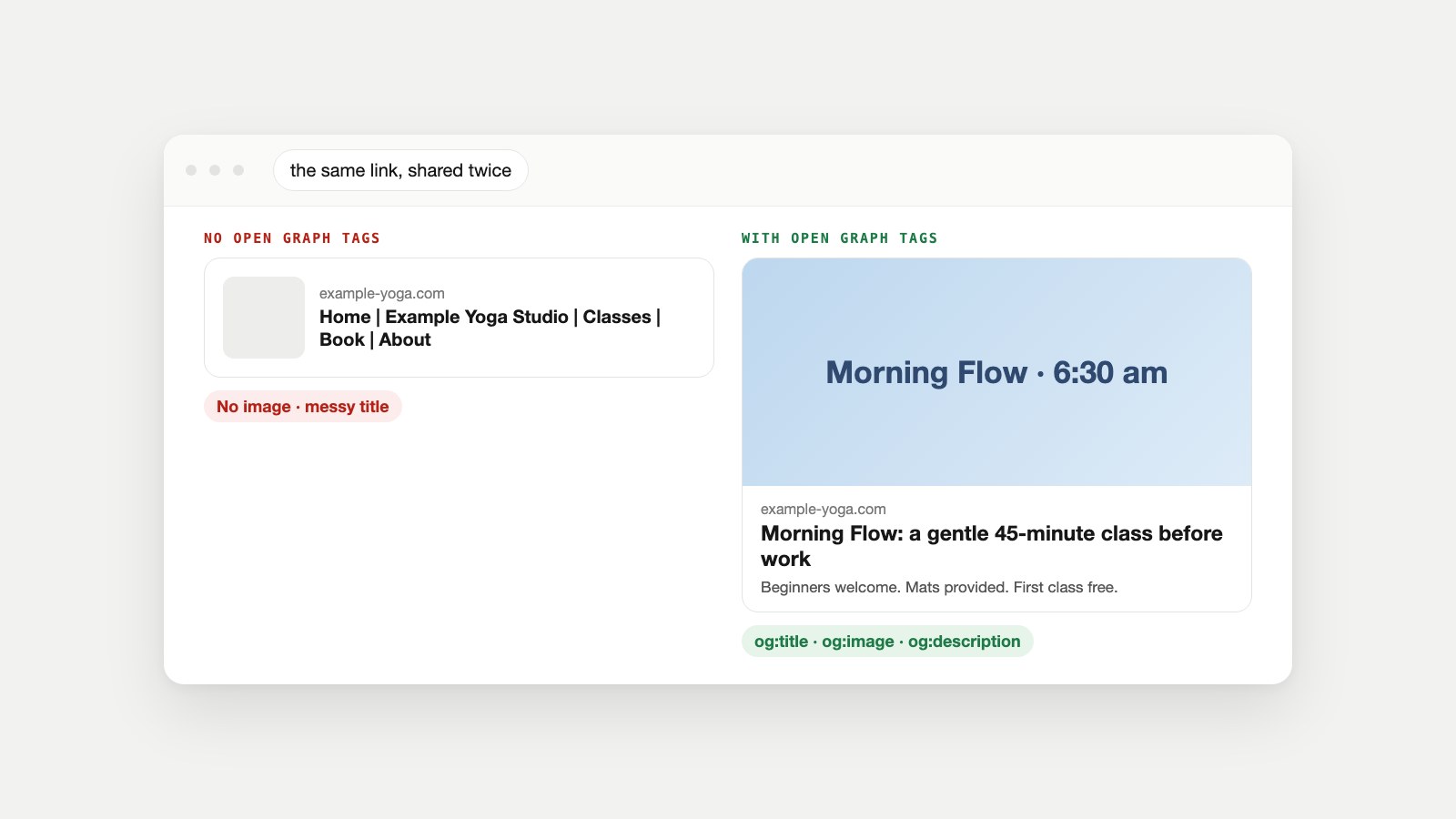
example-yoga.com launched a new early-morning class and the owner shared the page in three community groups. The card that appeared was a grey box with no picture and the title "Home | Example Yoga Studio | Classes | Book | About". Two people clicked.
Nothing was wrong with the page itself. It just had no Open Graph tags, so each app guessed: it took the <title> element, found no image it was told to use, and left the description blank. Ten minutes of fixes later, the same link produced the card on the right of the image above. Here's what happened behind the scenes, both times.
How Open Graph Works: The Two Seconds After You Paste a Link
When you paste a link into a post or chat, the app doesn't show you the page. It sends its own crawler to fetch it, then draws a card from what it finds:
- Fetch. A crawler such as Meta's
facebookexternalhit/1.1requests the page's HTML, the way a browser would, but without a person attached. - Read the tags. It looks in the
<head>forog:properties (andtwitter:ones on X). Where a tag is missing, each platform falls back to something else, such as your page title. - Fetch the image. It downloads the address in
og:imageseparately. If that file is too big, the wrong format or blocked, there's no picture. - Cache. The result is stored, so the next person who shares the link gets the same card instantly, even if you've since changed the page.
- Draw the card. Each app lays out the same data its own way: big image or thumbnail, description shown or hidden.
Slack documents this plainly: when no app handles a link, it crawls the URL, "looks for common OpenGraph and X (formerly known as Twitter) Card metadata," and renders a preview from it.
The Four Tags That Do Most of the Work
The protocol names four required properties for every page: og:title, og:type, og:image and og:url. In practice, add og:description too, because most platforms show it. Here they are for the yoga studio's class page:
<meta property="og:title" content="Morning Flow: a gentle 45-minute class before work">
<meta property="og:description" content="Beginners welcome. Mats provided. First class free.">
<meta property="og:image" content="https://example-yoga.com/img/morning-flow-1200x630.jpg">
<meta property="og:image:alt" content="Six people in a sunlit studio doing a low lunge">
<meta property="og:url" content="https://example-yoga.com/classes/morning-flow/">
<meta property="og:type" content="website">
<meta property="og:site_name" content="Example Yoga Studio">
<meta name="twitter:card" content="summary_large_image">
What each one is for
- og:title is the headline on the card. Write it for a feed, not for search: shorter than your page title, no site name tacked on (
og:site_namehandles that). - og:description is the line underneath. One sentence that says what someone gets by clicking.
- og:image is the picture, as a full
https://address. It's the single biggest factor in whether a card gets noticed. - og:image:alt describes the image for people using screen readers. The protocol says that if a page specifies an
og:image, it "should specifyog:image:alt." - og:url is the page's main address, so shares of tracking-tagged versions of the link count together. Use the same address as your canonical tag.
- og:type is
websitefor most pages andarticlefor blog posts and news.
The Open Graph Checker page has the full tag-by-tag table with what each platform falls back to, plus a template you can paste.
Which Crawlers Read Them
| Where it's shared | What reads the page | Notes |
|---|---|---|
| Facebook, Instagram links, Messenger | Meta's crawler, facebookexternalhit/1.1 | Refresh a stale card with the Sharing Debugger |
| LinkedIn's crawler | Needs og:title, og:image, og:description and og:url; refresh with Post Inspector | |
| X | X's crawler | Reads twitter: tags and Open Graph; twitter:card set to summary_large_image for the big card |
| Slack | Slack's unfurler | Reads Open Graph and X card tags when no app handles the link |
| WhatsApp, iMessage, Telegram, Discord | Each app's own fetcher | Open Graph tags; often a small or square thumbnail |
Because these are separate crawlers, a page can look perfect on one platform and broken on another. Check each place you actually share.
Why a Link Preview Isn't Showing
Work through the likely causes in this order:
The crawler is blocked
If robots.txt, a firewall or a bot-protection setting turns away unfamiliar crawlers, link previews fail along with them. Meta's crawler documentation lists the user agents it uses and notes that blocking is done with a disallow in robots.txt, which crawlers "may cache" for up to 24 hours. Our robots.txt guide explains how rules apply, and the AI Crawler Access Test shows whether bots are being turned away at the door. The same settings that block preview crawlers often block AI crawlers too; see our AI crawler explainer.
The image can't be used
A relative address (/img/share.jpg), an image behind a login, a file that's too large or an unsupported format all leave the card without a picture. LinkedIn's sharing image needs to be at least 1200 × 627 pixels, around a 1.91:1 ratio, and under 5 MB. The Image Size Checker finds heavy files quickly.
The tags are added by JavaScript
Some sites insert their meta tags with JavaScript after the page loads. Many preview crawlers read the HTML as it's first delivered and may never see tags added later. If your site is built that way, make sure the tags are in the server-rendered HTML.
The platform is showing an old copy
You fixed the tags, but the card hasn't changed. That's the cache. See the next section.
Stale Previews: Clearing the Cache
Platforms store the card the first time a link is shared. To make them read the page again:
- Facebook and Instagram links: paste the address into Meta's Sharing Debugger and ask it to scrape again. Meta's docs describe this as the way to force a crawl.
- LinkedIn: run the page through Post Inspector, then share again.
- Elsewhere: there's often no public refresh tool. Adding a harmless query string (
?v=2) makes the app treat it as a new link, although shares then won't count together unlessog:urlpoints to the main address.
Designing the og:image
The image does most of the work in a crowded feed. A few practical rules:
- Size: 1200 × 630 pixels (about 1.91:1) suits most platforms; LinkedIn asks for at least 1200 × 627. Keep the file small, well under the 5 MB limits some platforms set.
- Safe area: messaging apps often crop to a square thumbnail, so keep the subject and any words in the centre.
- Words: a few large words at most. The card already shows your title underneath.
- Format: JPEG or PNG are the safest choices; not every app shows SVG.
- One per page: a specific image for each important page beats one logo on everything. A generic site-wide image is still better than none.
Our guide to image SEO covers naming, alt text and file size for the images on the page itself.
Setting Open Graph Tags in Your CMS
| Platform | Where to set them |
|---|---|
| WordPress | An SEO plugin such as Yoast or Rank Math adds a social section to each post and page |
| Shopify | Most themes output them from each product's and page's SEO title, description and featured image |
| Wix and Squarespace | Each page's SEO or social sharing settings, including a social image |
| Webflow | Each page's Open Graph settings, or fields bound to CMS collection items |
| Hand-coded or framework sites | Add the meta tags to the page template's head, filled from each page's data |
Whatever the platform, check the result rather than trusting the settings screen: themes and plugins sometimes output duplicate or conflicting tags.
Open Graph for Different Kinds of Pages
The basic tags work everywhere, but a few page types benefit from extra properties defined in the Open Graph protocol:
- Blog posts and news: set
og:typetoarticle, and addarticle:published_time,article:modified_timeandarticle:author. Some apps show the date on the card. - Product pages: use the product photo as
og:imageand the product name asog:title, not your shop's name. A price in the description is fine if you keep it up to date. - Home page: the one page where a brand image and your site name make sense as the card.
- Pages in several languages:
og:localenames the language of the page, andog:locale:alternatelists the others. - Videos and music: the protocol has
og:videoandog:audioproperties for pages built around a media file.
Common Open Graph Mistakes
- One image for the whole site. Every share looks the same, so none of them stands out.
- og:url pointing at the home page on every page, so platforms treat all your pages as one.
- Duplicate tags from a theme and a plugin both adding them, leaving apps to pick one at random.
- A title copied from the browser tab, with the site name and separators that waste space on the card.
- An image with small text that's unreadable at thumbnail size.
- Forgetting staging tags: a share image or title left over from a test site, or a page shared before its tags were set and now stuck in the cache.
Each of these takes a minute to fix once you know it's there, which is why checking the card before you share is worth the habit.
Does Google Use Open Graph?
Not as a ranking factor, but it does read them. Google's documentation on title links lists "content in og:title meta tags" among the sources it can use to choose the title shown in search results. So a sensible og:title is one more reason to keep titles consistent; our guide to writing meta titles and descriptions covers the search side, and the Meta Tag Checker checks both.
Open Graph and structured data are different things. Open Graph describes how a page looks when shared; schema markup describes what a page is about for search engines. Most pages benefit from both.
Open Graph and Your Social Posts
Good tags turn every share into a small ad you didn't pay for, including shares by customers you'll never see. When you post your own links, a strong card is half the job. X Owl and LinkedIn Owl write the posts that go with your links, and Generative Engine Owl checks the signals AI assistants use to understand your brand.
Link Preview Questions
What are Open Graph tags in HTML?
They're meta tags in a page's head, such as og:title, og:description, og:image and og:url, that tell social platforms and messaging apps what to show when the page is shared.
What does og:image mean?
It's the Open Graph property that names the image to show in a link preview. It should be a full https address to a JPEG or PNG, ideally about 1200 × 630 pixels.
What are the best dimensions for an og:image?
Around 1200 × 630 pixels (1.91:1) works across most platforms. LinkedIn asks for at least 1200 × 627 and under 5 MB. Keep important content in the centre in case of square crops.
Why is my link preview not showing?
Usually the tags are missing, the image can't be fetched, the crawler is blocked by robots.txt or a firewall, or the platform is showing an old cached version. Check the page, then refresh the cache with the platform's tool.
How do I update a link preview after changing it?
Use Meta's Sharing Debugger for Facebook and LinkedIn's Post Inspector, then share the link again. Other apps may only refresh after their cache expires.
Does X use Open Graph tags?
Yes, it reads Open Graph title, description and image, but add twitter:card with the value summary_large_image to get the large image card.
Can an og:image be a WebP or SVG?
Support varies between apps, and SVG often doesn't display. JPEG or PNG are the safest choices for share images.
Do I need og:image:alt?
Yes. The Open Graph protocol says a page that sets og:image should also set og:image:alt, a description of the image for people using screen readers.
Specs and Docs
- The Open Graph protocol, ogp.me.
- Meta web crawlers, Meta for Developers.
- Sharing Debugger, Meta for Developers.
- Make your website shareable on LinkedIn, LinkedIn Help.
- Post Inspector, LinkedIn.
- Unfurling links in messages, Slack Developer Docs.
- Influencing title links in Google Search, Google Search Central.
- About X Cards, X Developer Platform.