The Checklist in Brief
- Be found: put images in a real
<img>element (Google doesn't index CSS background images) and list important ones in a sitemap. - Be understood: write specific alt text, use a short descriptive file name, and place the image next to text about the same thing.
- Be fast: resize and compress before uploading, serve smaller versions to phones, and let your main image load first.
- Stand out: add licence details if you sell or license images, and give every shareable page a proper share image.
One Photo's Journey
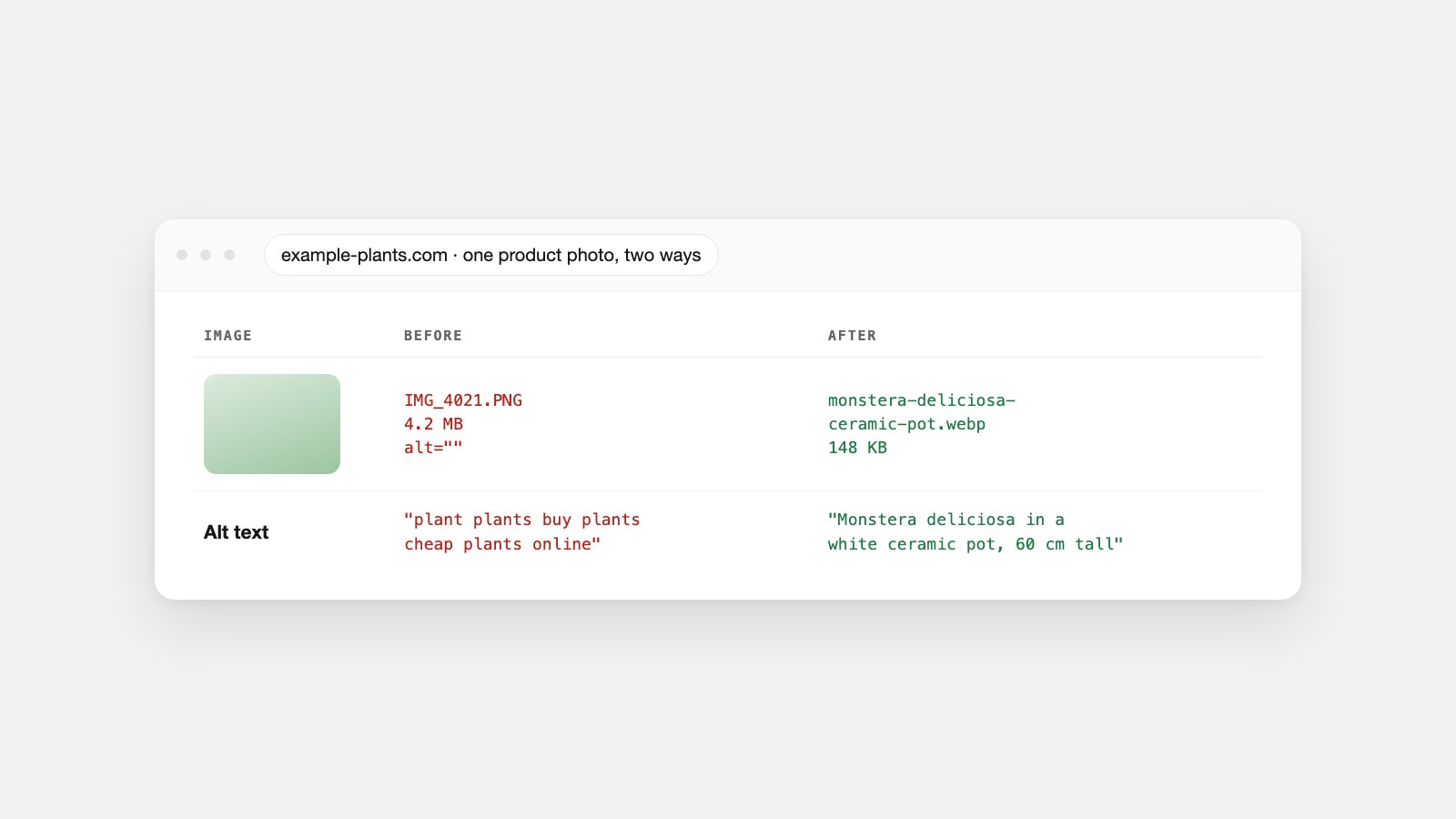
example-plants.com sells houseplants online. The owner photographs each plant on a phone and uploads it straight to the product page. For the monstera, that meant a file called IMG_4021.PNG, 4.2 MB, with alt text someone had stuffed with every keyword they could think of. The page ranked for nothing in Google Images, and on a phone the photo took seconds to appear.
Image SEO is the work of fixing that: making sure search engines can find each image, understand what it shows, and serve it quickly. The hero image above shows the before and after. The rest of this guide is the four stages in between.
Stage 1: Make Sure Google Can Find the Image
Google's image SEO guidance is direct about the first rule: it finds images in the src attribute of an <img> element, including inside a <picture> element, and "Google doesn't index CSS images." A product photo set as a background in a stylesheet may look identical to a visitor and still be invisible to Google Images.
<!-- Found and indexed -->
<img src="/img/monstera-deliciosa-ceramic-pot.webp" alt="Monstera deliciosa in a white ceramic pot, 60 cm tall">

<!-- Not indexed as an image -->
<div style="background-image:url(/img/monstera.webp)"></div>
If you use <picture> to offer modern formats, keep an <img> with a normal src inside it as the fallback, as Google's examples do. Google supports BMP, GIF, JPEG, PNG, WebP, SVG and AVIF; match the file extension to the actual format.
Give Google a list
For images that matter to how people find you, such as products, recipes and portfolio work, an image sitemap helps Google discover them, especially ones loaded by JavaScript. Our guide to sitemaps includes a copy-paste image sitemap template, and Google documents the format in its image sitemaps page.
Lazy loading without hiding images
Lazy loading delays images further down the page until a visitor scrolls near them, which saves data. Use the browser's built-in loading="lazy" attribute, which web.dev describes in its guide to browser-level lazy loading, rather than scripts that only insert the image after scrolling: if the image never appears in the HTML, crawlers may never see it. Never lazy-load the main image at the top of the page; more on that in Stage 3.
Stage 2: Help Google Understand What the Image Shows
Algorithms can recognise a plant, but not that it's this plant, in this pot, for sale on this page. Google says it extracts information about an image "from the content of the page, including captions and image titles," and that the alt attribute is the most important piece of metadata.
Alt text that helps people and search
Alt text is read aloud by screen readers and shown when an image fails to load. Google's guidance uses a puppy to show the range from useless to useful:
| Version | Alt text | Verdict |
|---|---|---|
| Missing | (none) | Bad |
| Keyword stuffing | puppy dog baby dog pup pups puppies doggies pups litter puppies dog retriever labrador… | Bad; can make a site look spammy |
| Better | puppy | Better, but vague |
| Best | Dalmatian puppy playing fetch | Specific and natural |
Write what you'd say to someone who can't see the image, in the context of the page. WebAIM puts it well: a maple leaf "might represent Canada, or it might just illustrate the leaf of a tree," so the right alternative text depends on why the image is there. Purely decorative images, such as background flourishes, should have an empty alt attribute (alt="") so screen readers skip them, as the W3C explains in its guide to decorative images.
File names: light clues, still worth it
Google says file names give "very light clues" about an image, and suggests short, descriptive names: my-new-black-kitten.jpg rather than IMG00023.JPG, and never generic names like image1.jpg. Use hyphens between words, and translate file names if you translate the page.
Words near the image
Put images near the text that describes them, on pages about the same subject. A caption under the photo ("Monstera deliciosa, about 60 cm, in a glazed ceramic pot") helps visitors and gives Google more context. A product name in the heading and a description below the photo do the same job.
Stage 3: Make the Image Fast
Google notes that images "are often the largest contributor to overall page size." A slow image hurts the page it's on, and page speed is part of how a page performs in search.
Right size, right format
Resize to roughly the size it's displayed (about twice that for sharp phone screens), choose a modern format, and compress. Our Image Size Checker page has the full routine, including a test of one screenshot in five formats, and checks every image on a page for you.
Serve smaller files to phones
Responsive images let the browser pick the right file for the screen, so a phone doesn't download a desktop-sized photo. MDN's guide to responsive images covers the details; the basic pattern is:
<img src="/img/monstera-800.webp"
     srcset="/img/monstera-400.webp 400w, /img/monstera-800.webp 800w, /img/monstera-1600.webp 1600w"
     sizes="(max-width: 600px) 100vw, 600px"
     width="1600" height="1600"
     alt="Monstera deliciosa in a white ceramic pot, 60 cm tall">
Always include width and height. They let the browser reserve the space before the image arrives, so the page doesn't jump, which is what the CLS metric measures.
Let the main image load first
On most product and article pages, the largest thing on screen is an image, and it decides your Largest Contentful Paint (LCP). web.dev's guide to optimizing LCP recommends loading that image with a high fetch priority. Add fetchpriority="high" to it and make sure it isn't lazy-loaded. Our guide to Core Web Vitals explains LCP and CLS, and reading PageSpeed Insights shows how to find which image is your LCP element.
Stage 4: Help Your Images Stand Out
- Licence details. If you sell or license photos, Google's image license metadata can make an image eligible for the Licensable badge in Google Images, with a link to how it can be used.
- Structured data. Product, recipe and article markup tells Google what the page is about, and can include images. See our guide to schema markup.
- Share images. The image people see when your page is shared comes from
og:image, not from your page body. Our guide to Open Graph tags covers sizing and the Open Graph Checker previews it. - Real photos. Google notes that high-quality photos appeal to users more than blurry ones, and sharp thumbnails are more likely to get clicks. Your own product photos also make your images different from every other shop's stock images.
Alt Text Examples by Image Type
| Image | Good alt text | Notes |
|---|---|---|
| Product photo | Monstera deliciosa in a white ceramic pot, 60 cm tall | What it is, plus the detail a buyer would want |
| Team photo | Our three florists arranging bouquets at the workbench | Who and what, not "team photo" |
| Chart | Bar chart: plant sales doubled from January to March | Give the takeaway; put full data in the text |
| Logo linking home | Example Plants home | Describe where the link goes |
| Screenshot | Checkout page showing the free-delivery banner | What the reader should notice |
| Decorative divider | (empty: alt="") | Screen readers skip it |
Two quick checks: would the sentence make sense read aloud in place of the image? And does it avoid starting with "image of"? Screen readers already announce that it's an image.
Image SEO for Online Shops
Product images carry more weight in a shop than anywhere else, because buyers can't touch the product. A few habits make a big difference:
- Several angles per product, each with its own alt text: front, side, in use, close-up of the material. "Monstera in pot, side view" and "Close-up of monstera leaf" beat four images all called "monstera".
- A naming pattern you can automate: product-name-variant-angle.webp. Google suggests automating names if you have thousands of images.
- One image per colour or variant, so a search for "green ceramic pot" can land on the green one.
- Keep images on stable addresses. Changing image URLs every time you re-upload means Google has to discover them again.
- Product structured data with an image property, so the photo is clearly tied to the product.
A 30-Minute Review of Your Existing Images
- List your ten most important pages: the ones that bring visitors or sales.
- Check each main image with the Image Size Checker: file size, format and whether it's far larger than it needs to be.
- Read the alt text of every image on those pages. Rewrite any that are empty, generic or stuffed with keywords.
- Look for CSS background images that carry real content, and move them into
<img>elements. - Check the main image isn't lazy-loaded, and add
fetchpriority="high"if it's the largest element on screen. - Re-test the page in PageSpeed Insights and note the change in LCP.
Then repeat for the next ten pages, and make the upload routine stick so new images arrive already right.
Image SEO Mistakes We See Most
- Uploading straight from the phone: multi-megabyte files with names like
IMG_4021. - Important images as CSS backgrounds, so Google never indexes them.
- Keyword-stuffed alt text, which Google says can make a site look spammy.
- The same alt text on every image in a gallery.
- Lazy-loading the hero image, which delays the most important thing on the page.
- Text inside images instead of real text: it's hard to read on phones, can't be translated, and is invisible unless described in alt text.
- Missing width and height, so the page jumps as images load.
Checking Your Images
For a single page, the Image Size Checker flags heavy files and formats, and the Meta Tag Checker counts images missing alt text. Then test the page on a phone with the Mobile-Friendly Checker.
Across a whole site, Watch Owl crawls up to 500 pages in a real browser and reports images that fail to load, image alt text coverage and image width and height coverage, along with accessibility checks. Owl-gorithm Hacker audits the crawl-and-index side of SEO. And images are one line of a broader website audit and SEO audit.
Image SEO Questions Answered
What is image SEO?
It's making images easy for search engines to find, understand and load quickly: real img elements, descriptive alt text and file names, nearby text, sitemaps, and small, fast files.
Does alt text help SEO?
Yes. Google calls the alt attribute the most important metadata for understanding an image, and it's essential for accessibility. Write it to describe the image naturally, not as a list of keywords.
Does the image file name matter for SEO?
A little. Google says file names give very light clues, so use short descriptive names like monstera-ceramic-pot.webp instead of IMG_4021.png. Alt text and nearby text matter more.
How do I get my images to show in Google Images?
Use an img element with a normal src, add specific alt text, place the image near relevant text on a relevant page, make sure the page is indexable, and consider an image sitemap for important images.
Should decorative images have alt text?
They should have an empty alt attribute (alt=""), so screen readers skip them. Leaving the attribute out entirely can make screen readers read the file name instead.
Does Google index background images?
No. Google states that it doesn't index CSS images, so any image you want found in search should be in an img element.
What image format is best for SEO?
Any format Google supports can rank. Choose for speed: modern formats such as WebP or AVIF are usually much smaller than JPEG or PNG at the same quality.
Does lazy loading hurt image SEO?
Not when you use the browser's loading="lazy" attribute on images below the first screen. Avoid lazy-loading the main image at the top of the page, and avoid scripts that only add images after scrolling.
Where the Advice Comes From
- Image SEO best practices, Google Search Central.
- Image sitemaps, Google Search Central.
- Image license metadata, Google Search Central.
- Optimize Largest Contentful Paint, web.dev.
- Browser-level image lazy loading, web.dev.
- Responsive images, MDN Web Docs.
- Alternative text, WebAIM.
- Decorative images, W3C Web Accessibility Initiative.