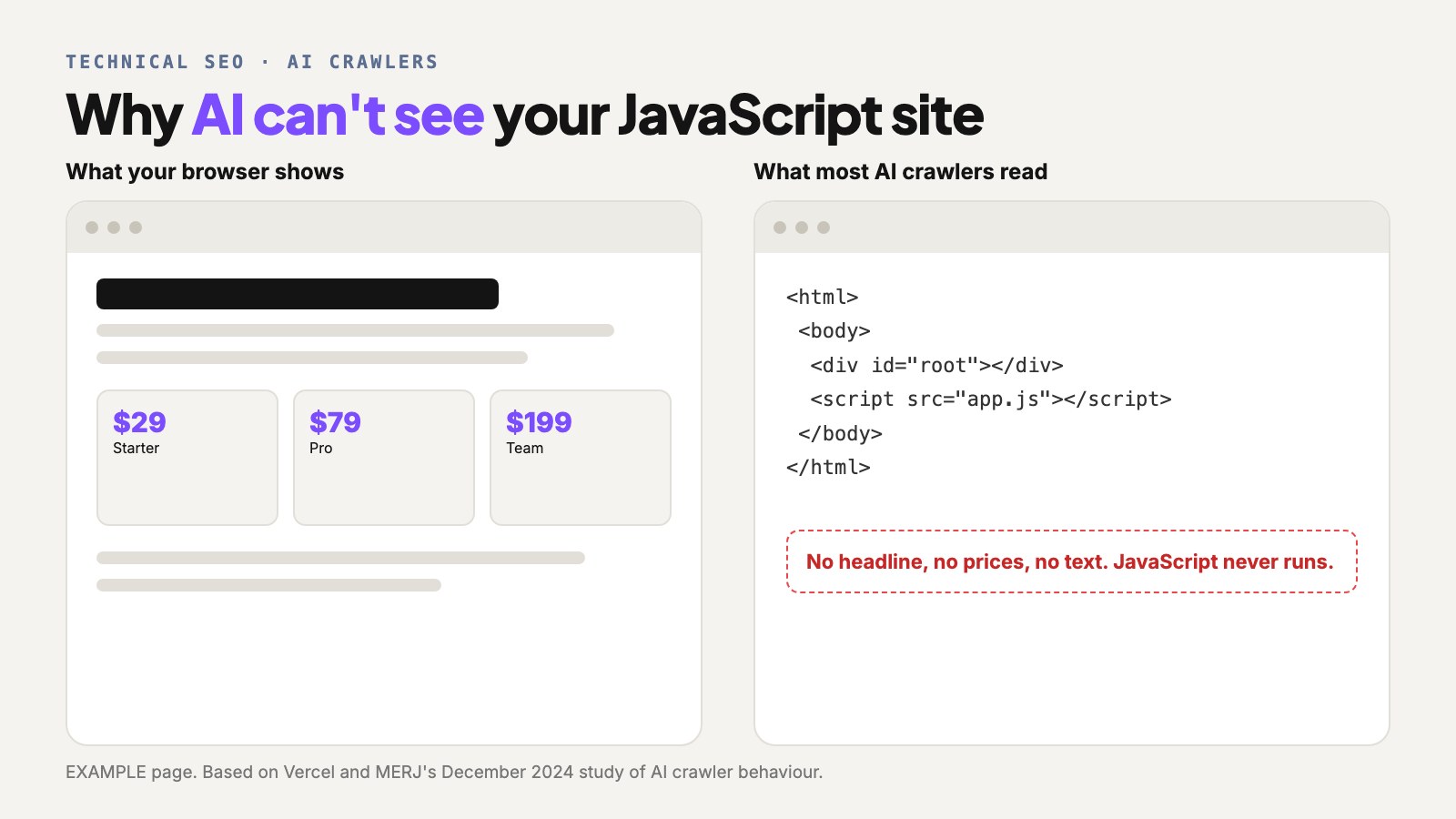
Your website looks perfect in a browser, ranks in Google, and yet ChatGPT says it can't find anything about your product. One common reason has nothing to do with content quality: the content is built by JavaScript after the page loads, and most AI crawlers never run JavaScript. This guide answers do AI crawlers render JavaScript, which ones do and don't, how to check your own site in five minutes, and how to fix it.
Key Takeaways
- Most AI crawlers don't run JavaScript. A 2024 study by Vercel and MERJ found OpenAI's crawlers, Anthropic's ClaudeBot and PerplexityBot read only the HTML the server sends.
- Googlebot is different: it renders JavaScript, and so do Gemini (on Google's infrastructure) and AppleBot.
- So a site can rank in Google and still be invisible to ChatGPT, Claude and Perplexity.
- Check it with "View page source": if your main text isn't in the source, most AI crawlers can't see it.
- Fix it by putting key content in the server's HTML: server-side rendering, static pages or pre-rendering. Google calls dynamic rendering a workaround, not a solution.
What "Rendering JavaScript" Means
Rendering means running a page's JavaScript to build the content you see; a crawler that doesn't render only reads the raw HTML the server first sends. Many modern sites send a nearly empty HTML file and a bundle of JavaScript. Your browser runs that JavaScript, which then fetches and draws the text, prices and product details. This is called client-side rendering.
A browser does that work automatically. A crawler has to choose to do it, and it's expensive: running JavaScript for billions of pages takes far more computing power than reading HTML. Google's guide to JavaScript SEO basics explains that it processes JavaScript sites in three phases (crawling, rendering and indexing) and that a page "may stay on this queue for a few seconds, but it can take longer than that" before it's rendered. The same guide warns that "not all bots can run JavaScript."
Which Crawlers Render JavaScript, and Which Don't
Googlebot, Gemini and AppleBot render JavaScript; OpenAI's crawlers, ClaudeBot and PerplexityBot don't. That's the finding of "The rise of the AI crawler", published by Vercel in December 2024 with the search consultancy MERJ, based on traffic across Vercel's network.
| Crawler | Who runs it | Renders JavaScript? | Requests in a month on Vercel's network |
|---|---|---|---|
| Googlebot | Google Search | Yes | 4.5 billion |
| Gemini | Google (via Googlebot's infrastructure) | Yes | Counted with Googlebot |
| AppleBot | Apple | Yes | 314 million |
| GPTBot, OAI-SearchBot, ChatGPT-User | OpenAI | No (fetches JS files but doesn't run them) | GPTBot: 569 million |
| ClaudeBot | Anthropic | No (fetches JS files but doesn't run them) | 370 million |
| PerplexityBot | Perplexity | No | 24.4 million |
| Meta-ExternalAgent, Bytespider, CCBot | Meta, ByteDance, Common Crawl | No | Not given |
The study also found AI crawlers waste a lot of effort: 34.82% of ChatGPT's fetches and 34.16% of Claude's hit 404 pages, against 8.22% for Googlebot. Broken links and missing redirects hurt AI crawlers more than Google. Our Broken Link Checker finds them for free.
Keep the date in mind: this data is from late 2024 and crawlers change. Treat it as the best available evidence, and re-check your own site rather than assuming. The crawlers' own documentation, such as OpenAI's, Perplexity's and Anthropic's, explains what each bot is for. Our AI crawler guide summarises them.
Why This Matters More Now
AI assistants answer questions from the pages their crawlers can read, so content they can't read simply doesn't exist for them. If your pricing, product features or service descriptions are drawn by JavaScript, ChatGPT search and Perplexity may describe your business from old or third-party pages instead, or not mention you at all.
Google's own AI features are less affected, because Googlebot renders. Google's page on AI features and your website still recommends "making sure that important content is available in textual form." The safest rule works for every engine: put important content in the HTML your server sends.
How to Check Your Site in Five Minutes
Compare what your browser shows with what your server sends; anything missing from the server's HTML is invisible to most AI crawlers.
- View the page source. Right-click the page and choose "View page source" (not "Inspect", which shows the page after JavaScript has run). Press Ctrl+F or Cmd+F and search for a sentence from your main content.
- Check the important parts. Search for your headline, a price, a product name and a key paragraph. If they're missing from the source, they're built by JavaScript.
- Check your links. Google's guide says it "can only discover your links if they are <a> HTML elements with an href attribute." Buttons that navigate with JavaScript are invisible as links.
- Run the free [AI Crawler Access Test](crawlertest). It fetches your page the way AI crawlers do and shows whether they're allowed in and what they receive.
- Compare with Google's view. Use the URL Inspection tool in Search Console to see Google's rendered version. If Google sees content that the page source doesn't contain, AI crawlers are missing it.
For a whole site, CMO Owls' Watch Owl opens up to 500 pages in a real browser and lists errors, and Owl-gorithm Hacker audits crawling and indexing layer by layer.
How to Fix It
Send the important content in the first HTML response, using server-side rendering, static generation or pre-rendering. Google's guide says "server-side or pre-rendering is still a great idea" because it makes sites faster for users and crawlers. The Vercel study gives the same advice: server-render critical content such as main text, metadata and navigation, and keep client-side rendering for non-essential features.
| Approach | How it works | Best for | Watch out for |
|---|---|---|---|
| Server-side rendering (SSR) | The server builds the full HTML for each request | Pages that change often, logged-out content | Server load; needs a framework that supports it |
| Static generation | Pages are built to HTML ahead of time | Blogs, docs, marketing and product pages | Rebuild when content changes |
| Pre-rendering service | A service stores rendered HTML for your JavaScript pages | Older single-page apps you can't rebuild | Keeping snapshots up to date |
| Hydration | Server sends HTML, then JavaScript adds interactivity | Interactive apps that still need crawlable content | Make sure the server HTML has the real content |
| Dynamic rendering (old) | Serving bots a different rendered version | Not recommended | Google calls it "a workaround and not a recommended solution" |
Google's page on dynamic rendering is explicit: it "is a workaround and not a recommended solution," and Google recommends "server-side rendering, static rendering, or hydration" instead. Most modern frameworks support at least one of these, so the fix is often a configuration change rather than a rebuild. Faster server-rendered pages usually help Core Web Vitals too.
Worked Example: A Software Company's Pricing Page
Here's how the problem typically shows up. The company and details are an EXAMPLE.
A software company asks ChatGPT "how much does [their product] cost?" and gets an out-of-date figure from a review site. Their own pricing page looks fine in a browser.
- View page source shows an empty container and a script tag. The prices are fetched by JavaScript after load.
- The access test confirms OAI-SearchBot is allowed in, so access isn't the issue; the content simply isn't in the HTML.
- The fix: the developer switches the pricing page to static generation, so the prices are in the HTML. It takes an afternoon.
Afterwards the prices appear in the page source. The company then checks ChatGPT and Perplexity over the following weeks to see whether answers start citing its own page. Our guides on getting recommended by ChatGPT and getting cited by Perplexity cover the next steps.
Which Sites Are Most at Risk
Sites built as single-page apps, or with content loaded after the page appears, are most likely to be invisible to AI crawlers. You don't need to know how your site was built to check, but these patterns are common warning signs:
- Single-page apps built with frameworks such as React, Vue or Angular without server rendering switched on. The first HTML is often a near-empty shell.
- Website builders and widgets that load content by script, such as embedded review widgets, pricing tables or product catalogues pulled in from another service.
- "Load more" and infinite scroll for blog lists or products. Items that only appear after scrolling or clicking aren't in the first HTML.
- Content behind tabs that fetch on click, such as FAQs or specifications loaded only when opened.
Sites built with traditional content systems that send full HTML, like most WordPress themes and static site generators, are usually fine. Check anyway: one plugin or embed can hide your most important page.
If you're not sure how your site is built, ask your developer or web agency one question: "Is our main content in the HTML the server sends, or is it loaded by JavaScript afterwards?" It's a quick answer for them, and it tells you straight away whether this guide applies to you. If it does, ask them which of the fixes below suits your setup and how long it would take.
Mistakes to Avoid
- Checking with Inspect instead of View page source. Inspect shows the page after JavaScript runs, so everything looks fine.
- Assuming Google rankings mean AI can see you. Googlebot renders; most AI crawlers don't.
- Hiding key facts in tabs, accordions or pop-ups that load on click. Keep them in the HTML even if they're visually collapsed.
- Using JavaScript-only links. Crawlers follow <a href> links, not click handlers.
- Serving bots a special version. Dynamic rendering is a workaround Google no longer recommends; fix the page itself.
JavaScript and AI Crawler Questions
Do AI crawlers render JavaScript?
Most don't. A 2024 Vercel and MERJ study found OpenAI's crawlers, ClaudeBot and PerplexityBot read only the HTML a server sends, while Googlebot, Gemini and AppleBot render JavaScript.
Can ChatGPT read my JavaScript website?
Only the parts in the HTML your server sends. OpenAI's crawlers fetch JavaScript files but don't run them, according to the Vercel study, so content built by JavaScript after load is missed.
Why does my site rank in Google but not appear in ChatGPT?
Googlebot renders JavaScript, so Google sees your content. ChatGPT's crawlers don't, so if your content is built by JavaScript they may not see it. Check that OAI-SearchBot is allowed too.
How do I check what AI crawlers see on my site?
Use "View page source" and search for your main text, or run an AI crawler access test. Content missing from the source is invisible to most AI crawlers.
Is server-side rendering required for SEO?
Not for Google, which renders JavaScript, though Google says server-side or pre-rendering is still a great idea. For AI crawlers that don't render, putting content in the server's HTML is the reliable fix.
Is dynamic rendering still a good fix?
No. Google describes dynamic rendering as a workaround and not a recommended solution, and recommends server-side rendering, static rendering or hydration instead.
Does this affect Google's AI Overviews?
Less, because Google's AI features use Googlebot, which renders JavaScript. Google still recommends keeping important content available as text.
Start With the Page Source
Open your three most important pages today and check "View page source" for your headline, prices and key paragraph. If they're missing, send the list to your developer with this guide. Then run the free AI Crawler Access Test to confirm access, and read GEO vs SEO for how this fits your wider AI visibility plan. If pages have also dropped from Google, see why a page isn't indexed.
Sources
- The rise of the AI crawler, Vercel and MERJ, 2024.
- Understand JavaScript SEO basics, Google Search Central, 2026.
- Dynamic rendering as a workaround, Google Search Central, 2026.
- AI features and your website, Google Search Central, 2026.
- Overview of OpenAI crawlers, OpenAI, 2026.
- Perplexity crawlers, Perplexity, 2026.
- Does Anthropic crawl data from the web, and how can site owners block the crawler?, Anthropic, 2026.
- URL Inspection tool, Search Console Help, 2026.