Key Takeaways
- Restaurant SEO is mostly about making the facts a hungry person needs easy to find and easy to trust: the menu, prices, hours, location and what other guests say.
- In both audits, the biggest problems weren't about keywords. One menu couldn't be read by Google at all, and one restaurant showed two different closing times.
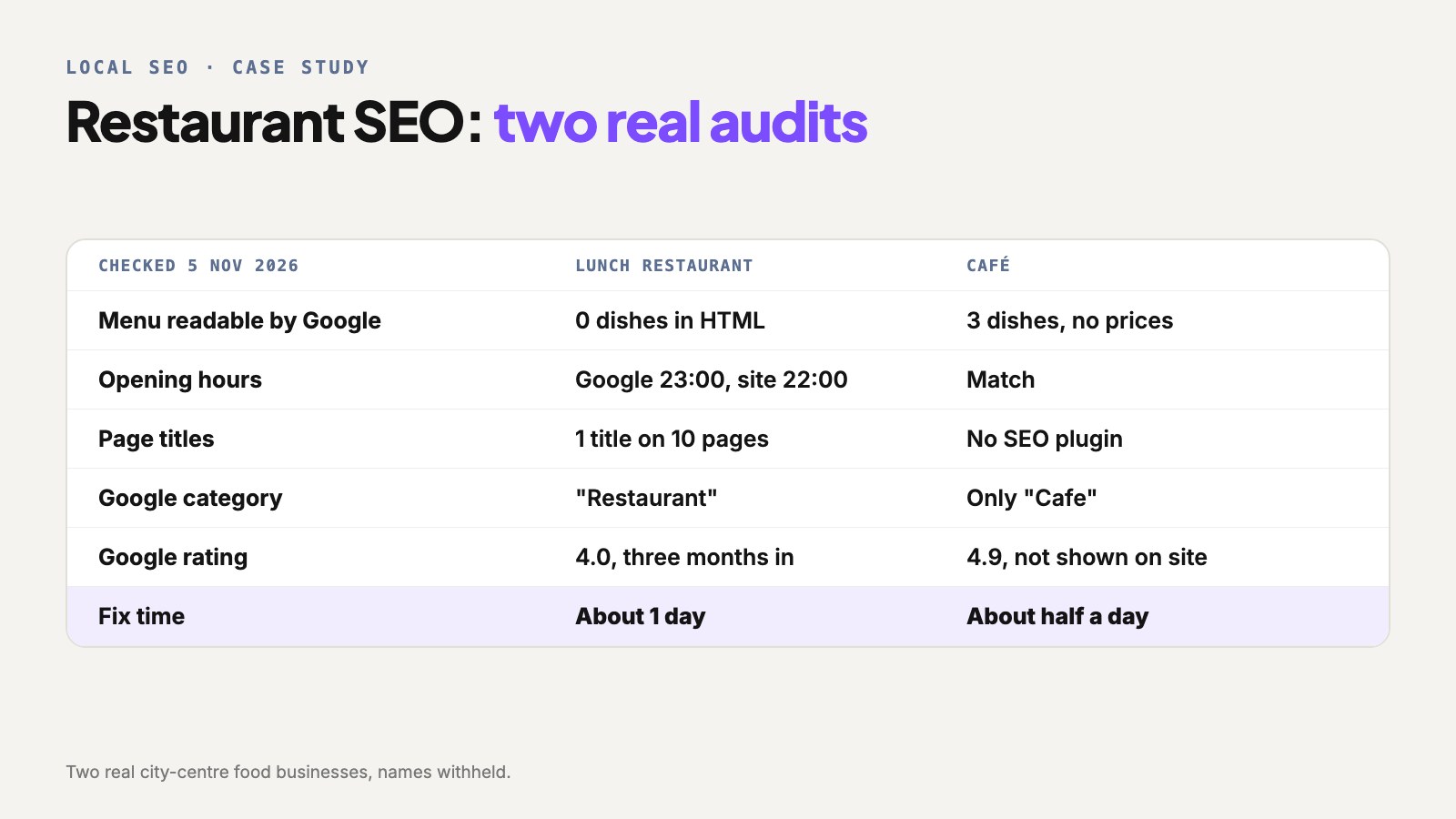
- Every technical issue we found was a fix of minutes or hours, not weeks. The lunch restaurant needed about one developer day; the café about half a day.
- A great rating does nothing for a website that never shows it. The café had 4.9 stars on Google and not one review on its own site.
The Two Businesses and How We Checked Them
In November 2026 we audited two independent food businesses in the same European city centre, a few hundred metres apart. We've left their names out. The point isn't who they are; it's how common these problems are.
- Business A: a fast-casual lunch restaurant, open about three months, with a modern JavaScript website, a 4.0-star Google rating and delivery through a delivery app.
- Business B: an independent café with a rare cuisine niche, a WordPress website and a 4.9-star Google rating.
On 5 November 2026 we checked each live website (robots.txt, sitemaps, redirects, headers and the HTML of every main page) and opened each Google Business Profile in a browser. We didn't have access to either Search Console account, so this case study covers what anyone can see from the outside, which is also what Google and AI assistants see. It's the same approach we describe in our website audit case study, applied to restaurants.
What Restaurant SEO Actually Means
Restaurant SEO is the work of getting a restaurant shown, and chosen, when someone nearby searches for food on Google, Maps or an AI assistant. It has two halves: the Google Business Profile, which wins most "near me" and map searches, and the website, which proves the details and wins searches for specific dishes, diets and occasions.
Google's guide to improving your local ranking says local results depend on relevance, distance and prominence. You can't move your restaurant closer to the searcher, so restaurant SEO is about the other two: being clearly relevant to what people search for, and being well known and well reviewed.
Finding 1: A Menu Google Couldn't Read
Business A's menu page contained zero dishes and zero prices in its HTML. The menu appeared in a visitor's browser, but only after JavaScript ran. The page Google first receives had nothing on it except navigation.
Google can render JavaScript, but its JavaScript SEO guide explains that pages go into a queue for rendering, and that server-side rendered pages, where the HTML already contains the content, work well for crawling. Many AI crawlers don't run JavaScript at all. For a restaurant, the menu is the most important content it has: dish names, ingredients, diets and prices are exactly what people search for.
Business B had the opposite problem: its menu was readable, but showed only three dishes and no prices. A guest deciding where to eat couldn't tell whether it was a snack bar or a full kitchen.
The fix
- Put the full menu on the page as text, with prices. Not a photo of the menu, and not a PDF on its own.
- For a JavaScript site, render the menu on the server, so the HTML Google and AI crawlers receive already contains it.
- Mark it up with Restaurant structured data, including the
menulink andservesCuisine, which Google's local business structured data guide lists for food businesses. Check it with our free schema checker. - Add allergen information to the same menu. In the EU, food information legislation already makes allergen information mandatory for non-prepacked food, including in restaurants and cafés, so it's work you have to do anyway.
Finding 2: Two Different Closing Times
Business A's Google profile said it closed at 23:00; its own contact page said 22:00. One of them was wrong, and a guest arriving at 22:15 finds out which the hard way.
It had a second mismatch too. The Google profile linked to a delivery app where the restaurant was live, but the website told visitors delivery was "coming soon". Customers on the website were being told they couldn't order something they could.
Its name also had two spellings: one with an accent on the website, one without on Google and the shop sign. Small differences like these make it harder for search engines and AI assistants to be sure they're looking at the same business.
The fix
- Decide the real hours, name and links once, and write them down.
- Update the website, Google Business Profile, delivery apps and social profiles to match, on the same day.
- Add holiday hours in advance. Google's help on special hours recommends confirming hours for official holidays even when they're the same as usual, so customers can see they're accurate.
Business B got this right: its hours matched everywhere, and it had posted an update on Google when its hours changed. It's a small habit that saves real customers from a closed door.
Finding 3: The Same Title on Every Page
All ten pages on Business A's website shared one title and one description. The menu, the about page, the contact page and the booking page all told Google the same thing.
Google's guide to title links asks for distinct text that describes each page, and warns against repeated boilerplate titles. A page titled only with the brand name and a slogan can't compete for "vegan lunch" or "gluten-free cake" searches, because nothing tells Google that's what the page is about.
Business B had no SEO plugin installed at all: no meta descriptions anywhere, and a homepage title that was just the café's name. Its logo text was also marked up as the main heading on every page, so the homepage had no real headline.
The fix
- Give each page its own title that says what it is and where: for example, "Gluten-free lunch menu and prices | [Name], [Street]". Our guide to writing title tags and meta descriptions shows the format.
- On WordPress, install an SEO plugin and fill in the title and description for each page.
- Use one main heading per page, written for that page.
Finding 4: A Category Too Broad to Win
Business A's primary Google category was simply "Restaurant", and Business B had only one category: "Cafe". Both are correct, and both are too broad.
Google's help on business categories says the categories you choose affect your local ranking, and tells businesses to pick the most specific one available (its own example: choose "Nail salon" instead of "Salon"). A restaurant that serves one kind of dish should say so in its primary category, then add a few secondary ones for what it genuinely offers, such as lunch, takeaway or a specific cuisine.
The same help page notes that restaurants can add links for online orders, reservations and menus to their profile. Neither business had a menu link on Google, and the café had no order or booking link either.
Finding 5: Great Reviews the Website Never Showed
Business B had a 4.9-star rating on Google, and none of that trust appeared on its website. No rating, no quotes, no mention of the things Google already showed about it.
That matters because reviews do much of the selling for food businesses. BrightLocal's Local Consumer Review Survey 2026 found that 97% of consumers read reviews for local businesses. A visitor who lands on the website from Instagram or a link never sees the Google profile, so the website has to make the case itself.
Business A had the opposite challenge: a 4.0 rating three months after opening, with several competitors one tap away. For a new restaurant, the answer is more genuine reviews and visible replies, not hiding the rating.
The fix
- Show your rating and two or three real reviews on the homepage, with a link to read them all.
- Reply to every review, good and bad, in the language it was written in.
- Ask every guest, not only the happy-looking ones. Google's policy on fake engagement bans offering rewards for reviews and selectively asking only for positive ones. A QR code on the receipt or table is allowed and works well. Our guide to getting more Google reviews covers the details.
Finding 6: The Website Plumbing
Both websites had technical gaps that cost nothing to fix but quietly hurt them. None of these is exciting, and all of them matter:
| Issue | Business A (lunch restaurant) | Business B (café) | Typical fix time |
|---|---|---|---|
| Sitemap and robots.txt | Both missing (404) | Present | 15 minutes |
| Duplicate addresses | www and non-www both loaded | www didn't exist at all; http:// loaded without redirecting to https:// | 10 to 15 minutes |
| Pages that shouldn't be in Google | Cart, login and order pages indexable | WordPress sample post and demo page indexed | 20 minutes |
| Structured data | None | None | 1 hour |
| Analytics | None, so no orders or bookings measured | None | 1 hour |
| Images | Fine | One food photo was 2.5 MB; most had no alt text | 1 hour |
| Language | English only, in a city where most guests search in the local language | English only | About a day per site |
Two of these are worth explaining. A missing XML sitemap doesn't stop Google finding a small site, but it's a free way to list every page you want indexed. And a site that loads on both http:// and https:// without a redirect shows a "Not secure" warning on one of them; our guide to why a website says "Not secure" explains the fix. You can check your own redirects with our free redirect checker and shrink heavy photos with the image compressor.
On language: if your guests search in one language and your site only speaks another, you're invisible to most of them. Google's guide to localized versions of pages explains how to tell it which page is for which language.
The Order We'd Fix Things In
Fix what loses customers today first, then what makes you findable, then what makes you chosen. Here's the order we gave both businesses:
- Stop the leaks (day 1): match hours, name and links everywhere; replace any "coming soon" that isn't true; add holiday hours.
- Make the menu readable (week 1): full menu as text, with prices, diets and allergens; restaurant markup with the menu link.
- Fix the basics (week 1): a title per page, a sitemap, one address (https, one version of www), private and demo pages removed from Google, analytics with orders and bookings as conversions.
- Sharpen the Google profile (week 2): the most specific primary category, a few honest secondary ones, menu, order and booking links, real photos and a weekly post.
- Show the proof (week 2): rating and real reviews on the website; reply to every review; a QR code for reviews at the table or on the receipt.
- Grow (weeks 3 and 4): pages for the searches you can win, like a diet, a dish or lunch near a nearby office or campus, in the language your guests use.
For a full checklist you can run yourself, see our local SEO audit guide, and for the profile itself, our Google Business Profile optimization guide.
Getting Recommended When Guests Ask AI
AI assistants recommend restaurants they can describe with confidence: what they serve, where they are, when they're open and what guests say. Business A gave them almost nothing to work with: no readable dishes, no prices, no structured data.
When someone asks ChatGPT or Google's AI for "a high-protein lunch near the university" or "somewhere with eggless cakes", the answer comes from what the web says. A menu in plain text, consistent facts across profiles, clear pages for diets and specialities, and reviews that mention them are what put a restaurant in that answer. Our guide on how to get recommended by ChatGPT goes through the steps.
What These Audits Can't Tell You
Two audits are two examples, not a study of every restaurant. We checked what's publicly visible on one day. We didn't measure Core Web Vitals for either site, and without Search Console access we can't say how much traffic either was losing. What we can say is that each problem above is common, visible to Google and fixable without a redesign.
How CMO Owls Helps a Restaurant Owner
CMO Owls is an AI marketing team for small businesses: it finds problems like these, writes the pages that fix them and tracks whether AI assistants mention you, while you run the kitchen. You approve what goes live; your Google Business Profile itself is still edited in Google's dashboard.
| Step | Agent | What it does |
|---|---|---|
| Find the website problems | Watch Owl | Opens up to 500 pages in a real browser and finds broken pages, errors and slow loading, worst first; fixes simple issues on WordPress, Ghost, Shopify and GitHub with undo |
| Check titles, indexing and markup | Owl-gorithm Hacker | A technical SEO audit with a specialist for each layer, from indexing and on-page basics to keywords close to page one |
| Turn findings into fixes and pages | Opportunity Owl | Sorts each opportunity into a precise fix or a new article, writes it, checks it and sends it to your site |
| Write menu, diet and occasion pages | Owlthor | Researches what ranks and writes the page, sent to WordPress or your CMS |
| See what AI says about you | Generative Engine Owl | Measures what ChatGPT, Gemini, Claude and Google AI Overviews say about your restaurant, and why they skip you |
| Watch the places next door | Spy Owl | Finds your real competitors and what they rank for that you don't |
Add your restaurant's website and, within minutes, the Overview shows a website report, which AI tools can read your site and the first problems found, so you know what's leaking before the next service.
Mind Map: Restaurant SEO
Frequently Asked Questions
What is restaurant SEO?
Restaurant SEO is making your restaurant appear, and look like the best choice, when people nearby search for food on Google, Maps or AI assistants. It covers your Google Business Profile, a readable menu, accurate details and reviews.
How do I get more customers to my restaurant from Google?
Use the most specific Google category, add your menu, order and booking links, keep hours identical everywhere and earn steady reviews. Then put the full menu with prices on your website as text, so Google can match it to dish and diet searches.
Should my menu be a PDF or an image?
Not on its own. Search engines and AI assistants read text far more reliably, and a menu in plain text on the page is easier to read on a phone. Keep a PDF as an extra if you like.
Does structured data help a restaurant rank?
It helps Google understand your details, like cuisine, address, hours and menu link, and can make you eligible for richer results. It won't fix a weak profile or a thin menu, so do those first.
What makes an AI assistant suggest one restaurant over another?
Clear, consistent facts. If it can't find them about you, it won't suggest you; common gaps are a menu in images, hours that differ between sites or few reviews describing your specialities. Make those readable and consistent, and AI assistants have something to recommend.
Is cafe marketing different from restaurant marketing?
The same basics apply: profile, menu, hours, reviews. Cafés usually win on occasions such as breakfast, study spots, cakes and coffee near a campus, so build pages and posts around those.
When will these fixes bring more guests?
Fixing hours, links and categories can bring more calls and direction requests within weeks. New pages and AI visibility usually take a few months to build.
The Next Step
Open your own Google profile and your website side by side right now and compare the hours, name, menu and links. If anything differs, fix it today; it's the cheapest win in this whole article. Then add your website to CMO Owls to see the rest of your report, and read our guide on getting more Google reviews next.
Sources
- Tips to improve your local ranking on Google, Google Business Profile Help, 2026.
- Manage your business category, Google Business Profile Help, 2026.
- How to set special hours, Google Business Profile Help, 2026.
- Understand JavaScript SEO basics, Google Search Central, 2026.
- Influencing title links in Google Search, Google Search Central, 2026.
- Tell Google about localized versions of your page, Google Search Central, 2026.
- Local business (LocalBusiness) structured data, Google Search Central, 2026.
- Restaurant, Schema.org, 2026.
- Food information to consumers: legislation, European Commission, 2026.
- Local Consumer Review Survey 2026, BrightLocal, 2026.
- Maps user-contributed content policy: Fake engagement and prohibited practices, Google, 2026.