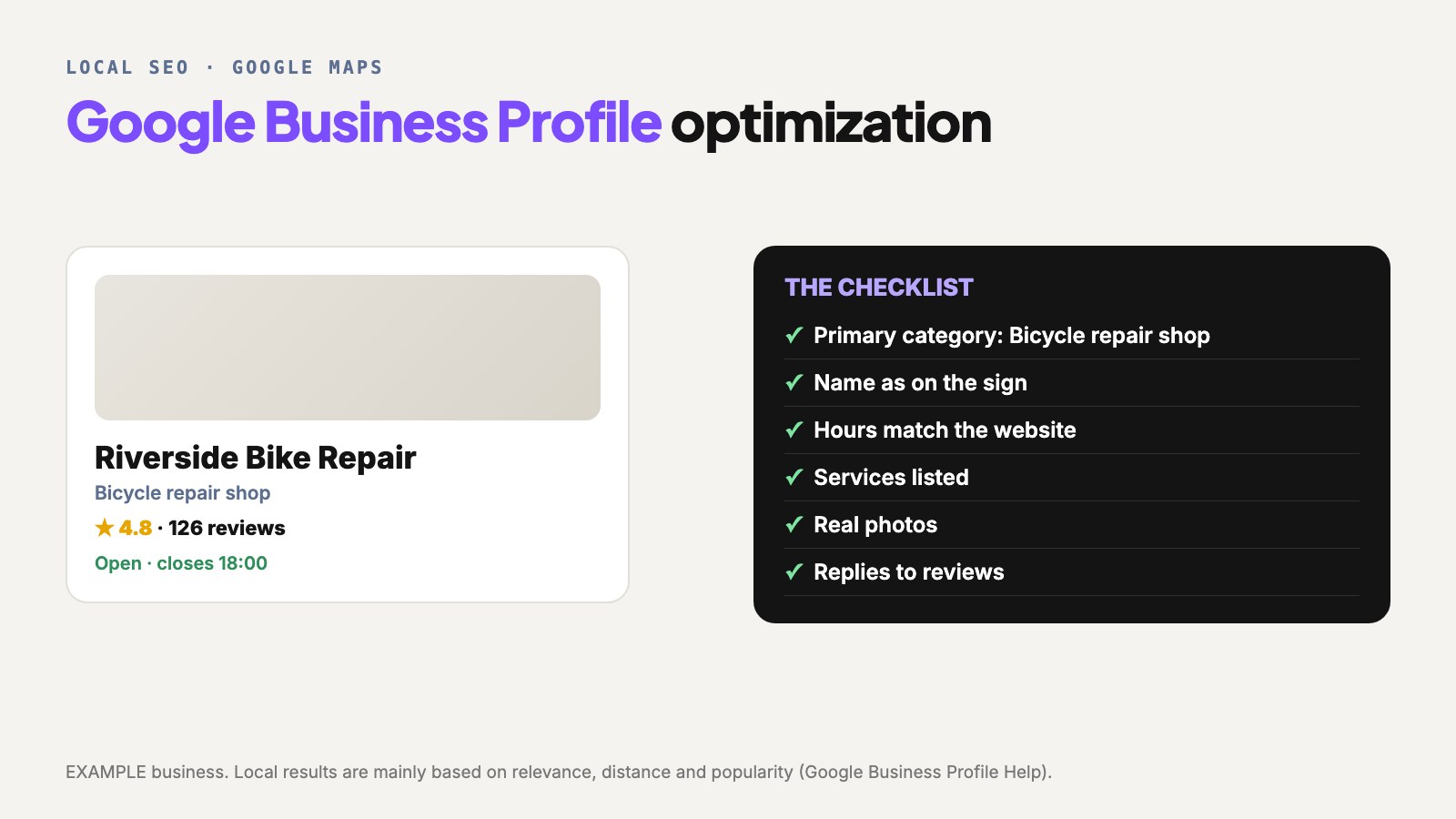
Key Takeaways
- Google Business Profile optimization means filling in every section accurately so Google can show your business for the right local searches, and so customers trust what they see.
- Google says local results are "mainly based on relevance, distance, and popularity", and that complete, accurate profiles are more likely to show up.
- The biggest levers you control: the primary category, your real business name, hours that match your website, services, photos and replies to reviews.
- You can't pay Google for a better local ranking, and stuffing keywords into your name breaks the guidelines and can get the profile suspended.
What Google Business Profile Optimization Means
Optimizing your Google Business Profile means giving Google complete, accurate and current information about your business, in the format its guidelines ask for. The profile is the panel that appears in Google Maps and in local search results, with your hours, phone number, photos and reviews. For many local businesses it gets more views than the website.
Google's own help page, Tips to improve your local ranking on Google, is unusually direct about how this works: "Local results are mainly based on relevance, distance, and popularity." You can't move your shop closer to every customer, but you can make the profile more relevant and more trusted. Google adds that "Businesses with complete and accurate info are more likely to show up in local search results."
This guide covers setting up each section properly. If you want to check an existing profile against your website, citations and schema, follow our local SEO audit instead; it scores the whole picture.
The Three Things Google Uses to Rank Local Results
Relevance, distance and popularity decide which businesses appear, and only two of them are in your hands.
| Factor | What it means | What you can do |
|---|---|---|
| Relevance | How well the profile matches what someone searched | Precise category, complete services, a clear description |
| Distance | How far the business is from the searcher or the place they named | Accurate address or service area; nothing else |
| Popularity | How well known the business is, online and offline | Reviews and replies, photos, mentions and links from local sites |
Google is also clear about what doesn't work: "There's no way to request or pay for a better local ranking on Google." Anyone selling guaranteed map rankings is selling something Google says can't be bought.
Google Business Profile Optimization Checklist
Work through these in order; the first four do most of the work.
- Verify the profile. Many features, including photos and review replies, only appear after verification.
- Choose the most precise primary category. "Bicycle repair shop" beats "Store".
- Use your real business name, exactly as it appears on your sign, with no extra keywords.
- Set hours that match your website, including holiday hours.
- Add your services or products with plain descriptions and, where possible, prices.
- Write a description that says what you do, for whom and where, in plain words.
- Upload real photos of the outside, inside, team and work.
- Reply to reviews, good and bad, within a few days.
- Post updates, offers or events when you have something real to share.
- Link to the right page on your website and track the clicks.
Choose the Right Primary Category
Your primary category is the single most important field, because it tells Google which searches you're relevant for. Google's category help asks you to "Select a primary category that best describes your business", and warns: "Do not select a category for every product or service."
Pick the most specific category that describes the core of the business, then add a small number of extra categories only if they describe something you genuinely are. Google's guidelines put it plainly: "Choose the fewest number of categories it takes to describe your overall core business" and "Do not use categories solely as keywords or to describe attributes of your business."
A quick way to choose: search for your main service in Google Maps, open the top three competitors' profiles and note the category shown under their name. If they all use a more specific category than you, that's usually the first fix.
Business Name, Address and Hours
These three fields must match the real world and your website exactly, because mismatches confuse customers and Google alike.
Name
Google's guidelines say "Your name should reflect your business's real-world name" and "Including unnecessary information in your business name isn't permitted". Adding a city or a keyword ("Joe's Plumbing Best Emergency Plumber Turku") breaks the rules, and competitors can report it.
Address or service area
If customers visit you, show your address. If you travel to them, set a service area instead; our guide to service area business SEO explains when to hide the address.
Hours
Hours are where we see the most avoidable mistakes. In local audits we ran in November 2026, one restaurant's profile said it closed at 23:00 while its own website said 22:00, and the same profile linked to a delivery service while the website still said delivery was "coming soon". A customer who arrives at 22:30 to a locked door doesn't come back. Check hours on the profile, the website and any delivery or booking app on the same day, and update all three together.
Services, Products and the Description
Services and the description are where you explain, in your customers' words, exactly what you do. They feed relevance: the more clearly you list what you offer, the more searches you can match.
- Services: add each main service as its own entry with a short, plain description. "Brake pad replacement" is more useful than "Car services".
- Products: if you sell physical items, add your best sellers with a photo and price.
- Description: two or three sentences on what you do, who for and where, plus what makes you different. Don't paste a keyword list; write it for a person deciding whether to call.
Use the same words customers use. Our near me SEO guide shows how people phrase local searches, and the same phrasing belongs here.
Photos and Videos
Real photos make the profile trustworthy and give customers a reason to choose you. Google's photo guidelines note that photos and videos "show up on Google only after you verify your Business Profile", recommend images of 720 by 720 pixels, and say new uploads can take 24 to 48 hours to appear. Videos can be up to 30 seconds long and 75 MB.
| Photo | Why it helps |
|---|---|
| The outside, from the street | Customers recognise the place when they arrive |
| The inside or your workspace | Shows what to expect |
| The team at work | Puts faces to the name and builds trust |
| Finished work or popular products | Shows quality better than any description |
| Your logo and a cover photo | Makes the profile look complete and official |
Skip stock photos. Customers can tell, and they add nothing Google doesn't already know. The same images can help on your website too; our image SEO guide covers file names and alt text.
Reviews and Replies
Reviews are the clearest popularity signal you can influence, and replies show you're paying attention. Google says "More reviews and positive ratings can help your business's local ranking", and its review management guide adds that "Helpful and positive replies to reviews can show that you're responsive to your customers."
You need a verified profile to reply, and the reviewer is notified when you do. Thank people for good reviews by name, and answer critical ones calmly with what you'll do about it. Getting more reviews in the first place is its own job; our guide on how to get more Google reviews covers review links, QR codes and what you're not allowed to do.
A pattern from our own local research: some of the best-rated businesses in a city, with 4.9 or 5.0 stars, had no website at all. Their profiles did the work. It shows how much a well-kept profile is worth, and how much those businesses could gain by adding a simple site that matches it.
Posts: Updates, Offers and Events
Posts let you share news directly on your profile. Google's posts guide lists three types, Updates, Offers and Events, and notes that "Posts older than 6 months are archived unless a date range is set."
Post when you have something real: a seasonal offer, new opening hours, an event or a new service. A post a month with a good photo keeps the profile looking active. Don't post the same text you use everywhere else; give a reason to visit or call this week.
Connect the Profile to Your Website
The profile and the website should tell the same story, and the website should prove it in more detail. Link the profile to the most relevant page (often the homepage or a location page), and add a UTM tag with our free UTM Builder so you can see those visits separately in analytics.
On the website, publish the same name, address, phone and hours, and describe the business with LocalBusiness structured data. Google's LocalBusiness documentation lists name and address as required properties, with opening hours, phone and URL recommended. Our guide to schema markup explains how it works, and the free Schema Checker tests yours.
Don't forget other maps. Bing Places feeds Bing Maps, and our Bing Webmaster Tools guide explains why Bing matters for Copilot and ChatGPT search.
Common Google Business Profile Mistakes
| Mistake | Why it hurts | Fix |
|---|---|---|
| Keywords added to the business name | Breaks Google's guidelines; can lead to suspension | Use the name on your sign |
| A vague primary category | Shows you for fewer relevant searches | Pick the most specific category that fits |
| Hours that differ from the website | Customers arrive to a closed door | Update profile, site and apps together |
| No services listed | Less to match searches against | Add each main service with a plain description |
| Stock or no photos | Looks inactive and untrustworthy | Upload real photos of the place and the work |
| Unanswered reviews | Looks like nobody's listening | Reply to every review within a few days |
| Profile links to a page that says something different | Customers lose trust | Make the website match the profile |
Where CMO Owls Helps, and Where You're in Charge
CMO Owls doesn't edit your Business Profile; that stays in your hands, and the checklist above is how to do it well. What the Owls do is make sure your website, local content and AI answers back the profile up, which is where most local businesses fall behind.
| Category | On your own | A typical local SEO tool | CMO Owls |
|---|---|---|---|
| Edits the Business Profile itself | You do | Some do | No, you stay in control of it |
| Checks your website's local details and schema | Manual | Sometimes | Yes: Owl-gorithm Hacker checks local business details when the site is a local business |
| Finds broken pages, slow pages and errors on the site the profile links to | No | Partly | Yes: Watch Owl, 54 checks on up to 500 pages |
| Writes service and location pages that match the profile | You write them | No | Yes: Owlthor writes and publishes them |
| Shows what ChatGPT and Google AI say when someone asks for a business like yours | Manual prompts | Rarely | Yes: Generative Engine Owl, with fixes |
- Owl-gorithm Hacker runs a technical SEO audit with a specialist for every layer, including structured data that matches what's visible and local business details when the site is a local business.
- Watch Owl opens up to 500 of your pages in a real browser, runs 54 checks and gives you a fix list, worst problem first, so the page your profile links to actually works.
- Generative Engine Owl measures what ChatGPT, Gemini, Claude and Google AI Overviews say about your brand and shows why AI skips you, and Owlthor writes the pages that give those assistants something to cite.
Keep the profile accurate with the checklist; let the Owls keep the website and content behind it in shape. To see how assistants decide which local business to name, read how to get recommended by ChatGPT.
Mind Map: Google Business Profile Optimization
Frequently Asked Questions
How do I optimize my Google Business Profile?
Verify it, choose the most specific primary category, use your real business name, keep hours accurate, add services, photos and a plain description, and reply to every review. Google says complete and accurate profiles are more likely to show in local results.
What is the most important part of a Google Business Profile?
The primary category, because it tells Google which searches the business is relevant for. Accurate hours and steady reviews come close behind.
Can I add keywords to my business name on Google?
No. Google's guidelines say the name should reflect your real-world name and that unnecessary information isn't permitted. Adding keywords can get the profile suspended.
How many categories should I choose?
As few as describe your core business. Google asks you to pick the most fitting primary category and not to add a category for every product or service.
How often should I post on Google Business Profile?
When you have something real to share, such as an offer, event or change in hours. Posts older than six months are archived unless they have a date range, so an occasional fresh post keeps the profile active.
Why aren't my photos showing on Google?
Photos only appear after the profile is verified, and new uploads can take 24 to 48 hours. They also need to meet Google's content guidelines.
Can I pay Google to rank higher on Maps?
No. Google states there's no way to request or pay for a better local ranking. Ads can appear above local results, but they're labelled and separate.
Does my website affect my Google Business Profile ranking?
It helps. A website that matches the profile and clearly describes your services supports relevance and trust, and it's where customers go for detail before they call.
The Next Step
Open your profile today and check the primary category, name and hours against your website; those three fixes take ten minutes. Then add your website to CMO Owls to make sure the site your profile links to is fast, error-free and ready for the people, and the AI assistants, who check it next.
Sources
- Tips to improve your local ranking on Google, Google Business Profile Help, 2026.
- Guidelines for representing your business on Google, Google Business Profile Help, 2026.
- Manage your business category, Google Business Profile Help, 2026.
- Manage your Business Profile photos and videos, Google Business Profile Help, 2026.
- Create and manage posts on your Business Profile, Google Business Profile Help, 2026.
- Manage customer reviews, Google Business Profile Help, 2026.
- Local business (LocalBusiness) structured data, Google Search Central, 2026.
- Bing Places for Business, Microsoft, 2026.