Key Takeaways
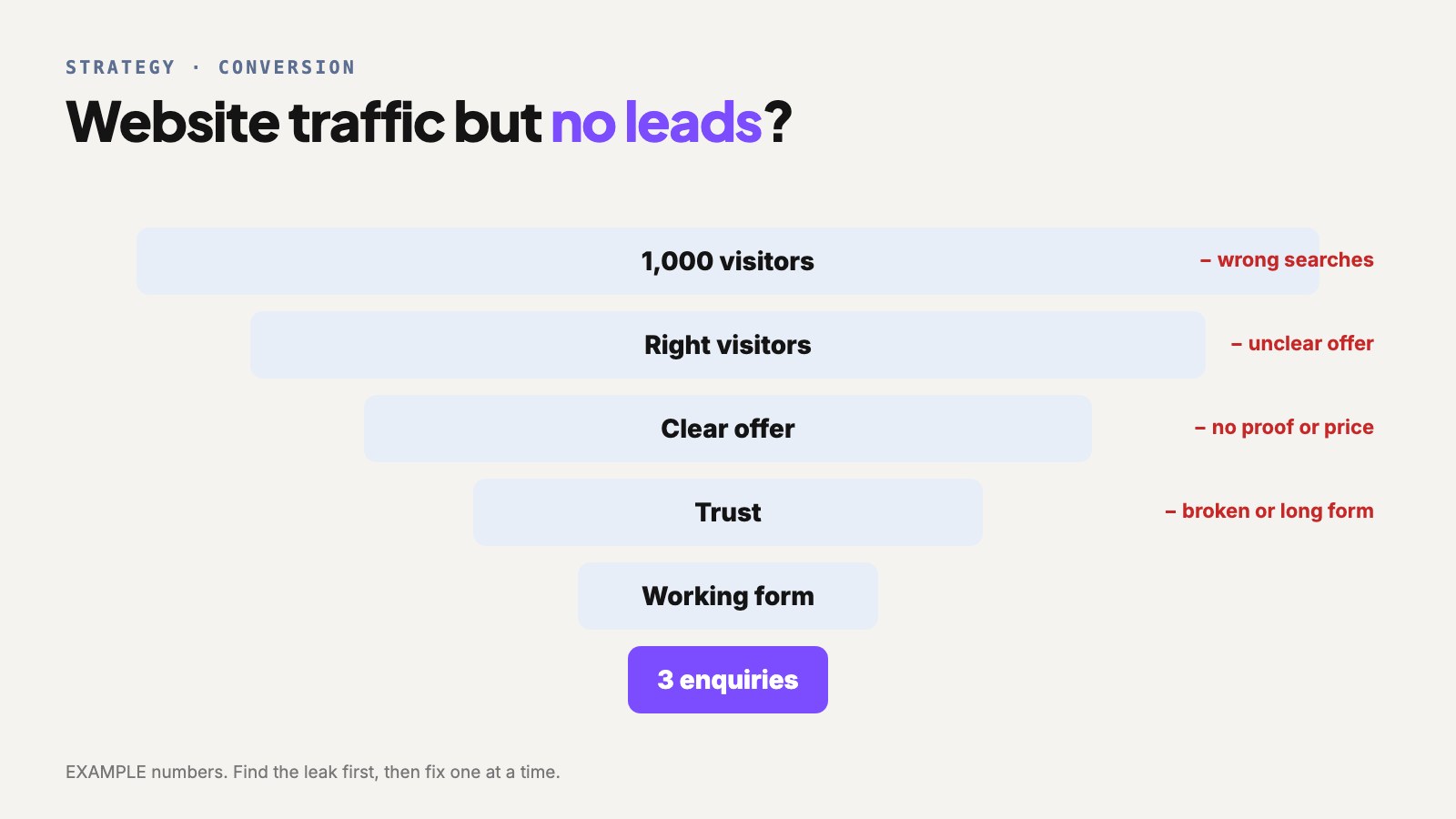
- Website traffic but no leads almost always means a gap between what visitors came for and what the page gives them, or something that stops them acting.
- Check in this order: are they the right visitors, do they understand the offer in seconds, can they trust you, and does the button or form actually work?
- Nielsen Norman Group found that users "often leave Web pages" within 10 to 20 seconds, so the first screen does most of the work.
- Measure before you change anything: set up a key event for enquiries in GA4, then fix one leak at a time.
What "Traffic But No Leads" Usually Means
It means your site is good at being found and bad at being chosen. Search engines send people because the page seems relevant. They leave because it doesn't answer their next question, doesn't earn their trust or doesn't make the next step easy.
The good news is that this is cheaper to fix than a lack of traffic. You already have the visitors. Every leak you close turns some of them into enquiries without a single extra visit.
If your traffic has dropped as well, start with our guide to why website traffic drops. This guide assumes the visits are there and the enquiries aren't.
First, Measure Leads Properly
You can't fix what you can't count, so make sure enquiries are tracked before you change the site. In GA4, Google defines a key event as "an event that measures an action that's particularly important to the success of your business" (Analytics Help). A form submission, a click on your phone number and a booking are all good candidates.
Then look at engagement. GA4 counts an engaged session as one that "Lasts longer than 10 seconds", "Has a key event" or "Has 2 or more screen or page views" (Analytics Help). Pages with plenty of visits and a low engagement rate are where people arrive and leave. Our guide on measuring content in GA4 shows how to see which pages actually produce enquiries.
The 9 Reasons, and How to Spot Each
| Reason | Typical sign | Where to check |
|---|---|---|
| 1. Wrong visitors | Visits from searches that don't fit what you sell | Search Console queries |
| 2. Unclear offer | People leave the page within seconds | GA4 engagement rate by page |
| 3. No next step on the page | Readers reach the end and stop | Scroll and click data |
| 4. Hidden or missing price | Visits to the page, few enquiries, many questions by phone | Your inbox and call notes |
| 5. Not enough trust | Long reads, no action | Reviews, proof and "Not secure" warnings |
| 6. Slow or broken on phones | Phone visitors engage far less than desktop | GA4 device split, a phone test |
| 7. Form too long or broken | Clicks on the form, few submissions | Test it yourself, form events |
| 8. Contact details hard to find | Visitors search the page for a phone number | Session recordings |
| 9. Slow follow-up | Enquiries arrive but don't become customers | Your reply time |
1. You're Attracting the Wrong Visitors
A page can rank well for a search that doesn't lead to buying. "How to fix a leaking tap" brings do-it-yourselfers to a plumber's site. Useful, but rarely a lead.
Open the Queries tab in Search Console for your busiest pages. If most searches are about learning rather than hiring, the page is doing its job as an article. Link it clearly to the matching service, and write pages for the searches that signal intent to buy; our keyword research guide shows how to tell them apart.
2. The Offer Isn't Clear in the First Seconds
Visitors decide fast whether to stay. Jakob Nielsen's research found that users "often leave Web pages" within 10 to 20 seconds, and that "To gain several minutes of user attention, you must clearly communicate your value proposition within 10 seconds" (Nielsen Norman Group).
Read your first screen as a stranger would. It should say what you do, for whom, where, and what to do next, in plain words. "Welcome to our website" says none of that. Google's own title guidance makes the same point for search results: "Avoid vague descriptors like "Home" for your home page". Our guide to titles and descriptions covers the search side.
3. There's No Obvious Next Step
Many pages explain well and then simply end. Every service page and every article that relates to a service needs one clear action: call, book, get a quote. Put it near the top and again at the end.
Eye-tracking research from Nielsen Norman Group recommends you "Include the most important points in the first two paragraphs on the page" (Nielsen Norman Group), because people scan rather than read every line. The same applies to your call to action.
4. Visitors Can't Tell What It Costs
When people can't estimate the cost, many leave to find a business that tells them. You don't need a fixed price list: a starting price, a typical range or the factors that change the price is enough to keep the right people moving. Our service page guide has wording for each situation.
5. Not Enough Trust
People hire businesses they believe will turn up and do the job. Real reviews, photos of your work, names and faces, and specific results all help. Generic claims don't.
- Show recent reviews that mention the service on the page; see how to get more Google reviews.
- Use real photos of your team and work instead of stock images.
- Fix any "Not secure" warning in the address bar; it undermines every claim on the page.
6. The Page Is Slow or Awkward on a Phone
Most local searches happen on phones, so a page that works on your laptop can still fail where it matters. Speed affects sales, not just rankings. In Google's collection of Core Web Vitals case studies, "Vodafone (Italy) improved LCP by 31% to achieve 8% more sales."
Open your most visited page on your own phone, on mobile data, and try to enquire. Then check it with our free Mobile-Friendly Checker, and read why a website is slow for the usual causes.
7. The Form Is Too Long or Doesn't Work
Forms are where most leads are lost, often silently. Nielsen Norman Group's form guidance starts with "Keep it short", noting that "Every time you cut a field or question from a form, you increase its conversion rate" (Nielsen Norman Group).
Baymard Institute's checkout research shows how far sites drift: "The average checkout flow in 2024 is 5.1 steps long and contains 11.3 form fields", while "most sites need only 8 form fields in total" (Baymard Institute). A contact form usually needs far fewer: name, a way to reply and a message.
- Submit your own form today, on a phone, and check the email arrives.
- Remove every field you don't need before the first call.
- Put the label next to each field, not inside it.
- Show a clear confirmation, and say when you'll reply.
8. Contact Details Are Hard to Find
Some customers will never fill in a form; they want to call. Make your phone number tappable on phones and visible in the header or near every call to action. Add opening hours next to it so people know whether to call now.
To see where visitors look for it, Microsoft Clarity offers heatmaps and session recordings and states that "Clarity is a free service forever" (Microsoft Learn). Watching ten recordings of people leaving your service page often explains more than any report.
9. Leads Arrive but Go Cold
Sometimes the website works and the follow-up doesn't. Check how long it takes to reply to a form, whether enquiries land in a monitored inbox and whether missed calls are returned. A same-day reply wins jobs that a three-day reply loses.
Which Leak to Fix First
Fix what's broken before you improve what's merely weak. A form that doesn't send is losing every lead on the page; a vague headline loses only some. Use this order.
| Priority | Leak | Why first |
|---|---|---|
| 1 | Broken form, phone link or booking | Every interested visitor is lost |
| 2 | Security warning or broken page on phones | It stops people before they read |
| 3 | Unclear first screen or missing next step | Most visitors decide in seconds |
| 4 | No price guide or proof | Interested visitors leave to compare |
| 5 | Wrong visitors | Needs new content, so it takes longest |
A One-Afternoon Fix Plan
- Set up GA4 key events for form submissions and phone clicks.
- List your ten most visited pages and their engagement rate.
- For each, check the first screen: what, for whom, where, next step.
- Add a price guide and one clear call to action to every service page.
- Test every form and phone link on a phone.
- Add two pieces of real proof to each service page.
- Watch ten session recordings, and fix the most common exit point.
Change one thing at a time where you can, and compare enquiries over the following month. Run a quick check of each page's basics with our free SEO Page Checker as you go.
How CMO Owls Finds the Leaks for You
The hard part is knowing which of the nine leaks you have. CMO Owls checks the site, the searches and the pages people actually visit, and tells you where enquiries are slipping away.
| Job | On your own | An analytics tool alone | CMO Owls |
|---|---|---|---|
| Test forms and buttons on every page | Click through yourself | No | Watch Owl tests forms, but never submits checkout or payment |
| Find broken links, images and errors | Hard to spot | No | Watch Owl, 54 checks on up to 500 pages |
| Check each page matches the search | Guesswork | No | Owl-gorithm Hacker judges whether title, H1 and opening match the topic |
| Show engagement beside each page | Separate reports | Yes | Watch Owl adds optional GA4, Search Console and Clarity data per page |
| Alert you when a key page slips | Rarely | Only if you set alerts | Cash Cow Stalker, including engagement thresholds |
| Write the missing service or comparison pages | You write them | No | Owlthor and Growth Hacker |
- Watch Owl opens your pages in a real browser, tests forms, and records broken links, failed requests and console errors, with optional GA4, Search Console and Clarity data beside each page.
- Owl-gorithm Hacker checks whether each page's title, heading and opening match its real topic, which is often why the wrong visitors arrive, and Growth Hacker writes the comparison pages buyers look for before choosing.
You still decide the offer and the price. The Owls make sure nothing on the site is quietly stopping people from acting on it.
Mind Map: Traffic But No Leads
Frequently Asked Questions
Why does my website get traffic but no leads?
Usually because the visitors aren't looking to buy, the offer isn't clear quickly, they can't see a price or trust signals, or the form or phone link doesn't work. Check those in that order.
What is a good conversion rate for a small business website?
It varies too much by industry, price and traffic source to give one honest number. Compare your own pages with each other and track whether each change improves enquiries.
How do I know if my contact form is broken?
Submit it yourself on a phone and a computer and confirm the message arrives. In GA4, compare form starts with form submissions to spot pages where people begin but don't finish.
Why do people visit my contact page but never get in touch?
Usually because the form is long, broken or confusing on a phone, or because they wanted to call and couldn't find a number. Test the page on a phone and offer more than one way to reach you.
Can too many form fields reduce leads?
Yes. Usability research consistently finds that removing fields increases completions, so ask only what you need for the first reply.
How can I see what visitors do on my website?
Use GA4 for engagement and key events, and a free tool such as Microsoft Clarity for heatmaps and session recordings.
Can a slow website lose me enquiries?
It can. Google's published case studies show businesses that improved loading speed seeing more sales, and slow pages give visitors more time to leave.
How long before changes increase enquiries?
Some fixes, like a broken form, work immediately. Others, like better trust signals, need a few weeks of traffic before you can compare fairly.
The Next Step
Submit your own contact form from your phone today and time how long it takes; that one test finds the most common leak. Then add your website to CMO Owls so Watch Owl tests every form and page for you.
Sources
- About key events, Google Analytics Help, accessed 2026.
- Engagement rate and bounce rate, Google Analytics Help, accessed 2026.
- How Long Do Users Stay on Web Pages?, Nielsen Norman Group, 2011.
- Influencing your title links in search results, Google Search Central, accessed 2026.
- F-Shaped Pattern of Reading on the Web, Nielsen Norman Group, 2017.
- Business impact of Core Web Vitals, web.dev, accessed 2026.
- Website Forms Usability: Top 10 Recommendations, Nielsen Norman Group, 2016.
- 5 Ways to Minimize Form Fields in Checkout, Baymard Institute, 2024.
- Clarity overview, Microsoft Learn, 2026.