Key Takeaways
- Keyword research for small business means finding the exact words your customers type into Google, then making sure a page on your site answers each one.
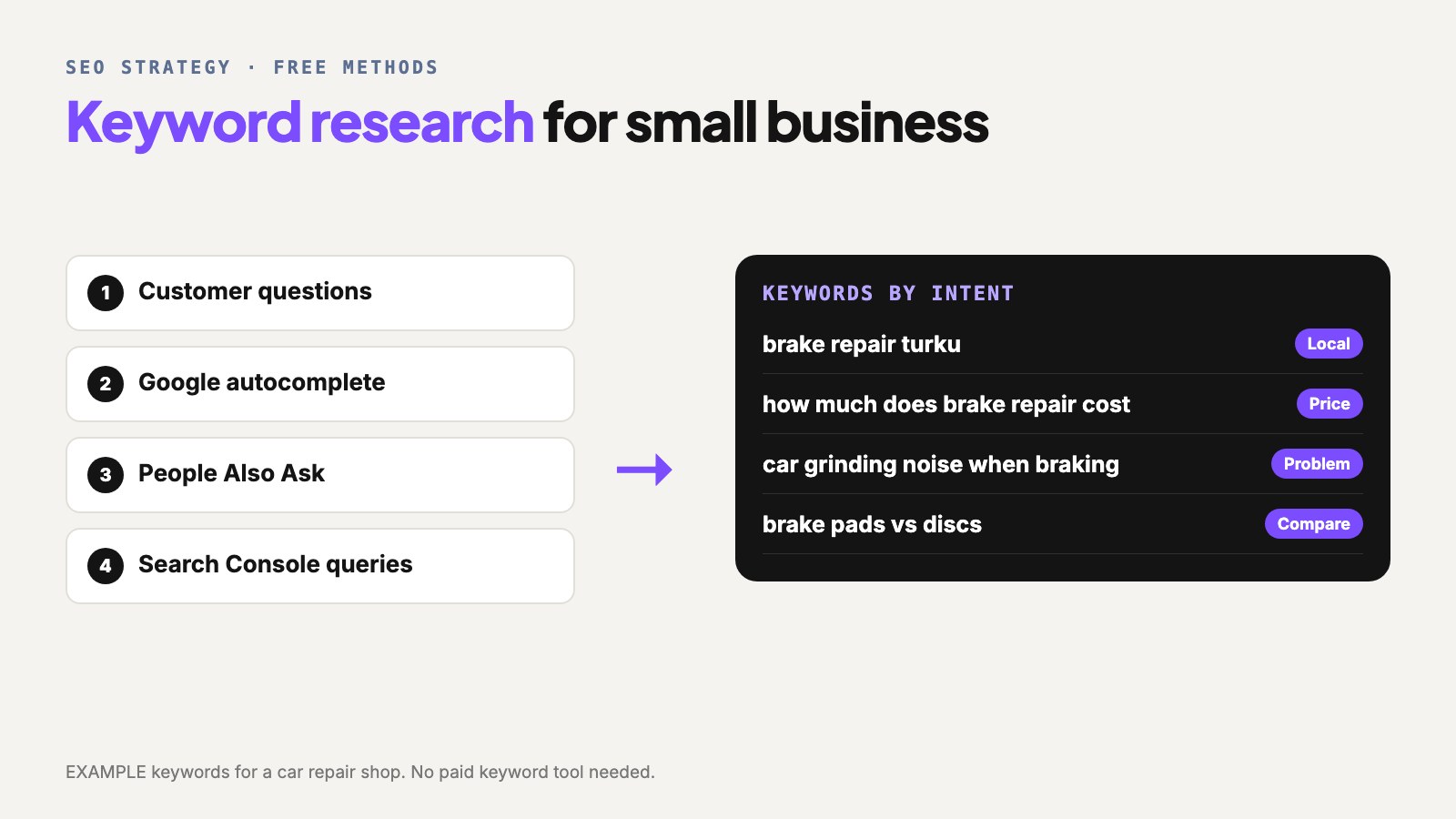
- You can do it free: start with your customers' own words, then use Google autocomplete, People Also Ask and your Search Console queries.
- Group keywords by search intent (what the person wants to do) and give each intent one page. Two pages chasing the same search compete with each other.
- Small businesses win on specific, longer searches ("emergency boiler repair Turku") long before they win on broad ones ("boiler").
What Keyword Research Is for a Small Business
Keyword research is finding the words people use when they search for what you sell, so you can build pages that match them. Google's SEO Starter Guide puts it simply: "Think about the words that a user might search for to find a piece of your content."
For a small business, the goal isn't the biggest keywords. It's the searches that bring customers: people looking for your service, in your area, with a problem you solve. A plumber doesn't need to rank for "plumbing"; they need "blocked drain [their town]" and "plumber open Sunday".
The method below uses only free sources. It takes an afternoon the first time, and gives you a list you can work from for months.
Step 1: Start With Your Customers' Words
The best keyword list starts with what customers actually say to you, because that's how they search too. Before opening any tool, write down:
- The questions people ask on the phone, by email and at the counter.
- The words they use for your services, which are often different from your trade terms ("tyre change" rather than "wheel fitment").
- The problems that make them contact you ("car making grinding noise when braking").
- The places they mention: towns, neighbourhoods, landmarks.
Twenty entries is plenty to start. This list is your seed: every free tool below works best when you feed it real customer phrases.
Step 2: Use Google Autocomplete
Autocomplete shows what people commonly search after typing the start of a phrase. Google explained in a 2018 post on how autocomplete works: "We look at the real searches that happen on Google and show common and trending ones relevant to the characters that are entered", and predictions can also relate to location and previous searches.
- Open Google in a private window so your history doesn't shape the suggestions.
- Type one of your seed phrases slowly, such as "brake repair", and note every suggestion.
- Add letters after the phrase ("brake repair a", "brake repair b") to see more.
- Try question starters: "how much does brake repair", "why does my brake".
- Repeat in Google Maps and YouTube, which show their own suggestions.
Because predictions can reflect location, the suggestions you see in your area are often exactly the local searches you want.
Step 3: Mine People Also Ask and Related Searches
The "People also ask" box and the related searches at the bottom of the results show the follow-up questions people have. Search each of your main phrases and note them.
These questions are gold for two reasons. They're the questions to answer on your service pages and in an FAQ, and they're the kind of direct questions people now ask AI assistants too. Our guide on how to get recommended by ChatGPT explains why pages that answer specific questions clearly get cited.
Step 4: Read Your Own Search Console Queries
If your site is already live, Search Console shows the exact searches that already display your pages, which is the most valuable free keyword data there is. Search Console is free, and its Performance report lists the queries that showed your site, with impressions, clicks, click-through rate and average position.
| Pattern | What it means | What to do |
|---|---|---|
| High impressions, low clicks | You appear but don't get chosen | Rewrite the page title and description |
| Average position 8 to 20 | You're close to page one | Improve the page that ranks; add detail and internal links |
| Queries you have no page for | Google is stretching an unrelated page | Write a page for that search |
| Questions (how, why, what, cost) | Real customer questions | Answer them on the page or in an FAQ |
| Place names | Local demand | Mention the area on the relevant service page |
Our beginner's guide to Search Console shows where to find these numbers, and our guide to meta titles and descriptions covers the high-impressions, low-clicks fix. Bing offers a free equivalent: Bing Webmaster Tools includes search performance and a keyword research report, set up in minutes with our Bing guide.
Step 5: Check Rough Demand (Free Options and Their Limits)
Free tools can tell you whether a search is popular, rising or seasonal, but rarely give exact numbers, and that's fine for a small business.
- Google Trends compares interest between terms and over time. Google's Trends FAQ explains that it "normalizes search data" and scales results from 0 to 100, and that low-volume terms appear as 0. Use it for comparisons and seasons ("winter tyres" every October), not exact volumes.
- Google Keyword Planner shows search estimates for keywords. Its help page says it can "View estimates on the number of searches a keyword gets each month", but you need a Google Ads account with billing information entered to use even the basic features.
For most local businesses, exact volume matters less than intent. A search with 30 people a month who all want to book is worth more than one with 3,000 people who just want a definition.
Step 6: Group Keywords by Search Intent
Search intent is what the person wants to do, and each intent needs its own kind of page. Sorting your list by intent turns a pile of phrases into a page plan.
| Intent | Example searches | Best page type |
|---|---|---|
| Find a business (local) | car repair near me, brake repair Turku | Service page with location details |
| Compare or decide | brake pads vs discs, best time to change tyres | Guide or comparison article |
| Price | how much does brake repair cost | Prices section or cost guide |
| Problem | car grinding noise when braking | Problem article that leads to the service |
| Learn | what are brake pads | Short explainer, linked to the service |
Then apply one rule: one main search intent per page. If two of your pages answer the same search, they compete and neither ranks as well as one strong page would. Combine them, or make each target a clearly different search.
Local searches deserve their own attention; our near me SEO guide explains how they work, and your Google Business Profile should use the same words as your service pages.
Step 7: Turn the List Into a Page Plan
A keyword list is only useful once each group has a page, and each page has a date.
- Put each intent group in a row of a spreadsheet, with its main keyword and two or three variants.
- Mark whether you already have a page for it. If yes, note the URL; if no, it's a new page to write.
- Prioritise: searches closest to a booking first, then problems and prices, then explainers.
- Use the main keyword in the page title, the main heading and the first paragraph, and the variants naturally in the text. Our free Keyword Density Checker catches overuse.
- Link each new page to its related service page and two or three siblings; our internal linking guide shows how.
- Schedule one or two pages a week in a content calendar so the plan actually gets done.
Long-Tail Keywords: Where Small Businesses Win
Long-tail keywords are longer, more specific searches, and they're where a small site can outrank big ones. "Boiler" is dominated by national retailers and encyclopaedias. "Boiler service price Turku" or "why is my boiler losing pressure" are searched by fewer people, but those people want exactly what you offer, and big sites rarely write for them.
Your customer list from Step 1 is mostly long-tail already. That's why starting there works: the questions customers ask you are the ones big competitors don't answer.
Common Keyword Research Mistakes
| Mistake | Why it hurts | Fix |
|---|---|---|
| Chasing broad, famous keywords | Big sites own them; you get nothing | Target specific, local, longer searches |
| Using trade terms customers don't use | Nobody searches them | Use your customers' words |
| Two pages for the same search | They compete with each other | One main intent per page |
| Stuffing the keyword everywhere | Reads badly; Google favours people-first content | Use it in the title, heading and opening, then write naturally |
| Ignoring your own Search Console data | Missing the searches you're closest to winning | Check queries monthly |
| Keyword list with no page plan | Nothing changes on the site | Give every group a page and a date |
On stuffing, Google's guidance on helpful, people-first content is the reference: content "created primarily for people, and not to manipulate search engine rankings." Write the page for the customer; the keyword simply makes sure it's the page they find.
Once you've covered your own customers' searches, look at what competitors rank for that you don't; our SEO competitor analysis guide covers that next step.
How CMO Owls Does Keyword Research and Writes the Pages
The free method works, but it takes an afternoon, and the list goes stale. CMO Owls turns your real data into a keyword plan every month and then writes the pages, so the research actually turns into traffic.
| Category | The free method above | A typical keyword tool | CMO Owls |
|---|---|---|---|
| Uses your own Search Console queries | Yes, by hand | Rarely | Yes: Game Plan Owl reads them automatically |
| Finds keywords competitors rank for and you don't | Hard | Yes | Yes: Spy Owl, with where every number came from |
| Spots your own pages competing for one search | Hard | Rarely | Yes: Owl-gorithm Hacker checks cannibalization |
| Finds keywords close to page one | From Search Console | Sometimes | Yes: Owl-gorithm Hacker |
| Turns the list into a monthly plan | Your spreadsheet | No | Yes: Game Plan Owl's content roadmap |
| Writes and publishes the pages | You write them | No | Yes: Owlthor, with images and internal links |
| Finds the questions people ask AI | Manual | Rarely | Yes: Buzz Creator Owl |
- Game Plan Owl builds a monthly content roadmap from your audit, your competitors' rankings and your Search Console queries, and Spy Owl finds your real competitors and the keywords they rank for that you don't.
- Owl-gorithm Hacker checks keyword intent, cannibalization between your own pages and keywords close to page one, so you fix what's nearly winning first.
- Owlthor researches what ranks for each keyword and writes the article with images, mind maps and charts, then sends it to your CMS, and Buzz Creator Owl answers the questions people ask AI about products like yours.
Do Step 1 yourself, because nobody knows your customers' words like you do. Let the Owls handle the rest every month.
Mind Map: Keyword Research for Small Business
Frequently Asked Questions
How do I do keyword research for free?
Start with the words your customers use, then collect Google autocomplete suggestions, People Also Ask questions and the queries in your Search Console Performance report. Group them by intent and give each group a page.
What are the best keywords for a small business?
Specific searches that show someone wants your service, often including a place or a problem, such as "brake repair Turku". They're less competitive than broad terms and more likely to bring customers.
Is Google Keyword Planner free?
It's part of Google Ads. Google's help page says you need to complete your account setup with billing information to access its basic features.
What is search intent?
It's what the person searching wants to do: find a business, compare options, check a price, fix a problem or learn something. Each intent needs a different kind of page.
How many keywords should a page target?
One main search intent, with its main keyword and a few close variants. Two pages targeting the same search compete with each other.
What are long-tail keywords?
Longer, more specific searches, such as "why is my boiler losing pressure". Fewer people search them, but they're easier to rank for and usually closer to a decision.
How often should I do keyword research?
Do a full pass once, then review your Search Console queries monthly and refresh the list each season or when you add a service.
Can I do keyword research without any tools?
Yes. Customer questions, Google autocomplete and People Also Ask need nothing but a browser, and Search Console is free once your site is verified.
The Next Step
Write down twenty things customers ask you this week; that list is your keyword research foundation. Then add your website to CMO Owls and connect Search Console, so Game Plan Owl can turn your real queries into a monthly plan and Owlthor can write the pages.
Sources
- Search Engine Optimization (SEO) Starter Guide, Google Search Central, 2026.
- How Google autocomplete works in Search, Google, 2018.
- About Search Console, Google Search Console Help, 2026.
- Performance report (Search results), Google Search Console Help, 2026.
- Bing Webmaster Tools, Microsoft, 2026.
- FAQ about Google Trends data, Google Trends Help, 2026.
- Use Keyword Planner, Google Ads Help, 2026.
- Creating helpful, reliable, people-first content, Google Search Central, 2026.