Key Takeaways
- Most website redesign SEO losses come from one thing: old page addresses that stop working, so Google and customers hit dead ends.
- Before launch, crawl the old site and map every old URL to its closest new page. Google warns against sending many old URLs to the home page.
- Use server-side permanent redirects, keep them for a long time (Google says "generally at least 1 year") and remove any staging blocks the moment you go live.
- Expect some movement for a few weeks. Check Search Console daily in the first week, then weekly, and fix 404s as they appear.
Why Redesigns Lose Rankings
A redesign loses rankings when the pages Google knew disappear, change address without a redirect, or come back with less content. Google has spent years learning which of your pages answer which searches. Each of those pages has an address, links from other sites and a history. Change the address without telling Google, and all of that starts again from nothing.
Google's own documentation on how HTTP status codes affect its crawlers is blunt: "URLs that are already indexed and return a 4xx status code are removed from the index." A page that used to rank and now returns "not found" is simply dropped.
The other common causes are quieter: a staging site's "don't index me" setting left on, page titles replaced with the same generic one, important text moved into images or tabs, or a new menu that no longer links to pages that used to be one click from the homepage.
Two Kinds of Redesign, Two Levels of Risk
A new design on the same addresses is low risk; anything that changes addresses is a site move and needs a full plan.
| Change | Risk | What Google's guidance covers |
|---|---|---|
| New design, same URLs, same host | Low | Check content, titles and links stay the same |
| New host or platform, same URLs | Low to medium | Changing your web hosting: no URL change |
| New URL structure on the same domain | High | How to move a site: map and redirect every URL |
| New domain name | Highest | Site move plus the Change of Address tool |
| http to https, or www to non-www | Medium | Redirects; not the Change of Address tool |
Google's guide to changing web hosting says it's "only for migrations that don't affect the user-visible URL". If any address changes, follow the site move guide instead.
Before Launch: The SEO Checklist
Do these on the old site while it's still live; once it's gone, the information is gone too.
- Crawl the old site and export every URL, title, meta description and H1. This is your record of what exists.
- Export your top pages from Search Console: the pages with the most clicks over the last 12 months. These must survive. Our Search Console guide shows where to find them.
- List pages with links from other sites. Those links carry value that only a redirect preserves.
- Build a URL map: a spreadsheet with every old URL in one column and its new URL in the next.
- Keep the content of ranking pages. Redesign the look, but don't cut the text that made them rank.
- Carry over titles and descriptions, or improve them deliberately; see our guide to meta titles and descriptions.
- Block the staging site from Google with noindex while you build it.
- Plan the internal links: Google's link best practices say "Every page you care about should have a link from at least one other page on your site." Our internal linking guide explains how.
How to Build a URL Map
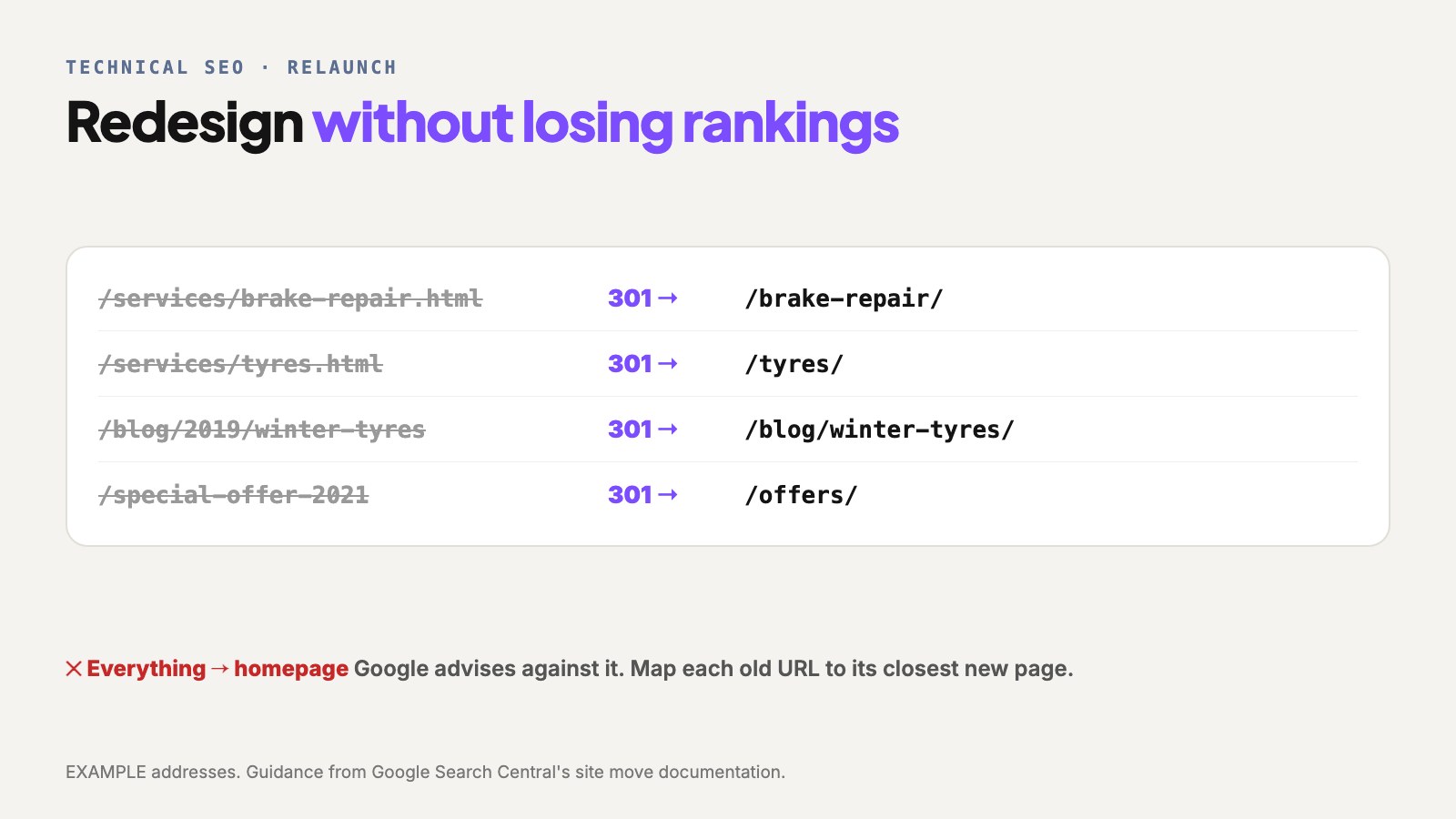
A URL map pairs every old address with the single best new address for the same content. It's the most important document in any redesign.
| Old URL | New URL | Note |
|---|---|---|
| /services/brake-repair.html | /brake-repair/ | Same content, new address: 301 |
| /services/tyres.html | /tyres/ | Same content: 301 |
| /blog/2019/winter-tyres | /blog/winter-tyres/ | Same article: 301 |
| /special-offer-spring-2021 | /offers/ | Expired page: closest relevant page |
| /about-us.php | /about/ | Same content: 301 |
| /contact.html | /contact/ | Same content: 301 |
The rule for pages with no exact match: send them to the closest relevant page, not the homepage. Google's site-move guide says: "Don't redirect many old URLs to one irrelevant single URL destination, such as the home page of the new site." A redirect to an unrelated page is treated much like a missing page.
If a page genuinely has no equivalent and no value (an old test page, say), it's fine to let it return 404. Just make sure it isn't one of your top pages.
Redirects: The Part That Saves Your Rankings
A permanent redirect tells Google and browsers that a page has moved for good, so the new address takes over the old one's place in search. Google's redirects documentation explains that permanent redirects "show the new redirect target in search results", while temporary ones "show the source page in search results", and recommends "a permanent server-side redirect whenever possible."
- Redirect old to new directly. Avoid chains where page A goes to B, then to C. Point A straight at the final page.
- Keep redirects for a long time. Google's site-move guide says "Keep the redirects for as long as possible, generally at least 1 year." There's little reason to ever remove them.
- Update your own links. Redirects catch outside links and bookmarks; your menu, footer and articles should link straight to the new addresses.
Our 301 redirect guide explains how to set them up on WordPress, Shopify and common servers, and the free Redirect Checker shows exactly where any old address ends up, including chains.
Launch Day: The Switch-Over
Launch day is where small slips cause big losses, so work from a written list.
- Remove the noindex and any password or robots.txt block from the new site. Google's hosting guide says to "Remove any temporary blocks to crawling."
- Switch on the redirects and test a sample from the URL map, including your top 20 pages.
- Submit the new sitemap in Search Console. Google notes that "Submitting a sitemap can help make the discovery process quicker", and its sitemaps overview adds that a sitemap helps most when a site is large or new. Check yours first with the free Sitemap Checker.
- Check the canonical tags point to the new addresses, not the old or staging ones; see our canonical tag guide.
- Run a broken link check across the new site with our free Broken Link Checker.
- Test analytics so you can compare before and after.
The noindex step matters more than any other. Google's documentation on noindex says it makes Google "drop that page entirely from Google Search results, regardless of whether other sites link to it." Left on after launch, it removes the whole new site.
After Launch: The First 8 Weeks
Watch closely for the first week, then weekly; most problems show up as 404s, indexing issues or falling clicks on specific pages.
| When | Check | Where |
|---|---|---|
| Day 1 | Top pages load and old URLs redirect correctly | Redirect Checker, your browser |
| Days 1 to 7 | New 404s and server errors | Search Console Pages report |
| Week 1 | Sitemap read successfully | Search Console Sitemaps report |
| Weeks 1 to 4 | Clicks and impressions on your top pages | Search Console Performance, compare periods |
| Weeks 2 to 8 | Pages Google hasn't indexed yet | URL Inspection on key pages |
| Week 4 | Speed for real visitors | Core Web Vitals report |
Google's site-move guide warns: "Expect temporary fluctuation in site ranking during the move." Small dips that recover over a few weeks are normal. A steady drop on one page usually means a missing redirect, lost content or a page Google can't index; our guides on traffic drops and unindexed pages cover the fixes. If the new design is slower, check Core Web Vitals too.
Changing Your Domain Name
A new domain needs everything above plus one extra step: telling Google with the Change of Address tool. Google's Change of Address tool is for moving "from one domain or subdomain to another". It's not for moving from http to https or between www and non-www on the same domain; those only need redirects.
For domain moves, the tool's help page asks you to keep redirects for at least 180 days, longer if Google Search still sends traffic to the old addresses. Combined with the site-move advice, the safe approach is simply to keep them permanently and keep renewing the old domain.
Common Redesign Mistakes
| Mistake | What happens | Prevention |
|---|---|---|
| No URL map | Old pages return 404 and drop out of Google | Map every old URL before launch |
| Everything redirected to the homepage | Google treats it much like a missing page | Send each URL to its closest match |
| Staging noindex left on | The whole site can drop out of search | Remove blocks on launch day and check |
| Content cut for a cleaner design | Pages lose what made them rank | Keep the text; redesign the layout |
| Redirect chains from older redesigns | Slower pages and diluted signals | Point every old URL to the final page |
| No baseline numbers | You can't tell what changed | Export Search Console data before launch |
How CMO Owls Protects a Relaunch
The hard part of a redesign isn't the redirects; it's knowing which ones are missing and noticing a falling page before it costs you a month of customers. That's the work CMO Owls takes off your hands.
| Category | On your own | A typical crawler | CMO Owls |
|---|---|---|---|
| Finds every redirect chain and loop | Manual checks | Yes | Yes: Watch Owl checks redirect chains and loops |
| Spots broken links and pages no menu links to | No | Partly | Yes: Watch Owl flags orphan pages and pages with no internal links |
| Compares the new site with the previous crawl | No | Rarely | Yes: Watch Owl's visual change detection |
| Alerts you when a top page loses clicks after launch | Only if you look | No | Yes: Cash Cow Stalker checks every five days |
| Checks www, trailing slash and canonical consistency | Manual | Yes | Yes: Watch Owl's URL variant and canonical checks |
| Explains each issue and the fix in plain words | No | Rarely | Yes, with a fix list, worst problem first |
- Watch Owl crawls up to 500 pages in a real browser, runs 54 checks including redirect chains and loops, orphan pages, click depth, sitemap and canonical consistency, and compares each crawl with the previous one.
- Cash Cow Stalker watches your top pages by clicks every five days using Search Console, GA4 and the page itself, and alerts you when clicks fall or a page drops out of Google, which is exactly what you need in the weeks after a relaunch.
- Owl-gorithm Hacker audits indexing, on-page basics and internal linking with a specialist for each layer, so the new site starts with a clean bill of health.
Run a crawl before you launch to record the old site, and another the day you go live. The difference between the two is your to-do list.
Mind Map: Website Redesign SEO
Frequently Asked Questions
Will a website redesign hurt my SEO?
It doesn't have to. Most losses come from old URLs that stop working, content that's removed or a staging block left on. Mapping and redirecting every URL and checking Search Console after launch prevents most of them.
How long does it take to recover rankings after a redesign?
Small fluctuations usually settle within a few weeks once Google has recrawled the new pages. A page that keeps falling usually has a specific problem, such as a missing redirect or lost content.
Should I redirect old pages to the homepage?
No. Google advises against redirecting many old URLs to one irrelevant page such as the homepage. Send each old URL to the closest matching new page.
How long should I keep redirects after a redesign?
For as long as possible. Google's site-move guidance says generally at least one year, and there's rarely a reason to remove them.
Do I need the Change of Address tool for a redesign?
Only if you're moving to a new domain or subdomain. It isn't used for http to https or www to non-www changes, which only need redirects.
How do I stop Google indexing my staging site?
Add a noindex rule to the staging pages, or put the staging site behind a password. Remove the noindex on launch day, or it will keep the new site out of Google.
Should I keep the same URLs when redesigning?
If you can, yes. Keeping the same addresses is the lowest-risk redesign, because nothing needs redirecting and Google's existing knowledge of each page stays attached.
What should I check right after launching a new website?
That the noindex is gone, old URLs redirect to the right pages, the new sitemap is submitted, canonical tags point to the new addresses and there are no broken links.
The Next Step
If a redesign is coming, export your top pages from Search Console today and start the URL map; that one spreadsheet prevents most losses. Then add your website to CMO Owls to record the old site with Watch Owl before launch and let Cash Cow Stalker watch your most valuable pages afterwards.
Sources
- How to move a site (site moves with URL changes), Google Search Central, 2026.
- Changing your web hosting and SEO, Google Search Central, 2026.
- Redirects and Google Search, Google Search Central, 2026.
- Change of Address tool, Google Search Console Help, 2026.
- Block search indexing with noindex, Google Search Central, 2026.
- Link best practices for Google, Google Search Central, 2026.
- What is a sitemap, Google Search Central, 2026.
- How HTTP status codes affect Google's crawlers, Google, 2026.