Key Takeaways
- An internal linking strategy is a plan for which pages on your site link to which, so Google, AI crawlers and visitors can find your important pages and understand how they relate.
- Google says it "primarily finds pages through links from other pages it already crawled", and that every page you care about should have a link from at least one other page.
- The simple system: a hub page for each main topic, supporting pages that link back to the hub and to each other, and descriptive anchor text instead of "click here".
- Fix orphan pages first: pages no other page links to are the hardest for Google and customers to find.
What Internal Links Are and Why They Matter
Internal links are links from one page on your site to another page on the same site. Your menu, footer, breadcrumbs and the links inside your articles are all internal links. They do three jobs at once: help visitors find the next useful page, help search engines discover pages, and show how your pages relate to each other.
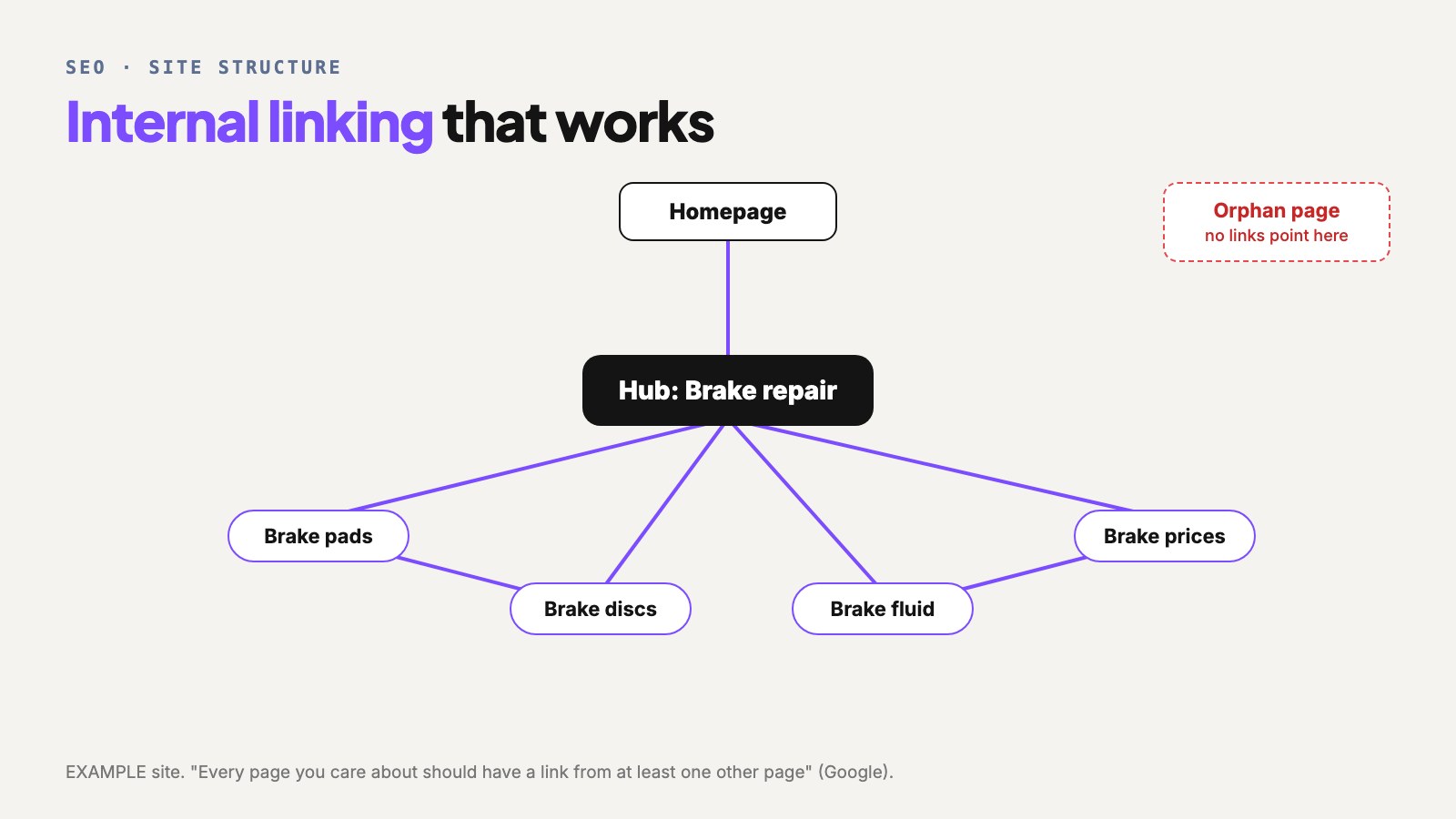
Discovery is the one most owners underestimate. Google's SEO Starter Guide states that "Google primarily finds pages through links from other pages it already crawled." Its explanation of how Search works gives a familiar example: a hub page, such as a category page, links to a new blog post, and that's how Google finds the post.
Internal links are also the only links you fully control. You can't make another website link to you, which is why earning backlinks takes months, but you can add a well-placed internal link in thirty seconds.
How Google Reads Internal Links
Google follows standard HTML links and uses the anchor text to understand the page being linked to. Its link best practices set out the rules:
- Use real links. "Generally, Google can only crawl your link if it's an
<a>HTML element" with an href. Buttons that only work with JavaScript may not be followed, which our guide on AI crawlers and JavaScript covers in more detail. - Link to every page that matters. "Every page you care about should have a link from at least one other page on your site."
- Write descriptive anchor text. Google says "Good anchor text is descriptive, reasonably concise, and relevant to the page that it's on", and lists "click here" and "read more" as too generic.
| Anchor text | Verdict | Why |
|---|---|---|
| click here | Bad | Says nothing about the page |
| read more | Bad | Too generic |
| brakes | Weak | Too short to show what the page offers |
| brake pad replacement in Turku | Good | Describes the page clearly |
| how much brake pad replacement costs | Good | Matches what the reader wants next |
AI crawlers that read pages for assistants work the same way: they follow links in the HTML. A page with no links pointing to it is a page they're unlikely to find.
The Hub-and-Spoke System for Small Websites
Group your pages into a few topics, give each topic a hub page, and link the hub and its supporting pages to each other. It's the simplest structure that works, and it scales from ten pages to five hundred.
1. Pick three to six main topics
For a car repair shop that might be brakes, tyres, servicing and diagnostics. For a bakery: cakes, catering, wholesale and the cafe. Each topic should match something customers search for; our keyword research guide shows how to find those topics.
2. Make one hub page per topic
The hub is the broad page: what the service is, who it's for, prices or how it works, and links out to every detailed page on that topic. Often it's simply your main service page.
3. Link supporting pages up, down and across
| Page | Links to | Why |
|---|---|---|
| Homepage or menu | Each hub page | Keeps hubs one click from the homepage |
| Hub page | Every supporting page in its topic | Lets Google and visitors find each detail page |
| Supporting page | Its hub page | Shows which topic it belongs to |
| Supporting page | 2 to 4 closely related siblings | Helps readers go deeper and spreads discovery |
| Blog articles | The service page they relate to | Turns readers into enquiries |
Breadcrumbs reinforce the structure. Google's breadcrumb documentation recommends breadcrumbs "that represent a typical user path to a page, instead of mirroring the URL structure", and you can describe them with BreadcrumbList structured data; our guide to schema markup explains how.
Orphan Pages and Click Depth
An orphan page is a page no other page on your site links to; click depth is how many clicks it takes to reach a page from the homepage. Both make pages harder to find.
Orphans usually appear when a page is published and never added to the menu or linked from an article, or when a redesign removes the only link to it. Google may still find them through your sitemap, but its sitemaps overview says a sitemap "doesn't guarantee that all the items in your sitemap will be crawled and indexed". A link from a related page is far stronger. Our guide to sitemaps explains what they can and can't do.
For click depth, a practical target on a small site is to keep every important page within three clicks of the homepage. If a key service page is five clicks deep, add it to the menu or link it from the relevant hub.
- List every URL in your sitemap.
- Crawl the site by following links from the homepage.
- Any URL in the sitemap that the crawl never reached is an orphan.
- Link each orphan from its hub page and one or two related pages, or remove it if it's no longer useful.
How Many Internal Links Per Page?
There's no magic number; link wherever it genuinely helps the reader take the next step. Google doesn't publish a limit for internal links. What matters is that each link is relevant and its anchor text is clear.
As a working habit for small sites: a service page links to its hub and two to four related services; a blog article links to the service it supports, two or three related articles and its hub. A page crammed with dozens of unrelated links helps nobody, while an article with no links at all is a dead end. Google's guidance on people-first content is a good test: "People-first content means content that's created primarily for people, and not to manipulate search engine rankings." Add a link if a reader would want it there.
A 30-Minute Internal Linking Routine for Every New Article
Every time you publish, add links from the new page and, just as importantly, to it.
- Link up: from the new article to its hub or service page, with descriptive anchor text.
- Link across: from the new article to two or three closely related pages.
- Link back: find two or three older pages on the same topic and add a sentence linking to the new article. This is the step most people skip, and it's how new pages get found fast.
- Update the hub: add the new page to the hub's list of supporting pages.
- Check: make sure every new link works and points to the final URL, not a redirect.
To find older pages worth linking from, search Google for site:yourdomain.com plus the topic, or look in the Pages tab of Search Console for pages that already get impressions on related searches.
Common Internal Linking Mistakes
| Mistake | Why it hurts | Fix |
|---|---|---|
| "Click here" and "read more" anchors | Tells Google nothing about the target page | Describe the page in the link text |
| Orphan pages | Hard for Google and visitors to find | Link them from their hub and related pages |
| Links pointing at redirects | Slower for visitors and crawlers | Update links to the final URL |
| Links to broken pages | Dead ends for everyone | Fix or remove them |
| Two pages competing for the same search | Neither ranks as well as one would | Merge them or make each target a different search |
| Important pages buried deep | Found late, or not at all | Keep key pages within three clicks |
| Navigation links built only with JavaScript | May not be followed by crawlers | Use standard <a href> links |
Links to redirects and broken pages build up after every redesign. Our free Broken Link Checker finds the dead ones, our guide to broken links explains the fixes, and our 301 redirect guide covers updating links after a move. Google's own redirects documentation treats redirects as the way to handle moved pages; on your own site, simply link to the final address. If a redesign is planned, our website redesign SEO checklist shows how to keep your links intact.
One caution on nofollow: you don't need it on internal links. Google's guidance on qualifying outbound links is about links to other sites, such as paid or user-generated ones.
How CMO Owls Builds and Maintains Your Internal Links
Planning internal links once is easy. Keeping them right as you publish, redesign and delete pages is where small sites slip, and it's exactly what CMO Owls automates.
| Category | By hand | A typical SEO crawler | CMO Owls |
|---|---|---|---|
| Finds orphan pages | Manual comparison | Often | Yes: Watch Owl flags orphan pages and pages with no internal links pointing in |
| Measures click depth from the homepage | No | Often | Yes: Watch Owl |
| Finds broken links and redirect chains | Slow | Yes | Yes, in the same crawl, worst problem first |
| Spots two of your pages competing for one search | Hard | Rarely | Yes: Owl-gorithm Hacker checks keyword cannibalization |
| Writes new pages with internal links already in place | You add them | No | Yes: Owlthor and Opportunity Owl |
| Plans topics as a cluster, not one-off posts | Manual | No | Yes: Game Plan Owl's monthly roadmap |
- Watch Owl crawls up to 500 pages in a real browser and flags orphan pages, click depth from the homepage, pages with no internal links pointing in, broken links and redirect chains, with a fix list, worst problem first.
- Owl-gorithm Hacker reviews internal linking and site architecture alongside topical authority and keyword cannibalization between your own pages.
- Opportunity Owl turns audit findings into articles and runs a rule check that an internal link is present before anything is sent to your site, and Owlthor writes full articles for your keywords.
The result is a site where every new page arrives already linked into its topic, and problems like orphans and broken links are caught on the next crawl instead of a year later.
Mind Map: Internal Linking Strategy
Frequently Asked Questions
What is an internal linking strategy?
It's a plan for how the pages on your site link to each other, usually built around hub pages for each main topic. The goal is that visitors and search engines can reach every important page and understand how pages relate.
Do internal links help SEO?
Yes. Google says it primarily finds pages through links from pages it has already crawled, and it uses anchor text to understand the linked page. Internal links also keep visitors moving to the pages that matter.
What is an orphan page?
A page that no other page on your site links to. Search engines may still find it through a sitemap, but it's harder to discover and usually performs worse than a well-linked page.
What anchor text should I use for internal links?
Descriptive, concise text that tells the reader what the linked page is about, such as "brake pad replacement prices". Google lists generic phrases like "click here" as bad anchor text.
How many internal links should a page have?
Google doesn't set a number. Link wherever it helps the reader: typically a hub page, the related service and two to four closely related pages for an article.
Should internal links be nofollow?
No. Nofollow is for qualifying outbound links, such as paid or user-generated links to other sites. Internal links should be normal links.
What is a hub page?
A broad page that covers a main topic and links to every detailed page on that topic. Supporting pages link back to it, which keeps the topic organised for readers and search engines.
How do I find orphan pages on my site?
Compare the URLs in your sitemap with the pages a crawler reaches by following links from your homepage. Anything in the sitemap that the crawl never reaches is an orphan.
The Next Step
Pick your three to six main topics today, make sure each has a hub page linked from the menu, and run the 30-minute routine on your next article. Then add your website to CMO Owls so Watch Owl can find every orphan page, broken link and buried page in one crawl, and the Owls can keep new content linked into place.
Sources
- Link best practices for Google, Google Search Central, 2026.
- Search Engine Optimization (SEO) Starter Guide, Google Search Central, 2026.
- In-depth guide to how Google Search works, Google Search Central, 2026.
- Breadcrumb (BreadcrumbList) structured data, Google Search Central, 2026.
- What is a sitemap, Google Search Central, 2026.
- Creating helpful, reliable, people-first content, Google Search Central, 2026.
- Redirects and Google Search, Google Search Central, 2026.
- Qualify your outbound links to Google, Google Search Central, 2026.