Key Takeaways
- To measure content performance in GA4, track enquiries as key events, then see which articles visitors landed on or read before they enquired.
- The most visited post is often not the one that brings customers. Judge posts by key events per landing page, not by page views.
- Some articles assist sales without being the last page before the enquiry; paths and attribution show their real value.
- Use the answer: grow the posts that bring customers, fix the ones that bring readers but no action, and stop writing topics that do neither.
Why Page Views Mislead
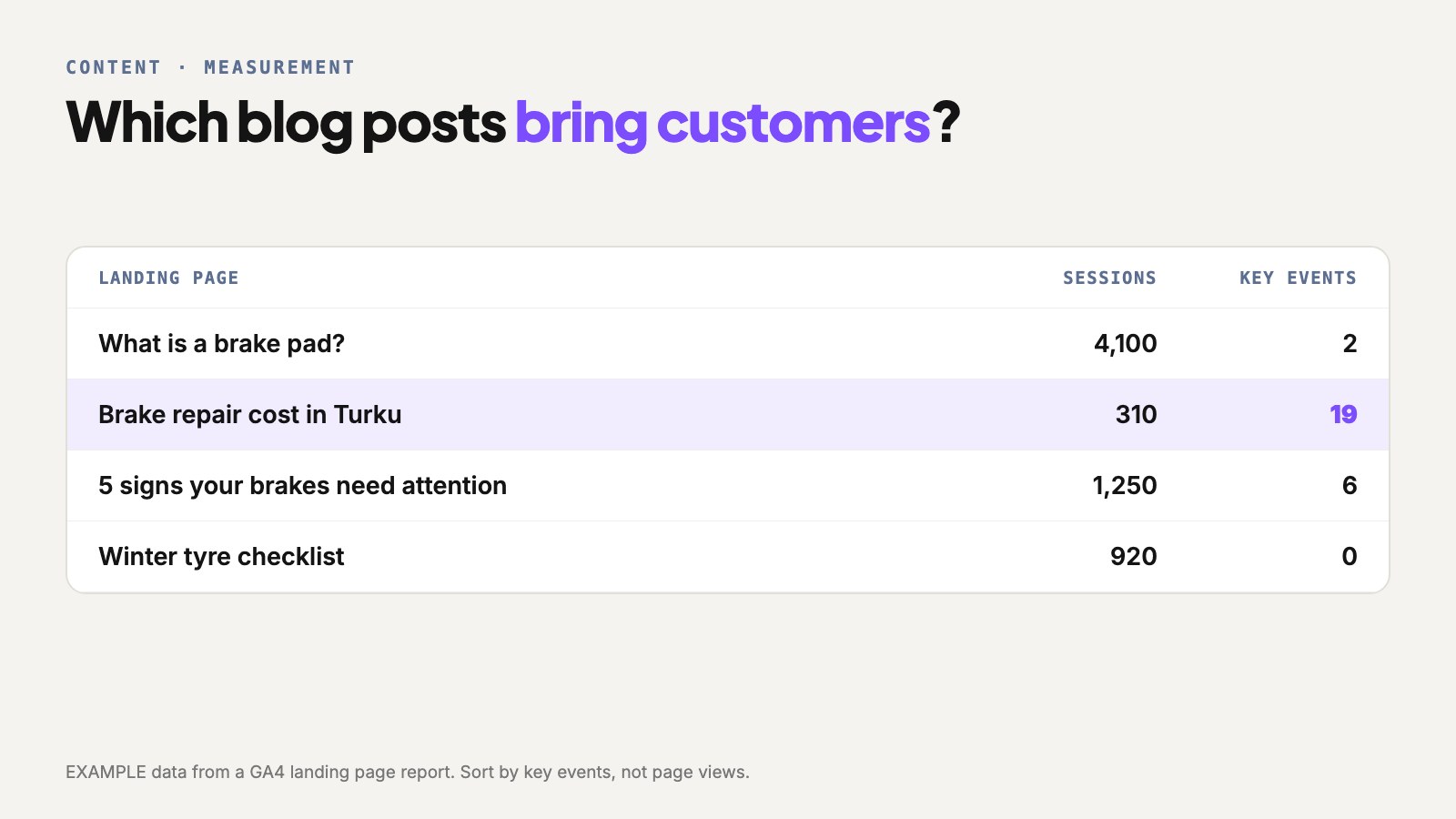
Page views measure attention, not business. A post about a general topic can bring thousands of curious readers and no customers, while a narrow guide brings forty visitors and three enquiries. If you only look at views, you'll write more of the wrong thing.
Measuring content properly answers three questions: which posts bring people in, which posts lead to an enquiry, and which posts help people decide along the way.
Step 1: Decide What Counts as a Lead
Before any report is useful, GA4 must know what a lead looks like. Google defines a key event as "an event that measures an action that's particularly important to the success of your business", and notes "Any event you collect can become a key event" (Analytics Help).
| Action | How it's usually tracked | Why it counts |
|---|---|---|
| Contact form sent | A form submission event or a thank-you page view | A direct enquiry |
| Phone number tapped | A click on a tel: link | Many local customers call |
| Booking made | A booking tool's confirmation event | The clearest sign of intent |
| Quote requested | A form or button event | A lead with a defined need |
| Sign-up or trial | A sign-up event | For software and online services |
GA4's enhanced measurement can record some actions automatically, including "'form_submit': when the user submits a form" (Analytics Help). Check that it fires on your real form before you rely on it, because custom forms don't always trigger it.
Step 2: Read the Landing Page Report
The landing page report shows which page each visit started on, and how many of those visits led to a key event. Google describes it as showing "the first page a visitor lands on when they visit your website and how many visitors land on each page"; you'll find it under "Engagement > Landing page" (Analytics Help).
- Open Reports, then Engagement, then Landing page.
- Set the date range to the last three months.
- Add a filter for your blog's folder, such as /blog/.
- Sort by key events, not sessions.
- Note the posts with key events and the busy posts with none.
Use engagement to understand the rest. GA4 counts an engaged session as one that "Lasts longer than 10 seconds", "Has a key event" or "Has 2 or more screen or page views" (Analytics Help). A post with many sessions and low engagement isn't holding its readers.
| Post | Sessions | Engagement rate | Key events | Verdict |
|---|---|---|---|---|
| What is a brake pad? | 4,100 | 38% | 2 | Brings readers, rarely customers |
| Brake repair cost in Turku | 310 | 71% | 19 | A money post: protect and grow it |
| 5 signs your brakes need attention | 1,250 | 64% | 6 | Good: link it more strongly to booking |
| Winter tyre change checklist | 920 | 22% | 0 | Readers leave: improve or merge |
Step 3: Connect Search Console
Linking Search Console shows which searches bring people to each post, next to what they did afterwards. Google says the integration "makes two reports available in your Google Analytics property", including one that "Displays landing pages with associated Search Console and Analytics metrics" (Analytics Help).
There's a limit to know about: Search Console metrics only combine with a few Analytics dimensions, such as landing page, device and country. Use it to connect searches to pages, then use GA4 for what happens on the site. Our Search Console guide explains the search side.
Step 4: See Which Posts Assist Sales
Some articles never start or end a visit that leads to an enquiry, but readers pass through them on the way. GA4's path exploration lets you "Explore your user journeys in a tree graph" (Analytics Help). Start from a key event and work backwards to see which posts came before it.
Attribution decides which channel gets credit for a key event. Google lists models including "Data-driven attribution", which "distributes credit for the key event based on data for each key event", and "Paid and organic last click" (Analytics Help). Note that by default "All attribution models exclude direct visits from receiving attribution credit" unless the whole path was direct.
For a small business, the practical takeaway is simple: don't delete a post just because it's rarely the last page before an enquiry. Check whether it appears on the paths of people who later enquired.
A practical way to do this without complex reports: list the five pages people most often view before your contact or booking page. If a blog post appears there regularly, it's doing a job, even if it rarely starts a visit. Make sure it links clearly to the next step, and keep it accurate.
Step 5: Track Posts You Share Elsewhere
When you share articles on social media or in emails, tag the links so GA4 can tell which share worked. Google's guidance says "you should always use utm_source, utm_medium, and utm_campaign", and that values are case sensitive (Analytics Help). Our free UTM Builder keeps them consistent, and our guide to repurposing blog content shows how to plan the shares themselves.
Step 6: Decide What to Do With Each Post
Put every post into one of four groups and act on it.
| Group | Signs | Action |
|---|---|---|
| Customer post | Key events from its visits | Keep it current, link to it from related posts, write more like it |
| Reader post | Plenty of visits, no key events | Add a clear link to the matching service; check the topic fits buyers |
| Assist post | Appears on paths before enquiries | Keep it; strengthen links to the posts customers land on |
| Quiet post | Few visits, no key events, no assists | Improve, merge or retire it |
Our guide to updating old content covers improving and merging, and internal linking shows how to point readers from reader posts towards customer posts. If busy posts bring no enquiries at all, read website traffic but no leads for the usual causes.
Numbers That Look Important but Aren't
Some metrics are easy to grow and tell you little about customers. Treat them as context, not goals.
| Metric | Why it misleads | Better question |
|---|---|---|
| Total page views | Counts curiosity, not intent | How many key events did the post lead to? |
| Time on page alone | Long can mean confused, not interested | Did readers go on to a service page? |
| Social likes | Happen without a visit | How many tagged clicks reached the site? |
| Average position | Averages many unrelated searches | Which searches bring visits that convert? |
| New users | Rises with any traffic | How many new users took a key action? |
None of these is useless. They help explain why a post does or doesn't produce enquiries. They just shouldn't decide what you write next on their own.
Watch Your Data Retention Setting
GA4 keeps detailed data for explorations for a limited time, so check the setting now. Google explains that you can set the retention of user-level data to "2 months" or "14 months", and that "The data retention setting only affects explorations and funnel reports" (Analytics Help). Most businesses should choose the longer option, or yearly comparisons in explorations won't be possible.
A Monthly 20-Minute Content Review
- Open the landing page report, filtered to your blog, for the last 28 days.
- Note your top five posts by key events and your top five by sessions.
- For any busy post with no key events, add or improve one link to a service.
- Check one path exploration from your main key event.
- Choose next month's topic from what customer posts have in common, using your keyword research.
Write down one decision each month, even a small one, such as adding a booking link to a busy post. Over a year those small changes add up to a blog that sends customers, not just readers. Put the decisions in your content calendar so the review changes what you publish. If traffic itself is falling, see our guide on why website traffic drops.
Common Measurement Mistakes
| Mistake | Result | Fix |
|---|---|---|
| No key events set up | Every post looks the same | Mark enquiries, calls and bookings as key events |
| Judging by page views | You write more of the wrong posts | Sort by key events per landing page |
| Untagged social links | Shares show up as direct or referral | Tag every shared link |
| 2-month data retention | No year-on-year explorations | Switch to 14 months |
| Trusting form tracking blindly | Missing or double-counted leads | Submit a test form and check it in real time |
| Deleting assist posts | Fewer enquiries later | Check paths before removing anything |
Measurement shows what people did on your site. It won't show what AI assistants say about your content before people arrive; for that, see how to check your AI visibility.
How CMO Owls Connects Content to Customers
GA4 can answer these questions, but only if someone opens the reports every month. CMO Owls reads your data on a schedule and turns it into a plan.
| Job | GA4 on your own | A reporting dashboard | CMO Owls |
|---|---|---|---|
| Spot a valuable page that's slipping | If you look | Shows charts | Cash Cow Stalker checks your top pages every five days with fixed thresholds |
| See engagement beside every page | Separate reports | Yes | Watch Owl can add GA4, Search Console and Clarity data per page |
| Plan next month's content from real queries | Manual | No | Game Plan Owl builds a roadmap from Search Console queries and your audit |
| Write the posts the data asks for | You write them | No | Owlthor writes them and sends them to your CMS |
| Fix the posts that bring readers but no action | Manual | No | Opportunity Owl turns findings into fixes or articles |
- Cash Cow Stalker watches your top ten pages by clicks plus any you add, checking clicks, impressions, position, top keyword and engagement every five days using Search Console, GA4 and the page itself.
- Game Plan Owl builds a monthly content roadmap from your audit, competitors' rankings and Search Console, so the next posts follow the evidence instead of guesses.
You still set up the key events, because only you know what a lead looks like. After that, the Owls keep reading the numbers when you don't have time to.
Mind Map: Measuring Content in GA4
Frequently Asked Questions
How do I see which blog posts bring customers in GA4?
Mark enquiries as key events, then open Engagement > Landing page and sort by key events. Filter to your blog's folder to compare posts.
What is a key event in GA4?
It's an event you mark as important to your business, such as a form submission, call or booking. Any collected event can be marked as one.
What is a good engagement rate for a blog post?
There's no universal number. Compare your posts with each other and look for posts far below your own average.
Why do my most popular posts bring no leads?
Popular posts often answer general questions from people who aren't ready to buy. Link them to a relevant service, or accept them as reader posts.
Can a blog post help sales without being the last page visited?
Yes. Path explorations show posts that appear before enquiries, even when another page gets the credit.
Should I connect Search Console to GA4?
Yes. It adds reports that show the searches bringing people to each landing page alongside what they did on the site.
How long does GA4 keep my data?
For explorations, user-level data is kept for 2 or 14 months depending on your setting. Choose 14 months for year-on-year comparisons.
How do I track blog posts shared on social media?
Add utm_source, utm_medium and utm_campaign to every shared link, using the same lowercase values each time.
The Next Step
Check today that your contact form or booking is marked as a key event, then open the landing page report and sort your blog by key events. Then add your website to CMO Owls so Cash Cow Stalker keeps watching the posts that bring customers.
Sources
- About key events, Google Analytics Help, accessed 2026.
- Enhanced measurement events, Google Analytics Help, accessed 2026.
- Landing page report, Google Analytics Help, accessed 2026.
- Engagement rate and bounce rate, Google Analytics Help, accessed 2026.
- Connect Search Console to Google Analytics, Google Analytics Help, accessed 2026.
- Path exploration, Google Analytics Help, accessed 2026.
- Get started with attribution, Google Analytics Help, accessed 2026.
- URL builders: Collect campaign data with custom URLs, Google Analytics Help, accessed 2026.
- Data retention, Google Analytics Help, accessed 2026.