Key Takeaways
- Repurposing blog content means turning one article into several pieces shaped for other places, so more people see the work you already did.
- The rule that matters: each post carries one idea from the article, rewritten for the platform. Ten copies of the same summary is just noise.
- Start with articles that already work: they've proved people want the topic.
- Tag every link back to the article so you can see which posts actually bring readers, not just likes.
What Content Repurposing Is (and Isn't)
Content repurposing is taking the research and ideas in one piece of content and reshaping them for other formats and audiences. A 2,000-word guide might hold a checklist, a strong opinion, a surprising number, a worked example and five questions customers ask. Each of those can stand alone.
It isn't copying the article to other sites. Google's spam policies describe scraping as "Republishing content from other sites without adding any original content or value, or even citing the original source". Republishing your own article word for word elsewhere isn't scraping, but it rarely helps either. Reshaping it for each audience does.
Why Repurpose Instead of Writing Something New
You've already done the hard part: the research, the examples and the thinking. Repurposing spreads that work across places where your customers already spend time.
- More reach for the same effort. People who never read blogs still scroll LinkedIn or watch short videos.
- Repetition helps people remember. Most followers miss most posts; seeing an idea in two formats makes it stick.
- It tests ideas. A point that takes off as a post might deserve its own article.
- It sends readers back. Every post can link to the full guide, where the detail and your offer live.
Step 1: Pick the Right Article
Repurpose what has already proved useful. Look for articles with steady search traffic, questions you're asked often, or results people found surprising. An article that nobody reads is usually better updated first than spread around.
A quick test: can you pull at least five separate ideas from it? If the article only makes one point, it'll make one good post, not ten.
Check the facts before you share them again. A price, date or screenshot that was right a year ago may not be now, and a repurposed post spreads an outdated detail much further than the original article did. Update the article first, then share.
Step 2: Break the Article Into Ideas
Read the article and list every idea that could stand alone. Use these labels; most good articles contain at least one of each.
| Idea type | What it looks like | Best format |
|---|---|---|
| The big claim | The single most useful or surprising point | LinkedIn post, short video |
| A number | A statistic or result, with its source | Single image, X post |
| A how-to | Steps in order | Carousel, X thread |
| A mistake | Something people commonly get wrong | Short video, LinkedIn post |
| A question | A question customers ask, answered | Reddit answer, FAQ post |
| An example | A before-and-after or real case | Carousel, newsletter |
| A checklist | Items to tick off | Image, downloadable PDF |
| A comparison | Option A versus option B | Table image, thread |
Step 3: Turn One Article Into 10 Posts
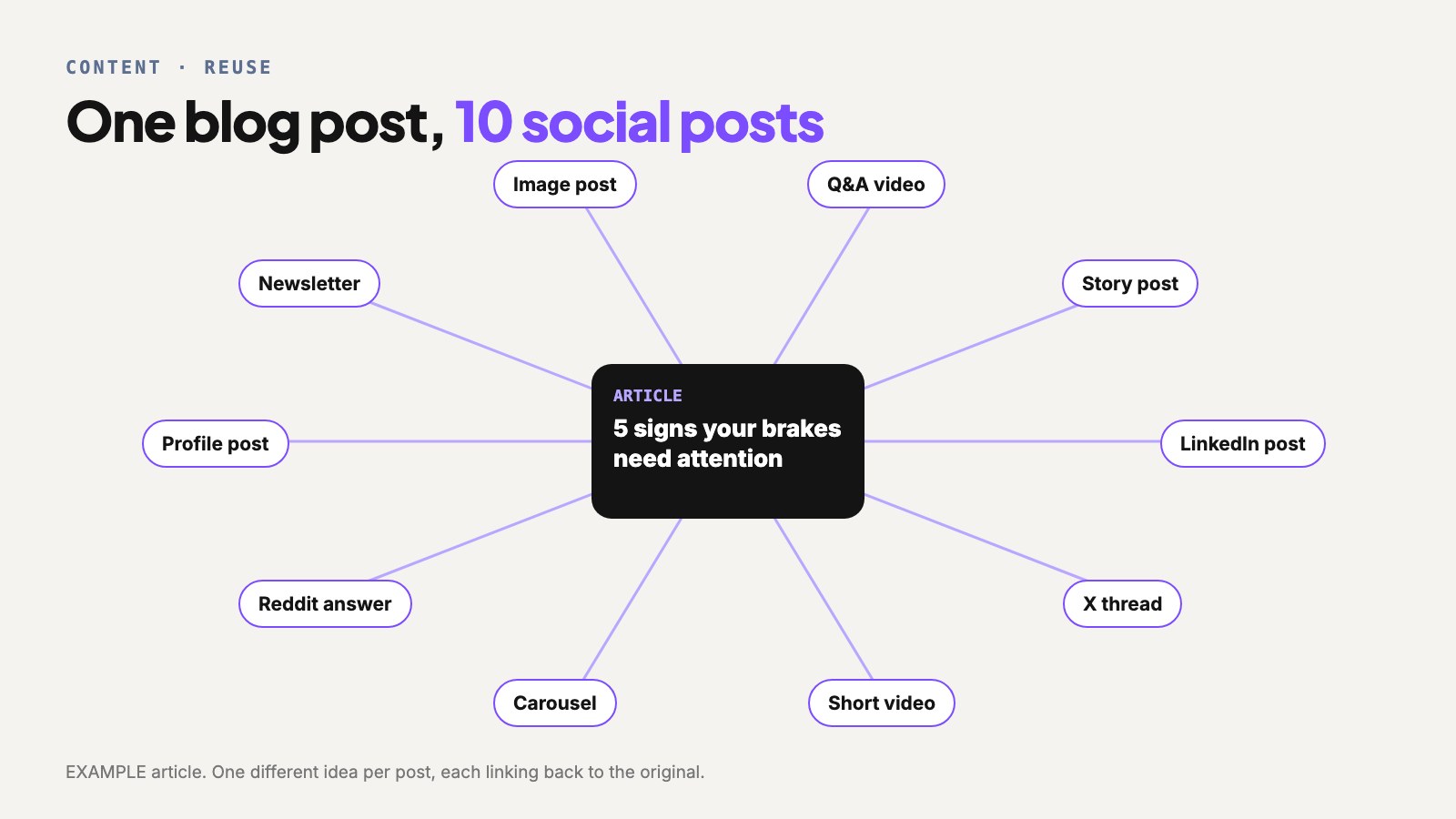
Here's how one article becomes ten distinct posts. The example is an invented article for a car repair shop, "5 Signs Your Brakes Need Attention".
| # | Platform and format | The idea it carries |
|---|---|---|
| 1 | LinkedIn post | Why brake noise is the cheapest warning you'll ever get |
| 2 | Short video (Shorts, Reels, TikTok) | Show the grinding sound and what causes it, in 30 seconds |
| 3 | X thread | The 5 signs, one per post, with a link at the end |
| 4 | Carousel | Brake pad wear in photos, new to replace-now |
| 5 | Reddit answer | Answer a real question about squeaking brakes, link only if it helps |
| 6 | Google Business Profile post | Seasonal reminder with the main checklist |
| 7 | Newsletter section | The one mistake drivers make, with a link to the guide |
| 8 | Image post | Stopping distance comparison as a simple graphic |
| 9 | Short video | Mechanic answers "how long do brake pads last?" |
| 10 | LinkedIn post (a month later) | A real customer story that proves the point |
Notice that no two posts say the same thing. That's what keeps followers from feeling repeated, and what makes each post worth a click.
Step 4: Shape Each Post for Its Platform
Each platform has its own length, tone and rules, so rewrite rather than paste. Check limits before you write; our free Social Media Character Counter shows them as you type.
LinkedIn's help centre states "Posts can contain up to 3,000 characters", and suggests that longer pieces become articles on its publishing platform (LinkedIn Help). Open with the claim, keep paragraphs short, and end with one question. Our guide on formatting LinkedIn posts covers the details.
X
Posts are short, so one idea per post. For a how-to, a thread works: each post one step, the link in the last one.
Short video
YouTube's help explains that its creation tools make it easy to create short-form videos "that are up to 3 minutes long" (YouTube Help). Most strong short videos are far shorter: one idea, shown rather than told, with the point in the first seconds.
Reddit and communities
Answer the question someone actually asked, fully, in the post itself. Add a link only if it genuinely helps, and read each community's rules first, because many limit self-promotion. Our guide to Hacker News explains the same principle for technical communities.
Medium and other blogs
If you republish a full article elsewhere, make sure readers can find the original, and point search engines at it where the platform allows. Google's canonical guidance also recommends keeping "a self-referential canonical" on the original page itself. Our Medium guide and canonical tag guide explain how.
Step 5: Link Back and Track Results
A repurposed post should send interested readers to the full article. Add campaign tags to each link so you know which posts work. Google's guidance on custom URLs says "you should always use utm_source, utm_medium, and utm_campaign", and warns that "Parameter values are case sensitive" (Analytics Help). Our free UTM Builder creates them consistently.
Make the landing worth the click: Nielsen Norman Group found that users "often leave Web pages" within 10 to 20 seconds (Nielsen Norman Group), so the article should deliver what the post promised in its opening lines. Then judge posts by what readers did after clicking, not by likes. Our guide to measuring content in GA4 shows how to see which posts lead to enquiries.
Which Content Repurposes Best
Some articles hold far more reusable ideas than others. Use this to choose what to repurpose first.
| Article type | Reusable ideas | Best repurposed as |
|---|---|---|
| Step-by-step guide | Many: each step stands alone | Thread, carousel, short videos |
| Original data or a survey | Many: each finding is a post | Image posts, LinkedIn posts, press pitch |
| Case study | Several: problem, fix, result | Story post, short video, newsletter |
| Opinion piece | One or two strong claims | LinkedIn post, community discussion |
| News reaction | Few, and they date quickly | One timely post |
Guides and original data are the best starting points. If you have neither yet, a case study from your own work is the next best thing, and it's evidence no competitor can copy.
Step 6: Space It Out
Spread the ten posts over two to four weeks, mixed with other content. The same followers shouldn't see the same article three days in a row. A simple content calendar keeps track of which idea went where.
Bring strong pieces back months later with a fresh angle. A post that worked in spring can work again in autumn with a new example. Keep a short list of your ten best-performing posts so you always have proven material ready when a quiet week comes.
Repurposing Mistakes to Avoid
| Mistake | What happens | Fix |
|---|---|---|
| Same summary on every platform | Followers tune out | One different idea per post |
| Pasting the link with no context | Few people click | Give the value in the post, link for more |
| Ignoring each platform's format | Posts look out of place | Rewrite for length and tone |
| Dropping links into communities | Removed as spam | Answer the question; link only if it helps |
| No tracking | You can't tell what works | Tag every link |
| Auto-generating dozens of posts | Bland, repetitive content | Fewer, better posts with real examples |
Readers skim, so lead with the point. Nielsen Norman Group's eye-tracking work advises "Include the most important points in the first two paragraphs on the page" (Nielsen Norman Group), and the same is true of a post's first line. On using AI to draft posts, the same standards apply as for articles: Google's guidance on people-first content asks whether content is "created primarily for people"; see also AI content and Google.
How CMO Owls Turns One Topic Into a Week of Posts
Repurposing by hand means rewriting the same research five ways. CMO Owls has a specialist for each channel, all working from the same brand facts, and a scheduler to spread the results.
| Job | By hand | A generic AI writer | CMO Owls |
|---|---|---|---|
| LinkedIn post | Rewrite yourself | Generic text | LinkedIn Owl: about 200 words in four checked beats, posted in one click |
| X thread | Rewrite yourself | Often too long | X Owl: a six-part thread with a word limit for every part |
| Long-form version | Rewrite yourself | Unchecked | Medium Owl: researched story with images, nine fixed checks |
| Community answers | Search threads yourself | Can't find them | Reddit Owl and Hacker News Owl find real threads and draft one reply |
| Short video | Film and edit | No | Owl Cam and Owl Studio make 15-second vertical videos |
| Spread across the month | Spreadsheet | No | Scheduler Owl lays everything across real working days |
| Stay on brand | Remember it | Rarely | Knowledge Base shares your product and tone with every writing agent |
- LinkedIn Owl and X Owl research your topic on the live web and write a post or thread with checked limits, so each channel gets its own version rather than a copy.
- Reddit Owl finds real threads about what you do, lets you pick the conversation and drafts one useful reply for you to post yourself, and Scheduler Owl spreads the month's articles, posts, videos and replies across the working days.
You choose which ideas deserve a post and add the real examples. The Owls handle the rewriting, the limits and the calendar.
Mind Map: Repurposing a Blog Post
Frequently Asked Questions
What does it mean to repurpose content?
It means taking the ideas and research from one piece of content and reshaping them into new formats for other channels. Each new piece should stand on its own.
How many posts can I get from one blog post?
A solid guide often gives eight to twelve posts, one for each distinct idea, example or question it contains. A short article may give two or three.
Is reposting my blog content on other sites bad for SEO?
Copying it word for word elsewhere rarely helps and can compete with your original. Rewrite it for each place, or make sure the original can be identified as the source.
Which blog posts should I repurpose first?
The ones that already get steady traffic or answer questions customers ask most. They've proved the topic matters.
How often should I share the same article?
Spread posts over a few weeks, each with a different idea, and bring strong ones back months later with a fresh angle.
Should every social post link to the article?
Not every one. Give value in the post itself and link when the reader would want more detail.
Can AI repurpose blog posts for me?
It can draft versions quickly, but a person should check facts, add real examples and make sure each post says something different.
How do I know if repurposing is working?
Tag your links with UTM parameters and check in GA4 which posts send visitors who read further or enquire.
The Next Step
Take your best-performing article, list every idea it contains and write the first three posts this week, each with a tagged link back. Then add your website to CMO Owls to have the channel Owls draft the rest and Scheduler Owl spread them across the month.
Sources
- Spam policies for Google web search, Google Search Central, accessed 2026.
- Post and share updates, LinkedIn Help, accessed 2026.
- Get started creating YouTube Shorts, YouTube Help, accessed 2026.
- URL builders: Collect campaign data with custom URLs, Google Analytics Help, accessed 2026.
- F-Shaped Pattern of Reading on the Web, Nielsen Norman Group, 2017.
- How Long Do Users Stay on Web Pages?, Nielsen Norman Group, 2011.
- How to specify a canonical URL, Google Search Central, accessed 2026.
- Creating helpful, reliable, people-first content, Google Search Central, accessed 2026.