Key Takeaways
- Service page SEO means giving each service you sell its own page that answers one need completely, so search engines can match it and customers can act.
- The winning order follows the buyer: what you do, who it's for, what it costs, how it works, proof, questions, next step.
- Say something about price. Even a starting figure or the factors that change it helps a customer decide whether to call.
- Don't copy one page across services or towns. Google's doorway policy covers pages made "to rank for specific, similar search queries".
What Makes a Good Service Page?
A good service page lets a stranger decide in a few minutes whether you're right for their job. It names the service in the customer's words, states facts they can compare, shows evidence and asks for one action.
A services page that lists everything in one line each can't do that. Someone searching for "emergency drain unblocking" wants to know how fast you arrive and what it costs, not that you "offer a full range of plumbing solutions".
| Category | One page listing 12 services | A page for each main service |
|---|---|---|
| Title can match a search | No, it has to be vague | Yes, each names one service |
| Room for prices and process | A line each | As much as the decision needs |
| Proof | General | Photos and reviews of that job |
| Works for AI assistants | Little to quote | Clear statements about one service |
| Best use | A hub linking to the details | The page that wins the customer |
Which Services Deserve Their Own Page?
Give a page to any service people search for by name, that has its own price or process, or that earns you real money. Everything else can live as a section.
- List every service you sell, in customers' words.
- Mark the ones people ask for directly.
- Mark the ones with a different price, process or customer.
- Group the rest under the nearest match.
- Check that no two pages would answer the same person; our keyword cannibalization guide shows how.
A useful test: could you write five facts about this service that aren't true of your others? If not, it's a section.
The 10-Part Service Page Template
Use these parts in order and drop any that don't apply. The order matters because most people skim. In Nielsen Norman Group's classic 1997 study, 79 percent of test users scanned any new page they came across and only 16 percent read word by word. The study is old, so test it against your own visitors, but designing for scanning is a safe default.
| Part | What to write | Common failure |
|---|---|---|
| 1. Heading | The service, plus place or customer if it matters | "Welcome" or a slogan |
| 2. Promise | One sentence: what they get and how soon | "Quality you can trust" |
| 3. Action | Call, book or get a quote, visible at once | Contact page only |
| 4. Fit | Who it's for, and who it isn't | "For everyone" |
| 5. What's included | A specific list | Marketing adjectives |
| 6. Price | Price, range, or what changes it | "Contact us for pricing" |
| 7. Process | Three to five steps with times | Nothing |
| 8. Proof | Photos, reviews, qualifications for this service | Stock images |
| 9. Questions | Five real ones, answered directly | Questions nobody asks |
| 10. Next step | The same action again, with what happens next | A dead end |
How to Write Each Part
Title, heading and description
Name the service the way customers do, add the place if you serve one, and make every title different. Google's title guidance says to "Avoid repeated or boilerplate text" and to keep titles descriptive and concise. Its snippet guidance warns that identical descriptions "aren't helpful when individual pages" appear in results. Our meta title guide has examples.
The first screen
A phone visitor should see the service, the promise and the action without scrolling. Check it on your own phone, and use our mobile guide if it doesn't fit.
What's included
Write facts, not praise. "Includes pads, fitting, brake fluid check and a 12-month warranty" tells people what they're buying. This is the heart of optimizing for meaning, and our semantic SEO guide shows the method on a full page.
The process
Tell people what happens after they press the button: who replies, when, what they need to have ready and how payment works. Uncertainty is a reason not to call.
Proof
Use evidence about this service. A photo of the finished job, a review that mentions it, the qualification the work requires. Ask for reviews as jobs finish, within Google's rules; see how to get more Google reviews. Never invent one. Our hairdresser marketing guide shows this for a visual service, where photos of real work do most of the selling.
Should You Show Prices on Your Website?
Usually, show something: a price, a range, a starting point or the factors that change it. A customer comparing three businesses may skip the one that gives no idea at all. You don't need a fixed menu to be helpful.
| Situation | What to publish | Example wording |
|---|---|---|
| Fixed job | The price and what's included | "€89, including parts and labour" |
| Varies within limits | A typical range | "Most jobs cost €150 to €280" |
| Depends on the site | A starting price and the factors | "From €400; access and pipe length change it" |
| Truly custom | How you quote, and how fast | "Free visit, written quote within two days" |
| Emergency | The call-out fee first | "€95 call-out, then hourly" |
Two cautions. Keep published prices true, because an old price costs more trust than no price. And say whether tax is included, following the rules where you trade.
Example: A Drain Service Page Rewritten
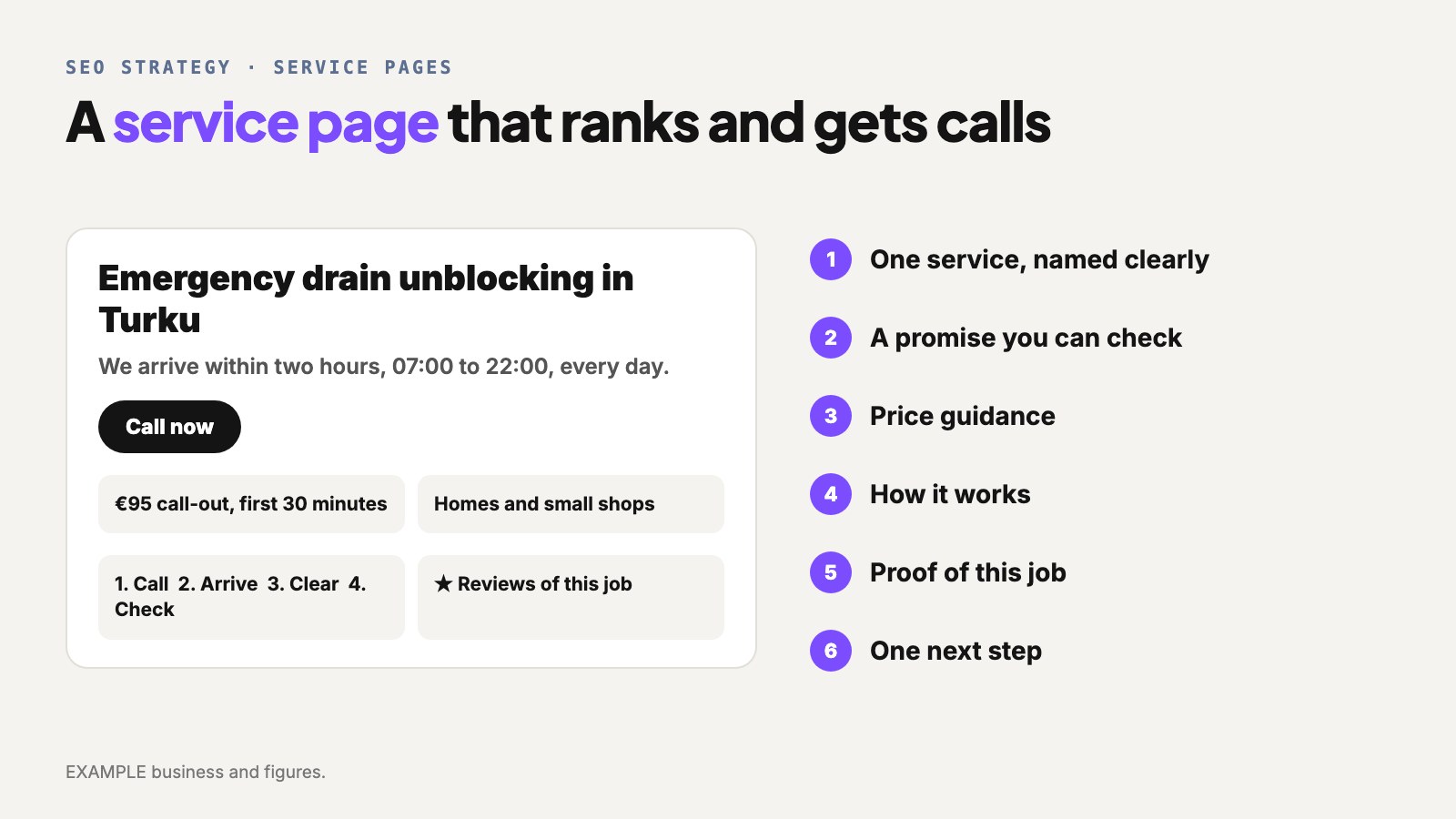
The same drain service, rewritten with the template. The business and figures are invented.
The vague version (EXAMPLE)
"Welcome to our plumbing services. We offer high-quality solutions for all your plumbing needs, including drains, boilers, taps and more. Our friendly team is here to help. Contact us today."
The template version (EXAMPLE)
"Emergency drain unblocking in Turku. We arrive within two hours, 07:00 to 22:00, every day. €95 call-out covers the first 30 minutes; most blockages are cleared in an hour. For homes and small shops; we don't service industrial lines. Call now and a plumber answers, not a call centre."
| Customer question | Before | After |
|---|---|---|
| Do you do my job? | Somewhere in a list | Yes, in the heading |
| Do you cover my area? | No | Yes |
| How fast? | No | Within two hours |
| How much? | No | Call-out fee and typical time |
| Am I the right customer? | "All your needs" | Homes and small shops |
| What happens when I call? | No | A plumber answers |
Add Structured Data That Matches the Page
Mark up who you are and what you offer, using only facts people can see. Google's local business documentation requires the name and address for a local business. Schema.org's Service type describes "A service provided by an organization" and includes areaServed and offers.
Be realistic about the reward. Google doesn't promise a special result for Service markup, and it has stopped showing FAQ rich results: its documentation updates say the feature no longer appears in Search from May 7, 2026. Keep the questions on your page because customers and assistants read them, not to win a dropdown. Our schema guide explains the types, and the Schema Checker shows what a page has.
Link the Page Into Your Site
A service page should be reachable from your menu or hub, and from every article that talks about the problem it solves. Google's link guidance says "Every page you care about should have a link from at least one other page on your site."
- From the homepage and services hub, using the service name as the link.
- From related articles, at the sentence where the reader would want help.
- From sister services ("also need your boiler checked?").
- From your Google Business Profile, if the service is your main one.
For the wider pattern of hubs and links, see our internal linking guide. A garage can see a whole set of pages planned out in our auto repair marketing guide.
Service Pages vs City Pages
A service page says what you do; a city page says why you're a good choice there. Build the service page first. Add a town page only when you have something real to say about working there.
Google's spam policies describe doorway abuse as pages that "lead users to intermediate pages that aren't as useful as the final destination", and one example is pages "targeted at specific regions or cities that funnel users to one page". Our service area guide covers how to do town pages properly.
Service Page Checklist
- One service, named in the title and main heading.
- Promise and action visible on a phone without scrolling.
- A specific list of what's included, and what isn't.
- A price, range or the factors that change it.
- Three to five steps with real times.
- At least two pieces of proof about this service.
- Five real questions, answered in the first sentence.
- Links in from the menu, a hub and two articles.
- Structured data that matches what's visible.
- A named person who checks the facts every few months.
Run the finished page through our free SEO Page Checker for the basics. Google's people-first guidance is the better judge of the rest: would a customer leave feeling they'd learned enough to decide?
Why a Service Page Ranks but Gets No Calls
If people arrive and don't act, the page is answering the search but not the doubt. Check these in order. For the site-wide version of this problem, read website traffic but no leads.
| Symptom | Likely doubt | Fix |
|---|---|---|
| People leave in seconds | "Is this what I searched for?" | Match the heading to the search |
| They read, then leave | "What will it cost?" | Add price guidance |
| They reach the form and stop | "What happens next?" | Shorten it and explain the reply |
| Calls from the wrong people | "Do you do this?" | Say who it isn't for |
| Visits from far away | "Do you come here?" | State the area near the top |
How CMO Owls Builds and Checks Service Pages
You know the job. CMO Owls finds which pages are missing or weak, helps write them and keeps checking that they work.
| Job | By hand | A page builder template | CMO Owls |
|---|---|---|---|
| Find searches you have no page for | Guess | No | Spy Owl finds what competitors rank for and you don't |
| Check the page matches its topic | Ask a friend | No | Owl-gorithm Hacker judges the title, H1 and opening |
| Check local details and schema | Manual | Adds basic markup | Owl-gorithm Hacker checks local details and markup for local businesses |
| Draft supporting content | You | Filler text | Owlthor writes keyword-led articles and sends them to WordPress or your CMS |
| Test forms and links | Click around | No | Watch Owl tests forms, but never submits checkout or payment |
| Notice a drop later | Rarely | No | Cash Cow Stalker alerts on tracked pages |
- Spy Owl finds your real competitors and the keywords they rank for that you don't, and labels where every number came from.
- Watch Owl opens your pages in a real browser and reports broken forms, links, images and missing titles, so a good page isn't let down by a dead button.
Prices, guarantees and photos have to come from you. Supply those, and the Owls handle the finding, checking and follow-up.
Mind Map: Service Page SEO
Frequently Asked Questions
What should I include on a service page?
Include what the service is, who it's for, what's included, price guidance, the process, proof, common questions and one clear action. Put them in the order a customer decides.
How many service pages should I have?
One for each service people search for by name or that has its own price or process. Combine the rest, because near-identical pages compete with each other.
How long should a service page be?
Long enough to answer the questions that stop someone from booking. Google has no preferred word count, so cover the decision and stop.
Is a service page the same as a landing page?
Not quite. A landing page is usually built for one campaign, while a service page is a permanent part of your site that can be found through search and menus.
Can I use the same service page for several towns?
You can list the towns you serve on one page. Copying it with the town name swapped risks Google's doorway policy and helps nobody.
Do service pages need FAQs?
They help when they answer real doubts about price, time and suitability. Google no longer shows FAQ rich results, so write them for readers.
Which schema should a service page use?
LocalBusiness describes the business, and Schema.org's Service type can describe the offer. Only mark up facts that are visible on the page.
Why doesn't my service page rank?
Common reasons are a vague title, too little specific information, few internal links, stronger competitors or another of your pages competing. Check that it's indexed first.
The Next Step
Choose the service that earns you the most, open its page on your phone and fill in the missing parts of the template, starting with price. Then add your website to CMO Owls to see which services your competitors are found for and you aren't.
Sources
- How Users Read on the Web, Nielsen Norman Group, 1997.
- Influencing your title links, Google Search Central, accessed 2026.
- Control your snippets in search results, Google Search Central, accessed 2026.
- Local business structured data, Google Search Central, accessed 2026.
- Service, Schema.org, accessed 2026.
- Latest documentation updates, Google Search Central, 2026.
- Link best practices for Google, Google Search Central, accessed 2026.
- Spam policies for Google web search, Google Search Central, accessed 2026.
- Creating helpful, reliable, people-first content, Google Search Central, accessed 2026.