Key Takeaways
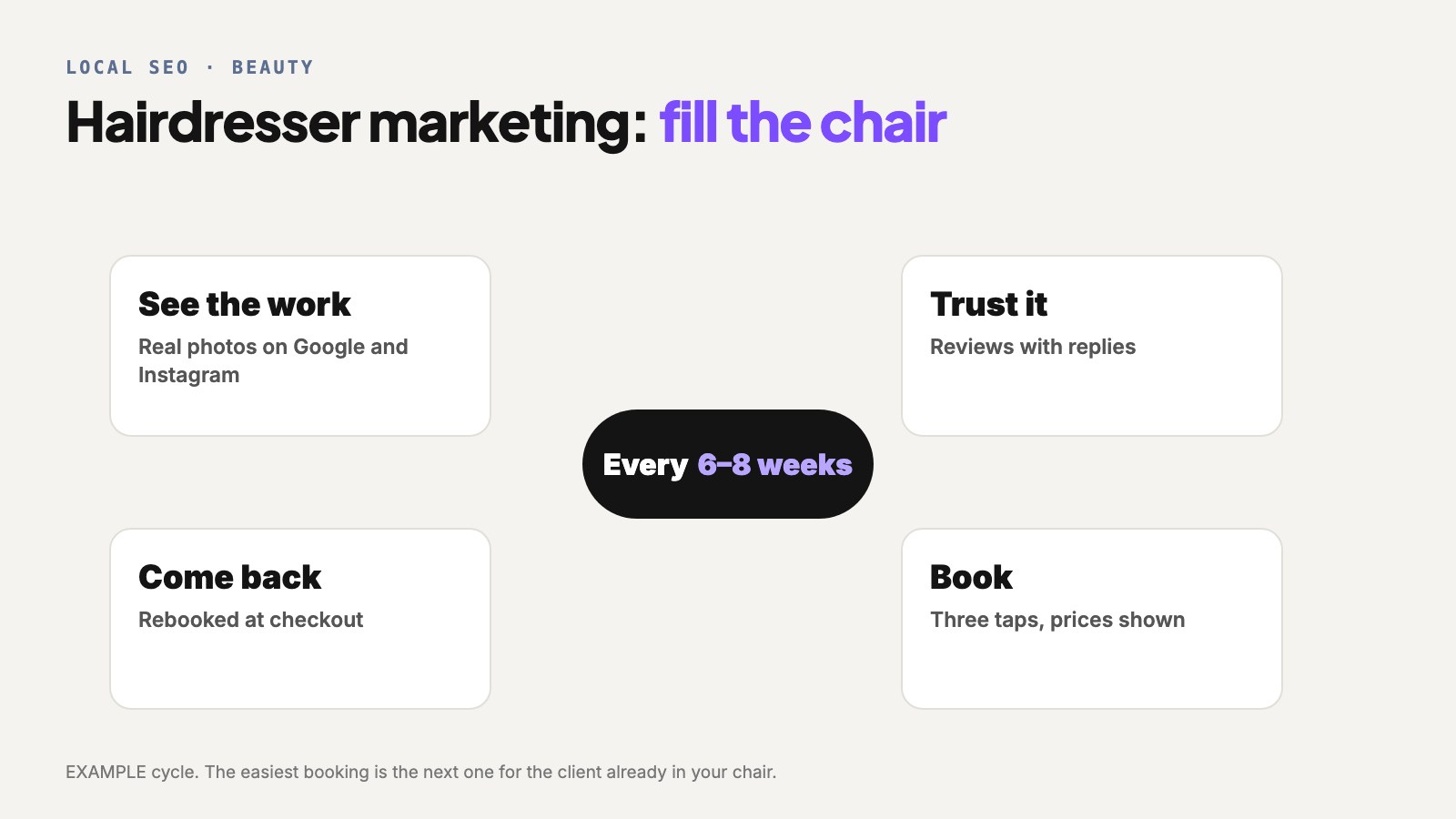
- Hairdresser marketing has one job: get a stranger to trust your work enough to book, then get them back in the chair every few weeks.
- People choose a hairdresser with their eyes. Real photos of your own work, on Google and Instagram, do more than any slogan.
- A booking that takes more than three taps loses clients. Put a booking button on your Google profile, your Instagram and every page of your website.
- The cheapest new appointment is the next one for the client already in your chair. Rebook before they leave.
How New Clients Choose a Hairdresser
Most new clients find a hairdresser by searching nearby, looking at photos of real work, reading a few reviews and booking whatever is easiest. The decision often takes minutes and happens on a phone.
They search for what they want, like "balayage", "men's haircut", "curly hair specialist" or "hairdresser near me", and look at the map results first. Google's guide to improving your local ranking says those results depend on relevance, distance and prominence. Then they read reviews: BrightLocal's Local Consumer Review Survey 2026 found that 97% of consumers read reviews for local businesses.
Others start on Instagram, find someone whose work they like, and go looking for a way to book. Either way, the same three things decide it: the work, the reviews and how easy it is to book. The rest of this guide is about making each of those as strong as possible.
Build a Booking Path That Takes Three Taps
Every extra step between "I like this" and "I'm booked" loses some of the people who wanted to book. Map the path from each place clients find you:
- From Google: profile, then the Book button, then a time slot. Google's help on bookings through a provider explains how to connect a supported booking system or add your own booking link.
- From Instagram: profile, then a booking link or button in the bio, then a time slot. Use the same booking system, not a "DM me to book" message that waits hours for a reply.
- From your website: any page, then a Book button that stays visible on phones, then a time slot.
- Show prices before the booking screen. A "from" price for each service stops people abandoning when they see the total.
- Test it on your own phone every month, and check your site with our free mobile-friendly checker.
If you get messages asking "how much is a cut and colour?" every day, that's a sign the prices aren't visible enough. Answer it once, on the page.
Your Google Profile: Show Real Work
Your Google Business Profile is often the first thing a nearby client sees, and for a hairdresser it should look like a portfolio.
- Choose the specific category. Google's category help tells businesses to choose the most specific category available, using "Nail salon" instead of "Salon" as its own example. For you that might be "Hair salon" or "Barber shop", with secondary categories only for what you really offer.
- List every service with a short description and a "from" price. The same help page notes that health and beauty businesses can add a booking button and a list of services.
- Post photos of your own work every week: finished cuts and colours in good light, the chairs, the front door so people recognise it. Google's photo guidelines ask for photos that are in focus, well lit and without significant alterations or excessive filters. That's good advice for a hairdresser anyway: clients want to see what the colour really looks like.
- Keep hours accurate, including late evenings and holidays.
Our full guide to Google Business Profile optimization covers posts, attributes and the rest of the settings. If most of your searches include "near me", read our guide to near me SEO too.
A Website That Sells Each Service
A website gives you something Google and Instagram can't: a page for each service that answers every question before the client books. It also gives AI assistants something to read and recommend.
Give each main service its own page, for example balayage, colour correction, curly cuts, men's cuts, bridal hair or extensions. Each page should include:
- Who it's for and what result to expect.
- How long it takes and how often clients come back.
- A "from" price and what changes it.
- Before-and-after photos of your own clients, with their permission.
- Who does it in your team, and a Book button.
Our guide to service page SEO shows how to structure each page so it ranks and converts. Name your photo files and write alt text that describes the work ("copper balayage on long wavy hair"), as our image SEO guide explains. Add HairSalon structured data with your address, hours and booking link, following Google's local business structured data guide.
Instagram: A Portfolio, Not a Diary
Treat your Instagram grid as your portfolio: someone landing on it for the first time should understand in five seconds what you're great at and how to book.
- Lead with the result. The finished look, in natural light, from the angle that shows the colour or cut best.
- Show the transformation. Before-and-after posts and short videos of the process are what people save and share.
- Say what it is. "Lived-in blonde, 3.5 hours" tells a future client more than "Loved this one!"
- Pin your best three posts and keep the booking link in your bio.
- Tag the location so people nearby can find you.
Post on a schedule you can keep. Two or three strong posts a week beat a burst of daily posts followed by a month of silence. Our content calendar guide and free social media calendar template help you plan it, and adding UTM tags to your bio link with our UTM builder shows you how many bookings Instagram actually brings.
| Channel | Its main job | What to post or update | What to measure |
|---|---|---|---|
| Google Business Profile | Win nearby searches | Weekly photos of real work, services with prices, hours | Calls, bookings, direction requests |
| Show your style | Finished looks, transformations, short process videos | Profile visits, bio link clicks, bookings | |
| Website | Answer questions, rank for services | A page per service with prices and photos | Bookings per page |
| Reviews | Build trust | A reply to every review | New reviews per month, rating |
| Rebooking | Bring clients back | Next appointment booked at checkout | Rebooking rate |
Rebook Every Client Before They Leave
The client in your chair already trusts you, so the easiest booking you'll ever get is their next one. Ask at checkout, while they're happy with the result.
- Suggest a time based on the service: "Your colour will need a refresh in about six to eight weeks. Shall I book you in for the 14th?"
- Send a reminder a day or two before, by text or email, through your booking system.
- Follow up with clients who didn't rebook after their usual gap with a friendly message and a booking link.
Only send marketing messages to clients who agreed to receive them. Appointment reminders are usually fine; promotions need consent in many countries, so check the rules where you work.
Ask for a Review While the Colour Is Fresh
Ask every client for a review the same way, right after the appointment, when the result is fresh. A short message from your booking system with a direct review link works well.
- Google's policy on fake engagement bans offering rewards, like a discount on the next visit, in exchange for reviews, and bans asking only the clients you expect to be happy.
- In the US, the FTC's rule on consumer reviews and testimonials also bans fake reviews and buying positive ones.
- Reply to every review. BrightLocal's 2026 survey found that 89% of consumers expect business owners to respond.
Our guide to getting more Google reviews includes message templates you can copy.
Team Up With Neighbours and Local Creators
Other local businesses already have the clients you want, and a simple partnership puts you in front of them. A bridal shop, a make-up artist, a photographer or a gym nearby all serve people who need a hairdresser.
- Swap recommendations: a small card or a mention in each other's posts, with a booking link.
- Bridal and event packages with a make-up artist or photographer, booked together.
- Local creators: a creator with a real local audience who shows a genuine visit can bring a wave of new bookings. If they received the service free or were paid, they need to say so clearly; that's the law in most countries.
Track each partnership with its own booking link or code, so you know which ones are worth repeating.
Getting Suggested by ChatGPT
When someone asks an AI assistant for "a good hairdresser for curly hair near me", it answers from what the web says about local salons. Specific services pages, reviews that mention your specialities and consistent details across your profiles all help. A salon described only as "a friendly hair salon" gives it nothing to match. Our guide on how to get recommended by ChatGPT covers the steps.
Five Mistakes That Leave the Chair Empty
- "DM to book." Every hour without a reply loses a client to someone with a booking button.
- No prices anywhere. People assume the worst and book elsewhere.
- Heavily filtered photos. Clients feel misled when the colour looks different in person.
- Instagram only. If the account is hacked or the algorithm changes, you lose your shop window. Own a website and a Google profile too.
- Letting clients leave without the next appointment. Most of them mean to come back, and many don't get round to booking.
How CMO Owls Helps a Hairdresser
CMO Owls is an AI marketing team for small businesses: it writes your service pages, keeps your website healthy, plans your posts and tracks whether AI assistants recommend you, while you do hair. You approve what goes out.
| What you need | Agent | How it helps |
|---|---|---|
| Service pages that rank | Owlthor | Researches what ranks for each service, like balayage, and writes the page, sent to WordPress or your CMS |
| Short video ads from your photos | Owl Studio | Turns up to three of your photos, your message and your call to action into a 15-second vertical video ad |
| Local creators | Owl Match | An influencer marketplace: browse creators by niche and platform and book one post, story or video |
| A posting plan | Scheduler Owl | One calendar for every article and post, so nothing goes quiet for a month |
| A working website | Watch Owl | Opens up to 500 pages in a real browser and finds broken pages, errors and slow loading |
| AI recommendations | Generative Engine Owl | Measures what ChatGPT, Gemini, Claude and Google AI Overviews say about your salon |
Mind Map: Hairdresser Marketing
Frequently Asked Questions
How do I get more clients as a hairstylist?
Show photos of your own work on Google and Instagram, let people book in three taps from both, show your prices and ask every client for a review. Then rebook clients before they leave so each new client becomes a regular.
What are good hair salon marketing ideas?
Weekly before-and-after posts, a page per service with prices, a booking button everywhere, a rebooking habit at checkout and partnerships with local creators. Start with the booking path, because it multiplies everything else.
Do hairdressers need a website if they have Instagram?
Yes. A website ranks for service searches, gives AI assistants something to read and keeps working if your Instagram account has a problem. It can be small: a page per service and a booking button.
Which Google category should a hair salon use?
The most specific one that fits, such as "Hair salon" or "Barber shop", with secondary categories only for services you genuinely offer. Google says the categories you choose affect your local ranking.
Can I give a discount for a Google review?
No. Google bans rewards for reviews, and US federal rules also ban buying positive reviews. Ask every client the same way, without an incentive.
How often should a salon post on Instagram?
As often as you can keep up with good photos, usually two or three times a week. Consistency and quality matter more than daily posting.
The Next Step
Book an appointment with yourself: open Google and Instagram on your phone as if you were a new client and count the taps to a confirmed booking. If it's more than three, fix that first. Then add your salon's website to CMO Owls to see your website report and what AI tools say about you, and read our guide to getting more Google reviews.
Sources
- Tips to improve your local ranking on Google, Google Business Profile Help, 2026.
- Manage your business category, Google Business Profile Help, 2026.
- Set up bookings through a provider, Google Business Profile Help, 2026.
- Manage your Business Profile photos and videos, Google Business Profile Help, 2026.
- Maps user-contributed content policy: Fake engagement and prohibited practices, Google, 2026.
- 16 CFR Part 465: Use of consumer reviews and testimonials, Federal Trade Commission (eCFR), 2024.
- Local Consumer Review Survey 2026, BrightLocal, 2026.
- HairSalon, Schema.org, 2026.
- Local business (LocalBusiness) structured data, Google Search Central, 2026.